

jquery 漂亮的删除确认和提交无刷新删除示例
更新时间:2013年11月13日 16:33:54 作者:
jquery 漂亮的删除确认和提交无刷新删除,本例数据库结构很简单,就一个字段就行了,具体的实现代码如下,感兴趣的朋友可以参考下
本例数据库结构很简单,就一个字段就行了
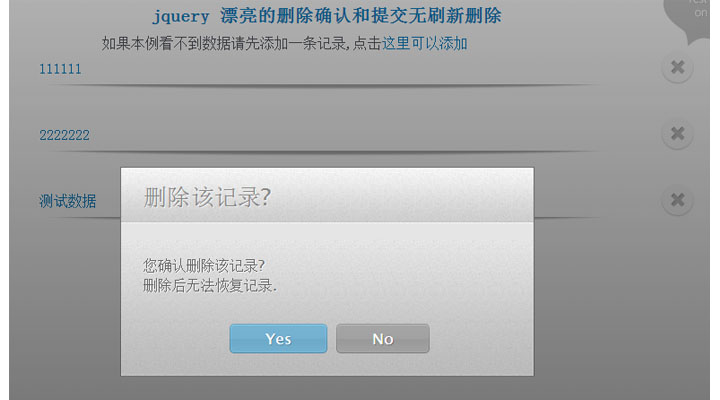
jquery.confirm.js
(function($){
$.confirm = function(params){
if($('#confirmOverlay').length){
// A confirm is already shown on the page:
return false;
}
var buttonHTML = '';
$.each(params.buttons,function(name,obj){
// Generating the markup for the buttons:
buttonHTML += '<a href="#" class="button '+obj['class']+'">'+name+'<span></span></a>';
if(!obj.action){
obj.action = function(){};
}
});
var markup = [
'<div id="confirmOverlay">',
'<div id="confirmBox">',
'<h1>',params.title,'</h1>',
'<p>',params.message,'</p>',
'<div id="confirmButtons">',
buttonHTML,
'</div></div></div>'
].join('');
$(markup).hide().appendTo('body').fadeIn();
var buttons = $('#confirmBox .button'),
i = 0;
$.each(params.buttons,function(name,obj){
buttons.eq(i++).click(function(){
// Calling the action attribute when a
// click occurs, and hiding the confirm.
obj.action();
$.confirm.hide();
return false;
});
});
}
$.confirm.hide = function(){
$('#confirmOverlay').fadeOut(function(){
$(this).remove();
});
}
})(jQuery);
PHP Code
<div id="page">
<?php
require "conn.php";
$sql="select * from `add_delete_record` where id>0";
$rs=mysql_query($sql);
if ($row = mysql_fetch_array($rs))
{
do {
?>
<div class="item">
<a href="#" >
<?php echo $row['text']?>
</a>
<div class="delete" id="<?php echo $row['id']?>"></div>
</div>
<?php
}
while ($row = mysql_fetch_array($rs));
}?>
</div>
JavaScript Code
$(document).ready(function(){
$('.item .delete').click(function(){
var elem = $(this).closest('.item');
var id=$(this).attr('id');
$.confirm({
'title' : '删除该记录?',
'message' : '您确认删除该记录? <br />删除后无法恢复记录.',
'buttons' : {
'Yes' : {
'class' : 'blue',
'action': function(){$.ajax({
type: 'GET',
url: 'del.php',
data: 'id='+id,
});
elem.slideUp();
}
},
'No' : {
'class' : 'gray',
'action': function(){} // Nothing to do in this case. You can as well omit the action property.
}
}
});
});
});
del.php
<?php
require "conn.php";
$id=$_GET['id'];
$delete_small_sql = "delete from add_delete_record where id='$id'";
$result_small = mysql_query($delete_small_sql);
?>
jquery.confirm.js
复制代码 代码如下:
(function($){
$.confirm = function(params){
if($('#confirmOverlay').length){
// A confirm is already shown on the page:
return false;
}
var buttonHTML = '';
$.each(params.buttons,function(name,obj){
// Generating the markup for the buttons:
buttonHTML += '<a href="#" class="button '+obj['class']+'">'+name+'<span></span></a>';
if(!obj.action){
obj.action = function(){};
}
});
var markup = [
'<div id="confirmOverlay">',
'<div id="confirmBox">',
'<h1>',params.title,'</h1>',
'<p>',params.message,'</p>',
'<div id="confirmButtons">',
buttonHTML,
'</div></div></div>'
].join('');
$(markup).hide().appendTo('body').fadeIn();
var buttons = $('#confirmBox .button'),
i = 0;
$.each(params.buttons,function(name,obj){
buttons.eq(i++).click(function(){
// Calling the action attribute when a
// click occurs, and hiding the confirm.
obj.action();
$.confirm.hide();
return false;
});
});
}
$.confirm.hide = function(){
$('#confirmOverlay').fadeOut(function(){
$(this).remove();
});
}
})(jQuery);
PHP Code
复制代码 代码如下:
<div id="page">
<?php
require "conn.php";
$sql="select * from `add_delete_record` where id>0";
$rs=mysql_query($sql);
if ($row = mysql_fetch_array($rs))
{
do {
?>
<div class="item">
<a href="#" >
<?php echo $row['text']?>
</a>
<div class="delete" id="<?php echo $row['id']?>"></div>
</div>
<?php
}
while ($row = mysql_fetch_array($rs));
}?>
</div>
JavaScript Code
复制代码 代码如下:
$(document).ready(function(){
$('.item .delete').click(function(){
var elem = $(this).closest('.item');
var id=$(this).attr('id');
$.confirm({
'title' : '删除该记录?',
'message' : '您确认删除该记录? <br />删除后无法恢复记录.',
'buttons' : {
'Yes' : {
'class' : 'blue',
'action': function(){$.ajax({
type: 'GET',
url: 'del.php',
data: 'id='+id,
});
elem.slideUp();
}
},
'No' : {
'class' : 'gray',
'action': function(){} // Nothing to do in this case. You can as well omit the action property.
}
}
});
});
});
del.php
复制代码 代码如下:
<?php
require "conn.php";
$id=$_GET['id'];
$delete_small_sql = "delete from add_delete_record where id='$id'";
$result_small = mysql_query($delete_small_sql);
?>
相关文章

formStorage 基于jquery的一个插件(存储表单中元素的状态到本地)
原理很简单,通过本地存储机制(userData或者localStorage),存储表单中元素的状态到本地. 需要时可以把所存储的状态还原到表单元素上2012-01-01 jQuery的选择包含两种,一种是选择器,一种是筛选器。筛选器是对选择器选定的jQuery对象做进一步选择;记下来将详细介绍下筛选器children()感兴趣的你可不要错过了哈,或许本文的知识点对你有所帮助2013-02-02
解决3.01版的jquery.form.js中文乱码问题的解决方法
最近用到了jquery的一个fom插件,是一个全面支持表单的jQuery插件。昨天在用ajaxSubmit进行Form Post提交的时候,发现服务器端取回的中文数据居然是乱码。这个可能是因为jquery是utf-8,不支持gb23122012-03-03
jQueryMobile之Helloworld与页面切换的方法
这篇文章主要介绍了jQueryMobile之Helloworld与页面切换的方法,实例分析了jQueryMobile的基础用法,具有一定参考借鉴价值,需要的朋友可以参考下2015-02-02 这篇文章主要介绍了Jquery动态列功能,结合完整实例形式详细分析了jQuery基于事件响应及页面元素动态属性操作实现的动态列显示功能相关操作技巧,需要的朋友可以参考下2019-08-08
 这篇文章主要介绍了JQuery实现级联下拉框效果,需要的朋友可以参考下2015-09-09
 下面小编就为大家带来一篇jQuery操作属性和样式详解。小编觉得挺不错的,现在分享给大家,也给大家做个参考。一起跟随小编过来看看吧2016-04-04
 这篇文章主要介绍了jquery实现网页的页面平滑滚动效果代码,涉及jQuery结合鼠标事件操作页面元素滚动效果的实现技巧,具有一定参考借鉴价值,需要的朋友可以参考下2015-11-11
关于hashchangebroker和statehashable的补充文档
我觉得之前写的两篇随笔有点不负责任,完全没写明白,补充了一份文档(权且算是文档吧=.=)2011-08-08 这篇文章介绍了Jquery倒数计时按钮setTimeout的实例,有需要的朋友可以参考一下2013-07-07
最新评论