

IIS中User-mode caching引起的Cache-Control不为public问题的解决方法
更新时间:2013年11月22日 16:06:34 作者:
在IIS的Output caching中如果启用了User-mode caching将引起Cache-Control为no-cache,从而造成页面不能被浏览器或代理服务器缓存,下面看解决方法

web.config中对应的配置如下:
复制代码 代码如下:
<configuration>
<system.webServer>
<caching>
<profiles>
<add extension=".css" policy="CacheUntilChange" kernelCachePolicy="CacheUntilChange" duration="00:00:30" />
<add extension=".js" policy="CacheUntilChange" kernelCachePolicy="CacheUntilChange" duration="00:00:30" />
</profiles>
</caching>
</system.webServer>
</configuration>
浏览器中看到的效果:
解决方法:
1、禁用User-mode caching,只用Kernel-mode caching。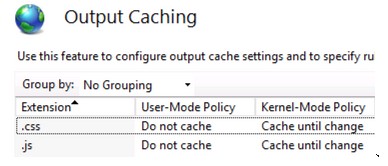
2、在web.config中加上cacheControlCustom="public"
复制代码 代码如下:
<configuration>
<system.webServer>
<staticContent>
<clientCache cacheControlCustom="public" cacheControlMode="UseMaxAge" cacheControlMaxAge="300.00:00:00" />
</staticContent>
<caching>
<profiles>
<add extension=".css" policy="DontCache" kernelCachePolicy="CacheUntilChange" duration="30:00:30" />
<add extension=".js" policy="DontCache" kernelCachePolicy="CacheUntilChange" duration="30:00:30" />
</profiles>
</caching>
</system.webServer>
</configuration>
相关文章

windows server 2012 dhcp服务器安装图解
这篇文章主要介绍了windows server 2012 dhcp服务器安装图解,需要的朋友可以参考下2014-03-03
lIS报错:修改iis配置或web.config提示不能在此路径中使用此配置节的解决方法
今天在修改iis配置的时候提示错误:不能在此路径中使用此配置节,如果在父级别上锁定了该节,便会出现这种情况,锁定是默认设置的等等,其实只要通过下面的步骤设置一下即可2024-03-03 目前,随着网页内容越来越绚烂,访问速度却令人越来越不满。实践证明,正确设置Http Response Header中的Expires头将有助于提高网页访问速度2012-01-01
 最近有客户反馈,网站打开500错误,能否开启浏览器调试功能,这是什么问题呢?应该怎么协调运维技术解决2024-03-03
iis 7.5 选中站点提示 错误: 无法读取配置文件的解决方法
今天在本地学习配置windows server 2008 r2的时候,点击很早以前创建的站点竟然提示错误: 无法读取配置文件,也不知道如何删除站点重新创建一个也行,经过摸索方法如下,特分享一下需要的朋友可以参考下2016-06-06 这篇文章主要介绍了域内禁止上某个网站的方法(wpkg.org),需要的朋友可以参考下2015-09-09
 在现行的很多网络操纵中,偶然一台做事器每每不能满意客户端的哀求,此时只能通过增进做事器来办理题目2012-11-11
在win2008 r2 英文版 IIS7.5上配置Https,SSL的方法
这篇文章主要介绍了在win2008 r2 英文版 IIS7.5上配置Https,SSL的方法,在非服务器、而且没有证书颁发机构(Certificate Authority简称CA)的开发环境中,配置HTTPS,SSL用于测试或学习 ,需要的朋友可以参考下2018-02-02 远程管理服务器有时候不小心会禁用网卡,那么就需要找机房的人来登录系统帮忙开启,无疑为我们增加了许多麻烦。2011-01-01
 最近在做Silverlight,Windows Phone应用移植到Windows 8平台,在IIS8中测试一些传统WCF服务应用,发现IIS8不支持WCF服务svc请求,本文将详细介绍解决方法2012-11-11
最新评论