

jquery动感漂浮导航菜单代码分享
更新时间:2020年04月15日 14:35:58 投稿:lijiao
这篇文章主要为大家详细介绍了jquery动感漂浮导航菜单特效,菜单可以实现上下浮动,文中示例代码介绍的非常详细,具有一定的参考价值,感兴趣的小伙伴们可以参考一下
这是一款基于jquery实现动感漂浮导航菜单的特效代码,菜单可以上下浮动,动感十足,为自己的网站增加了活力,是一款非常实用的导航菜单特效源码。
运行效果图:
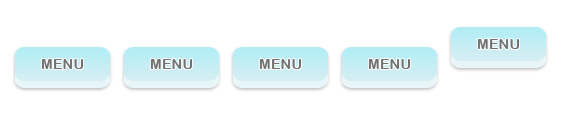
点击:下载源码
为大家分享的jquery动感漂浮导航菜单代码如下
<head>
 <meta http-equiv="Content-Type" content="text/html; charset=utf-8">
 <title>jQuery Floating Menu</title>
 <script type="text/javascript" src="js/jquery-1.3.1.min.js"></script>
 <script type="text/javascript" src="js/jquery.easing.1.3.js"></script>
 <script>

 $(document).ready(function () {

 //get the default top value
 var top_val = $('#menu li a').css('top');

 //animate the selected menu item
 $('#menu li.selected').children('a').stop().animate({top:0}, {easing: 'easeOutQuad', duration:500});

 $('#menu li').hover(
 function () {

 //animate the menu item with 0 top value
 $(this).children('a').stop().animate({top:0}, {easing: 'easeOutQuad', duration:500});
 },
 function () {

 //set the position to default
 $(this).children('a').stop().animate({top:top_val}, {easing: 'easeOutQuad', duration:500});

 //always keep the previously selected item in fixed position
 $('#menu li.selected').children('a').stop().animate({top:0}, {easing: 'easeOutQuad', duration:500});
 }
 );

 });

 </script>

 <style>


 #menu {
 list-style:none;
 padding:0;
 margin:0 auto;;
 height:70px;
 width:600px;
 }

 #menu li {
 float:left;
 width:109px;
 height:inherit;
 position:relative;
 overflow:hidden;
 }

 #menu li a {
 position:absolute;
 top:20px;
 text-indent:-999em;
 background:url(menu.png) no-repeat 0 0;
 display:block;
 width:109px;
 height:inherit;

 /* fast png fix for ie6 */
 position:relative;
 behavior: expression((this.runtimeStyle.behavior="none")&&(this.pngSet?this.pngSet=true:(this.nodeName == "IMG" && this.src.toLowerCase().indexOf('.png')>-1?(this.runtimeStyle.backgroundImage = "none",
this.runtimeStyle.filter = "progid:DXImageTransform.Microsoft.AlphaImageLoader(src='" + this.src + "', sizingMethod='image')",
this.src = "transparent.gif"):(this.origBg = this.origBg? this.origBg :this.currentStyle.backgroundImage.toString().replace('url("','').replace('")',''),
this.runtimeStyle.filter = "progid:DXImageTransform.Microsoft.AlphaImageLoader(src='" + this.origBg + "', sizingMethod='crop')",
this.runtimeStyle.backgroundImage = "none")),this.pngSet=true));
 }

 </style>

</head>
<body>
<br/><br/><br/>

<ul id="menu">
 <li><a href="#">Item 1</a></li>
 <li><a href="#">Item 2</a></li>
 <li><a href="#">Item 3</a></li>
 <li><a href="#">Item 4</a></li>
 <li><a href="#">Item 5</a></li>
</ul>
<head>
 <meta http-equiv="Content-Type" content="text/html; charset=utf-8">
 <title>jQuery Floating Menu</title>
 <script type="text/javascript" src="js/jquery-1.3.1.min.js"></script>
 <script type="text/javascript" src="js/jquery.easing.1.3.js"></script>
 <script>

 $(document).ready(function () {

 //get the default top value
 var top_val = $('#menu li a').css('top');

 //animate the selected menu item
 $('#menu li.selected').children('a').stop().animate({top:0}, {easing: 'easeOutQuad', duration:500});

 $('#menu li').hover(
 function () {

 //animate the menu item with 0 top value
 $(this).children('a').stop().animate({top:0}, {easing: 'easeOutQuad', duration:500});
 },
 function () {

 //set the position to default
 $(this).children('a').stop().animate({top:top_val}, {easing: 'easeOutQuad', duration:500});

 //always keep the previously selected item in fixed position
 $('#menu li.selected').children('a').stop().animate({top:0}, {easing: 'easeOutQuad', duration:500});
 }
 );

 });

 </script>

 <style>


 #menu {
 list-style:none;
 padding:0;
 margin:0 auto;;
 height:70px;
 width:600px;
 }

 #menu li {
 float:left;
 width:109px;
 height:inherit;
 position:relative;
 overflow:hidden;
 }

 #menu li a {
 position:absolute;
 top:20px;
 text-indent:-999em;
 background:url(menu.png) no-repeat 0 0;
 display:block;
 width:109px;
 height:inherit;

 /* fast png fix for ie6 */
 position:relative;
 behavior: expression((this.runtimeStyle.behavior="none")&&(this.pngSet?this.pngSet=true:(this.nodeName == "IMG" && this.src.toLowerCase().indexOf('.png')>-1?(this.runtimeStyle.backgroundImage = "none",
this.runtimeStyle.filter = "progid:DXImageTransform.Microsoft.AlphaImageLoader(src='" + this.src + "', sizingMethod='image')",
this.src = "transparent.gif"):(this.origBg = this.origBg? this.origBg :this.currentStyle.backgroundImage.toString().replace('url("','').replace('")',''),
this.runtimeStyle.filter = "progid:DXImageTransform.Microsoft.AlphaImageLoader(src='" + this.origBg + "', sizingMethod='crop')",
this.runtimeStyle.backgroundImage = "none")),this.pngSet=true));
 }

 </style>

</head>
<body>
<br/><br/><br/>

<ul id="menu">
 <li><a href="#">Item 1</a></li>
 <li><a href="#">Item 2</a></li>
 <li><a href="#">Item 3</a></li>
 <li><a href="#">Item 4</a></li>
 <li><a href="#">Item 5</a></li>
</ul>
如果大家还想深入学习,可以点击jQuery级联菜单特效汇总、Javascript级联菜单特效汇总进行学习。
以上就是为大家分享的jquery动感漂浮导航菜单代码,希望大家可以喜欢。
相关文章
 下面小编就为大家带来一篇JQuery Mobile 弹出式登录框的实现方法。小编觉得挺不错的,现在就分享给大家,也给大家做个参考。一起跟随小编过来看看吧2016-05-05
 因为jquery的易用性,很多朋友使用jquery,但仍然需要注意的是性能的问题,下面是曾祥展特为大家整理的一些技巧。2010-12-12
 这篇文章主要为大家详细介绍了jQuery插件ajaxFileUpload使用教程,具有一定的参考价值,感兴趣的小伙伴们可以参考一下2017-01-01
 jquery基础知识第一讲之初次见面,对jquery有一个初步认识,为之后的学习打下基础,感兴趣的小伙伴们可以参考一下2016-03-03
 这篇文章主要介绍了jQuery中:animated选择器用法,实例分析了:animated选择器的功能、定义及匹配动画效果元素的使用技巧,具有一定的参考借鉴价值,需要的朋友可以参考下2014-12-12
jQuery Ajax 仿AjaxPro.Utility.RegisterTypeForAjax辅助方法
我们都知道在AjaxPro的方法AjaxPro.Utility.RegisterTypeForAjax(typeof(所在类的类名));会将标记有[Ajax.AjaxMethod]方法注册在客户端。2011-09-09
使用jquery+iframe做一个ajax上传效果(实例)
下面小编就为大家带来一篇使用jquery+iframe做一个ajax上传效果(实例)。小编觉得挺不错的,现在就分享给大家,也给大家做个参考。一起跟随小编过来看看吧2017-08-08 本篇文章主要是对jquery实现ajax提交form表单的方法进行了总结介绍,需要的朋友可以过来参考下,希望对大家有所帮助2014-03-03
 String的Trim()方法失效,在ie8下是有这样的情况的,解决方法也很简单使用$.trim(str)即可,需要的朋友可以了解下2013-11-11
 这篇文章主要为大家详细介绍了jQuery实现菜单显示效果,文中示例代码介绍的非常详细,具有一定的参考价值,感兴趣的小伙伴们可以参考一下2019-12-12
最新评论