

Android布局之LinearLayout线性布局
LinearLayout是线性布局控件:要么横向排布,要么竖向排布
常用属性:
android:gravity------------设置的是控件自身上面的内容位置
android:layout_gravity-----设置控件本身相对于父控件的显示位置
android:layout_weight----- 给控件分配剩余空间
先给大家展示一下导图:
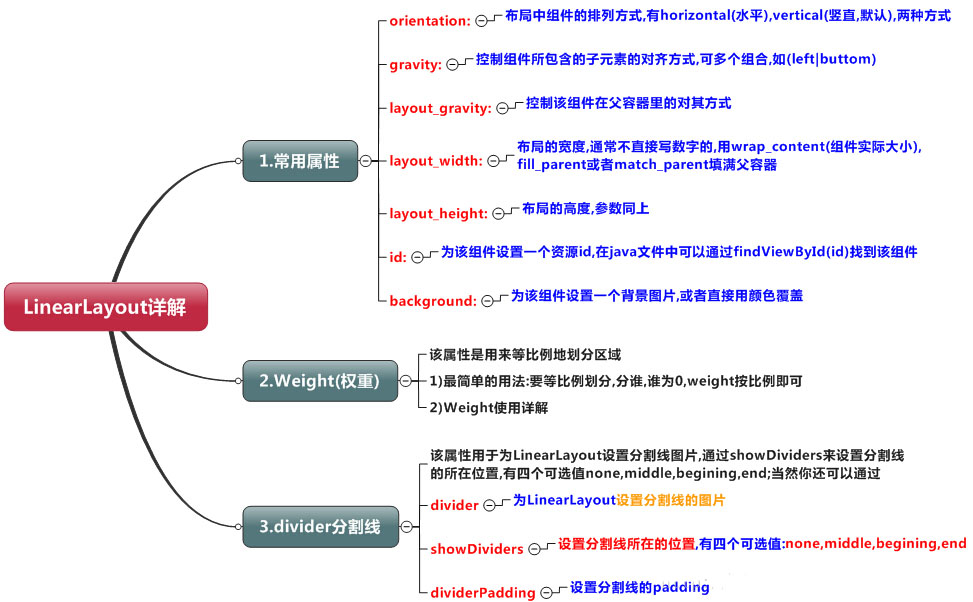
知识点详解(演示效果方便组件没有设置id)
(1)gravity和Layout_gravity
android:gravity 属性是对该view中内容的限定.比如一个button 上面的text. 你可以设置该text 相对于view的靠左,靠右等位置.
android:layout_gravity是用来设置该view相对与父view 的位置.比如一个button 在linearlayout里,你想把该button放在linearlayout里靠左、靠右等位置就可以通过该属性设置.
(2)weight权重(以水平为例)
(a)当width = 0或者 width = wrap_content的时候,按照权重比例计算!:2: 3
<?xml version="1.0" encoding="utf-8"?>
<LinearLayout
xmlns:android="http://schemas.android.com/apk/res/android"
android:layout_width="match_parent"
android:layout_height="match_parent"
android:orientation="horizontal">
<TextView
android:id="@+id/text1"
android:layout_width="0dp"
android:layout_height="match_parent"
android:layout_weight="1"
android:background="@android:color/holo_red_dark"
android:text="Text1"/>
<TextView
android:id="@+id/text2"
android:layout_width="0dp"
android:layout_height="match_parent"
android:layout_weight="2"
android:background="@android:color/holo_blue_bright"
android:text="Text2"/>
<TextView
android:id="@+id/text3"
android:layout_width="0dp"
android:layout_height="match_parent"
android:background="@android:color/white"
android:layout_weight="3"
android:text="Text3"/>
</LinearLayout>
(b)当width = fill_parent/match_parent的时候
第一步:当三个都为match_parent的时候屏幕只有一个 1 -3 = -2;
第二步:计算每个TextView占有的比例 1/6,2/6,3/6;
第三步: 1 -2*1/6 = 2/3; 1 - 2*2/6 = 1/3; 1 - 2*3/6 = 0;
第四步:2:1:0
<?xml version="1.0" encoding="utf-8"?>
<LinearLayout
xmlns:android="http://schemas.android.com/apk/res/android"
android:layout_width="match_parent"
android:layout_height="match_parent"
android:orientation="horizontal">
<TextView
android:id="@+id/text1"
android:layout_width="match_parent"
android:layout_height="match_parent"
android:layout_weight="1"
android:background="@android:color/holo_red_dark"
android:text="Text1"
android:gravity="center"
android:textSize="40sp"/>
<TextView
android:id="@+id/text2"
android:layout_width="match_parent"
android:layout_height="match_parent"
android:layout_weight="2"
android:background="@android:color/holo_blue_bright"
android:text="Text2"
android:gravity="center"
android:textSize="40sp"/>
<TextView
android:id="@+id/text3"
android:layout_width="match_parent"
android:layout_height="match_parent"
android:background="@android:color/white"
android:layout_weight="3"
android:text="Text3"
android:gravity="center"
android:textSize="40sp"/>
</LinearLayout>
(3)分割线
<View
android:layout_marginLeft="20sp"
android:layout_marginRight="20sp"
android:layout_width="3"
android:layout_height="match_parent"
android:background="#ff00ee" />
案例(底部导航)
<?xml version="1.0" encoding="utf-8"?>
<LinearLayout
xmlns:android="http://schemas.android.com/apk/res/android"
android:layout_width="match_parent"
android:layout_height="match_parent"
android:orientation="horizontal"
>
<LinearLayout
android:layout_width="match_parent"
android:layout_height="80sp"
android:layout_gravity="bottom"
android:background="@android:color/holo_purple">
<LinearLayout
android:layout_width="0sp"
android:layout_height="match_parent"
android:layout_weight="1"
android:orientation="vertical"
android:gravity="center">
<ImageView
android:layout_width="60dp"
android:layout_height="60dp"
android:src="@mipmap/ic_launcher"/>
<TextView
android:layout_width="wrap_content"
android:layout_height="wrap_content"
android:text="one"
android:textSize="20sp"/>
</LinearLayout>
<View
android:layout_marginLeft="20sp"
android:layout_marginRight="20sp"
android:layout_width="3"
android:layout_height="match_parent"
android:background="#ff00ee" />
<LinearLayout
android:layout_width="0sp"
android:layout_height="match_parent"
android:layout_weight="1"
android:orientation="vertical"
android:gravity="center">
<ImageView
android:layout_width="60dp"
android:layout_height="60dp"
android:src="@mipmap/ic_launcher"/>
<TextView
android:layout_width="wrap_content"
android:layout_height="wrap_content"
android:text="two"
android:textSize="20sp"/>
</LinearLayout>
<View
android:layout_marginLeft="20sp"
android:layout_marginRight="20sp"
android:layout_width="3"
android:layout_height="match_parent"
android:background="#ff00ee" />
<LinearLayout
android:layout_width="0sp"
android:layout_height="match_parent"
android:layout_weight="1"
android:orientation="vertical"
android:gravity="center">
<ImageView
android:layout_width="60dp"
android:layout_height="60dp"
android:src="@mipmap/ic_launcher"/>
<TextView
android:layout_width="wrap_content"
android:layout_height="wrap_content"
android:text="three"
android:textSize="20sp"/>
</LinearLayout>
</LinearLayout>
</LinearLayout>
以上内容给大家介绍了Android布局之LinearLayout线性布局的相关知识,希望大家喜欢。
相关文章
 在Android平台上开发一个音乐播放器是一项常见的任务,这涉及到对音频文件的处理、用户界面设计以及多媒体框架的运用,本项目基于样例代码进行扩展,虽然功能相对简单,但包含了Android音乐播放器开发的核心知识点,需要的朋友可以参考下2024-08-08
 这篇文章主要给大家介绍了关于Flutter学习之构建、布局及绘制三部曲的相关资料,文中通过示例代码介绍的非常详细,对大家学习或者使用Flutter具有一定的参考学习价值,需要的朋友们下面来一起学习学习吧2019-04-04
 这篇文章主要给大家介绍了关于Android自定义View如何实现多边形统计图的相关资料,文中通过示例代码介绍的非常详细,对大家的学习或者工作具有一定的参考学习价值,需要的朋友们下面随着小编来一起学习学习吧。2018-01-01
Android 判断是否是是全汉字、全字母、全数字、数字和字母等(代码)
这篇文章主要介绍了Android 判断是否是是全汉字、全字母、全数字、数字和字母等的实例代码,需要的朋友可以参考下2016-12-12 如果您要显示敏感数据,例如钱包金额,或者只是当登录表单显示插入的密码清晰时,当您不在应用程序中时,您必须隐藏敏感数据。本文将利用Flutter实现切换应用时隐藏应用预览,需要的可以参考一下2022-06-06
 随着移动互联网的普及以及智能终端设备的广泛应用,移动支付变得越来越便捷,通过扫描二维码代替传统的刷卡行为。这篇文章给大家介绍Android生成条形码和二维码功能,需要的朋友参考下吧2019-10-10
 这篇文章主要介绍了android如何获取当前手机号的方法,大家参考使用吧2013-11-11
Android AutoCompleteTextView控件使用实例
AutoCompleteTextView这个控件用于输入框的自动完成提示,非常适合搜索框等。它本质上是个EditText,实际上它也是从EditText继承的,使用起来也十分简单2014-04-04 这篇文章主要为大家详细介绍了Android的ListView多选删除操作实现代码,具有一定的参考价值,感兴趣的小伙伴们可以参考一下2016-05-05
 这篇文章主要为大家详细介绍了Android TreeView实现带复选框树形组织结构,文中示例代码介绍的非常详细,具有一定的参考价值,感兴趣的小伙伴们可以参考一下2019-07-07
最新评论