

Android布局之GridLayout网格布局
更新时间:2015年12月31日 10:53:39 作者:会飞的一只狼
网格布局标签是GridLayout。这个布局是android4.0新增的布局。这个布局只有4.0之后的版本才能使用。本文给大家介绍Android布局之GridLayout网格布局相关知识,感兴趣的朋友一起学习吧
网格布局标签是GridLayout。这个布局是android4.0新增的布局。这个布局只有4.0之后的版本才能使用。
不过新增了一些东东
①跟LinearLayout(线性布局)一样,他可以设置容器中组件的对齐方式
②容器中的组件可以跨多行也可以跨多列(相比TableLayout直接放组件,占一行相比较)
因为是android 4.0新增的,API Level 14,在这个版本以前的sdk
都需要导入项目,等下会详细介绍
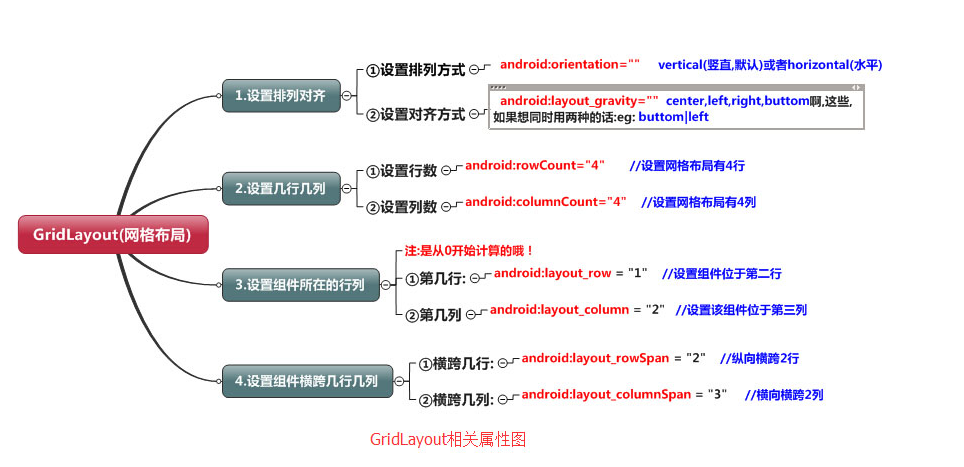
常用属性:
排列对齐:
①设置组件的排列方式: android:orientation="" vertical(竖直,默认)或者horizontal(水平)
②设置组件的对齐方式: android:layout_gravity="" center,left,right,buttom啊,这些,如果想同时用两种的话:eg: buttom|left
学习导图
(一)简介
网格布局由GridLayout所代表,在android4.0之后新增加的布局管理器,因此需要android4.0之后的版本中使用,如果在更早的平台使用该布局管理器,则需要导入相应的支持库<android.support.v7.widget.GridLayout>
(二)案列----计算器
<?xml version="1.0" encoding="utf-8"?>
<GridLayout
  xmlns:android="http://schemas.android.com/apk/res/android"
  android:layout_width="match_parent"
  android:layout_height="match_parent"
  android:rowCount="6"
  android:columnCount="4"
  android:layout_gravity="fill">
  <TextView
    android:layout_width="match_parent"
    android:layout_height="wrap_content"
    android:text="0"
    android:textSize="80sp"
    android:layout_marginRight="5dp"
    android:layout_marginLeft="5dp"
    android:layout_columnSpan="4"
    android:background="#eee"
    android:padding="3sp"
    android:editable="false"
    android:textColor="#000"
    />
 <Button
   android:layout_width="match_parent"
   android:layout_height="wrap_content"
   android:layout_columnSpan="4"
   android:text="清除"
   android:textColor="#000"
   android:textSize="24dp"
   android:layout_marginLeft="5dp"
   android:layout_marginRight="5dp"
   android:background="@android:color/background_light"
   />
  <Button
    android:layout_marginTop="20dp"
    android:layout_width="wrap_content"
    android:layout_height="wrap_content"
    android:text="7"
    android:textColor="#000"
    android:textSize="24dp"
    android:layout_marginLeft="5dp"
    android:layout_marginRight="5dp"
    android:background="@android:color/background_light"
    />
  <Button
    android:layout_marginTop="20dp"
    android:layout_width="wrap_content"
    android:layout_height="wrap_content"
    android:text="8"
    android:textColor="#000"
    android:textSize="24dp"
    android:layout_marginLeft="10dp"
    android:background="@android:color/background_light"
    />
  <Button
    android:layout_marginTop="20dp"
    android:layout_width="wrap_content"
    android:layout_height="wrap_content"
    android:text="9"
    android:textColor="#000"
    android:textSize="24dp"
    android:layout_marginLeft="10dp"
    android:background="@android:color/background_light"
    />
  <Button
    android:layout_marginTop="20dp"
    android:layout_width="wrap_content"
    android:layout_height="wrap_content"
    android:text="+"
    android:textColor="#000"
    android:textSize="24dp"
    android:layout_marginLeft="10dp"
    android:background="@android:color/background_light"
    />
  <Button
    android:layout_marginTop="20dp"
    android:layout_width="wrap_content"
    android:layout_height="wrap_content"
    android:text="4"
    android:textColor="#000"
    android:textSize="24dp"
    android:layout_marginLeft="5dp"
    android:layout_marginRight="5dp"
    android:background="@android:color/background_light"
    />
  <Button
    android:layout_marginTop="20dp"
    android:layout_width="wrap_content"
    android:layout_height="wrap_content"
    android:text="5"
    android:textColor="#000"
    android:textSize="24dp"
    android:layout_marginLeft="10dp"
    android:background="@android:color/background_light"
    />
  <Button
    android:layout_marginTop="20dp"
    android:layout_width="wrap_content"
    android:layout_height="wrap_content"
    android:text="6"
    android:textColor="#000"
    android:textSize="24dp"
    android:layout_marginLeft="10dp"
    android:background="@android:color/background_light"
    />
  <Button
    android:layout_marginTop="20dp"
    android:layout_width="wrap_content"
    android:layout_height="wrap_content"
    android:text="-"
    android:textColor="#000"
    android:textSize="24dp"
    android:layout_marginLeft="10dp"
    android:background="@android:color/background_light"
    />
  <Button
    android:layout_marginTop="20dp"
    android:layout_width="wrap_content"
    android:layout_height="wrap_content"
    android:text="1"
    android:textColor="#000"
    android:textSize="24dp"
    android:layout_marginLeft="5dp"
    android:layout_marginRight="5dp"
    android:background="@android:color/background_light"
    />
  <Button
    android:layout_marginTop="20dp"
    android:layout_width="wrap_content"
    android:layout_height="wrap_content"
    android:text="2"
    android:textColor="#000"
    android:textSize="24dp"
    android:layout_marginLeft="10dp"
    android:background="@android:color/background_light"
    />
  <Button
    android:layout_marginTop="20dp"
    android:layout_width="wrap_content"
    android:layout_height="wrap_content"
    android:text="3"
    android:textColor="#000"
    android:textSize="24dp"
    android:layout_marginLeft="10dp"
    android:background="@android:color/background_light"
    />
  <Button
    android:layout_marginTop="20dp"
    android:layout_width="wrap_content"
    android:layout_height="wrap_content"
    android:text="*"
    android:textColor="#000"
    android:textSize="24dp"
    android:layout_marginLeft="10dp"
    android:background="@android:color/background_light"
    />
  <Button
    android:layout_marginTop="20dp"
    android:layout_width="wrap_content"
    android:layout_height="wrap_content"
    android:text="."
    android:textColor="#000"
    android:textSize="24dp"
    android:layout_marginLeft="5dp"
    android:layout_marginRight="5dp"
    android:background="@android:color/background_light"
    />
  <Button
    android:layout_marginTop="20dp"
    android:layout_width="wrap_content"
    android:layout_height="wrap_content"
    android:text="0"
    android:textColor="#000"
    android:textSize="24dp"
    android:layout_marginLeft="10dp"
    android:background="@android:color/background_light"
    />
  <Button
    android:layout_marginTop="20dp"
    android:layout_width="wrap_content"
    android:layout_height="wrap_content"
    android:text="="
    android:textColor="#000"
    android:textSize="24dp"
    android:layout_marginLeft="10dp"
    android:background="@android:color/background_light"
    />
  <Button
    android:layout_marginTop="20dp"
    android:layout_width="wrap_content"
    android:layout_height="wrap_content"
    android:text="/"
    android:textColor="#000"
    android:textSize="24dp"
    android:layout_marginLeft="10dp"
    android:background="@android:color/background_light"
    />
</GridLayout>
以上内容是小编给大家介绍的Android布局之GridLayout网格布局相关知识,希望大家喜欢。
相关文章
 这篇文章主要介绍了Android的应用程序组件的相关资料,帮助大家更好的理解和使用Android,感兴趣的朋友可以了解下2021-01-01
 这篇文章主要介绍了Android下载gradle失败的解决方法,文章通过图文结合的方式给大家介绍的非常详细,对大家的学习或工作有一定的帮助,需要的朋友可以参考下2024-06-06
 这篇文章主要为大家详细介绍了Android自定义View实现标签流效果,文中示例代码介绍的非常详细,具有一定的参考价值,感兴趣的小伙伴们可以参考一下2022-02-02
 这篇文章主要为大家详细介绍了Android仿音乐播放器带进度的播放暂停按钮,文中示例代码介绍的非常详细,具有一定的参考价值,感兴趣的小伙伴们可以参考一下2018-12-12
 这篇文章主要介绍了Android开发中滑动分页功能,结合实例形式详细分析了Android滑动分页功能的具体步骤与相关实现技巧,代码中备有详尽的注释便于理解,需要的朋友可以参考下2017-10-10
 这篇文章主要介绍了Android实现微信朋友圈发本地视频功能的相关资料,非常不错,具有参考借鉴价值,需要的朋友可以参考下2016-11-11
 这篇文章主要介绍了Android组件化、插件化详细讲解,这些单独⼆次封装的功能模块apk,就称作插件,文章围绕主题展开详细的内容介绍,需要的朋友可以参考一下2022-07-07
 这篇文章主要为大家详细介绍了Android自定义View实现天气预报折线图,文中示例代码介绍的非常详细,具有一定的参考价值,感兴趣的小伙伴们可以参考一下2022-09-09
 离线缓存就是在网络畅通的情况下将从服务器收到的数据保存到本地,当网络断开之后直接读取本地文件中的数据。本文给大家介绍Android实现离线缓存的方法,需要的朋友参考下2016-03-03
 本篇文章主要介绍了Android 基于Socket的聊天应用实例,具有一定的参考价值,有需要的可以了解一下。2016-12-12
最新评论