

asp编译成dll-图形化教程第2/2页
4。编写代码:
Option Explicit
Private Context As ScriptingContext
Private Application As Application
Private Response As Response
Private Request As Request
Private Session As Session
Private Server As Server
Public Sub OnStartPage(PassedscriptContext As ScriptingContext)
Set Context = PassedscriptContext
Set Application = Context.Application
Set Request = Context.Request
Set Response = Context.Response
Set Server = Context.Server
Set Session = Context.Session
End Sub
Public Sub showsuc()
Response.Write "我是蓝色理想的老农,您好"
End Sub
' 释放内部对象
Public Sub OnEndPage()
Set Application = Nothing
Set Request = Nothing
Set Response = Nothing
Set Server = Nothing
Set Session = Nothing
Set Context = Nothing
End Sub
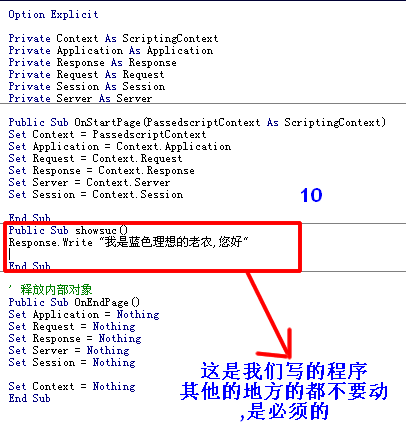
其中,除10处,其他都是必须的.
10处是我们自己要表现的程序.
ctrl+s保存在d:\mylib\cjjer.cls
在把工程保存为d:\mylib\bi.vbp
5 。编译,注册成dll:
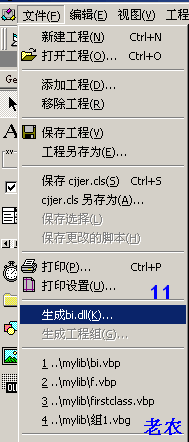
点击生成bi.dll
没啥警告的话那就ok了,路径保存在d:\mylib\bi.dll.
然后开始--------->运行-->
regsvr32 d:\mylib\bi.dll
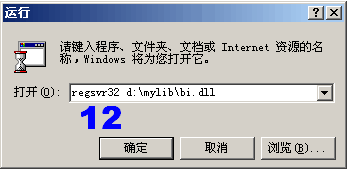
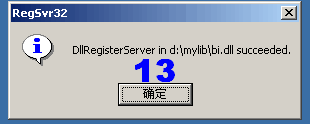
这就注册成功了.
6。使用bi.dll:
新建asp文件,输入:
<%
Dim bicjjer
Set bicjjer=Server.CreateObject("bi.cjjer")
bicjjer.showsuc()
%>
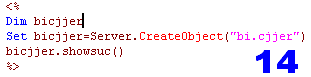
浏览器,预览,显示如下:

注意:对已经存在的组建名称或这修改了dll文件,必须先停止IIS,再重启注册使用,否则会一直在原来的基础上.
另外补充一点:生成的dll文件不注册到服务器也可以使用:
<% @ language="vbscript" %>
<!--METADATA TYPE="typelib" FILE="e:\web\web\asp\bi\bi.dll"-->
<%
Dim bicjjer
Set bicjjer=Server.CreateObject("bi.cjjer")
bicjjer.showsuc()
%>
这绝对是个好消息,有人说这个没什么价值,那我说"您还是固陋寡闻或者您技术高的藐视dll...",哈哈哈,当然是玩笑了,注意,METADATA的file路径是绝对的物理路径,否则无法装载.
相关文章
 ASP动态生成的javascript表单验证代码...2006-11-11
asp 取一个数的整数 但不是四舍五入,只要有小数,就取大于这个数的整数
asp 取一个数的整数 但不是四舍五入,只要有小数,就取大于这个数的整数2009-10-10
错误类型:Provider (0x80004005)未指定的错误 的一个处理方法
一般情况下asp可以正常运行,但只要连接数据库就提示,Microsoft JET Database Engine 错误'80004005'2007-04-04 这篇文章是本人发现的关于asp下正则表达式使用详解说明的文章,推荐大家看下。2011-03-03
 ASP 能快速执行你的动态网页,但你还可以通过紧缩代码和数据库连接以使它们执行更快。2009-01-01
 asp按关键字查询XML的问题2008-10-10
 ASP提供了一个叫 DateDiff() 的函数,这个函数可以返回一个时间差的秒,那就是说我们放进去一个格林威治标准时间与现在的时间对比一下返回秒就OK2014-06-06
 有时候通过程序上传木马,一般都是伪装成图片,下面是asp下检测图片木马的代码,需要的朋友可以参考下。2010-09-09
 有时候用户输入的分隔符种类比较多,支持逗号也想要支持空格等等,其实原来就是先统一为一中分隔符再使用split进行分割就可以了2013-03-03
 asp 类型转换的实现函数2008-10-10
最新评论