

IOS简单实现瀑布流UICollectionView
更新时间:2020年04月20日 11:30:10 作者:tanhui_ui
这篇文章主要为大家介绍了IOS简单实现瀑布流UICollectionView的相关资料,文中示例代码介绍的非常详细,具有一定的参考价值,感兴趣的小伙伴们可以参考一下
UICollectionView 比tableView 灵活,功能也强大很多。系统实现了流式布局,但用处还有很多限制。
要想实现更灵活的布局,就咬重写UICollectionViewLayout。
先看下实现效果:
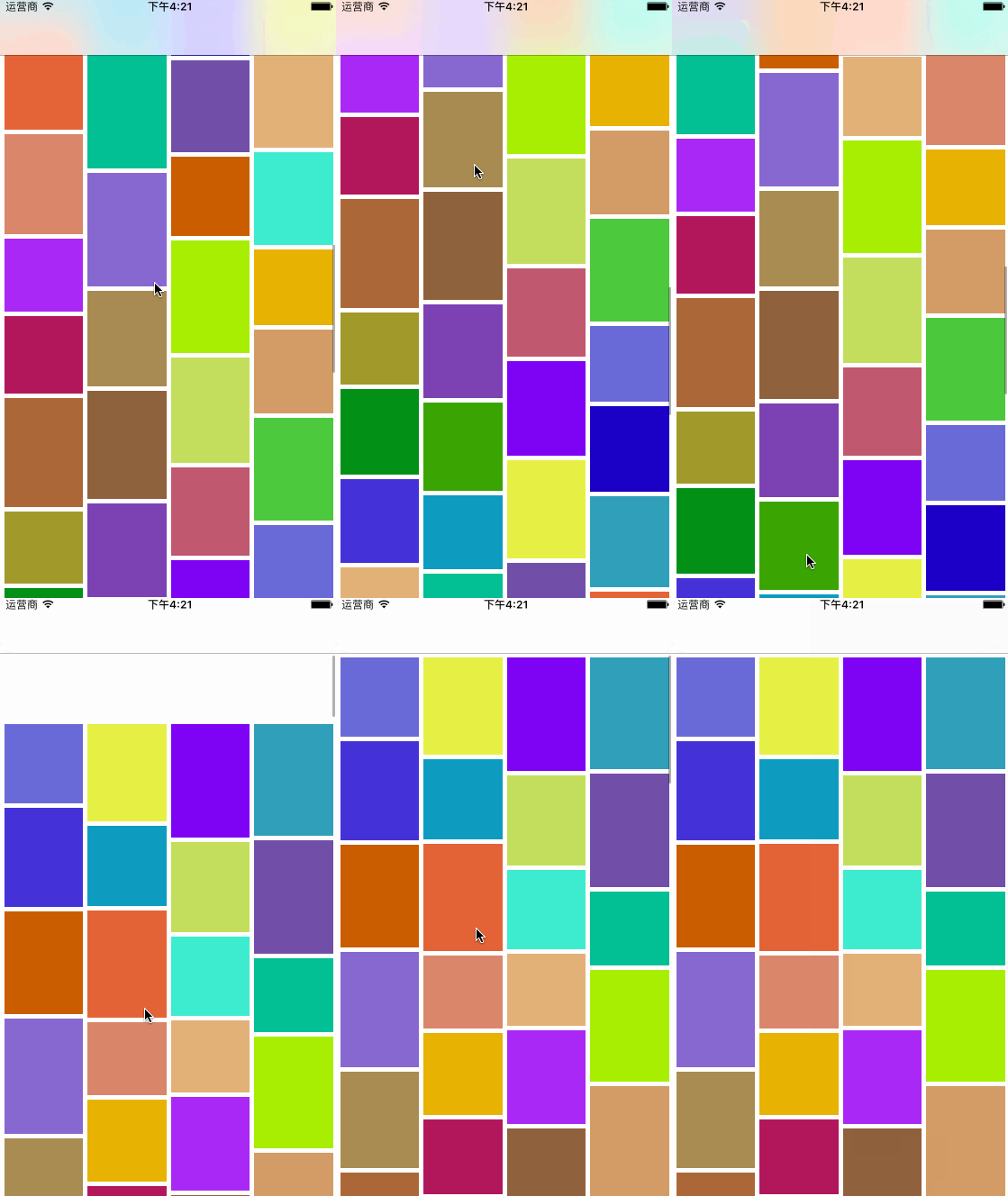
废话不多说,直接上代码:
先看WaterfallCollectionLayout.m
#import "WaterfallCollectionLayout.h"
#define colMargin 5
#define colCount 4
#define rolMargin 5
@interface WaterfallCollectionLayout ()
//数组存放每列的总高度
@property(nonatomic,strong)NSMutableArray* colsHeight;
//单元格宽度
@property(nonatomic,assign)CGFloat colWidth;
@end
该类要重写以下方法:
//完成布局前的初始工作
-(void)prepareLayout;

//collectionView的内容尺寸
-(CGSize)collectionViewContentSize;

//为每个item设置属性
-(UICollectionViewLayoutAttributes *)layoutAttributesForItemAtIndexPath:(NSIndexPath *)indexPath;

//获取制定范围的所有item的属性
-(NSArray<UICollectionViewLayoutAttributes *> *)layoutAttributesForElementsInRect:(CGRect)rect;

-(BOOL)shouldInvalidateLayoutForBoundsChange:(CGRect)newBounds;
每次调用会清空colsHeight数组里的信息:
//完成布局前的初始工作
-(void)prepareLayout{
 [super prepareLayout];
 self.colWidth =( self.collectionView.frame.size.width - (colCount+1)*colMargin )/colCount;
 //让它重新加载
 self.colsHeight = nil;
}
通过遍历colHeight数组里的所有列来获得最长的那一列,返回contentsize
//collectionView的内容尺寸
-(CGSize)collectionViewContentSize{
 NSNumber * longest = self.colsHeight[0];
 for (NSInteger i =0;i<self.colsHeight.count;i++) {
  NSNumber* rolHeight = self.colsHeight[i];
  if(longest.floatValue<rolHeight.floatValue){
   longest = rolHeight;
  }
 }
 return CGSizeMake(self.collectionView.frame.size.width, longest.floatValue);
}
每个cell要出来时这个方法会被调用,在此方法中设置该cell的frame。
注意heightBlock是外部控制器传进来的block用以计算每个cell的高度,现在我只是设置了随机数。如果没有传block进来我这里直接让他崩溃了。
//为每个item设置属性
-(UICollectionViewLayoutAttributes *)layoutAttributesForItemAtIndexPath:(NSIndexPath *)indexPath{
 UICollectionViewLayoutAttributes* attr = [UICollectionViewLayoutAttributes layoutAttributesForCellWithIndexPath:indexPath];
 NSNumber * shortest = self.colsHeight[0];
 NSInteger shortCol = 0;
 for (NSInteger i =0;i<self.colsHeight.count;i++) {
  NSNumber* rolHeight = self.colsHeight[i];
  if(shortest.floatValue>rolHeight.floatValue){
   shortest = rolHeight;
   shortCol=i;
  }
 }
 CGFloat x = (shortCol+1)*colMargin+ shortCol * self.colWidth;
 CGFloat y = shortest.floatValue+colMargin;

 //获取cell高度
 CGFloat height=0;
 NSAssert(self.heightBlock!=nil, @"未实现计算高度的block ");
 if(self.heightBlock){
  height = self.heightBlock(indexPath);
 }
 attr.frame= CGRectMake(x, y, self.colWidth, height);
 self.colsHeight[shortCol]=@(shortest.floatValue+colMargin+height);

 return attr;
}
//获取所有item的属性
-(NSArray<UICollectionViewLayoutAttributes *> *)layoutAttributesForElementsInRect:(CGRect)rect{
 NSMutableArray* array = [NSMutableArray array];
 NSInteger items = [self.collectionView numberOfItemsInSection:0];
 for (int i = 0; i<items;i++) {
  UICollectionViewLayoutAttributes* attr = [self layoutAttributesForItemAtIndexPath:[NSIndexPath indexPathForItem:i inSection:0]];
  [array addObject:attr];
 }
 return array;
}
实现下列方法会在出现新的cell时重新布局并调用preparelayout方法
-(BOOL)shouldInvalidateLayoutForBoundsChange:(CGRect)newBounds{
 return YES;
}
每列高度的存放,初始高度可以改,我这里是0
-(NSMutableArray *)colsHeight{
 if(!_colsHeight){
  NSMutableArray * array = [NSMutableArray array];
  for(int i =0;i<colCount;i++){
   //这里可以设置初始高度
   [array addObject:@(0)];
  }
  _colsHeight = [array mutableCopy];
 }
 return _colsHeight;
}
再来看看控制器里就是这么简单
#pragma mark getter-setter
-(UICollectionView *)collectionView{
 if(!_collectionView){
  _collectionView = [[UICollectionView alloc]initWithFrame:self.view.frame collectionViewLayout:self.layout];
  _collectionView.backgroundColor = [UIColor whiteColor];
  _collectionView.delegate=self;
  _collectionView.dataSource=self;
  [_collectionView registerClass:[CollectionViewCell class] forCellWithReuseIdentifier:identifer];
 }
 return _collectionView;
}
-(UICollectionViewLayout *)layout{
 if(!_layout){
  _layout = [[WaterfallCollectionLayout alloc]initWithItemsHeightBlock:^CGFloat(NSIndexPath *index) {
   return [self.heightArr[index.item] floatValue];
  }];

 }
 return _layout;
}
-(NSArray *)heightArr{
 if(!_heightArr){
  //随机生成高度
  NSMutableArray *arr = [NSMutableArray array];
  for (int i = 0; i<100; i++) {
   [arr addObject:@(arc4random()%50+80)];
  }
  _heightArr = [arr copy];
 }
 return _heightArr;
}
关于瀑布流的文章特别多,本文就是为大家分享了IOS简单实现瀑布流的方法,希望对大家的学习有所帮助。
您可能感兴趣的文章:
- IOS Xib控件拖拽与页面跳转实例
- iOS实现百度地图拖拽后更新位置以及反编码
- 浅谈iOS11新特性:新增拖拽交互体验
- Android ReboundScrollView仿IOS拖拽回弹效果
- IOS使用UICollectionView实现无限轮播效果
- iOS 解决UICollectionView 计算 Cell 大小的问题
- IOS 自定义UICollectionView的头视图或者尾视图UICollectionReusableView
- iOS应用中UICollectionViewCell定制Button
- iOS中关于Swift UICollectionView横向分页的问题
- iOS开发UICollectionView实现拖拽效果
相关文章

iOS开发中Quartz2D绘图路径的使用以及条纹效果的实现
这篇文章主要介绍了iOS开发中Quartz2D绘图路径的使用以及条纹效果的实现,代码基于传统的Objective-C,需要的朋友可以参考下2015-11-11 这篇文章主要为大家详细介绍了iOS中sqlite数据库的原生用法,sqlite数据库相信各位早已耳闻,非常轻巧的一个数据库,数据库仅一个文件,即建即用,感兴趣的小伙伴们可以参考一下32016-05-05
 这篇文章主要给大家介绍了关于利用iOS实现一个意见反馈类型的输入栏,通过文中实现的输入栏会用户一个很好的体验效果,文中给了详细的示例代码,需要的朋友可以参考借鉴,下面随着小编来一起学习学习吧。2017-10-10
 最近发现许多常用的APP都有图片浏览器,于是想仿照着自己写一个,下面这篇文章主要给大家介绍了关于iOS开发教程之自定制图片浏览器的相关资料,文中通过示例代码介绍的非常详细,需要的朋友可以参考下。2017-12-12
 下面小编就为大家分享一篇基于iOS Realm数据库的使用实例详解,具有很好的参考价值,希望对大家有所帮助。一起跟随小编过来看看吧2018-01-01
 本文通过一段实例代码给大家介绍了ios中uilabel text两边对齐的实现方法,非常不错,具有参考借鉴价值,需要的朋友参考下2017-01-01
 在本篇文章里小编给大家整理的是关于ios中getTime()的兼容性实例代码,需要的朋友们可以学习下。2020-03-03
IOS如何在Host App 与 App Extension 之间发送通知
这篇文章主要介绍了IOS如何在Host App 与 App Extension 之间发送通知 的相关资料,需要的朋友可以参考下2016-03-03 自从有了CocoaPods以后,这些繁杂的工作就不再需要我们亲力亲为了,只需要我们做好少量的配置工作,CocoaPods会为我们做好一切2016-09-09
 随着移动设备的普及为二维码提供了一个很好应用平台,无论是在商城购物还是美食城都离不开二维码,本篇文章就给大家介绍IOS笔记061之二维码的生成和扫描,感兴趣的朋友可以过来一起学习啦,本文内容讲的很详细2015-08-08
最新评论