

Android使用setCustomTitle()方法自定义对话框标题
更新时间:2016年02月12日 20:08:43 作者:MSTK
Android有自带的对话框标题,但是不太美观,如果要给弹出的对话框设置一个自定义的标题,使用AlertDialog.Builder的setCustomTitle()方法非常方便,接下来通过本文给大家介绍Android使用setCustomTitle()方法自定义对话框标题,感兴趣的朋友一起学习吧
Android有自带的对话框标题,但是不太美观,如果要给弹出的对话框设置一个自定义的标题,使用AlertDialog.Builder的setCustomTitle()方法。
运行效果如下,左边是点击第一个按钮,弹出Android系统自带的对话框(直接用setTitle()设置标题);右边是点击第二个按钮,首先inflate一个View,然后用setCustomTitle()方法把该View设置成对话框的标题。
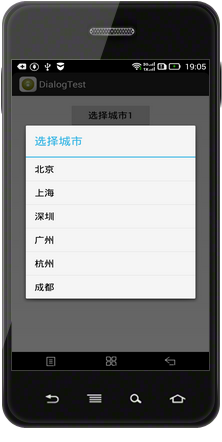
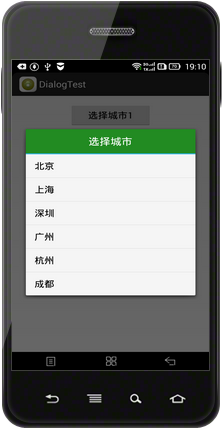
定义一个对话框标题的title.xml文件:
<?xml version="1.0" encoding="UTF-8"?>
<LinearLayout xmlns:android="http://schemas.android.com/apk/res/android"
android:layout_width="fill_parent"
android:layout_height="wrap_content"
android:background="@color/white"
android:gravity="center_vertical"
android:orientation="vertical" >
<LinearLayout
android:id="@+id/patient_top"
android:layout_width="match_parent"
android:layout_height="50dp"
android:layout_alignParentTop="true"
android:background="@color/green"
android:gravity="center_vertical|center_horizontal"
android:orientation="vertical" >
<TextView
android:id="@+id/txtPatient"
android:layout_width="wrap_content"
android:layout_height="wrap_content"
android:text="选择城市"
android:textColor="@color/white"
android:textSize="20sp" />
</LinearLayout>
</LinearLayout>
MainActivity的布局文件:
<LinearLayout xmlns:android="http://schemas.android.com/apk/res/android"
xmlns:tools="http://schemas.android.com/tools"
android:layout_width="fill_parent"
android:layout_height="wrap_content"
android:gravity="center_vertical|center_horizontal"
android:orientation="vertical"
android:paddingBottom="@dimen/activity_vertical_margin"
android:paddingLeft="@dimen/activity_horizontal_margin"
android:paddingRight="@dimen/activity_horizontal_margin"
android:paddingTop="@dimen/activity_vertical_margin"
tools:context="com.hzhi.dialogtest.MainActivity" >
<Button
android:id="@+id/btn01"
android:layout_width="150dp"
android:layout_height="wrap_content"
android:text="选择城市1" />
<Button
android:id="@+id/btn02"
android:layout_width="150dp"
android:layout_height="wrap_content"
android:text="选择城市2" />
</LinearLayout>
MainActivity.java文件:
package com.hzhi.dialogtest;
import android.support.v7.app.ActionBarActivity;
import android.app.AlertDialog;
import android.content.DialogInterface;
import android.os.Bundle;
import android.view.LayoutInflater;
import android.view.View;
import android.view.View.OnClickListener;
import android.widget.Button;
public class MainActivity extends ActionBarActivity implements OnClickListener{
final String[] cities = new String[6];
Button button_01, button_02;
@Override
protected void onCreate(Bundle savedInstanceState) {
super.onCreate(savedInstanceState);
setContentView(R.layout.activity_main);
initView();
}
private void initView(){
cities[0] = "北京";
cities[1] = "上海";
cities[2] = "深圳";
cities[3] = "广州";
cities[4] = "杭州";
cities[5] = "成都";
button_01 = (Button) findViewById(R.id.btn01);
button_01.setOnClickListener(this);
button_02 = (Button) findViewById(R.id.btn02);
button_02.setOnClickListener(this);
}
@Override
public void onClick(View v) {
// TODO Auto-generated method stub
switch (v.getId()){
case R.id.btn01:
AlertDialog.Builder builder1 = new AlertDialog.Builder(MainActivity.this);
builder1.setItems(cities, new DialogInterface.OnClickListener()
{
@Override
public void onClick(DialogInterface dialog, int which)
{

}
});
builder1.setTitle("选择城市");
builder1.show();
break;
case R.id.btn02:
LayoutInflater layoutInflater = LayoutInflater.from(MainActivity.this);
View mTitleView = layoutInflater.inflate(R.layout.title, null);
AlertDialog.Builder builder2 = new AlertDialog.Builder(MainActivity.this);
builder2.setItems(cities, new DialogInterface.OnClickListener()
{
@Override
public void onClick(DialogInterface dialog, int which)
{

}
});
builder2.setCustomTitle(mTitleView);
builder2.show();
break;
}
}
}
以上所述是小编给大家分享的Android使用setCustomTitle()方法自定义对话框标题,希望对大家有所帮助。
相关文章
 这篇文章主要为大家详细介绍了RecyclerView自定义分割线的相关资料,文中示例代码介绍的非常详细,具有一定的参考价值,感兴趣的小伙伴们可以参考一下2020-09-09
 这篇文章主要为大家详细介绍了Android调用外置摄像头的方法,文中示例代码介绍的非常详细,具有一定的参考价值,感兴趣的小伙伴们可以参考一下2022-03-03
 这篇文章主要介绍了在Flutter中正确处理文本缩放的解决方案,本教程的结构首先介绍最简单且最有影响力的解决方案,后面的部分涵盖了较难实施且总体影响较小的解决方案,但它们对于解决特定情况很有用,需要的朋友可以参考下2024-06-06
 字的跑马灯效果在移动端开发中是一个比较常见的需求场景,下面这篇文章主要给大家介绍了关于Android TextView跑马灯实现原理及方法的相关资料,需要的朋友可以参考下2022-05-05
 这篇文章给大家分享了Android单元测试方法与步骤的相关知识点,有兴趣和需要的朋友参考学习下。2018-07-07
 下面小编就为大家带来一篇Android 读取sdcard上的图片实例(必看)。小编觉得挺不错的,现在就分享给大家,也给大家做个参考。一起跟随小编过来看看吧2017-03-03
 这篇文章主要为大家介绍了Android neon 优化实践示例详解,有需要的朋友可以借鉴参考下,希望能够有所帮助,祝大家多多进步,早日升职加薪2022-09-09
android 获取APP的唯一标识applicationId的实例
下面小编就为大家分享一篇android 获取APP的唯一标识applicationId的实例,具有很好的参考价值,希望对大家有所帮助。一起跟随小编过来看看吧2018-02-02 这篇文章主要为大家详细介绍了RecyclerView的简单使用方法,具有一定的参考价值,感兴趣的小伙伴们可以参考一下2017-08-08
 用过微信分享SDK的都应该知道,微信分享到朋友圈的时候是不能同时分享图片和文字的,只要有缩略图,那么文字就不会生效。那么问题就来了,如果我们想把APP内的某些内容连带图片一起分享到微信,是不是没办法了呢?下面一起来看看怎么解决。2016-08-08
最新评论