

iOS开发使用JSON解析网络数据
更新时间:2016年02月14日 08:47:58 投稿:hebedich
JSON是一种轻量级的数据格式,一般用于数据交互,服务器返回给客户端的数据,一般都是JSON格式或者XML格式(文件下载除外)下面我们就看下在IOS开发中如何结合json呢
前言:对服务器请求之后,返回给客户端的数据,一般都是JSON格式或者XML格式(文件下载除外)

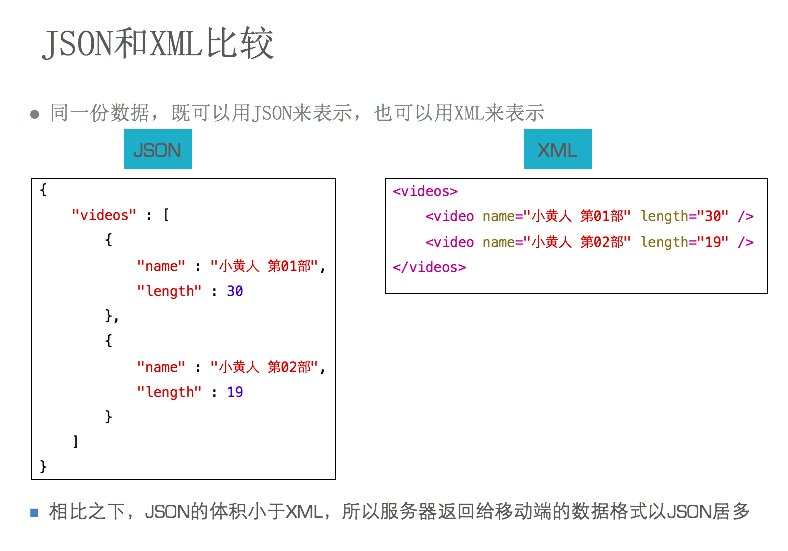
本篇随便先讲解JSON解析。
正文:
关于JSON:
JSON是一种轻量级的数据格式,一般用于数据交互JSON的格式很像Objective-C中的字典和数组:{"name":"jack","age":10}
补充:
标准的JSON格式的注意点:key必须用双引号。(但是在Java中是单引号)
JSON-OC的转换对照表
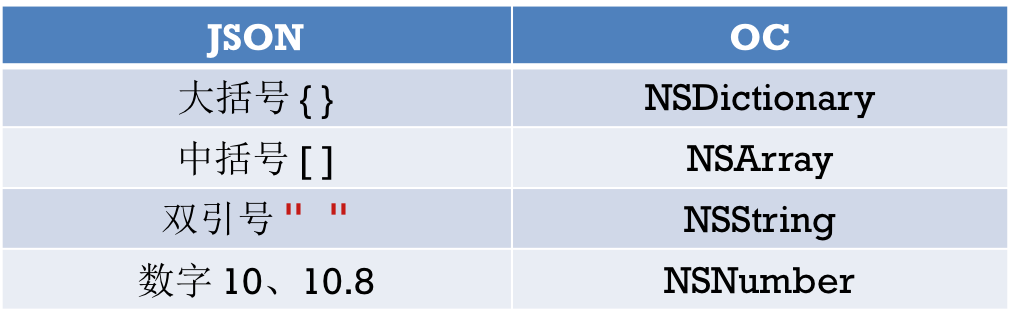
其中:null--返回OC里的NSNull类型
使用:
在JSON解析方案有很多种,但是(苹果原生的)NSJSONSerialization性能最好
反序列化(JSON --> OC对象),下面示例解析成字典对象
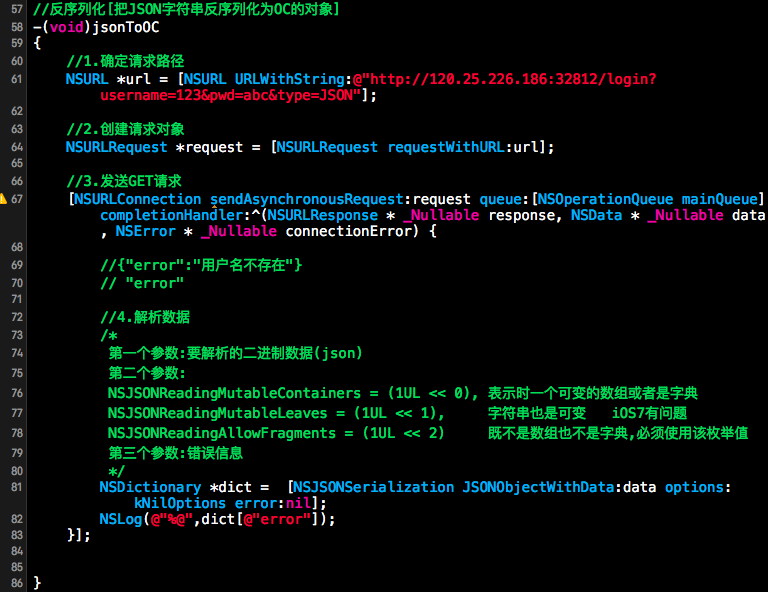
序列化(OC对象 --> JSON),注意字典的值不能传nil,但是可以传[NSNull null]
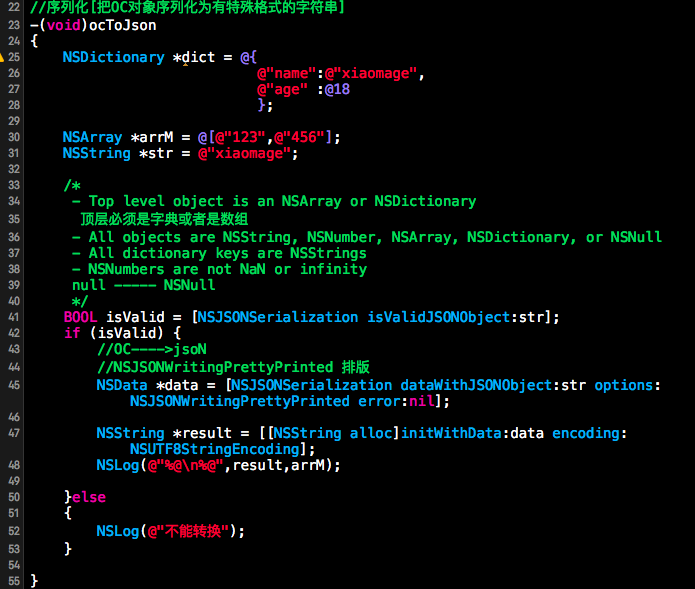
并不是所有的类型都是可以转为JSON的
以下是苹果官方规定:

我们再来看个实例:
#import "MainViewController.h"
#import "Video.h"

#define kBaseURL @"http://192.168.3.252/~apple"

@interface MainViewController ()
@property (strong, nonatomic) NSArray *dataList;
@property (weak, nonatomic) UITableView *tableView;
@end
@implementation MainViewController


class="p1">

"412158" snippet_file_name="blog_20140630_1_3481337" name="code" class="objc">
#pragma mark 实例化视图
- (void)loadView
{
  self.view = [[UIView alloc]initWithFrame:[UIScreen mainScreen].applicationFrame];
  //1 tableview
  CGRect frame = self.view.bounds;
  UITableView *tableView = [[UITableView alloc]initWithFrame:CGRectMake(0, 0, frame.size.width, frame.size.height - 44) style:UITableViewStylePlain];
  //1)数据源
  [tableView setDataSource:self];
  //2)代理
  [tableView setDelegate:self];
  //)设置表格高度
  [tableView setRowHeight:80];
  [self.view addSubview:tableView];
  self.tableView = tableView;

  //toolBar
  UIToolbar *toolBar = [[UIToolbar alloc]initWithFrame:CGRectMake(0, tableView.bounds.size.height, 320, 44)];
  [self.view addSubview:toolBar];

  //添加toolbar按钮
  UIBarButtonItem *item1 = [[UIBarButtonItem alloc]initWithTitle:@"load json" style:UIBarButtonItemStyleDone target:self action:@selector(loadJson)];
  UIBarButtonItem *item2 = [[UIBarButtonItem alloc]initWithTitle:@"load xml" style:UIBarButtonItemStyleDone target:self action:@selector(loadXML)];
  UIBarButtonItem *item3 = [[UIBarButtonItem alloc]initWithBarButtonSystemItem:UIBarButtonSystemItemFlexibleSpace target:nil action:nil];
  [toolBar setItems:@[item3, item1, item3, item2, item3]];
}

#pragma mark -uitableview数据源方法 对于uitableview下面这两个方法是必须实现的。
- (NSInteger)tableView:(UITableView *)tableView numberOfRowsInSection:(NSInteger)section
{
  return self.dataList.count;
}

//每填充一行都调用一次这个方法。知道界面上的所有行都填充完毕。,
- (UITableViewCell *)tableView:(UITableView *)tableView cellForRowAtIndexPath:(NSIndexPath *)indexPath
{
  //使用可充用标示符查询可重用单元格
  static NSString *ID = @"MyCell";
  UITableViewCell *cell = [tableView dequeueReusableCellWithIdentifier:ID];

  if (cell == nil) {
    cell = [[UITableViewCell alloc]initWithStyle:UITableViewCellStyleSubtitle reuseIdentifier:ID];
  }
  //设置单元格内容
  Video *v = self.dataList[indexPath.row];

  cell.textLabel.text = v.name;
  cell.detailTextLabel.text = v.teacher;
  //加载图片
  //1)同步加载网络图片,同步方法以为这这些指令在完成之前,后续指令都无法执行。
  //注意:在开发网络应用时,不要使用同步方法加载图片,否则会严重影响用户体验
//  NSString *imagePath = [NSString stringWithFormat:@"%@%@", kBaseURL, v.imageURL];
//  NSURL *imageUrl = [NSURL URLWithString:imagePath];
//  NSData *imageData = [NSData dataWithContentsOfURL:imageUrl];
//  UIImage *image = [UIImage imageWithData:imageData];
//
//  //2)异步加载网络图片
//  //网络连接本身就有异步命令 sendAsync
//  [cell.imageView setImage:image];
  //如果缓存图像不存在
  if (v.cacheImage == nil) {
    //使用默认图像占位,即能够保证有图像,又能够保证有地方。
    UIImage *image = [UIImage imageNamed:@"user_default.png"];
    [cell.imageView setImage:image]; //使用默认图像占位
    //开启异步连接,加载图像,因为加载完成之后,需要刷新对应的表格航
    [self loadImageAsyncWithIndexPath:indexPath];
  }else
  {
    [cell.imageView setImage:v.cacheImage];
  }

  //[self loadImageAsyncWithUrl:imageUrl imageView:cell.imageView];
  return cell;
}


#pragma mark 异步加载网络图片
//由于uitableview是可重用的,为了避免用户快速频繁刷新表格,造成数据冲突,不能直接将uiimageview传入异步方法
//正确的解决方法是:将表格行的indexpath传入异步方法,加载完成图像以后,直接刷新指定的行。
- (void)loadImageAsyncWithIndexPath:(NSIndexPath *)indexPath
{
  Video *v = self.dataList[indexPath.row]; //取出当前要填充的行
  NSString *imagePath = [NSString stringWithFormat:@"%@%@", kBaseURL, v.imageURL];
  NSURL *imageUrl = [NSURL URLWithString:imagePath];

  //NSLog(@"%@ %@", url, imageView);
  //1 request
  NSURLRequest *request = [NSURLRequest requestWithURL:imageUrl];
  //2 connection sendasync异步请求
  [NSURLConnection sendAsynchronousRequest:request queue:[NSOperationQueue mainQueue] completionHandler:^(NSURLResponse *response, NSData *data, NSError *error) {
    //UIImage *image = [UIImage imageWithData:data];
    //[imageView setImage:image];
    //将网络数据保存至缓存图像。
    v.cacheImage = [UIImage imageWithData:data];
    //刷新表格
    [self.tableView reloadRowsAtIndexPaths:@[indexPath] withRowAnimation:UITableViewRowAnimationLeft];
  }];
}

#pragma mark 处理json数据
- (void)handlerJSONData:(NSData *)data
{
  //json文件中的[]表示一个数据。
  //反序列化json数据

  //第二个参数是解析方式,一般用NSJSONReadingAllowFragments
  NSArray *array = [NSJSONSerialization JSONObjectWithData:data options:NSJSONReadingAllowFragments error:nil];

  NSLog(@"%@", array); //json解析以后是nsarray格式的数据。

  //提示:如果开发网络应用,可以将反序列化出来的对象,保存至沙箱,以便后续开发使用。
  NSArray *docs = NSSearchPathForDirectoriesInDomains(NSDocumentDirectory, NSUserDomainMask, YES);
  NSString *path = [docs[0]stringByAppendingPathComponent:@"json.plist"];
  [array writeToFile:path atomically:YES]; //把array里面的数据写入沙箱中的jspn.plist中。

  //给数据列表赋值
  NSMutableArray *arrayM = [NSMutableArray array];
  for (NSDictionary *dict in array) {
    Video *video = [[Video alloc]init];
    //给video赋值
    [video setValuesForKeysWithDictionary:dict];
    [arrayM addObject:video];
  }
  self.dataList = arrayM;
  //刷新表格
  [self.tableView reloadData];

  NSLog(@"%@", arrayM); //这句话将调用video里面的description和nsarray+log里面的descriptionWithLocale
}

#pragma mark 加载json
- (void)loadJson
{
  NSLog(@"load json");
  //从web服务器加载数据
  NSString *str = @"http://www.baidu.com?format=json"; //这里是乱写的
  //提示:NSData本身具有同步方法,但是在实际开发中,不要使用次方法
  //在使用NSData的同步方法时,无法指定超时时间,如果服务器连接不正常,会影响用户体验。
  //NSData *data = [NSData dataWithContentsOfURL:[NSURL URLWithString:str]];
  //简历NSURL
  NSURL *url = [NSURL URLWithString:str];
  //建立NSURLRequest
  NSURLRequest *request = [NSURLRequest requestWithURL:url cachePolicy:NSURLRequestUseProtocolCachePolicy timeoutInterval:2.0f];
  //建立NSURLConnect的同步方法加载数据
  NSURLResponse *response = nil;
  NSError *error = nil;
  //同步加载数据
  NSData *data = [NSURLConnection sendSynchronousRequest:request returningResponse:&response error:&error];
  //错误处理
  if (data != nil) {
    //下面这两句话本身没有什么意义,仅用于跟踪调试。
    NSString *result = [[NSString alloc]initWithData:data encoding:NSUTF8StringEncoding];
    NSLog(@"%@", result);

    //在处理网络数据的时候,不要将NSData转换成nsstring。
    [self handlerJSONData:data];
  }else if (data == nil && error == nil){
    NSLog(@"空数据");
  }else
  {
    NSLog(@"%@", error.localizedDescription);
  }
}
#pragma mark 加载xml
- (void)loadXML
{
  NSLog(@"load xml");
}
//- (void)viewDidLoad
//{
//  [super viewDidLoad];
//}

@end
相关文章
 这篇文章给大家分享了利用iOS实现知乎和途家导航栏渐变的文字动画效果,有需要的朋友们可以参考借鉴。下面来一起看看。2016-09-09
 这篇文章主要为大家详细介绍了iOS仿网易新闻滚动导航条效果,文中示例代码介绍的非常详细,具有一定的参考价值,感兴趣的小伙伴们可以参考一下2018-05-05
iOS10通知框架UserNotification理解与应用
在iOS10系统中,通知被整合进了UserNotification框架,除了使通知的处理脱离了UIApplication,通知功能的相关开发更加结构化与模块化外,还新增开放了许多更加灵活的开发接口,现在,开发者可以为通知定义UI末班,添加媒体附件,需要的朋友可以参考下2016-09-09 这篇文章主要为大家详细介绍了iOS购物分类模块的实现方案,具有一定的参考价值,感兴趣的小伙伴们可以参考一下2016-02-02
 这篇文章主要为大家详细介绍了IOS实现图片轮播效果,文中示例代码介绍的非常详细,具有一定的参考价值,感兴趣的小伙伴们可以参考一下2016-03-03
iOS安全防护系列之ptrace反调试与汇编调用系统方法详解
这篇文章主要给大家介绍了关于iOS安全防护系列之ptrace反调试与汇编调用系统方法的相关资料,文中通过示例代码介绍的非常详细,对大家的学习或者工作具有一定的参考学习价值,需要的朋友们下面随着小编来一起学习学习吧2018-07-07 本篇文章主要介绍了IOS开发笔记之禁用手势滑动返回功能的示例,小编觉得挺不错的,现在分享给大家,也给大家做个参考。一起跟随小编过来看看吧2017-09-09
 这篇文章主要为大家详细介绍了iOS自定义水平滚动条、进度条,具有一定的参考价值,感兴趣的小伙伴们可以参考一下2019-04-04
详解ios中自定义cell,自定义UITableViewCell
本篇文章主要介绍了ios中自定义cell,自定义UITableViewCell,非常具有实用价值,需要的朋友可以参考下。2016-12-12 下面小编就为大家分享一篇IOS微信端confirm以及alert去掉网址的实例代码,具有很好的参考价值,希望对大家有所帮助。一起跟随小编过来看看吧2018-01-01
最新评论