

Android中颜色选择器和改变字体颜色的实例教程
更新时间:2016年04月28日 15:39:17 作者:by2n
这篇文章主要介绍了Android中颜色选择器和改变字体颜色的实例教程,其中改变字体颜色用到了ColorPicker颜色选择器,需要的朋友可以参考下
1.构建一张七彩图:
我们经常看到这种样子的颜色选择器吧..
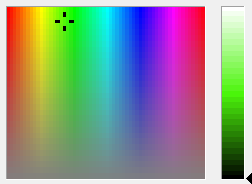
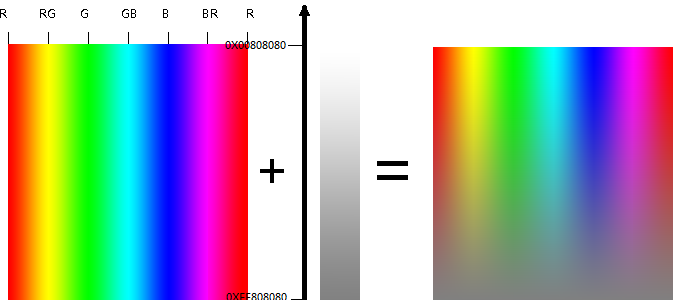
然后其实右边的亮度选择是:
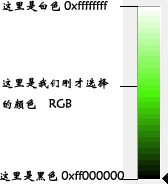
这样我们的代码就可以进行啦...
// 创建七彩图片
 private void init() {
 int[] oc = { 0xffff0000, 0xffffff00, 0xff00ff00, 0xff00ffff,
  0xff0000ff, 0xffff00ff, 0xffff0000 };
 float[] op = { 0, 0.16667f, 0.33333f, 0.5f, 0.66667f, 0.83333f, 1 };
 LinearGradient lg = new LinearGradient(0, 0, ORIWIDTH, 0, oc, op,
  TileMode.MIRROR);
 LinearGradient lg2 = new LinearGradient(0, 0, 0, ORIHEIGHT, 0x00808080,
  0xff808080, TileMode.MIRROR);
 oriColor = Bitmap.createBitmap(ORIWIDTH, ORIHEIGHT, Config.ARGB_8888);
 Canvas c = new Canvas(oriColor);
 paint.setShader(lg);
 c.drawRect(0, 0, ORIWIDTH, ORIHEIGHT, paint);
 paint.setShader(lg2);
 c.drawRect(0, 0, ORIWIDTH, ORIHEIGHT, paint);
 }

// 右边的亮度栏
 private void drawABar(Canvas c) {
 int x, y;
 x = (roundColor & 0x00ffffff);
 y = (x | 0xff000000);
 LinearGradient lg = new LinearGradient(0, 0, layoutWidth, 0, x, y,
  TileMode.MIRROR);
 // 初始化 x 240 + 6 * 2
 y = ORIHEIGHT + (GAP << 2) - GAP + BARHEIGHT;
 paint.setColor(0xffffffff);
 c.drawBitmap(aBk, 0, y, paint);
 paint.setShader(lg);
 c.drawRect(0, y, layoutWidth, y + BARHEIGHT, paint);
 }
其他屏幕事件什么的就不贴代码啦...

2.ColorPicker颜色选择器改变字体颜色实例:
(1)测试界面

(2)调色板对话框

(3)改变字体颜色

嗯好,来看代码:
package com.xsl.colorpicker;

import android.app.Dialog;

import android.content.Context;

import android.graphics.Canvas;

import android.graphics.Color;

import android.graphics.LinearGradient;

import android.graphics.Paint;

import android.graphics.RectF;

import android.graphics.Shader;

import android.graphics.SweepGradient;

import android.os.Bundle;

import android.util.Log;

import android.view.MotionEvent;

import android.view.View;

import android.view.WindowManager;


public class ColorPickerDialog extends Dialog {

  private final boolean debug = true;

  private final String TAG = "ColorPicker";


  Context context;

  private String title;    //标题

  private int mInitialColor; //初始颜色

  private OnColorChangedListener mListener;


  /**

   * 初始颜色黑色

   * @param context

   * @param title 对话框标题

   * @param listener 回调

   */

  public ColorPickerDialog(Context context, String title,

      OnColorChangedListener listener) {

    this(context, Color.BLACK, title, listener);

  }
  /**

   *

   * @param context

   * @param initialColor 初始颜色

   * @param title 标题

   * @param listener 回调

   */

  public ColorPickerDialog(Context context, int initialColor,

      String title, OnColorChangedListener listener) {

    super(context);

    this.context = context;

    mListener = listener;

    mInitialColor = initialColor;

    this.title = title;

  }


  @Override

  protected void onCreate(Bundle savedInstanceState) {

    super.onCreate(savedInstanceState);

    WindowManager manager = getWindow().getWindowManager();

    int height = (int) (manager.getDefaultDisplay().getHeight() * 0.38f);    //0.5

    int width = (int) (manager.getDefaultDisplay().getWidth() * 0.5f);     //0.7

    ColorPickerView myView = new ColorPickerView(context, height, width);

    setContentView(myView);

    setTitle(title);

  }
  private class ColorPickerView extends View {

    private Paint mPaint;      //渐变色环画笔

    private Paint mCenterPaint;   //中间圆画笔

    private Paint mLinePaint;    //分隔线画笔

    private Paint mRectPaint;    //渐变方块画笔


    private Shader rectShader;   //渐变方块渐变图像

    private float rectLeft;     //渐变方块左x坐标

    private float rectTop;     //渐变方块右x坐标

    private float rectRight;    //渐变方块上y坐标

    private float rectBottom;    //渐变方块下y坐标


    private final int[] mCircleColors;   //渐变色环颜色

    private final int[] mRectColors;    //渐变方块颜色


    private int mHeight;          //View高

    private int mWidth;           //View宽

    private float r;            //色环半径(paint中部)

    private float centerRadius;       //中心圆半径


    private boolean downInCircle = true;  //按在渐变环上

    private boolean downInRect;       //按在渐变方块上

    private boolean highlightCenter;    //高亮

    private boolean highlightCenterLittle; //微亮


    public ColorPickerView(Context context, int height, int width) {

      super(context);

      this.mHeight = height - 36;

      this.mWidth = width;

      setMinimumHeight(height - 36);

      setMinimumWidth(width);


      //渐变色环参数

      mCircleColors = new int[] {0xFFFF0000, 0xFFFF00FF, 0xFF0000FF,

          0xFF00FFFF, 0xFF00FF00,0xFFFFFF00, 0xFFFF0000};

      Shader s = new SweepGradient(0, 0, mCircleColors, null);

      mPaint = new Paint(Paint.ANTI_ALIAS_FLAG);

      mPaint.setShader(s);

      mPaint.setStyle(Paint.Style.STROKE);

      mPaint.setStrokeWidth(50);

      r = width / 2 * 0.7f - mPaint.getStrokeWidth() * 0.5f;


      //中心圆参数

      mCenterPaint = new Paint(Paint.ANTI_ALIAS_FLAG);

      mCenterPaint.setColor(mInitialColor);

      mCenterPaint.setStrokeWidth(5);

      centerRadius = (r - mPaint.getStrokeWidth() / 2 ) * 0.7f;


      //边框参数

      mLinePaint = new Paint(Paint.ANTI_ALIAS_FLAG);

      mLinePaint.setColor(Color.parseColor("#72A1D1"));

      mLinePaint.setStrokeWidth(4);


      //黑白渐变参数

      mRectColors = new int[]{0xFF000000, mCenterPaint.getColor(), 0xFFFFFFFF};

      mRectPaint = new Paint(Paint.ANTI_ALIAS_FLAG);

      mRectPaint.setStrokeWidth(5);

      rectLeft = -r - mPaint.getStrokeWidth() * 0.5f;

      rectTop = r + mPaint.getStrokeWidth() * 0.5f +

          mLinePaint.getStrokeMiter() * 0.5f + 15;

      rectRight = r + mPaint.getStrokeWidth() * 0.5f;

      rectBottom = rectTop + 50;

    }
    @Override

    protected void onDraw(Canvas canvas) {

      //移动中心

      canvas.translate(mWidth / 2, mHeight / 2 - 50);

      //画中心圆

      canvas.drawCircle(0, 0, centerRadius, mCenterPaint);


      //是否显示中心圆外的小圆环

      if (highlightCenter || highlightCenterLittle) {

        int c = mCenterPaint.getColor();

        mCenterPaint.setStyle(Paint.Style.STROKE);

        if(highlightCenter) {

          mCenterPaint.setAlpha(0xFF);

        }else if(highlightCenterLittle) {

          mCenterPaint.setAlpha(0x90);

        }

        canvas.drawCircle(0, 0,

            centerRadius + mCenterPaint.getStrokeWidth(), mCenterPaint);


        mCenterPaint.setStyle(Paint.Style.FILL);

        mCenterPaint.setColor(c);

      }
      //画色环

      canvas.drawOval(new RectF(-r, -r, r, r), mPaint);

      //画黑白渐变块

      if(downInCircle) {

        mRectColors[1] = mCenterPaint.getColor();

      }

      rectShader = new LinearGradient(rectLeft, 0, rectRight, 0, mRectColors, null, Shader.TileMode.MIRROR);

      mRectPaint.setShader(rectShader);

      canvas.drawRect(rectLeft, rectTop, rectRight, rectBottom, mRectPaint);

      float offset = mLinePaint.getStrokeWidth() / 2;

      canvas.drawLine(rectLeft - offset, rectTop - offset * 2,

          rectLeft - offset, rectBottom + offset * 2, mLinePaint);//左

      canvas.drawLine(rectLeft - offset * 2, rectTop - offset,

          rectRight + offset * 2, rectTop - offset, mLinePaint);//上

      canvas.drawLine(rectRight + offset, rectTop - offset * 2,

          rectRight + offset, rectBottom + offset * 2, mLinePaint);//右

      canvas.drawLine(rectLeft - offset * 2, rectBottom + offset,

          rectRight + offset * 2, rectBottom + offset, mLinePaint);//下

      super.onDraw(canvas);

    }


    @Override

    public boolean onTouchEvent(MotionEvent event) {

      float x = event.getX() - mWidth / 2;

      float y = event.getY() - mHeight / 2 + 50;

      boolean inCircle = inColorCircle(x, y,

          r + mPaint.getStrokeWidth() / 2, r - mPaint.getStrokeWidth() / 2);

      boolean inCenter = inCenter(x, y, centerRadius);

      boolean inRect = inRect(x, y);


      switch (event.getAction()) {

        case MotionEvent.ACTION_DOWN:

          downInCircle = inCircle;

          downInRect = inRect;

          highlightCenter = inCenter;

        case MotionEvent.ACTION_MOVE:

          if(downInCircle && inCircle) {//down按在渐变色环内, 且move也在渐变色环内

            float angle = (float) Math.atan2(y, x);

            float unit = (float) (angle / (2 * Math.PI));

            if (unit < 0) {

              unit += 1;

            }

            mCenterPaint.setColor(interpCircleColor(mCircleColors, unit));

            if(debug) Log.v(TAG, "色环内, 坐标: " + x + "," + y);

          }else if(downInRect && inRect) {//down在渐变方块内, 且move也在渐变方块内

            mCenterPaint.setColor(interpRectColor(mRectColors, x));

          }

          if(debug) Log.v(TAG, "[MOVE] 高亮: " + highlightCenter + "微亮: " + highlightCenterLittle + " 中心: " + inCenter);

          if((highlightCenter && inCenter) || (highlightCenterLittle && inCenter)) {//点击中心圆, 当前移动在中心圆

            highlightCenter = true;

            highlightCenterLittle = false;

          } else if(highlightCenter || highlightCenterLittle) {//点击在中心圆, 当前移出中心圆

            highlightCenter = false;

            highlightCenterLittle = true;

          } else {

            highlightCenter = false;

            highlightCenterLittle = false;

          }

          invalidate();

          break;

        case MotionEvent.ACTION_UP:

          if(highlightCenter && inCenter) {//点击在中心圆, 且当前启动在中心圆

            if(mListener != null) {

              mListener.colorChanged(mCenterPaint.getColor());

              ColorPickerDialog.this.dismiss();

            }

          }

          if(downInCircle) {

            downInCircle = false;

          }

          if(downInRect) {

            downInRect = false;

          }

          if(highlightCenter) {

            highlightCenter = false;

          }

          if(highlightCenterLittle) {

            highlightCenterLittle = false;

          }

          invalidate();

          break;

      }

      return true;

    }


    @Override

    protected void onMeasure(int widthMeasureSpec, int heightMeasureSpec) {

      super.onMeasure(mWidth, mHeight);

    }
    /**

     * 坐标是否在色环上

     * @param x 坐标

     * @param y 坐标

     * @param outRadius 色环外半径

     * @param inRadius 色环内半径

     * @return

     */

    private boolean inColorCircle(float x, float y, float outRadius, float inRadius) {

      double outCircle = Math.PI * outRadius * outRadius;

      double inCircle = Math.PI * inRadius * inRadius;

      double fingerCircle = Math.PI * (x * x + y * y);

      if(fingerCircle < outCircle && fingerCircle > inCircle) {

        return true;

      }else {

        return false;

      }

    }
    /**

     * 坐标是否在中心圆上

     * @param x 坐标

     * @param y 坐标

     * @param centerRadius 圆半径

     * @return

     */

    private boolean inCenter(float x, float y, float centerRadius) {

      double centerCircle = Math.PI * centerRadius * centerRadius;

      double fingerCircle = Math.PI * (x * x + y * y);

      if(fingerCircle < centerCircle) {

        return true;

      }else {

        return false;

      }

    }
    /**

     * 坐标是否在渐变色中

     * @param x

     * @param y

     * @return

     */

    private boolean inRect(float x, float y) {

      if( x <= rectRight && x >=rectLeft && y <= rectBottom && y >=rectTop) {

        return true;

      } else {

        return false;

      }

    }
    /**

     * 获取圆环上颜色

     * @param colors

     * @param unit

     * @return

     */

    private int interpCircleColor(int colors[], float unit) {

      if (unit <= 0) {

        return colors[0];

      }

      if (unit >= 1) {

        return colors[colors.length - 1];

      }


      float p = unit * (colors.length - 1);

      int i = (int)p;

      p -= i;


      // now p is just the fractional part [0...1) and i is the index

      int c0 = colors[i];

      int c1 = colors[i+1];

      int a = ave(Color.alpha(c0), Color.alpha(c1), p);

      int r = ave(Color.red(c0), Color.red(c1), p);

      int g = ave(Color.green(c0), Color.green(c1), p);

      int b = ave(Color.blue(c0), Color.blue(c1), p);


      return Color.argb(a, r, g, b);

    }
    /**

     * 获取渐变块上颜色

     * @param colors

     * @param x

     * @return

     */

    private int interpRectColor(int colors[], float x) {

      int a, r, g, b, c0, c1;

      float p;

      if (x < 0) {

        c0 = colors[0];

        c1 = colors[1];

        p = (x + rectRight) / rectRight;

      } else {

        c0 = colors[1];

        c1 = colors[2];

        p = x / rectRight;

      }

      a = ave(Color.alpha(c0), Color.alpha(c1), p);

      r = ave(Color.red(c0), Color.red(c1), p);

      g = ave(Color.green(c0), Color.green(c1), p);

      b = ave(Color.blue(c0), Color.blue(c1), p);

      return Color.argb(a, r, g, b);

    }


    private int ave(int s, int d, float p) {

      return s + Math.round(p * (d - s));

    }

  }
  /**

   * 回调接口
   */

  public interface OnColorChangedListener {

    /**

     * 回调函数

     * @param color 选中的颜色

     */

    void colorChanged(int color);

  }


  public String getTitle() {

    return title;

  }


  public void setTitle(String title) {

    this.title = title;

  }


  public int getmInitialColor() {

    return mInitialColor;

  }


  public void setmInitialColor(int mInitialColor) {

    this.mInitialColor = mInitialColor;

  }


  public OnColorChangedListener getmListener() {

    return mListener;

  }


  public void setmListener(OnColorChangedListener mListener) {

    this.mListener = mListener;

  }

}
测试界面
PaintDemoActivity.java
package com.xsl.colorpicker;

import android.app.Activity;

import android.content.Context;

import android.os.Bundle;

import android.view.View;

import android.widget.Button;

import android.widget.TextView;

public class PaintDemoActivity extends Activity {
  Context context;

  private Button btnColorPicker;

  private TextView tvText;


  private ColorPickerDialog dialog;

  @Override

  public void onCreate(Bundle savedInstanceState) {

    context = this;

    super.onCreate(savedInstanceState);

    setContentView(R.layout.main);

    initViews();

  }


  /**

   * 初始化UI

   */

  private void initViews() {

    btnColorPicker = (Button) findViewById(R.id.button1);

    btnColorPicker.setOnClickListener(new View.OnClickListener() {


      public void onClick(View v) {

        dialog = new ColorPickerDialog(context, tvText.getTextColors().getDefaultColor(),

            getResources().getString(R.string.app_name),

            new ColorPickerDialog.OnColorChangedListener() {

          public void colorChanged(int color) {

            tvText.setTextColor(color);

          }

        });

        dialog.show();

      }

    });


    tvText = (TextView) findViewById(R.id.tv);

  }

}
相关文章
 FFmpeg-Android 是一个基于 FFmpeg n4.0 版本编译运行在 Android 平台上的音视频处理框架,本文为大家整理了使用FFmpeg-Android进行音视频处理的详细操作,需要的可以了解下2025-03-03
 本文主要介绍Android 安全加密,非对称加密的知识,这里整理了详细的资料,及使用方法,有需要的小伙伴可以参考下2016-09-09
实例讲解Android应用开发中Fragment生命周期的控制
这篇文章主要介绍了Android应用开发中Fragment生命周期的控制,Fragment依赖于Activity,所以生命周期方面也受Activity的影响,需要的朋友可以参考下2016-02-02 这篇文章主要介绍了android module解耦组件化总体概述(推荐),小编觉得挺不错的,现在分享给大家,也给大家做个参考。一起跟随小编过来看看吧2018-07-07
 主要摘要关键知识点和记录我的学习思路及验证结论,可以帮助读者比较全面的认识FileProvider,FileProvider是特殊的ContentProvider,目标是在为保护隐私和数据安全而加强应用沙箱机制的同时,支持在应用间共享文件2023-03-03
 这篇文章主要介绍了Volley源码之使用方式和使用场景详解,具有一定参考价值,需要的朋友可以了解下。2017-11-11
Kotlin之自定义 Live Templates详解(模板代码)
这篇文章主要介绍了Kotlin之自定义 Live Templates详解(模板代码),具有很好的参考价值,希望对大家有所帮助。一起跟随小编过来看看吧2020-03-03 在Android开发中滑动冲突可以说是比较常见的一类问题,也是比较让人头疼的一类问题,两个原本完美的控件,组合在一起之后,忽然发现整个世界都不好了。滑动冲突主要分为同方向滑动冲突和不同方向滑动冲突,下面本文将详细说明两种滑动冲突如何解决。2016-08-08
 Choreographer作为Android系统中重要的组件,负责协调App进程的UI渲染与SurfaceFlinger进程的数据合成,本文详细分析了Choreographer的创建流程、VSYNC信号的调度和处理机制,揭示了其在UI渲染过程中的核心作用2024-10-10
 这篇文章主要介绍了从0搭建一个实用的MVVM框架,结合Jetpack,构建快速开发的MVVM框架,支持快速生成ListActivity、ListFragment,主要是基于MVVM进行快速开发上手即用,需要的朋友可以参考下2022-03-03
最新评论