

jQuery实例—选项卡的简单实现(js源码和jQuery)
更新时间:2016年06月14日 10:54:37 投稿:jingxian
下面小编就为大家带来一篇jQuery实例—选项卡的简单实现(js源码和jQuery) 。小编觉得挺不错的,现在就分享给大家,也给大家做个参考。一起跟随小编过来看看吧
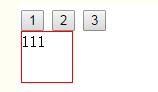
分别利用javascript的源码和jQuery来实现一个简单的选项卡,对比各自的步骤。
<!DOCTYPE html PUBLIC "-//W3C//DTD XHTML 1.0 Transitional//EN" "http://www.w3.org/TR/xhtml1/DTD/xhtml1-transitional.dtd">
<html xmlns="http://www.w3.org/1999/xhtml">
<head>
<meta http-equiv="Content-Type" content="text/html; charset=utf-8" />
<title>jQuery实例—选项卡的简单实现(js源码和jQuery) </title>
<style>
div{
  display:none;
  width:50px;
  height:50px;
  border:1px solid red;
  }
.active{
  display:block;
  }
.back{
  background:red;
  }
</style>
<script type="text/javascript" src="jquery-1.12.3.min.js"></script>
<script>
//javascript源码写
/*window.onload=function(){
  var aInput=document.getElementsByTagName('input');
  var aDiv=document.getElementsByTagName('div');

  for(var i=0;i<aInput.length;i++){
    aInput[i].index=i;
    aInput[i].onclick=function(){
      for(var i=0;i<aInput.length;i++){
        aInput[i].className='';
        aDiv[i].style.display='none';
        }
      this.className='back';
      aDiv[this.index].style.display='block';
      }
    }
  };*/

//jQuery写
$(function(){
  $('input').click(function(){
    $('input').attr('class','');
    $('div').css('display','none');
    $(this).attr('class','back');
    $('div').eq($(this).index()).css('display','block');

    });
  });

</script>
<script>

</script>
</head>

<body>
<input type="button" value="1" />
<input type="button" value="2" />
<input type="button" value="3" />
<div class="active">111</div>
<div>222</div>
<div>333</div>


</body>
</html>
以上这篇jQuery实例—选项卡的简单实现(js源码和jQuery) 就是小编分享给大家的全部内容了,希望能给大家一个参考,也希望大家多多支持脚本之家。
相关文章
 zTree 是利用 JQuery 的核心代码,实现一套能完成大部分常用功能的 Tree 插件。接下来通过本文给大家分享ztree实现左边动态生成树右边为内容详情功能,需要的朋友参考下吧2017-11-11
JQuery事件e参数的方法preventDefault()取消默认行为
JQuery事件的e参数的方法preventDefault()可以取消对象的默认行为,下有个不错的示例,大家可以参考下,希望对大家有所帮助2013-09-09 内部链接是通过在a标签内将href属性值设为#+id的形式,外链则是在a中增加rel属性,并将属性值设为external,感兴趣的朋友可以了解下哦2013-01-01
jQuery Attributes(属性)的使用(二、类篇)
本系列文章主要讲述jQuery框架的属性(Attributes)使用方法,我将以实例方式进行讲述,以简单,全面为基础,不会涉及很深,我的学习方法:先入门,后进阶!2009-12-12 这篇文章主要介绍了jQuery遍历DOM元素与节点方法,结合实例形似详细分析了jQuery遍历DOM父级节点,子级节点及兄弟节点的相关技巧,需要的朋友可以参考下2016-04-04
 本文给大家介绍jquery获取url参数及url参数的方法,在url中加参数的方法本文通过多种方式给大家介绍jquery获取url参数,感兴趣的朋友一起学习学习吧2015-10-10
 jquery的ajax异步请求接收返回json数据方法设置简单,一个是服务器处理程序是返回json数据,另一种就是ajax发送设置的datatype设置为jsonp格式数据或json格式都可以。这篇文章对此进行了实例介绍,需要的朋友可以参考下2014-06-06
 这篇文章主要介绍了jQuery样式操作方法,并通过实际案例更浅显的理解,文中通过示例代码介绍的非常详细,对大家的学习或者工作具有一定的参考学习价值,需要的朋友们下面随着小编来一起学习吧2022-10-10
jquery 设置元素相对于另一个元素的top值(实例代码)
在jquery中offset().top是相对于body来说的,另外在设置top值的时候要找到与该元素最近的有相对值的元素2013-11-11 这篇文章主要介绍了jQuery同步提交实现方法,实例分析了jQuery基于ajax实现同步提交的具体技巧,以及jQuery版本更新的使用注意事项,需要的朋友可以参考下2015-12-12
最新评论