

Android自定义ViewGroup之实现FlowLayout流式布局
更新时间:2020年09月23日 07:39:55 作者:可乐淘
这篇文章主要为大家详细介绍了Android自定义ViewGroup之实现FlowLayout流式布局的相关代码,具有一定的参考价值,感兴趣的小伙伴们可以参考一下
整理总结自鸿洋的博客,希望可以帮到大家。
一、FlowLayout介绍
所谓FlowLayout,就是控件根据ViewGroup的宽,自动的往右添加,如果当前行剩余空间不足,则自动添加到下一行。有点像所有的控件都往左飘的感觉,第一行满了,往第二行飘~所以也叫流式布局。Android并没有提供流式布局,但是某些场合中,流式布局还是非常适合使用的,比如关键字标签,搜索热词列表等,比如下图:
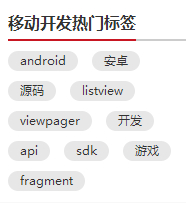

github上已有现成的FlowLayout,本文是从无到有去制作。
二、制作分析
1、对于FlowLayout,需要指定的LayoutParams,我们目前只需要能够识别margin即可,即使用MarginLayoutParams.
2、onMeasure中计算所有childView的宽和高,然后根据childView的宽和高,计算自己的宽和高。(当然,如果不是wrap_content,直接使用父ViewGroup传入的计算值即可)
3、onLayout中对所有的childView进行布局。
三、代码
1、MainActivity.java
 public class MainActivity extends Activity {

 @Override
 protected void onCreate(Bundle savedInstanceState) {
 super.onCreate(savedInstanceState);
 setContentView(R.layout.activity_main);
// setContentView(R.layout.activity_main2);
// setContentView(R.layout.activity_main3);
 }
}
2、CustomViewGroup.java
public class CustomViewGroup extends ViewGroup {

 private final String TAG = getClass().getSimpleName();

 public CustomViewGroup(Context context) {
 super(context);
 }

 public CustomViewGroup(Context context, AttributeSet attrs) {
 super(context, attrs);
 }

 public CustomViewGroup(Context context, AttributeSet attrs, int defStyleAttr) {
 super(context, attrs, defStyleAttr);
 }

 /**
 * 一、重写generateLayoutParams,确定该ViewGroup的LayoutParams
 * 返回MarginLayoutParams的实例,这样就为我们的ViewGroup指定了其LayoutParams为MarginLayoutParams
 */
 @Override
 public LayoutParams generateLayoutParams(AttributeSet attrs) {
 return new MarginLayoutParams(getContext(), attrs);
 }

 /**
 * 二、计算所有ChildView的宽度和高度 然后根据ChildView的计算结果,设置自己的宽和高
 */
 @Override
 protected void onMeasure(int widthMeasureSpec, int heightMeasureSpec) {
 super.onMeasure(widthMeasureSpec, heightMeasureSpec);
 //1、获得此ViewGroup上级容器为其推荐的宽和高,以及计算模式
 int widthMode = MeasureSpec.getMode(widthMeasureSpec);
 int heightMode = MeasureSpec.getMode(heightMeasureSpec);
 int sizeWidth = MeasureSpec.getSize(widthMeasureSpec);
 int sizeHeight = MeasureSpec.getSize(heightMeasureSpec);

 // 2、如果ViewGroup布局是wrap_content时,根据childView的尺寸,计算容器的宽和高
 int width = 0;//ViewGroup的宽度
 int height = 0;//ViewGroup的高度
 int lineWidth = 0;//childView所占据的当前行总宽度
 int lineHeight = 0;//childView所占据的各行总高度
 int cCount = getChildCount();////childView的数量
 for(int i=0; i<cCount; i++){//遍历每个childView
  View childView = getChildAt(i);
  measureChild(childView, widthMeasureSpec, heightMeasureSpec);// 测量当前child的宽和高
  MarginLayoutParams mlp = (MarginLayoutParams) childView.getLayoutParams();
  int cWidth = childView.getMeasuredWidth() + mlp.leftMargin + mlp.rightMargin;
  int cHeight = childView.getMeasuredHeight() + mlp.topMargin + mlp.bottomMargin;
  if(lineWidth + cWidth > sizeWidth){//如果加入当前childView后超出最大宽度,width取最大高度,累加lineHeight,然后开启新行
  width = Math.max(lineWidth, cWidth);
  height += lineHeight;
  lineWidth = cWidth;
  }else{//如果加入当前childView后小于最大宽度,则累加lineWidthheight lineHeight取最大高度
  lineWidth += cWidth;
  height = Math.max(lineHeight, cHeight);
  }
  if(i == cCount-1){// 如果是最后一个childView,则将当前记录的最大宽度和当前lineWidth做比较
  width = Math.max(lineWidth, cWidth);
  height += lineHeight;
  }
 }

 //3、如果是wrap_content设置为我们计算的值;否则直接设置为父容器计算的值
 setMeasuredDimension(
  (widthMode == MeasureSpec.EXACTLY) ? sizeWidth : width,
  (heightMode == MeasureSpec.EXACTLY) ? sizeHeight : height
 );
 }

 /**
 * 三、重写onLayout,对其所有childView进行定位(设置childView的绘制区域)
 */
 private List<List<View>> allChildViews = new ArrayList<List<View>>();//存储所有的childView,按行记录
 private List<Integer> maxLineHeight = new ArrayList<Integer>();//存储每行的最大高度值
 @Override
 protected void onLayout(boolean changed, int l, int t, int r, int b) {
 allChildViews.clear();
 maxLineHeight.clear();

 int width = getWidth();//每行的最大宽度
 int lineWidth = 0;//每行的即时宽度
 int lineHeight = 0;//每行的即时高度

 List<View> lineChildViews = new ArrayList<View>();//存储每行所有的childView

 int cCount = getChildCount();
 for(int i=0; i<cCount; i++){//遍历所有childView
  View childView = getChildAt(i);
  MarginLayoutParams mlp = (MarginLayoutParams) childView.getLayoutParams();
  int cWidth = childView.getMeasuredWidth();
  int cHeight = childView.getMeasuredHeight();
  if(lineWidth + cWidth + mlp.leftMargin + mlp.rightMargin > width){//如果需要换行
  maxLineHeight.add(lineHeight);// 存储这一行最大高度
  allChildViews.add(lineChildViews);// 将当前行的childView保存,然后开启新的ArrayList保存下一行的childView
  lineChildViews = new ArrayList<View>();
  lineWidth = 0;// 重置行宽
  }else{//如果不需要换行
  lineWidth += cWidth + mlp.leftMargin + mlp.rightMargin;//即时宽度累加
  lineHeight = Math.max(lineHeight,cHeight + mlp.topMargin + mlp.bottomMargin );//即时高度取最大值
  lineChildViews.add(childView);//把当前childView存入这一行的集合
  }
 }
 // 记录最后一行
 maxLineHeight.add(lineHeight);
 allChildViews.add(lineChildViews);

 int left = 0;//左坐标
 int top = 0;//上坐标
 int lineNums = allChildViews.size();// 得到总行数
 for (int i = 0; i < lineNums; i++) {
  lineChildViews = allChildViews.get(i);// 取得每一行的所有的views
  lineHeight = maxLineHeight.get(i);// 取得当前行的最大高度

  Log.e(TAG, "第" + i + "行 :" + lineChildViews.size() + " , " + lineChildViews);
  Log.e(TAG, "第" + i + "行, :" + lineHeight);

  // 遍历当前行所有的View
  for (int j = 0; j < lineChildViews.size(); j++) {
  View childView = lineChildViews.get(j);//取得childView
  if (childView.getVisibility() == View.GONE) {
   continue;
  }
  MarginLayoutParams mlp = (MarginLayoutParams) childView.getLayoutParams();
  //计算childView的left,top,right,bottom
  int lc = left + mlp.leftMargin;
  int tc = top + mlp.topMargin;
  int rc = lc + childView.getMeasuredWidth();
  int bc = tc + childView.getMeasuredHeight();

  Log.e(TAG, childView + " , l = " + lc + " , t = " + t + " , r =" + rc + " , b = " + bc);

  childView.layout(lc, tc, rc, bc);//设置这个childView的位置
  left += childView.getMeasuredWidth() + mlp.rightMargin + mlp.leftMargin;//左坐标累加
  }
  left = 0;//开始新的一行,左坐标重置
  top += lineHeight;//开始新的一行,上坐标累加
 }
 }
}
3、activity_main.xml
<LinearLayout xmlns:android="http://schemas.android.com/apk/res/android"
 xmlns:tools="http://schemas.android.com/tools"
 android:layout_width="fill_parent"
 android:layout_height="fill_parent"
 android:background="#E1E6F6"
 android:orientation="vertical">

 <com.cctvjiatao.customviewgroupflowlayout.view.CustomViewGroup
 android:layout_width="fill_parent"
 android:layout_height="wrap_content">

 <TextView
  style="@style/text_flag_01"
  android:text="Welcome" />

 <TextView
  style="@style/text_flag_01"
  android:text="IT工程师" />

 <TextView
  style="@style/text_flag_01"
  android:text="学习ing" />

 <TextView
  style="@style/text_flag_01"
  android:text="恋爱ing" />

 <TextView
  style="@style/text_flag_01"
  android:text="挣钱ing" />

 <TextView
  style="@style/text_flag_01"
  android:text="努力ing" />

 <TextView
  style="@style/text_flag_01"
  android:text="I thick i can" />
 </com.cctvjiatao.customviewgroupflowlayout.view.CustomViewGroup>

</LinearLayout>
4、activity_main2.xml
<LinearLayout xmlns:android="http://schemas.android.com/apk/res/android"
 xmlns:tools="http://schemas.android.com/tools"
 android:layout_width="fill_parent"
 android:layout_height="fill_parent"
 android:background="#E1E6F6"
 android:orientation="vertical">

 <com.cctvjiatao.customviewgroupflowlayout.view.CustomViewGroup
 android:layout_width="fill_parent"
 android:layout_height="wrap_content">

 <TextView
  style="@style/text_flag_01"
  android:text="Welcome" />

 <TextView
  style="@style/text_flag_01"
  android:text="IT工程师" />

 <TextView
  style="@style/text_flag_01"
  android:text="学习ing" />

 <TextView
  style="@style/text_flag_01"
  android:text="恋爱ing" />

 <TextView
  style="@style/text_flag_01"
  android:text="挣钱ing" />

 <TextView
  style="@style/text_flag_01"
  android:text="努力ing" />

 <TextView
  style="@style/text_flag_01"
  android:text="I thick i can" />
 </com.cctvjiatao.customviewgroupflowlayout.view.CustomViewGroup>


 <com.cctvjiatao.customviewgroupflowlayout.view.CustomViewGroup
 android:layout_width="fill_parent"
 android:layout_height="wrap_content"
 android:layout_marginTop="20dp">

 <TextView
  style="@style/text_flag_01"
  android:background="@drawable/flag_02"
  android:text="Welcome"
  android:textColor="#888888" />

 <TextView
  style="@style/text_flag_01"
  android:background="@drawable/flag_02"
  android:text="IT工程师"
  android:textColor="#888888" />

 <TextView
  style="@style/text_flag_01"
  android:background="@drawable/flag_02"
  android:text="学习ing"
  android:textColor="#888888" />

 <TextView
  style="@style/text_flag_01"
  android:background="@drawable/flag_02"
  android:text="恋爱ing"
  android:textColor="#888888" />

 <TextView
  style="@style/text_flag_01"
  android:background="@drawable/flag_02"
  android:text="挣钱ing"
  android:textColor="#888888" />

 <TextView
  style="@style/text_flag_01"
  android:background="@drawable/flag_02"
  android:text="努力ing"
  android:textColor="#888888" />

 <TextView
  style="@style/text_flag_01"
  android:background="@drawable/flag_02"
  android:text="I thick i can"
  android:textColor="#888888" />
 </com.cctvjiatao.customviewgroupflowlayout.view.CustomViewGroup>

 <com.cctvjiatao.customviewgroupflowlayout.view.CustomViewGroup
 android:layout_width="fill_parent"
 android:layout_height="wrap_content"
 android:layout_marginTop="20dp">

 <TextView
  style="@style/text_flag_01"
  android:background="@drawable/flag_03"
  android:text="Welcome"
  android:textColor="#43BBE7" />

 <TextView
  style="@style/text_flag_01"
  android:background="@drawable/flag_03"
  android:text="IT工程师"
  android:textColor="#43BBE7" />

 <TextView
  style="@style/text_flag_01"
  android:background="@drawable/flag_03"
  android:text="学习ing"
  android:textColor="#43BBE7" />

 <TextView
  style="@style/text_flag_01"
  android:background="@drawable/flag_03"
  android:text="恋爱ing"
  android:textColor="#43BBE7" />

 <TextView
  style="@style/text_flag_01"
  android:background="@drawable/flag_03"
  android:text="挣钱ing"
  android:textColor="#43BBE7" />

 <TextView
  style="@style/text_flag_01"
  android:background="@drawable/flag_03"
  android:text="努力ing"
  android:textColor="#43BBE7" />

 <TextView
  style="@style/text_flag_01"
  android:background="@drawable/flag_03"
  android:text="I thick i can"
  android:textColor="#43BBE7" />
 </com.cctvjiatao.customviewgroupflowlayout.view.CustomViewGroup>

</LinearLayout>
5、activity_main3.xml
<com.cctvjiatao.customviewgroupflowlayout.view.CustomViewGroup xmlns:android="http://schemas.android.com/apk/res/android"
 xmlns:tools="http://schemas.android.com/tools"
 android:layout_width="200dp"
 android:layout_height="wrap_content"
 android:background="#FFFFFF">

 <TextView
 style="@style/text_flag_01"
 android:background="@drawable/flag_04"
 android:text="Welcome"
 android:textColor="#323232" />

 <TextView
 style="@style/text_flag_01"
 android:background="@drawable/flag_04"
 android:text="IT工程师"
 android:textColor="#323232" />

 <TextView
 style="@style/text_flag_01"
 android:background="@drawable/flag_04"
 android:text="学习ing"
 android:textColor="#323232" />

 <TextView
 style="@style/text_flag_01"
 android:background="@drawable/flag_04"
 android:text="恋爱ing"
 android:textColor="#323232" />

 <TextView
 style="@style/text_flag_01"
 android:background="@drawable/flag_04"
 android:text="挣钱ing"
 android:textColor="#323232" />

 <TextView
 style="@style/text_flag_01"
 android:background="@drawable/flag_04"
 android:text="努力ing"
 android:textColor="#323232" />

 <TextView
 style="@style/text_flag_01"
 android:background="@drawable/flag_04"
 android:text="I thick i can"
 android:textColor="#323232" />

</com.cctvjiatao.customviewgroupflowlayout.view.CustomViewGroup>
以上就是本文的全部内容,希望对大家的学习有所帮助,也希望大家多多支持脚本之家。
相关文章
 这篇文章主要介绍了 Android自定义控件 WaveView实现水流波动效果,具有一定的参考价值,感兴趣的小伙伴们可以参考一下2016-03-03
 这篇文章主要介绍了Android仿String的对象驻留,较为详细的分析说明了对象驻留的概念及Android实现仿String对象驻留的相关技巧,需要的朋友可以参考下2015-12-12
 这篇文章主要介绍了Android手势操作方法,包含了针对上、下、左、右等方向的判断,具有一定参考借鉴价值,需要的朋友可以参考下2016-06-06
 这篇文章主要介绍了Android Intent实现页面跳转的两种方法,具有一定的参考价值,感兴趣的小伙伴们可以参考一下2018-05-05
 这篇文章主要介绍了Android中的颜色表示的详解的相关资料,希望通过本文能帮助到大家,需要的朋友可以参考下2017-10-10
Android Studio实现自定义全局悬浮按钮的示例代码
在 Android 应用中实现全局悬浮按钮是一个常见的需求,可以用于快速访问重要功能或返回顶部等操作,下面我将详细介绍如何实现一个自定义的全局悬浮按钮,感兴趣的小伙伴跟着小编一起来看看吧2025-04-04 这篇文章主要介绍了 appium运行各种坑爹报错问题及解决方法,本文给大家介绍的非常详细,具有一定的参考借鉴价值,需要的朋友可以参考下2019-06-06
 HTTP协议上的GZIP编码是一种用来改进WEB应用程序性能的技术,4.4MB的文本数据经过Gzip传输到客户端之后变为392KB,压缩效率极高,下面与大家分享下具体的实现2013-06-06
 这篇文章主要为大家详细介绍了Android实现自动播放图片功能,具有一定的参考价值,感兴趣的小伙伴们可以参考一下2018-06-06
 在Android开发中,我们经常会用到对商家或者商品的评价,运用星星进行打分,下面这篇文章主要给大家介绍了关于Android自定义评分控件的相关资料,文中通过图文介绍的非常详细,需要的朋友可以参考下2022-05-05
最新评论