

IOS代码笔记UIView的placeholder的效果
更新时间:2016年07月06日 10:12:28 作者:情深雨蒙
这篇文章主要为大家详细介绍了IOS实现placeholder效果的相关资料,具有一定的参考价值,感兴趣的小伙伴们可以参考一下
本文实例为大家分享了IOS占位符效果,供大家参考,具体内容如下
一、效果图

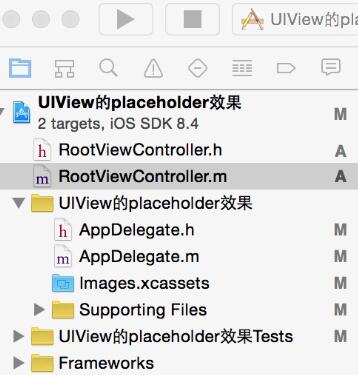
二、工程图
三、代码
RootViewController.h
#import <UIKit/UIKit.h>

@interface RootViewController : UIViewController
<UITextViewDelegate>
{
  UITextView *psTextView;
  UILabel *pslabel;
}
@end
RootViewController.m
#import "RootViewController.h"

@interface RootViewController ()

@end

@implementation RootViewController

- (id)initWithNibName:(NSString *)nibNameOrNil bundle:(NSBundle *)nibBundleOrNil
{
  self = [super initWithNibName:nibNameOrNil bundle:nibBundleOrNil];
  if (self) {
    // Custom initialization
  }
  return self;
}

- (void)viewDidLoad
{
  [super viewDidLoad];
  // Do any additional setup after loading the view.

  self.title=@"UIView的placeholder的效果";

  [self initBackgroundView];

}
#pragma -mark -初始化背景图
-(void)initBackgroundView
{
  UIView *backView=[[UIView alloc]initWithFrame:CGRectMake(0, 0, 320, 480)];
  [self.view addSubview:backView];

  psTextView=[[UITextView alloc]initWithFrame:CGRectMake(10, 70, 280, 200)];
  psTextView.text=@"";
  psTextView.backgroundColor=[UIColor yellowColor];
  psTextView.delegate=self;
  psTextView.scrollEnabled=NO;
  [backView addSubview:psTextView];


  pslabel=[[UILabel alloc]initWithFrame:CGRectMake(15, 140, 280, 20)];
  pslabel.text=@"请输入备注信息";
  pslabel.textColor=[UIColor grayColor];
  pslabel.enabled=NO;
  pslabel.backgroundColor=[UIColor clearColor];
  [backView addSubview:pslabel];

}
#pragma -mark -UITextView Delegate
- (BOOL)textViewShouldBeginEditing:(UITextView *)textView
{
  return YES;
}
-(BOOL)textView:(UITextView *)textView shouldChangeTextInRange:(NSRange)range replacementText:(NSString *)text
{

  if (text.length>0) {
    pslabel.hidden=YES;
  }

  if ([text isEqualToString:@"\n"]) {
    [textView resignFirstResponder];
    return NO;
  }

  return YES;
}
以上就是本文的全部内容,希望对大家的学习有所帮助,也希望大家多多支持脚本之家。
您可能感兴趣的文章:
相关文章

Objective-C中NSNumber与NSDictionary的用法简介
这篇文章主要介绍了Objective-C中NSNumber与NSDictionary的用法简介,虽然Objective-C即将不再是iOS的主流开发语言...well,需要的朋友可以参考下2015-09-09
IOS 中loadView,viewDidLoad,viewDidUnload详解及使用
这篇文章主要介绍了IOS 中loadView,viewDidLoad,viewDidUnload详解及使用的相关资料,需要的朋友可以参考下2017-02-02 本篇文章主要介绍了iOS 高效的分页加载实现示例,小编觉得挺不错的,现在分享给大家,也给大家做个参考。一起跟随小编过来看看吧2017-10-10
iOS开发中使用Quartz2D绘图及自定义UIImageView控件
这篇文章主要介绍了iOS开发中使用Quartz2D绘图及自定义UIImageView控件的方法,代码基于传统的Objective-C,需要的朋友可以参考下2015-11-11 这篇文章主要介绍了IOS 照片编辑的view封装的实例详解的相关资料,这里提供实例帮助大家实现这样的功能,需要的朋友可以参考下2017-08-08
 这篇文章主要介绍了怎样优化今日头条IOS安装包,对IOS优化感兴趣的同学,可以参考下2021-04-04
 这篇文章主要介绍了iOS App开发中Masonry布局框架的基本用法解析,Masonry支持iOS和OSX的Auto Layout,在GitHub上的人气很高,需要的朋友可以参考下2016-03-03
IOS 七种手势操作(拖动、捏合、旋转、点按、长按、轻扫、自定义)详解及实例代码
这篇文章主要介绍了IOS 七种手势操作(拖动、捏合、旋转、点按、长按、轻扫、自定义)详解及实例代码的相关资料,需要的朋友可以参考下2016-12-12 这篇文章主要为大家详细介绍了iOS tabview如何添加字母索引,具有一定的参考价值,感兴趣的小伙伴们可以参考一下2017-03-03
 这篇文章主要为大家介绍了UICollectionView 实现图片浏览效果示例,有需要的朋友可以借鉴参考下,希望能够有所帮助,祝大家多多进步,早日升职加薪2022-07-07
最新评论