

BootStrap入门教程(二)之固定的内置样式
相关阅读:
HTML5文档类型(Doctype)
Bootstrap使用了一些HTML5元素和CSS属性,所以需要使用HTML5文档类型。
<!DOCTYPE html>
<html>
....
</html>
移动设备优先
<meta name=”viewport” content=”width=device-width, initial-scale=1.0”>
宽度设置为device-width可以确保它能正确呈现在不同设备上。
initial-scale=1.0确保网页加载时,以1:1的比例呈现。
可以为viewport meta标签添加user-scalable=no来禁止其缩放功能。
<meta name="viewport" content="width=device-width,
initial-scale=1.0,
maximum-scale=1.0,
user-scalable=no">
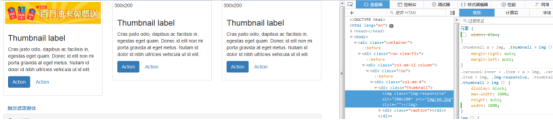
响应式图像
<img src="..." class="img-responsive" alt="响应式图像">
  bootstrap.css里设置了img-responsive的属性:
.img-responsive {
display: inline-block;
height: auto;
max-width: 100%;
}
基本的全局显示
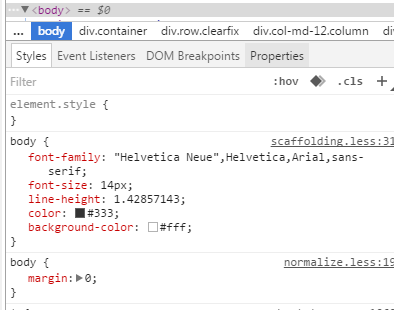
body {
font-family: "Helvetica Neue", Helvetica, Arial, sans-serif;
font-size: 14px;
line-height: 1.428571429;
color: #333333;
background-color: #ffffff;
}
body {margin:0}
链接样式
a:hover,
a:focus {
color: #2a6496;
text-decoration: underline;
}
a:focus {
outline: thin dotted #333;
outline: 5px auto -webkit-focus-ring-color;
outline-offset: -2px;
}
默认设置有好有坏,难免嘛。
不想要下划线的话可以在a链接上加一个名为btn的class,该class的默认设置如下:
a:hover,
a:focus {
color: #2a6496;
text-decoration: underline;}
a:focus {
outline: thin dotted #333;
outline: 5px auto -webkit-focus-ring-color;
outline-offset: -2px;}
避免跨浏览器的不一致
Normalize.css提供了更好的跨浏览器一致性。
容器(Container)
<div class=”container”>
..
</div>
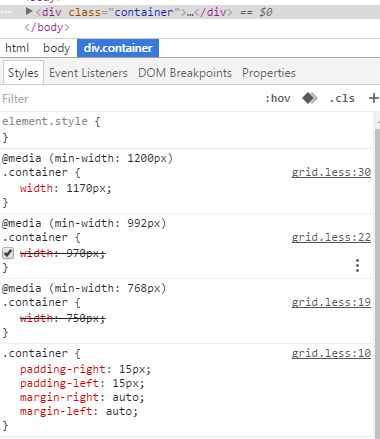
.container的样式:
.container {
padding-right: 15px;
padding-left: 15px;
margin-right: auto;
margin-left: auto;
}
左右外边距交由浏览器决定。
由于内边距是固定宽度,默认情况下容器是不可嵌套的。
.container:before,.container:after {
display: table;
content: " ";
}
设置display为table,会创建一个匿名的table-cell和一个新的块格式化上下文。:before伪元素防止上边距崩塌,:after伪元素清除浮动。content:” ”修复一些Opera bug。
.container:after {
clear: both;
}
另外还有申请相应的媒体查询:
@media (min-width: 768px) {
.container {
width: 750px;
  }
}
Bootstrap浏览器/设备支持

* Bootstrap 支持 Internet Explorer 8 及更高版本的 IE 浏览器。
参考:http://www.runoob.com/bootstrap/bootstrap-css-overview.html
以上所述是小编给大家介绍的BootStrap入门教程(二)之固定的内置样式,希望对大家有所帮助,如果大家有任何疑问请给我留言,小编会及时回复大家的。在此也非常感谢大家对脚本之家网站的支持!
相关文章
 这篇文章主要为大家详细介绍了微信小程序实现3D轮播图效果,具有一定的参考价值,感兴趣的小伙伴们可以参考一下2019-09-09
bootstrap-paginator服务器端分页使用方法详解
这篇文章主要为大家详细介绍了bootstrap-paginator服务器端分页的使用方法,文中示例代码介绍的非常详细,具有一定的参考价值,感兴趣的小伙伴们可以参考一下2020-02-02 这篇文章主要介绍了Bootstrap模态框调用功能实现方法的相关资料,非常不错,具有参考借鉴价值,感兴趣的朋友一起看看吧2016-09-09
原生JS实现风箱式demo,并封装了一个运动框架(实例代码)
下面小编就为大家带来一篇原生JS实现风箱式demo,并封装了一个运动框架(实例代码)。小编觉得挺不错的,现在就分享给大家,也给大家做个参考。一起跟随小编过来看看吧2016-07-07
Express框架Router Route Layer对象使用示例详解
这篇文章主要为大家介绍了Express框架Router Route Layer对象使用示例详解,有需要的朋友可以借鉴参考下,希望能够有所帮助,祝大家多多进步,早日升职加薪2023-03-03 这篇文章主要介绍了javascript设置页面背景色及背景图片的方法,涉及JavaScript动态操作页面元素属性的相关技巧,需要的朋友可以参考下2015-12-12
 这篇文章主要介绍了JavaScript中数组去重的5种方法,文中讲解非常详细,实例代码帮助大家更好的理解和学习,感兴趣的朋友可以了解下2020-07-07
 本篇文章主要是对js中浮点型运算BUG的解决方法进行了介绍,需要的朋友可以过来参考下,希望对大家有所帮助2014-01-01
 昨天碰到一道关于如何解决有序数组的连接问题,这是一个很常见的问题。但是这里要考虑到代码的效率问题,因为要连接的数组都是有序的,这是一个非常重要的前提条件2013-10-10
JavaScript中net::ERR_CONNECTION_REFUSED解决方法大全
在一次测试中遇到了报net::ERR_CONNECTION_REFUSED的错误,五哦一下面这篇文章主要给大家介绍了关于JavaScript中net::ERR_CONNECTION_REFUSED解决方法的相关资料,需要的朋友可以参考下2022-10-10
最新评论