

C#学习基础概念二十五问续2第1/2页
答:
sealed 修饰符表示密封
用于类时,表示该类不能再被继承,不能和 abstract 同时使用,因为这两个修饰符在含义上互相排斥
用于方法和属性时,表示该方法或属性不能再被继承,必须和 override 关键字一起使用,因为使用 sealed 修饰符的方法或属性肯定是基类中相应的虚成员
通常用于实现第三方类库时不想被客户端继承,或用于没有必要再继承的类以防止滥用继承造成层次结构体系混乱
恰当的利用 sealed 修饰符也可以提高一定的运行效率,因为不用考虑继承类会重写该成员
示例:
using System;
using System.Collections.Generic;
using System.Text;
namespace Example06
{
class Program
{
class A
{
public virtual void F()
{
Console.WriteLine("A.F");
}
public virtual void G()
{
Console.WriteLine("A.G");
}
}
class B : A
{
public sealed override void F()
{
Console.WriteLine("B.F");
}
public override void G()
{
Console.WriteLine("B.G");
}
}
class C : B
{
public override void G()
{
Console.WriteLine("C.G");
}
}
static void Main(string[] args)
{
new A().F();
new A().G();
new B().F();
new B().G();
new C().F();
new C().G();
Console.ReadLine();
}
}
}
结果:
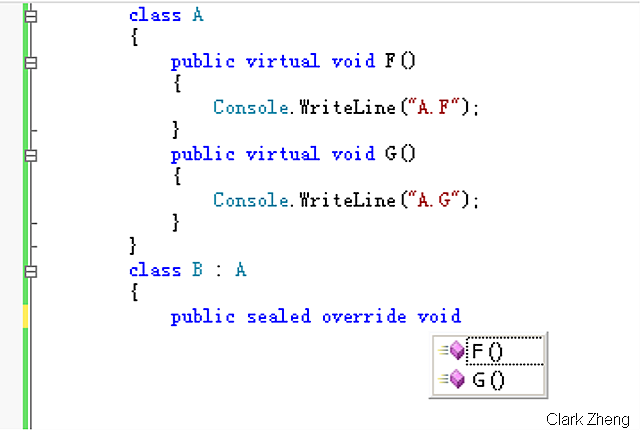
类 B 在继承类 A 时可以重写两个虚函数,如图所示:
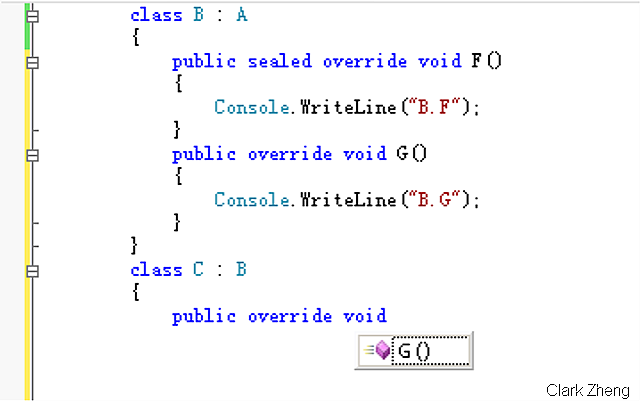
由于类 B 中对 F 方法进行了密封, 类 C 在继承类 B 时只能重写一个函数,如图所示:
控制台输出结果,类 C 的方法 F 只能是输出 类B 中对该方法的实现:
A.F
A.G
B.F
B.G
B.F
C.G
7.override 和 overload 的区别?
答:
override 表示重写,用于继承类对基类中虚成员的实现
overload 表示重载,用于同一个类中同名方法不同参数(包括类型不同或个数不同)的实现
示例:
using System;
using System.Collections.Generic;
using System.Text;
namespace Example07
{
class Program
{
class BaseClass
{
public virtual void F()
{
Console.WriteLine("BaseClass.F");
}
}
class DeriveClass : BaseClass
{
public override void F()
{
base.F();
Console.WriteLine("DeriveClass.F");
}
public void Add(int Left, int Right)
{
Console.WriteLine("Add for Int: {0}", Left + Right);
}
public void Add(double Left, double Right)
{
Console.WriteLine("Add for int: {0}", Left + Right);
}
}
static void Main(string[] args)
{
DeriveClass tmpObj = new DeriveClass();
tmpObj.F();
tmpObj.Add(1, 2);
tmpObj.Add(1.1, 2.2);
Console.ReadLine();
}
}
}
结果:
BaseClass.F
DeriveClass.F
Add for Int: 3
Add for int: 3.3
8.什么是索引指示器?
答:
实现索引指示器(indexer)的类可以象数组那样使用其实例后的对象,但与数组不同的是索引指示器的参数类型不仅限于int
简单来说,其本质就是一个含参数属性
示例:
using System;
using System.Collections.Generic;
using System.Text;
namespace Example08
{
public class Point
{
private double x, y;
public Point(double X, double Y)
{
x = X;
y = Y;
}
//重写ToString方法方便输出
public override string ToString()
{
return String.Format("X: {0} , Y: {1}", x, y);
}
}
public class Points
{
Point[] points;
public Points(Point[] Points)
{
points = Points;
}
public int PointNumber
{
get
{
return points.Length;
}
}
//实现索引访问器
public Point this[int Index]
{
get
{
return points[Index];
}
}
}
//感谢watson hua(http://huazhihao.cnblogs.com/)的指点
//索引指示器的实质是含参属性,参数并不只限于int
class WeatherOfWeek
{
public string this[int Index]
{
get
{
//注意case段使用return直接返回所以不需要break
switch (Index)
{
case 0:
{
return "Today is cloudy!";
}
case 5:
{
return "Today is thundershower!";
}
default:
{
return "Today is fine!";
}
}
}
}
public string this[string Day]
{
get
{
string TodayWeather = null;
//switch的标准写法
switch (Day)
{
case "Sunday":
{
TodayWeather = "Today is cloudy!";
break;
}
case "Friday":
{
TodayWeather = "Today is thundershower!";
break;
}
default:
{
TodayWeather = "Today is fine!";
break;
}
}
return TodayWeather;
}
}
}
class Program
{
static void Main(string[] args)
{
Point[] tmpPoints = new Point[10];
for (int i = 0; i < tmpPoints.Length; i++)
{
tmpPoints[i] = new Point(i, Math.Sin(i));
}
Points tmpObj = new Points(tmpPoints);
for (int i = 0; i < tmpObj.PointNumber; i++)
{
Console.WriteLine(tmpObj[i]);
}
string[] Week = new string[] { "Sunday", "Monday", "Tuesday", "Wednesday", "Thursday", "Friday", "Staurday"};
WeatherOfWeek tmpWeatherOfWeek = new WeatherOfWeek();
for (int i = 0; i < 6; i++)
{
Console.WriteLine(tmpWeatherOfWeek[i]);
}
foreach (string tmpDay in Week)
{
Console.WriteLine(tmpWeatherOfWeek[tmpDay]);
}
Console.ReadLine();
}
}
}
结果:
X: 0 , Y: 0
X: 1 , Y: 0.841470984807897
X: 2 , Y: 0.909297426825682
X: 3 , Y: 0.141120008059867
X: 4 , Y: -0.756802495307928
X: 5 , Y: -0.958924274663138
X: 6 , Y: -0.279415498198926
X: 7 , Y: 0.656986598718789
X: 8 , Y: 0.989358246623382
X: 9 , Y: 0.412118485241757
Today is cloudy!
Today is fine!
Today is fine!
Today is fine!
Today is fine!
Today is thundershower!
Today is cloudy!
Today is fine!
Today is fine!
Today is fine!
Today is fine!
Today is thundershower!
Today is fine!
相关文章
 C#和Asp.net下excel进程一被打开,有时就无法关闭,尤其是website.对关闭该进程有过GC、release等方法,但这些方法并不是在所有情况下均适用2013-07-07
 这篇文章主要分享了C#配置文件操作类,具有一定的参考价值,感兴趣的小伙伴们可以参考一下2017-06-06
 这篇文章主要介绍了如何区分C# 中的 Struct 和 Class,帮助大家更好的理解和学习c#编程,感兴趣的朋友可以了解下2020-09-09
 .NET Framework在System.Threading命名空间中具有与线程相关的类,线程是一小组可执行指令,这篇文章主要给大家介绍了关于C#中Thread(线程)和Task(任务)的相关资料,需要的朋友可以参考下2022-03-03
VS2019下安装和破解 DevExpress 19.2 插件的详细教程
这篇文章主要介绍了VS2019 安装并破解 DevExpress 19.2 插件的详细教程,本文通过图文并茂的形式给大家介绍的非常详细,对大家的学习或工作具有一定的参考借鉴价值,需要的朋友可以参考下2022-03-03 这篇文章主要介绍了C#获取USB事件API,实例分析了C#操作USB事件的相关技巧,具有一定参考借鉴价值,需要的朋友可以参考下2015-05-05
 这篇文章主要介绍了如何用C#在PC上查找连接蓝牙设备并实现数据传输,帮助大家更好的理解和学习使用c#,感兴趣的朋友可以了解下2021-03-03
 这篇文章主要介绍了c#如何实现接口事件,帮助大家更好的理解和学习c#,感兴趣的朋友可以了解下2020-10-10
 这篇文章主要介绍了C#线程处理系列之线程池中的I/O线程,在这篇文章中将介绍如何用线程池中的I/O线程来执行I/O操作,感兴趣的小伙伴们可以参考一下2016-04-04
C#中使用DataContractSerializer类实现深拷贝操作示例
这篇文章主要介绍了C#中使用DataContractSerializer类实现深拷贝操作示例,本文给出了实现深拷贝方法、测试深拷贝方法例子、DataContractSerializer类实现深拷贝的原理等内容,需要的朋友可以参考下2015-06-06
最新评论