

iOS开发仿电商类APP首页实例
现在淘宝,京东应用很广泛,今天就效仿做一个类似电商APP首页的实例。
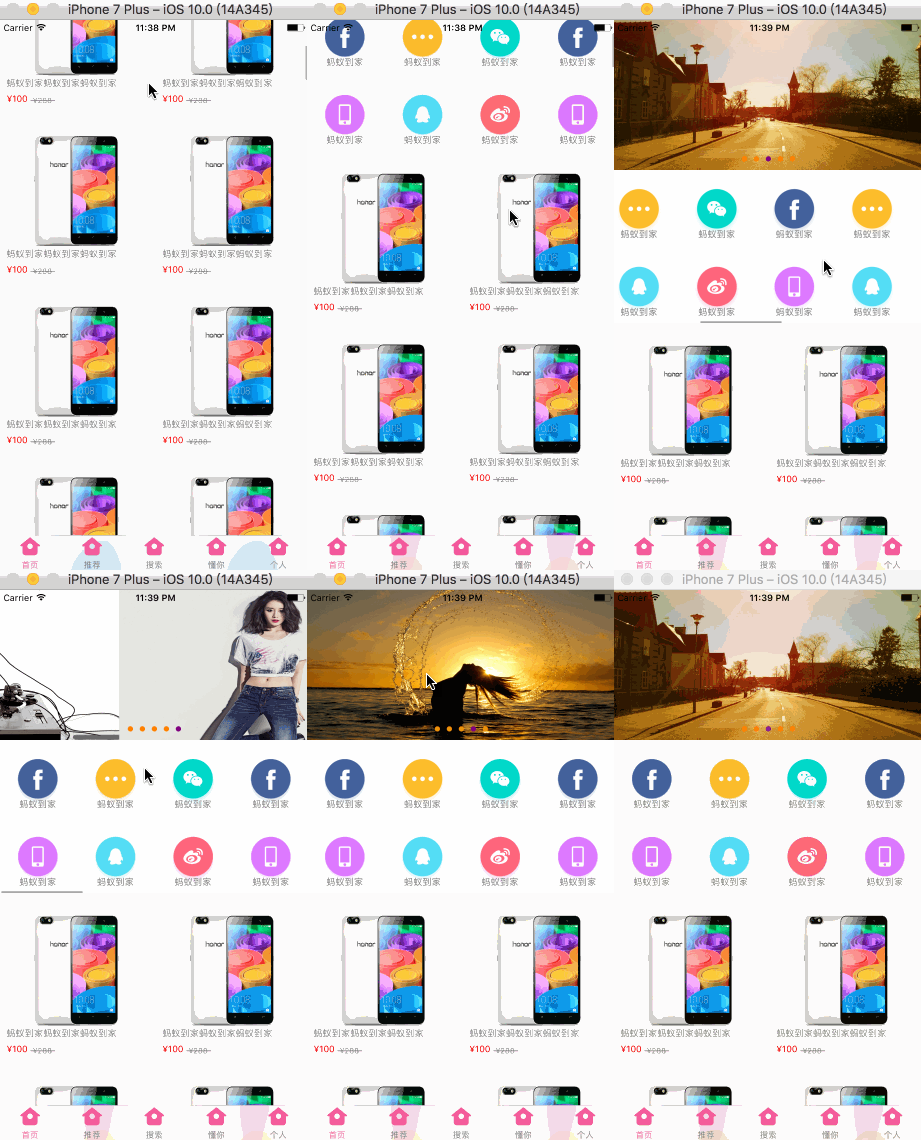
一、Gif效果图:
二、UI布局:
看下图的层级关系,除去最下方的TabBar,首页其余部分全是用UICollectionView实现;其分两大部分,实现三种功能。上方是父UICollectionView的headerView,在此headerView中添加了两个UICollectionView,分别实现图片无限轮播器和一个横向滑动的功能菜单按钮。然后下面就是父UICollectionView的cell,上下滑动展示商品内容。
三、代码:
因为这篇文章主要是讲如何实现电商类APP首页布局的,所以如何设置UICollectionView我就不再赘述,网上有很多这方面的章。
下面是主控制器MYIHomeViewController.m文件中的代码,初始化父UICollectionView的代码就在这里面,贴出这部分代码是有些地方需要特别注意,有需要的可以下载源码:https://pan.baidu.com/s/1dFsnJpR
#import "MYIHomeViewController.h"

#import "MYIHomeHeaderView.h"
#import "JFConfigFile.h"
#import "MYIHomeLayout.h"
#import "MYIHomeCell.h"

static NSString *ID = @"collectionViewCell";

@interface MYIHomeViewController ()<UICollectionViewDelegate, UICollectionViewDataSource, UICollectionViewDelegateFlowLayout>

@property (nonatomic, strong) UICollectionView *collectionView;

@end

@implementation MYIHomeViewController

- (void)viewDidLoad {
  [super viewDidLoad];

  //关闭自动调整滚动视图(不关闭图片轮播器会出现问题)
  self.automaticallyAdjustsScrollViewInsets = NO;
}

- (void)viewWillAppear:(BOOL)animated {
  [super viewWillAppear:animated];

  //隐藏navigationBar
  self.navigationController.navigationBar.hidden = YES;
}

- (void)loadView {
  [super loadView];

  //添加collectionView
  [self.view addSubview:self.collectionView];
}

//懒加载collectionView
- (UICollectionView *)collectionView {
  if (!_collectionView) {
    _collectionView = [[UICollectionView alloc] initWithFrame:[UIScreen mainScreen].bounds collectionViewLayout:[[MYIHomeLayout alloc] init]];
    _collectionView.backgroundColor = JFRGBColor(238, 238, 238);

    //注册cell
    [_collectionView registerClass:[MYIHomeCell class] forCellWithReuseIdentifier:ID];

    //注册UICollectionReusableView即headerView(切记要添加headerView一定要先注册)
    [_collectionView registerClass:[MYIHomeHeaderView class] forSupplementaryViewOfKind:UICollectionElementKindSectionHeader withReuseIdentifier:@"headerView"];

    _collectionView.delegate = self;
    _collectionView.dataSource = self;
  }
  return _collectionView;
}

#pragma mark ---UICollectionViewDataSource 数据源方法
- (NSInteger)collectionView:(UICollectionView *)collectionView numberOfItemsInSection:(NSInteger)section {
  return 80;
}

- (UICollectionViewCell *)collectionView:(UICollectionView *)collectionView cellForItemAtIndexPath:(NSIndexPath *)indexPath {
  MYIHomeCell *cell = [collectionView dequeueReusableCellWithReuseIdentifier:ID forIndexPath:indexPath];
  cell.iconName = @"goodsimagetest";
  cell.describe = @"蚂蚁到家蚂蚁到家蚂蚁到家";
  cell.currentPrice = @"¥100";
  cell.originalPrice = @"¥288";
  return cell;
}

//添加headerView
- (UICollectionReusableView *)collectionView:(UICollectionView *)collectionView viewForSupplementaryElementOfKind:(NSString *)kind atIndexPath:(NSIndexPath *)indexPath {
  MYIHomeHeaderView *headerView = [collectionView dequeueReusableSupplementaryViewOfKind:UICollectionElementKindSectionHeader withReuseIdentifier:@"headerView" forIndexPath:indexPath];;

  //判断上面注册的UICollectionReusableView类型
  if (kind == UICollectionElementKindSectionHeader) {
    return headerView;
  }else {
    return nil;
  }
}

#pragma mark ---UICollectionViewDelegate
//设置headerView的宽高
-(CGSize)collectionView:(UICollectionView *)collectionView layout:(UICollectionViewLayout *)collectionViewLayout referenceSizeForHeaderInSection:(NSInteger)section {

  return CGSizeMake(self.view.bounds.size.width, 380);
}

#pragma mark ---UICollectionViewDelegateFlowLayout

//设置collectionView的cell上、左、下、右的间距
- (UIEdgeInsets)collectionView:(UICollectionView *)collectionView layout:(UICollectionViewLayout*)collectionViewLayout insetForSectionAtIndex:(NSInteger)section {
  return UIEdgeInsetsMake(14, 0, 0, 0);
}

- (void)didReceiveMemoryWarning {
  [super didReceiveMemoryWarning];
  // Dispose of any resources that can be recreated.
}

@end
注意:
1、在主控制器中最好将automaticallyAdjustsScrollViewInsets属性设置为NO这个原因我在上一篇文章一行代码实现图片无限轮播器中有说明,如果在有NavigationBar的情况下如果不设置就会自动调整滚动视图的frame,这样会导致轮播器imageView显示错位。
- (void)viewDidLoad {
   [super viewDidLoad];

  //关闭自动调整滚动视图(不关闭图片轮播器会出现问题)
   self.automaticallyAdjustsScrollViewInsets = NO;
}
2、UICollectionView的UICollectionReusableView就相当于UITableView的headerView和footerView,要想给UICollectionView追加headerView就必须先注册,且追加的类型是UICollectionElementKindSectionHeader相对应的UICollectionElementKindSectionFooter就是追加footerView
实例化UICollectionView时的注册UICollectionReusableView代码
//注册UICollectionReusableView即headerView(切记要添加headerView一定要先注册)
    [_collectionView registerClass:[MYIHomeHeaderView class] forSupplementaryViewOfKind:UICollectionElementKindSectionHeader withReuseIdentifier:@"headerView"];
3、实现UICollectionView的数据源代理方法- (UICollectionReusableView *)collectionView:(UICollectionView *)collectionView viewForSupplementaryElementOfKind:(NSString *)kind atIndexPath:(NSIndexPath *)indexPath;
//添加headerView
- (UICollectionReusableView *)collectionView:(UICollectionView *)collectionView viewForSupplementaryElementOfKind:(NSString *)kind atIndexPath:(NSIndexPath *)indexPath {
  MYIHomeHeaderView *headerView = [collectionView dequeueReusableSupplementaryViewOfKind:UICollectionElementKindSectionHeader withReuseIdentifier:@"headerView" forIndexPath:indexPath];

  //判断上面注册的UICollectionReusableView类型
  if (kind == UICollectionElementKindSectionHeader) {
    return headerView;
  }else {
    return nil;
  }
}
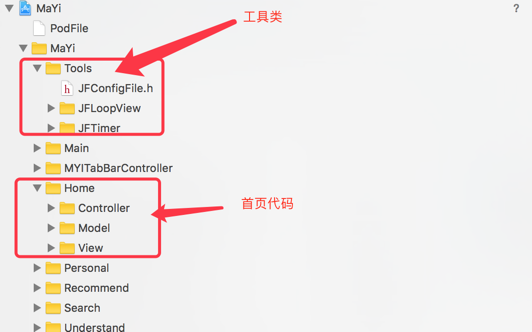
下面是项目文件夹说明:
下载完成解压后请打开这个文件运行项目:

四、总结:
1、实现这种首页布局其实还可以用UITableView,原理差不多就看功能需求,这里就简单的实现了此类电商APP的首页,像淘宝和京东那样更复杂的UI布局,有兴趣的同学可以研究一下,希望这篇文章可以给你带来收获和启发,欢迎评论交流。
最后:源码下载
相关文章

iOS UIAlertController中UITextField添加晃动效果与边框颜色详解
这篇文章主要给大家介绍了关于iOS UIAlertController中UITextField添加晃动效果与边框颜色的相关资料,实现后的效果非常适合在开发中使用,文中给出了详细的示例代码,需要的朋友可以参考借鉴,下面随着小编来一起看看吧。2017-10-10 这篇文章主要介绍了iOS masonry的基本使用方法的相关资料,文章还介绍了CocoaPods的安装过程,需要的朋友可以参考下面文字内容2021-09-09
 这篇文章主要介绍了iOS设计模式——Category简单介绍,有兴趣学习的同学可以了解一下。2016-11-11
 这篇文章主要介绍了iOS组件化初步构思,并对iOS组件化常用方式的讨论进行了方案分析,以便帮助大家对ios组件化有一个深刻的了解2023-03-03
 这篇文章主要给大家介绍了关于iOS中延时执行的几种方式比较及汇总,文中通过示例代码介绍的非常详细,对大家的学习或者工作具有一定的参考学习价值,需要的朋友们下面随着小编来一起学习学习吧。2018-02-02
 这篇文章主要介绍了 IOS与网页JS交互详解及实例的相关资料,需要的朋友可以参考下2016-12-12
 这篇文章主要为大家详细介绍了iOS指纹登录TouchID的集成方案,具有一定的参考价值,感兴趣的小伙伴们可以参考一下2018-04-04
iOS中的表单按钮选项UIActionSheet常用方法整理
UIActionSheet经常被用来制作各种弹出的选项,这里我们就来看一下iOS中的表单按钮选项UIActionSheet常用方法整理,需要的朋友可以参考下2016-06-06 这篇文章主要介绍了IOS CocoaPods详解之进阶篇,需要的朋友可以参考下2016-09-09
 这篇文章主要为大家详细介绍了iOS开关按钮UISwitch控件,文中示例代码介绍的非常详细,具有一定的参考价值,感兴趣的小伙伴们可以参考一下2016-08-08
最新评论