

什么是clearfix (一文搞清楚css清除浮动clearfix)
 我要评论
我要评论什么是 clearfix ?
clearfix 是一种 CSS 技巧,可以在不添加新的 html 标签的前提下,解决让父元素包含浮动的子元素的问题。这个技巧的版本是很多的,最流行的一个是 Micro Clearfix Hack 。这个也是 Bootstrap 采用的方案(可以 google 一下 “bootstrap clearfix” 来查看详情)。
Micro Clearfix Hack 的作者给出的原始方案,内容如下:
/**
 * For modern browsers
 * 1. The space content is one way to avoid an Opera bug when the
 *    contenteditable attribute is included anywhere else in the document.
 *    Otherwise it causes space to appear at the top and bottom of elements
 *    that are clearfixed.
 * 2. The use of `table` rather than `block` is only necessary if using
 *    `:before` to contain the top-margins of child elements.
 */
.cf:before,
.cf:after {
    content: " "; /* 1 */
    display: table; /* 2 */
}

.cf:after {
    clear: both;
}

/**
 * For IE 6/7 only
 * Include this rule to trigger hasLayout and contain floats.
 */
.cf {
    *zoom: 1;
}
但是我的习惯是支持到 IE9+ ,同时习惯了用 “ clearfix ” 作为 class 名,所有稍微修改后的版本如下:
.clearfix:before,
.clearfix:after {
    content: " ";
    display: table;
}

.clearfix:after {
    clear: both;
}
百度用的代码
.clearfix:after{content:'\20';display:block;height:0;clear:both}
.clearfix{zoom:1}
.clear{clear:both;height:0;line-height:0;font-size:0;visibility:hidden;overflow:hidden}
脚本之家用的
.clear{clear: both;overflow: hidden;line-height: 0;height: 0;zoom:1}
.clear:after {display: block; height: 0px; visibility: hidden; clear: both; content: ""}
.clearfix{ *zoom:1;}
.clearfix:before,
.clearfix:after {content: ".";display: block;height: 0;overflow: hidden;visibility: hidden;}
.clearfix:after{clear: both}
用了这个方法很长时间之后,都觉得上面的代码就是天书,尤其是对 display: table 这一行不理解。其实,这些代码为的是解决两个实际中经常遇到,而且非常让人恼火的问题。问题搞清楚了,代码也就明白了。
自清除子元素浮动
-
先说第一个问题和解决方案。
-
div 布局的一个非常让新手头疼的问题就是,如果一个父元素中包含若干个子元素,那么当给所有的子元素都设置了浮动( e.g float: left ),那么父元素的高度就会为0。
比如有这样的 html 代码:
<div class="container">
  <div class="item">1</div>
  <div class="item">2</div>
</div>
如果子元素没有浮动,那么显示是这样的:
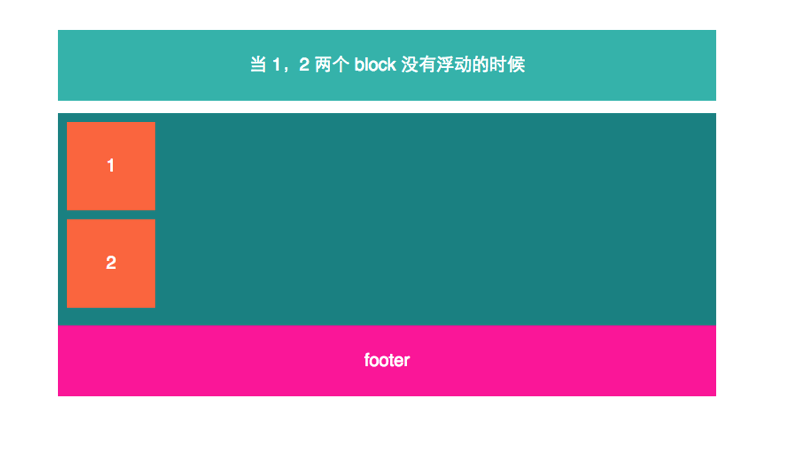
但是一旦所有子元素都浮动了,那么父元素的高度变为0,就成了这样的恶心效果:
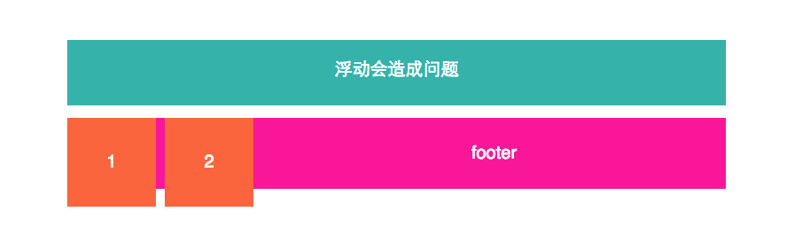
解决方法如下:
html 中添加 clearfix
<div class="container clearfix">
  <div class="item">1</div>
  <div class="item">2</div>
</div>
如果只是解决这个问题,那么下面的代码就够了。
.clearfix:after {
   content: " ";
   display: block;
   clear: both;
}
但是注意,文章开始的代码中使用 display: table 而不是这里的 display: block ,可以同样解决这个问题。但是,下面这个问题中使用 display: table 就是必须的了。
Margin Collapse 外边距重叠问题
再来说第二个问题。
外边距重叠也是一个很让人讨厌的问题。来描述一下症状。
container 之中包含一个 item 子元素,代码如下
<div class="container">
  <div class="item">
    item
  </div>
</div>
比如默认显示成这样:
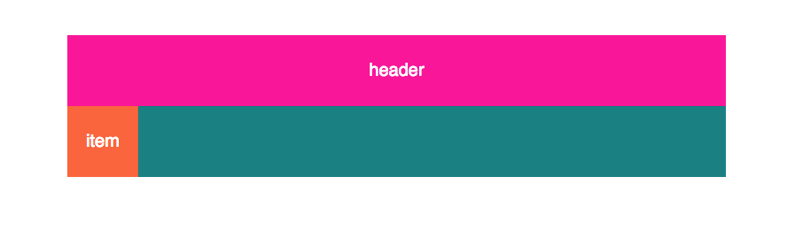
这时,我给 item 加了 margin-top: 30px ,本来这时候我期待的结果是,item 块本身应该距离 container 青色区域的上边界 30px 。同时一个副作用是青色区域应该拉高 30px 。但是实际上得到的却是下面的效果:
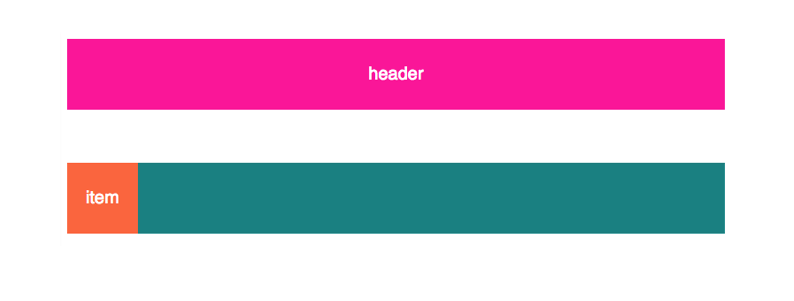
造成这个的原因是,父子元素的 margin-top 是会重叠的,即使是像上面的情况中,父元素 container 自身 margin-top 为 0 的情况下也一样。这样造成的一个现象就是父元素“包不住”子元素的 margin-top ,溢出了。类似的问题也会发生在 margin-bottom 身上。
要解决这个问题,就要给 container 添加 clearfix ,html 代码如下
<div class="container clearfix">
  <div class="item">
    item
  </div>
</div>
如果只是针对这一种问题,最简单的 clearfix 实现是这样:
.clearfix:before,
.clearfix:after
{
 content: "   ";
 display: table;
}
注意,display: table 换成 dispaly: block 是不行的。
效果图
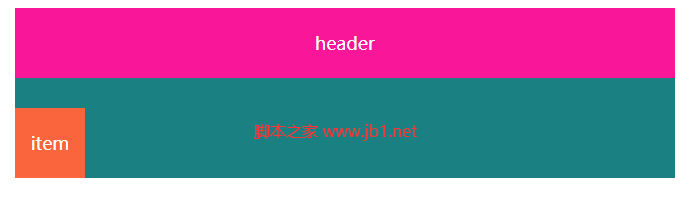
完整测试代码脚本的家专门提供
<!DOCTYPE html>
<html lang="zh-CN">
<head>
    <meta charset="UTF-8">
    <meta http-equiv="X-UA-Compatible" content="IE=edge">
    <meta name="viewport" content="width=device-width, initial-scale=1.0">
    <title>Document</title>
<style>
.header{margin:0 auto;width:660px;color:white;font-size:18px;text-align:center;background-color:#fa1698;width:660px;height:70px;line-height:70px}
.container{margin:0 auto;width:660px;color:white;font-size:18px;text-align:center;background-color:#1a8081;}
.item{background-color:#fa653e;width:70px;height:70px;line-height:70px;margin-top: 30px}
.clearfix:before,
.clearfix:after
{
 content: " ";
 display: table;
}
.clearfix{zoom:1}
.clear{clear:both;height:0;line-height:0;font-size:0;visibility:hidden;overflow:hidden}
    </style>
</head>
<body style="text-align:center;">
<div class="header">
header
</div>
<div class="container clearfix">
  <div class="item">
    item
  </div>
</div>
</body>
</html>
当然,外边距重叠不局限于上面的父子元素之间,也会发生在兄弟元素之间,甚至是一个高度为 0 的元素,自己的上下边距也会重叠,这个就是 MDN Margin Collapse 文档上给出的全部三种情况,但是后两种在实际开发中不会带来很大麻烦,也不是咱们的 clearfix 方法所关心的。
结语
上面两个问题的解决代码合并到一起,就是文章最初 Peter 给出的 clearfix 代码了。 有了这个方法,当给子元素添加浮动或者是 margin 的时候,父元素的行为就非常符合正常的预期了,开发页面布局变得非常简单,所以 clearfix 方法对于按照 div 的 block 模型排版是非常有用的。
下面分享一段当前比较常用的代码
.clearfix:after{content:'\20';display:block;height:0;clear:both}
.clearfix{zoom:1}
.clear{clear:both;height:0;line-height:0;font-size:0;visibility:hidden;overflow:hidden}
但是,顺便提一下,未来 flexbox 会大行其道,flexbox 模型的特点是,不用 float ,并且子元素的 margin 也不会和父元素重叠。
到此这篇关于什么是clearfix (一文搞清楚css清除浮动clearfix)的文章就介绍到这了,更多相关什么是clearfix内容请搜索脚本之家以前的文章或继续浏览下面的相关文章,希望大家以后多多支持脚本之家!
相关文章
- 下面小编就为大家带来一篇css之clearfix的用法深入理解(必看篇)。小编觉得挺不错的,现在就分享给大家,也给大家做个参考。一起跟随小编过来看看吧,祝大家游戏愉快哦2023-05-12
- 下面小编就为大家带来一篇浅谈css清除浮动(clearfix 和clear)的用法,小编觉得挺不错的,现在就分享给大家,也给大家做个参考,一起跟随小编过来看看吧2023-05-12
- 这篇文章主要介绍了CSS中使用clearfix清除浮动的方法,作者列出了几个clearfix的不同的使用方法进行对比,需要的朋友可以参考下2015-07-09
用clearfix:after消除css浮动解决外部div不能撑开问题
如果有一个DIV作为外部容器,内部的DIV如果设置了float样式,则外部的容器DIV因为内部没有clear,导致不能被撑开。使用clearfix:after,可以解决这个问题2014-06-16- 大家对css中clearfix并不陌生吧,它的作用就是清除浮动,下面对clearfix的定义及实现原理简要的为大家做个介绍,另外还有个不错的示例,喜欢的朋友不要错过2013-11-05
css清除浮动clearfix:after的用法详解(附完整代码)
如果外部有一个div容器,其内部div容器设置了float样式,则外部的容器div因为内部没有clear,导致不能撑开2023-05-12- 有时候我们需要清楚浮动的一些操作,这里介绍的是clearfix:after的实例代码,需要的朋友可以参考下2023-05-12
- 本文主要讲解下css中的清除浮动的使用,在网页布局中此属性的作用不可小视,它的存在对你的布局好坏有所影响,感兴趣的朋友可以参考下哈2013-04-26
overflow:hidden line-height clearfix:after使用方法介绍
overflow:hidden的作用是隐藏溢出,line-height指的是在DIV中的元素上下居中接下来详细介绍它们的用法,感兴趣的朋友可以了解下哦2013-01-08
最新评论