

vue yaml代码编辑器组件问题
更新时间:2023年07月20日 14:19:01 作者:极值小白
这篇文章主要介绍了vue yaml代码编辑器组件问题,具有很好的参考价值,希望对大家有所帮助。如有错误或未考虑完全的地方,望不吝赐教
一、前期准备
此组件的功能主要依赖于codemirror,另外加入了js-yaml进行语法检查,方便在实时编辑时提示语法不正确的地方。
因此首先需要在项目中安装codemirror与js-yaml:
- codemirror:
npm install codemirror - js-yaml:
npm install js-yaml --save
二、组件源码及说明
新建@/components/YamlEditor/index.vue文件:
<template>
  <div class="yaml-editor">
    <textarea ref="textarea" />
  </div>
</template>
<script>
import CodeMirror from 'codemirror'
import 'codemirror/addon/lint/lint.css'
import 'codemirror/lib/codemirror.css'
import 'codemirror/theme/monokai.css'
import 'codemirror/mode/yaml/yaml'
import 'codemirror/addon/lint/lint'
import 'codemirror/addon/lint/yaml-lint'
window.jsyaml = require('js-yaml') // 引入js-yaml为codemirror提高语法检查核心支持
export default {
name: 'YamlEditor',
// eslint-disable-next-line vue/require-prop-types
props: ['value'],
data() {
return {
yamlEditor: false
}
},
watch: {
value(value) {
const editorValue = this.yamlEditor.getValue()
if (value !== editorValue) {
this.yamlEditor.setValue(this.value)
}
}
},
mounted() {
    this.yamlEditor = CodeMirror.fromTextArea(this.$refs.textarea, {
      lineNumbers: true, // 显示行号
      mode: 'text/x-yaml', // 语法model
      gutters: ['CodeMirror-lint-markers'],  // 语法检查器
      theme: 'monokai', // 编辑器主题
      lint: true // 开启语法检查
    })
this.yamlEditor.setValue(this.value)
this.yamlEditor.on('change', (cm) => {
this.$emit('changed', cm.getValue())
this.$emit('input', cm.getValue())
})
},
methods: {
getValue() {
return this.yamlEditor.getValue()
}
}
}
</script><style scoped>
.yaml-editor{
height: 100%;
position: relative;
}
.yaml-editor >>> .CodeMirror {
height: auto;
min-height: 300px;
}
.yaml-editor >>> .CodeMirror-scroll{
min-height: 300px;
}
.yaml-editor >>> .cm-s-rubyblue span.cm-string {
color: #F08047;
}
</style>codemirror的核心配置如下:
this.yamlEditor = CodeMirror.fromTextArea(this.$refs.textarea, {
lineNumbers: true, // 显示行号
mode: 'text/x-yaml', // 语法model
gutters: ['CodeMirror-lint-markers'], // 语法检查器
theme: 'monokai', // 编辑器主题
lint: true // 开启语法检查
})这里的配置只有几个简单的参数,个人认为有这些功能已经足够了,更多的详细参数配置可以移步官方文档;
如果想让编辑器支持其他语言,可以查看codemirror官方文档的语法支持,这里我个人比较倾向下载codemirror源码,可以看到对应语法demo的源代码,使用不同的语法在本组件中import相应的依赖即可。
三、组件使用
<template>
  <div>
    <div class="editor-container">
      <yaml-editor  v-model="value" />
    </div>
  </div>
</template>
<script>
import YamlEditor from '@/components/YamlEditor/index.vue';
const yamlData = "- hosts: all\n become: yes\n become_method: sudo\n gather_facts: no\n\n tasks:\n - name: \"install {{ package_name }}\"\n package:\n name: \"{{ package_name }}\"\n state: \"{{ state | default('present') }}\"";
export default {
name: 'YamlEditorDemo',
components: { YamlEditor },
data() {
return {
value: yamlData,
};
},
};
</script><style scoped>
.editor-container{
position: relative;
height: 100%;
}
</style>四、效果截图
使用效果:
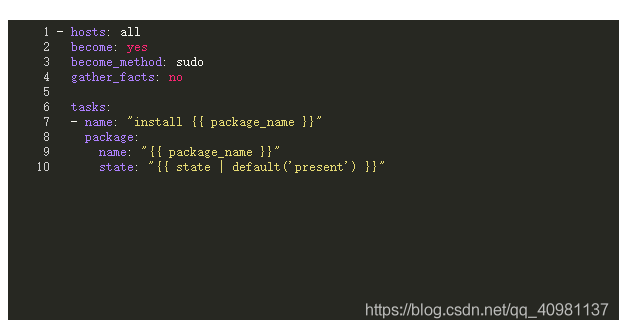
语法检测效果:
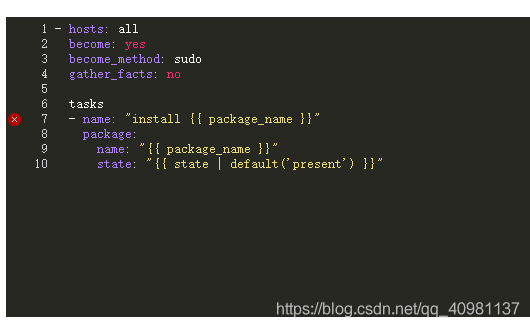
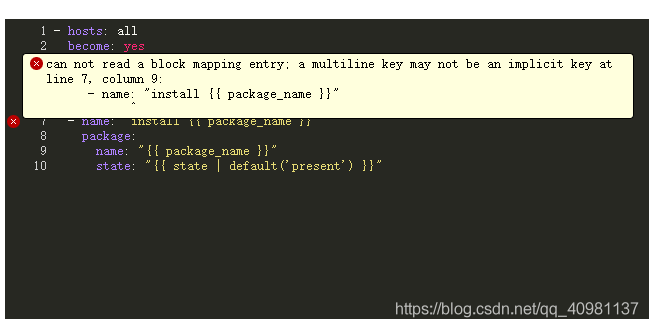
总结
以上为个人经验,希望能给大家一个参考,也希望大家多多支持脚本之家。
相关文章

Element-ui DatePicker显示周数的方法示例
这篇文章主要介绍了Element-ui DatePicker显示周数的方法示例,文中通过示例代码介绍的非常详细,对大家的学习或者工作具有一定的参考学习价值,需要的朋友们下面随着小编来一起学习学习吧2019-07-07 这篇文章主要为大家介绍了vue发送验证码计时器防止刷新实现详解,<BR>有需要的朋友可以借鉴参考下,希望能够有所帮助,祝大家多多进步,早日升职加薪2023-03-03
 本文通过实例代码给大家讲解vue.js树形组件之删除双击增加分支功能,非常不错,具有参考借鉴价值,需要的的朋友参考下2017-02-02
 WebSocket是一种在客户端和服务器之间进行双向通信的网络协议,它通过建立持久性的、全双工的连接,允许服务器主动向客户端发送数据,本文小编给大家介绍了基于Vue3+WebSocket实现实时文件传输监控系统,需要的朋友可以参考下2025-03-03
 这篇文章主要介绍了vue2+elementUI的el-tree的懒加载,文中给大家提到了element ui 中 el-tree 实现懒加载的方法,本文结合实例代码给大家介绍的非常详细,需要的朋友可以参考下2022-09-09
vue实现分环境打包步骤(给不同的环境配置相对应的打包命令)
这篇文章主要介绍了vue实现分环境打包步骤(给不同的环境配置相对应的打包命令),小编觉得挺不错的,现在分享给大家,也给大家做个参考。一起跟随小编过来看看吧2019-06-06 这篇文章主要介绍了vue的虚拟DOM使用方式,具有很好的参考价值,希望对大家有所帮助,如有错误或未考虑完全的地方,望不吝赐教2024-09-09
webpack4+express+mongodb+vue实现增删改查的示例
这篇文章主要介绍了webpack4+express+mongodb+vue 实现增删改查的示例,小编觉得挺不错的,现在分享给大家,也给大家做个参考。一起跟随小编过来看看吧2018-11-11 本篇介绍directive的简单实现,主要学习其实现的思路及代码的设计,需要的朋友参考下吧2018-01-01
 本文主要介绍了vue实现虚拟滚动渲染成千上万条数据,文中通过示例代码介绍的非常详细,对大家的学习或者工作具有一定的参考学习价值,需要的朋友们下面随着小编来一起学习学习吧2023-02-02
最新评论