

element-plus日历(Calendar)动态渲染以及避坑指南
更新时间:2023年08月04日 11:27:02 作者:瑞 新
这篇文章主要给大家介绍了关于element-plus日历(Calendar)动态渲染以及避坑指南的相关资料,这是最近帮一个后端朋友处理一个前端问题,elementUI中calendar日历组件内容进行自定义显示,实现类似通知事项的日历效果,需要的朋友可以参考下
效果图
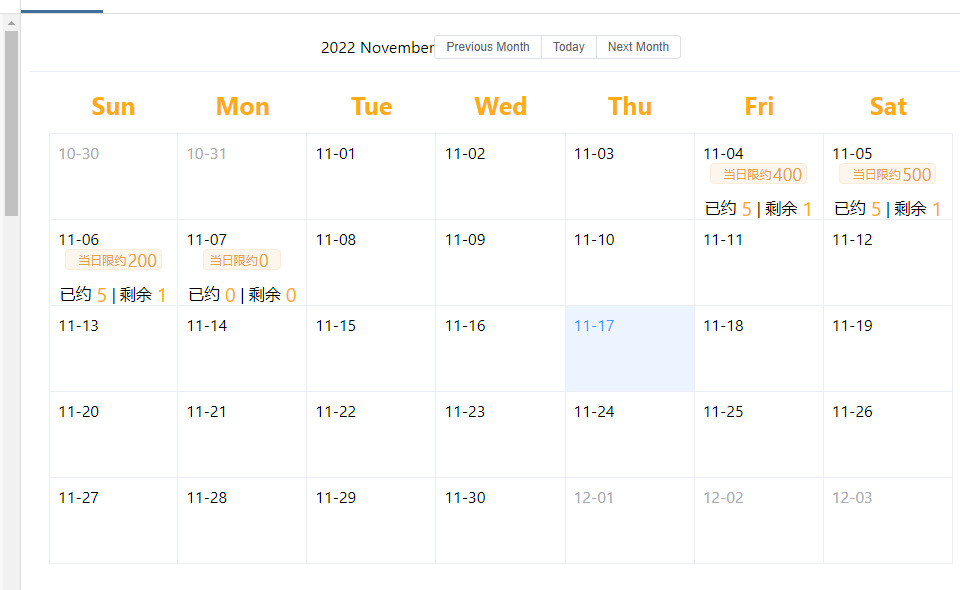
实战代码
<template>
  <el-calendar>
    <template #date-cell="{ data }">
      <el-row :class="data.isSelected ? 'is-selected' : 'sds'">
        {{ data.day.split('-').slice(1).join('-') }}
        {{ data.isSelected ? '✔️' : '' }}
      </el-row>
      <div v-for="(item, index) in textContent(data.day)" :key="index">
                <e-row>
                  <el-col class="center">
                    <el-tag type="warning" class="tag">
                      <el-row v-if="item.xianyue == 0">
                        <el-col :span="17" class="tag">
                          <span>当日限约</span>
                        </el-col>
                        <el-col :span="1"></el-col>
                        <el-col :span="6" class="tag2">
                          <span>0</span>
                        </el-col>
                      </el-row>
                      <el-row v-else>
                        <el-col :span="17" class="tag">
                          <span>当日限约</span>
                        </el-col>
                        <el-col :span="1"></el-col>
                        <el-col :span="6" class="tag2">
                          <span>{{ item.xianyue }}</span>
                        </el-col>
                      </el-row>
                    </el-tag>
                  </el-col>
                </e-row>
                <el-row
                  style="margin-top: 10px"
                  class="yuyue"
                  v-if="item.yiyue && item.sy == 0"
                >
                  <el-col :span="11" class="center">
                    <span>已约</span
                    ><span class="center2" style="">0</span></el-col
                  >
                  <el-col :span="2" class="center">|</el-col>
                  <el-col :span="11" class="center">
                    <span>剩余</span><span class="center2">0</span></el-col
                  >
                </el-row>
                <el-row style="margin-top: 10px" class="yuyue" v-else>
                  <el-col :span="11" class="center">
                    <span>已约</span
                    ><span class="center2" style="">{{
                      item.yiyue
                    }}</span></el-col
                  >
                  <el-col :span="2" class="center">|</el-col>
                  <el-col :span="11" class="center">
                    <span>剩余</span
                    ><span class="center2">{{ item.sy }}</span></el-col
                  >
                </el-row>
              </div>
    </template>
  </el-calendar>
</template>
<style>
.is-selected {
  color: #1989fa;
}
</style>
<style scoped >
:deep .el-calendar__body {
  padding: 4px 20px 35px;
}
:deep .el-calendar-table thead th {
  color: #ffab11;
  font-weight: bold;
  font-size: 25px;
}
.tag {
  display: flex;
  align-items: center;
  height: 2.5vh;
  justify-content: center;
}
.tag2 {
  display: flex;
  align-items: center;
  height: 2.5vh;
  justify-content: center;
  font-size: 18px;
}
.aaa .is-selected .yuyue {
  color: #ffab11;
}
.aaa .datastyle {
  display: flex;
  justify-content: center;
  align-items: center;
  font-size: 3rem;
  color: #353636;
  font-weight: 600;
}
:deep .el-calendar-table .el-calendar-day:hover {
  background-color: #faecd8;
}
:deep .el-calendar {
  --el-calendar-selected-bg-color: #faecd8;
}
.aaa .is-selected .datastyle {
  color: #ffab11;
}
.aaa .prev .datastyle {
  color: #c4c5c8;
}
.aaa .next .datastyle {
  color: #c4c5c8;
}
:deep .el-calendar {
  --el-calendar-cell-width: 130px;
}
.center {
  display: flex;
  justify-content: center;
  align-items: center;
}
.center2 {
  display: flex;
  justify-content: center;
  align-items: center;
  color: #ffab11;
  margin-left: 5px;
  font-size: 20px;
}
:deep .el-calendar__header {
  justify-content: center;
}
</style>
<script setup lang="ts">
import { ref, reactive, toRefs, onMounted } from "vue";
import { ElMessage, ElMessageBox } from "element-plus";
  const state = reactive({
      tableData: [],
        //测试数据
      calendarData: [
        {
          day: "2022-11-04",
          xianyue: 400,
          yiyue: 5,
          sy: 1,
        },
        {
          day: "2022-11-05",
          xianyue: 500,
          yiyue: 5,
          sy: 1,
        },
        {
          day: "2022-11-06",
          xianyue: 200,
          yiyue: 5,
          sy: 1,
        },
        {
          day: "2022-11-07",
          xianyue: 0,
          yiyue: 0,
          sy: 0,
        },
      ],
    });
  //处理日期获取后台数据动态渲染上去
    const textContent = (date) => {
        //当前date是拿到上面日历组件当前的日期值 根据该值去筛选测试数据找到对应各个日期下对应的数据return出去
        console.log(date, 1111);
        return state.calendarData.filter((item) => {
          return date === item.day;
        });
      };
</script>
避坑-插槽不生效
#dateCell 驼峰书写
总结
到此这篇关于element-plus日历(Calendar)动态渲染以及避坑的文章就介绍到这了,更多相关element-plus日历动态渲染内容请搜索脚本之家以前的文章或继续浏览下面的相关文章希望大家以后多多支持脚本之家!
相关文章
 这篇文章主要为大家介绍了vue实现前端按钮组件权限管理,有需要的朋友可以借鉴参考下,希望能够有所帮助,祝大家多多进步,早日升职加薪2022-09-09
 这篇文章主要介绍了form 表单验证是异步问题记录,通过实例代码介绍了Promise.all 和 Promise.allSettled 区别,需要的朋友可以参考下2023-01-01
 这篇文章主要介绍了iview的table组件自带的过滤器实现,文中通过示例代码介绍的非常详细,对大家的学习或者工作具有一定的参考学习价值,需要的朋友们下面随着小编来一起学习学习吧2019-07-07
 这篇文章主要介绍了webpack搭建vue 项目的步骤,小编觉得挺不错的,现在分享给大家,也给大家做个参考。一起跟随小编过来看看吧2017-12-12
 Babel是一个JS编译器,主要作用是将ECMAScript2015+ 版本的代码,转换为向后兼容的JS语法,以便能够运行在当前和旧版本的浏览器或其它环境中,下面这篇文章主要给大家介绍了关于Vue中babel.config.js配置详解的相关资料,需要的朋友可以参考下2023-02-02
 本篇文章主要介绍了vue.js+Element实现增删改查,具有一定的参考价值,有兴趣的可以了解一下。2017-01-01
 本篇文章给大家详细分享了Vue Elememt-UI构建管理后台的过程以及相关代码实例,一起参考学习下。2018-02-02
 这篇文章主要介绍了React Diff算法不采用Vue双端对比算法原因详解,有需要的朋友可以借鉴参考下,希望能够有所帮助,祝大家多多进步,早日升职加薪2022-07-07
基于Vue中this.$options.data()的this指向问题
这篇文章主要介绍了基于Vue中this.$options.data()的this指向问题,具有很好的参考价值,希望对大家有所帮助。如有错误或未考虑完全的地方,望不吝赐教2022-03-03 这篇文章主要介绍了详解vue-cli 2.0配置文件(小结),小编觉得挺不错的,现在分享给大家,也给大家做个参考。一起跟随小编过来看看吧2019-01-01
最新评论