

vue3中标签form插件的使用教程详解
更新时间:2024年01月05日 09:54:52 作者:warrah
这篇文章主要为大家详细介绍了vue3中标签form插件的使用的相关知识,文中的示例代码讲解详细,具有一定的借鉴价值,感兴趣的小伙伴可以了解下
想写一个系统,对八字进行标注,比如格局,有些八字就有很多格局,于是就想着使用el-tag但是,form表单中如何处理呢?
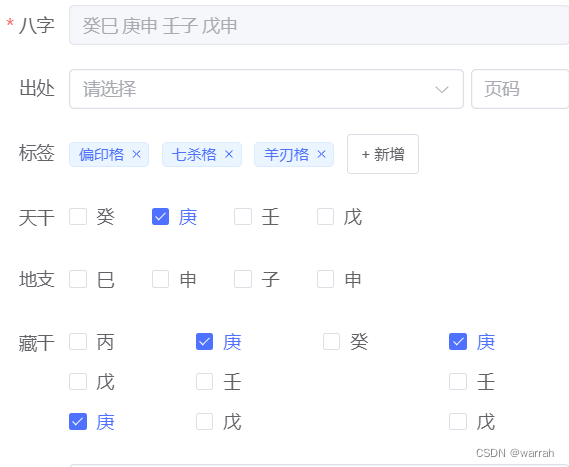
这个时候,就需要自己写一个,modelValue是表单的默认属性
<template>
    <div>
        <el-tag v-for="(item,index) in keywordTags" :key="index" closable @close="handleClose(tag)"
        size="small" class="mx-1">{{item}}
        </el-tag>
        <el-input v-if="inputVisible" ref="InputRef" v-model="inputValue" class="ml-1 w-20" size="small" @keyup.enter="handleInputConfirm" @blur="handleInputConfirm"></el-input>
        <el-button v-else class="button-new-tag ml-1" size="small" @click="showInput">
            + 新增
        </el-button>
    </div>
</template>
<script lang="ts" setup>
const inputVisible = ref(false)
import { nextTick,ref,watch,getCurrentInstance } from 'vue'
import type { FormInstance, FormRules,ElInput  } from 'element-plus'
const { proxy }: any = getCurrentInstance();
const emits = defineEmits(['update:modelValue'])
const props = defineProps<{
    modelValue:String,

}>()
const keywordTags = ref([])
const inputValue = ref('')
const InputRef = ref<InstanceType<typeof ElInput>>()
const showInput  = () =>{
    inputVisible.value = true
    nextTick(() => {
        InputRef.value!.input!.focus()
    })
}
const handleClose = (tag:String) => {
    keywordTags.value.splice(keywordTags.value.indexOf(tag),1)
}
const handleInputConfirm = () => {
  if (inputValue.value) {
    keywordTags.value.push(inputValue.value)
  }
  inputVisible.value = false
  inputValue.value = ''
}
watch(()=>keywordTags,(newVal,oldVal)=>{
    if (!proxy.$_.isEmpty(newVal.value)){
        console.log(newVal.value.join(','))
        emits('update:modelValue',newVal.value.join(','))
    }
},{immediate:true,deep:true})
watch(()=>props.modelValue,(newVal,oldVal)=>{
    if (!proxy.$_.isEmpty(newVal)){
        keywordTags.value = newVal.split(',')
    }
},{immediate:true,deep:true})
</script>
<style lang="less" scoped>
.w-20{
    width: 50px;
}
.mx-1{
    margin-right: 10px;
}
</style>
</style>
使用的话参见,这样保存和编辑就很容易了。
<el-form-item label="标签" prop="tags">
    <udf-tags v-model="form.tags"></udf-tags>
</el-form-item>
到此这篇关于vue3中标签form插件的使用教程详解的文章就介绍到这了,更多相关vue3 form内容请搜索脚本之家以前的文章或继续浏览下面的相关文章希望大家以后多多支持脚本之家!
相关文章
 漏斗图常用于可视化业务流程中的各个阶段的转换率,例如销售漏斗或营销漏斗,它可以帮助用户识别流程中的瓶颈和改进机会,本文给大家介绍了如何使用Vue3和Plotly.js绘制交互式漏斗图,,文中有相关代码示例供大家参考,需要的朋友可以参考下2024-07-07
 这篇文章主要介绍了vue 注释template中组件的属性说明,具有很好的参考价值,希望对大家有所帮助。如有错误或未考虑完全的地方,望不吝赐教2022-04-04
 本文主要介绍了uniapp+vue3路由跳转传参的实现,文中通过示例代码介绍的非常详细,对大家的学习或者工作具有一定的参考学习价值,需要的朋友们下面随着小编来一起学习学习吧2023-11-11
关于vue的element-ui web端引入高德地图并获取经纬度
这篇文章主要介绍了关于vue的element-ui web端引入高德地图并获取经纬度,高德地图首先要去申请key和密钥,文中提供了部分实现代码和解决思路,感兴趣的朋友可以学习一下2023-04-04 这篇文章主要介绍了如何写一个Vue loading 插件,帮助大家更好的理解和学习vue 插件的相关知识,感兴趣的朋友可以了解下2020-11-11
vue使用smooth-signature实现移动端横竖屏电子签字
这篇文章主要为大家介绍了vue使用smooth-signature实现移动端横竖屏电子签字示例详解,有需要的朋友可以借鉴参考下,希望能够有所帮助,祝大家多多进步,早日升职加薪2023-10-10
vue eslint报错error "Component name "*****"
这篇文章主要给大家介绍了关于vue eslint报错error “Component name “*****“ should always be multi-word”的解决方法,文中通过图文以及实例代码介绍的非常详细,需要的朋友可以参考下2022-09-09 这篇文章主要介绍了Vue 自适应高度表格的实现方法,文中通过示例代码介绍的非常详细,对大家的学习或者工作具有一定的参考学习价值,需要的朋友们下面随着小编来一起学习学习吧2020-05-05
 这篇文章主要为大家详细介绍了如何在Vue3中使用jsx/tsx的相关知识,文中的示例代码讲解详细,具有一定的借鉴价值,需要的小伙伴可以了解下2024-02-02
Vue的transition-group与Virtual Dom Diff算法的使用
这篇文章主要介绍了Vue的transition-group与Virtual Dom Diff算法的使用,文中通过示例代码介绍的非常详细,对大家的学习或者工作具有一定的参考学习价值,需要的朋友们下面随着小编来一起学习学习吧2019-12-12
最新评论