

create-react-app如何降低react的版本
create-react-app降低react的版本
react最近不是出18了吗
但问题是很多的库都还不支持
而且工作中不会使用特别新的技术
但用create-react-app创建的项目默认为react18版本
这里我们降版本只需要一行命令
npm install react@17.x react-dom@17.x --save
这里有个坑,这两个要同时降!!!,只改一个会报错!!!
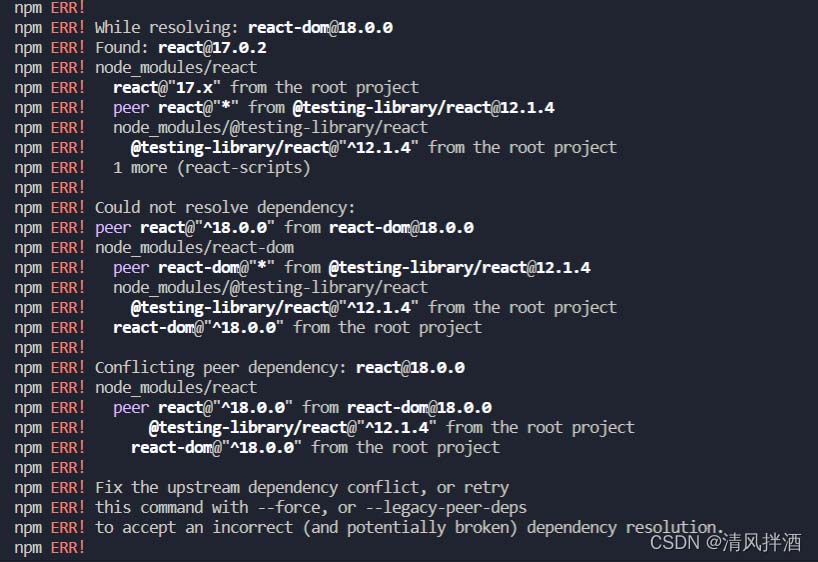
顺便提醒一下,报错虽然长,但可以用翻译软件翻译一下,我这里也是通过看翻译之后的报错才注意到这个问题。
本来很简单的问题,我搞了一个多小时~
create-react-app npm start解决webpack版本过高导致的报错
PS E:\HtmlProject\react\reactProject\react_staging> npm start
> react_staging@0.1.0 start
> react-scripts start
There might be a problem with the project dependency tree.
It is likely not a bug in Create React App, but something you need to fix locally.The react-scripts package provided by Create React App requires a dependency:
"webpack": "4.44.2"
Don't try to install it manually: your package manager does it automatically.
However, a different version of webpack was detected higher up in the tree:E:\HtmlProject\react\reactProject\react_staging\node_modules\webpack (version: 5.55.0)
Manually installing incompatible versions is known to cause hard-to-debug issues.
If you would prefer to ignore this check, add SKIP_PREFLIGHT_CHECK=true to an .env file in your project.
That will permanently disable this message but you might encounter other issues.To fix the dependency tree, try following the steps below in the exact order:
1. Delete package-lock.json (not package.json!) and/or yarn.lock in your project folder.
2. Delete node_modules in your project folder.
3. Remove "webpack" from dependencies and/or devDependencies in the package.json file in your project folder.
4. Run npm install or yarn, depending on the package manager you use.If this has not helped, there are a few other things you can try:
5. If you used npm, install yarn (http://yarnpkg.com/) and repeat the above steps with it instead.
This may help because npm has known issues with package hoisting which may get resolved in future versions.6. Check if E:\HtmlProject\react\reactProject\react_staging\node_modules\webpack is outside your project directory.
For example, you might have accidentally installed something in your home folder.7. Try running npm ls webpack in your project folder.
This will tell you which other package (apart from the expected react-scripts) installed webpack.If nothing else helps, add SKIP_PREFLIGHT_CHECK=true to an .env file in your project.
That would permanently disable this preflight check in case you want to proceed anyway.P.S. We know this message is long but please read the steps above :-) We hope you find them helpful!
npm start报错上面的错误
查找了很久网上的解决方法,其中尝试了错误里建议创建.env文件的方法,但是还是会报错,报错里说
The react-scripts package provided by Create React App requires a dependency:
"webpack": "4.44.2"
但是我们的项目路径下的webpack是
E:\HtmlProject\react\reactProject\react_staging\node_modules\webpack (version: 5.55.0)
```版本不一致
``## ## 解决方法
既然它需要4.44.2的版本,那我们直接在该项目路径下卸载原来的版本`
npm uninstall webpack
安装它需要的版本
npm install --save-dev webpack@4.44.2
这样就可以了
总结
以上为个人经验,希望能给大家一个参考,也希望大家多多支持脚本之家。
相关文章
 React Hooks是React 16.8引入的重要特性,让函数组件能够拥有类组件的状态和生命周期能力,下面就来介绍一下React Hooks的具体使用,m感兴趣的可以了解一下2025-09-09
 本文主要介绍了React的相关知识,具有一定的参考价值,下面跟着小编一起来看下吧2017-01-01
react中useState使用:如何实现在当前表格直接更改数据
这篇文章主要介绍了react中useState的使用:如何实现在当前表格直接更改数据,具有很好的参考价值,希望对大家有所帮助。如有错误或未考虑完全的地方,望不吝赐教2022-08-08
React SSR架构Streaming Render与Selective Hydration解析
这篇文章主要为大家介绍了React SSR架构Streaming Render与Selective Hydration解析,有需要的朋友可以借鉴参考下,希望能够有所帮助,祝大家多多进步,早日升职加薪2023-03-03 在React中,受控组件指的是表单元素的value值受React组件的state或props控制的组件,而非受控组件则是表单元素的value值由DOM自身负责管理的组件,本文将给大家详细介绍React受控组件与非受控组件,需要的朋友可以参考下2023-08-08
 本篇文章主要介绍了详解在React里使用"Vuex",小编觉得挺不错的,现在分享给大家,也给大家做个参考。一起跟随小编过来看看吧2018-04-04
React路由的history对象的插件history的使用解读
这篇文章主要介绍了React路由的history对象的插件history的使用,具有很好的参考价值,希望对大家有所帮助,如有错误或未考虑完全的地方,望不吝赐教2023-10-10 这篇文章主要为大家详细介绍了React实现二级联动的方法,文中示例代码介绍的非常详细,具有一定的参考价值,感兴趣的小伙伴们可以参考一下2021-09-09
一文搞懂 React 18 中的 useTransition() 与 useDeferredValue()
这篇文章主要介绍了一文搞懂 React 18 中的 useTransition()与useDeferredValue(),文章围绕主题展开详细的内容介绍,具有一定的参考价值,需要的小伙伴可以参考一下2022-09-09
深入React 18源码useMemo useCallback memo用法及区别分析
这篇文章主要为大家介绍了React 18源码深入分析useMemo useCallback memo用法及区别,有需要的朋友可以借鉴参考下,希望能够有所帮助,祝大家多多进步,早日升职加薪2023-04-04
最新评论