

vue3无法显示element-plus问题及解决
更新时间:2024年03月20日 15:27:09 作者:SwaryLA
这篇文章主要介绍了vue3无法显示element-plus问题及解决方案,具有很好的参考价值,希望对大家有所帮助,如有错误或未考虑完全的地方,望不吝赐教
vue3无法显示element-plus
原本想使用el-tree做目录,结果找了很久的原因都无法显示,并且没有任何报错,但是在调试的过程中发现el-tree使用的数据是对象形式的

并且还报了el-tree组件无法解析
runtime-core.esm-bundler.js:38 [Vue warn]: Failed to resolve component: el-tree If this is a native custom element, make sure to exclude it from component resolution via compilerOptions.isCustomElement.
刚开始以为需要解析数据,但是其他人都可以正常使用,所以尝试放其他组件,结果其他组件也都无法使用,那么很有可能是挂载出现问题
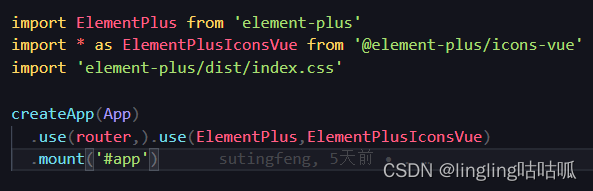
因为将所有需要挂载使用的变量放在了一个use里导致的,还是得多熟悉才行
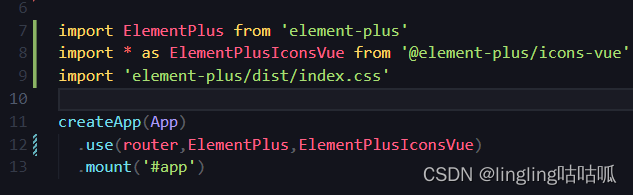
正确使用方法
vue3使用Element-plus的图标
首先安装Element-Plus-icon
# 选择一个你喜欢的包管理器

# NPM
$ npm install @element-plus/icons-vue
# Yarn
$ yarn add @element-plus/icons-vue
# pnpm
$ pnpm install @element-plus/icons-vue
如何使用
Element-Plus-icon官方文档链接
https://element-plus.org/zh-CN/component/icon.html#icon-collection
在main.ts中引入Element-Plus-icon
import * as ElementPlusIconsVue from '@element-plus/icons-vue'

Object.keys(ElementPlusIconsVue).forEach((key) => {
    app.component(key, ElementPlusIconsVue[key])
})- 第一种直接点击图标复制<el-icon>
<el-icon><ArrowRight /></el-icon>
- 第二种通过icon="el-icon-plus"
<el-button type="success" icon="el-icon-plus" >
    1111
</el-button>- 第三种通过SVG
<template>
  <div style="font-size: 20px">
    <!-- 由于SVG图标默认不携带任何属性 -->
    <!-- 你需要直接提供它们 -->
    <Edit style="width: 1em; height: 1em; margin-right: 8px" />
    <Share style="width: 1em; height: 1em; margin-right: 8px" />
    <Delete style="width: 1em; height: 1em; margin-right: 8px" />
    <Search style="width: 1em; height: 1em; margin-right: 8px" />
  </div>
</template>
总结
以上为个人经验,希望能给大家一个参考,也希望大家多多支持脚本之家。
相关文章

Vue使用vue-area-linkage实现地址三级联动效果的示例
很多时候我们需要使用地址三级联动,即省市区三级联动,这篇文章主要介绍了Vue使用vue-area-linkage实现地址三级联动效果的示例,感兴趣的小伙伴们可以参考一下2018-06-06 这篇文章主要介绍了vue中window.onresize的使用方式,具有很好的参考价值,希望对大家有所帮助。如有错误或未考虑完全的地方,望不吝赐教2022-04-04
 在vxe-table中,可通过cell-style或cell-class-name设置单元格垂直对齐,使用verticalAlign: top实现顶部对齐,默认为垂直居中,合并单元格时同样支持此设置,本文给大家介绍vxe-table 设置单元格垂直对齐的方法,感兴趣的朋友一起看看吧2025-06-06
 这篇文章主要介绍了vant之van-list的使用及踩坑记录,具有很好的参考价值,希望对大家有所帮助。如有错误或未考虑完全的地方,望不吝赐教2022-04-04
 本篇文章主要介绍了vue2.0 axios前后端数据处理实例代码,小编觉得挺不错的,现在分享给大家,也给大家做个参考。一起跟随小编过来看看吧2017-06-06
 今天小编就为大家分享一篇关于vue-router实现嵌套路由的讲解,小编觉得内容挺不错的,现在分享给大家,具有很好的参考价值,需要的朋友一起跟随小编来看看吧2019-01-01
 这篇文章主要介绍了vue cli 3.0通用打包配置代码,不分一二级目录,具有很好的参考价值,希望对大家有所帮助。一起跟随小编过来看看吧2020-09-09
Vue createRenderer 自定义渲染器从入门到实战
本文主要介绍了Vue createRenderer 自定义渲染器从入门到实战,文中通过示例代码介绍的非常详细,对大家的学习或者工作具有一定的参考学习价值,需要的朋友们下面随着小编来一起学习学习吧2026-01-01 文章介绍了在使用Pinia定义的useHeaderTabStore中,tab状态通过会话存储初始化但未在退出登录时同步清空的问题,通过在PiniaStore中定义清空tab的函数,并在退出登录时调用该函数,可以确保状态和会话存储同步清空,避免内存中残留旧数据,感兴趣的朋友一起看看吧2024-12-12
 这篇文章主要为大家详细介绍了vue实现经典选项卡功能,文中示例代码介绍的非常详细,具有一定的参考价值,感兴趣的小伙伴们可以参考一下2022-03-03
最新评论