

vue操作select获取option值方式
更新时间:2025年01月30日 07:12:54 作者:学习中的小亮
文章介绍了在Vue中操作select元素并实时获取选中的option值的方法,通过使用`@change`事件并传递参数,可以实现动态获取选中的值
vue操作select获取option值
如何实时的获取你选中的值 只用@change件事
@change="changeCategoryList($event)" 动态传递参数
vue操作select获取option的value值
示例
  <div id="app">
        <select name="topicCategoryId" class="article-title" id="category" @change="changeCategoryList($event)"  style="width: 180px;">
                <option  v-for="(category,index) in categoryList" v-bind:value="category.id">{{category.categoryTitle}}</option>
         </select>
   </div
data:{
categoryList:[{id:1,categoryTitle:"Java面试"},{id:2,categoryTitle:"Web开发"},
{id:3,categoryTitle:"设计系统"},{id:4,categoryTitle:"框架服务"}]
},
methods: {
changeCategoryList(event){
console.log(event);
var selectIndex =event.target.selectedIndex;//选中的第几个option元素 从0开始
var options = event.target.options;//代表option组合
options[selectIndex].innerHTML //选择的值 // categoryTitle
event.target.value; //绑定的value值 //v-bind:value="category.id"
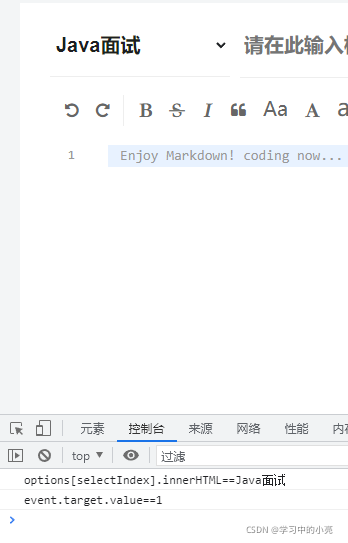
console.log("options[selectIndex].innerHTML=="+options[selectIndex].innerHTML);
console.log("event.target.value=="+event.target.value);
}
}
总结
以上为个人经验,希望能给大家一个参考,也希望大家多多支持脚本之家。
相关文章

vue中给el-radio添加tooltip并实现点击跳转方式
这篇文章主要介绍了vue中给el-radio添加tooltip并实现点击跳转方式,具有很好的参考价值,希望对大家有所帮助。如有错误或未考虑完全的地方,望不吝赐教2023-04-04 这篇文章主要介绍了vue3在jsx中使用component组件方式,具有很好的 参考价值,希望对大家有所帮助,如有错误或未考虑完全的地方,望不吝赐教2023-10-10
 这篇文章主要介绍了详解如何在你的Vue项目配置vux,小编觉得挺不错的,现在分享给大家,也给大家做个参考。一起跟随小编过来看看吧2018-06-06
Vue中使用create-keyframe-animation与动画钩子完成复杂动画
这篇文章主要介绍了Vue中使用create-keyframe-animation与动画钩子完成复杂动画,小编觉得挺不错的,现在分享给大家,也给大家做个参考。一起跟随小编过来看看吧2019-04-04 这篇文章主要介绍了vue如何获取当前url地址加端口号问题,具有很好的参考价值,希望对大家有所帮助,如有错误或未考虑完全的地方,望不吝赐教2023-09-09
 这是一个实现平滑滚动的函数,可以让页面在滚动到指定位置时产生缓动效果,本文给大家介绍了如何在在Vue页面中实现平滑滚动功能,<BR>,文中详细的代码讲解供大家参考,具有一定的参考价值,需要的朋友可以参考下2023-12-12
 这篇文章主要介绍了Vue自定义全局弹窗组件操作,具有很好的参考价值,希望对大家有所帮助。一起跟随小编过来看看吧2020-08-08
 这篇文章主要介绍了Vue关于Element UI中的文本域换行问题,具有很好的参考价值,希望对大家有所帮助,如有错误或未考虑完全的地方,望不吝赐教2024-03-03
vue+element+springboot实现文件下载进度条展现功能示例
本文主要介绍了vue + element-ui + springboot 实现文件下载进度条展现功能,文中通过示例代码介绍的非常详细,具有一定的参考价值,感兴趣的小伙伴们可以参考一下2021-11-11 今天小编就为大家分享一篇vue修改对象的属性值后页面不重新渲染的实例,具有很好的参考价值,希望对大家有所帮助。一起跟随小编过来看看吧2018-08-08
最新评论