

Vue中嵌入可浮动的第三方网页窗口的示例详解
更新时间:2025年02月06日 11:43:21 作者:码农研究僧
本文介绍了在Vue2项目中嵌入可浮动的第三方网页窗口的实现方法,包括使用iframe、div+script和dialog元素等方式,并提供了一个实战Demo,展示了如何在Vue组件中动态加载和控制浮窗的显示,需要的朋友可以参考下
1. 思路Demo
以下Demo提供思路参考,需要结合实际自身应用代码
下述URL的链接使用百度替代!
方式 1:使用 iframe 浮窗
可以创建一个固定在页面右下角的 iframe,让它加载该 script 生成的内容
<!DOCTYPE html>
<html lang="zh">
<head>
    <meta charset="UTF-8">
    <meta name="viewport" content="width=device-width, initial-scale=1.0">
    <title>浮窗嵌入</title>
    <style>
        /* 浮窗样式 */
        #floating-window {
            position: fixed;
            bottom: 20px;
            right: 20px;
            width: 400px;
            height: 500px;
            border: none;
            box-shadow: 0 4px 8px rgba(0, 0, 0, 0.2);
            background: white;
            z-index: 9999;
            border-radius: 10px;
        }
        /* 关闭按钮 */
        #close-btn {
            position: absolute;
            top: 5px;
            right: 5px;
            background: red;
            color: white;
            border: none;
            width: 25px;
            height: 25px;
            border-radius: 50%;
            cursor: pointer;
            font-size: 14px;
            line-height: 25px;
            text-align: center;
        }
    </style>
</head>
<body>

    <!-- 按钮触发浮窗 -->
    <button id="open-float">打开浮窗</button>

    <!-- 浮窗框架 -->
    <div id="floating-container" style="display: none;">
        <button id="close-btn">×</button>
        <iframe id="floating-window" src="https://www.baidu.com/"></iframe>
    </div>

    <script>
        document.getElementById("open-float").addEventListener("click", function() {
            document.getElementById("floating-container").style.display = "block";
        });

        document.getElementById("close-btn").addEventListener("click", function() {
            document.getElementById("floating-container").style.display = "none";
        });
    </script>

</body>
</html>
方式 2:使用 div + script 动态加载
script 代码是动态生成 HTML 的,可以创建一个浮窗 div,然后在 div 里动态插入 script
<!DOCTYPE html>
<html lang="zh">
<head>
    <meta charset="UTF-8">
    <meta name="viewport" content="width=device-width, initial-scale=1.0">
    <title>浮窗嵌入 Script</title>
    <style>
        #floating-div {
            position: fixed;
            bottom: 20px;
            right: 20px;
            width: 400px;
            height: 500px;
            border: 1px solid #ccc;
            background: white;
            z-index: 9999;
            box-shadow: 0 4px 8px rgba(0, 0, 0, 0.2);
            display: none;
            border-radius: 10px;
        }
        #close-div-btn {
            position: absolute;
            top: 5px;
            right: 5px;
            background: red;
            color: white;
            border: none;
            width: 25px;
            height: 25px;
            border-radius: 50%;
            cursor: pointer;
            font-size: 14px;
            line-height: 25px;
            text-align: center;
        }
    </style>
</head>
<body>

    <!-- 按钮触发浮窗 -->
    <button id="show-div-btn">打开浮窗</button>

    <!-- 浮窗内容 -->
    <div id="floating-div">
        <button id="close-div-btn">×</button>
        <div id="script-content"></div>
    </div>

    <script>
        document.getElementById("show-div-btn").addEventListener("click", function() {
            document.getElementById("floating-div").style.display = "block";
            let script = document.createElement("script");
            script.async = true;
            script.defer = true;
            script.src = "https://www.baidu.com/";
            document.getElementById("script-content").appendChild(script);
        });

        document.getElementById("close-div-btn").addEventListener("click", function() {
            document.getElementById("floating-div").style.display = "none";
        });
    </script>

</body>
</html>
方式 3:使用 dialog 元素
想要更现代化的 UI,可以使用 <dialog> 标签
<dialog id="floating-dialog">
    <button onclick="document.getElementById('floating-dialog').close()">关闭</button>
    <iframe src="https://www.baidu.com/"></iframe>
</dialog>

<button onclick="document.getElementById('floating-dialog').showModal()">打开浮窗</button>
2. 实战Demo
下述实战代码为Vue2(项目源自bladex)
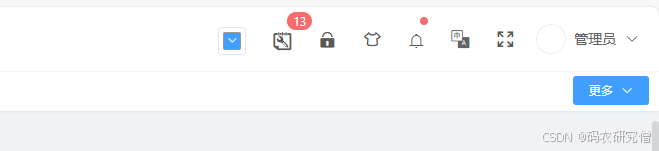
初始:
集成之后:
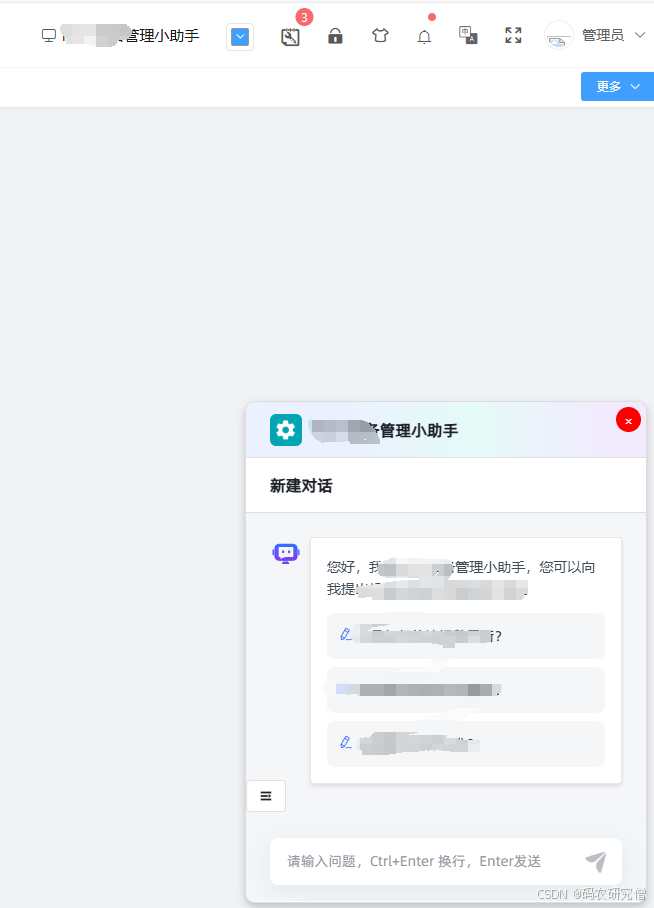
在 avue-top 组件里嵌入一个浮窗 div,然后动态加载 script,确保它能够嵌入 Vue 组件中
<template>
  <div class="avue-top">

    <div class="top-bar__right">
      <el-tooltip effect="dark" content="打开浮窗" placement="bottom">
        <div class="top-bar__item" @click="toggleFloatingWindow">
          <i class="el-icon-monitor"></i> <!-- 你可以换成任意图标 -->
        </div>
      </el-tooltip>
    </div>

    <!-- 浮窗 -->
    <div v-if="showFloatingWindow" class="floating-window">
      <button class="close-btn" @click="showFloatingWindow = false">×</button>
      <iframe :src="floatingUrl"></iframe>
    </div>
  </div>

</template>
在 methods 里添加 toggleFloatingWindow 方法,控制浮窗的显示:
<script>
export default {
  data() {
    return {
      showFloatingWindow: false,
      floatingUrl: "http://xxxxx"
    };
  },
  methods: {
    toggleFloatingWindow() {
      this.showFloatingWindow = !this.showFloatingWindow;
    }
  }
};
</script>
添加 <style> 样式
<style lang="scss" scoped>
.floating-window {
  position: fixed;
  bottom: 20px;
  right: 20px;
  width: 400px;
  height: 500px;
  background: white;
  box-shadow: 0 4px 8px rgba(0, 0, 0, 0.2);
  z-index: 9999;
  border-radius: 10px;
  border: 1px solid #ddd;
  overflow: hidden;
}

.floating-window iframe {
  width: 100%;
  height: 100%;
  border: none;
}

.close-btn {
  position: absolute;
  top: 5px;
  right: 5px;
  background: red;
  color: white;
  border: none;
  width: 25px;
  height: 25px;
  border-radius: 50%;
  cursor: pointer;
  font-size: 14px;
  line-height: 25px;
  text-align: center;
}
</style>
但这样会有个bug,每次点开隐藏都会刷新下网页
优化浮窗:防止重复加载内容
可以使用 v-show 而不是 v-if,这样 iframe 只会被隐藏,而不会被销毁,内容不会丢失
<div v-show="showFloatingWindow" class="floating-window">
  <button class="close-btn" @click="showFloatingWindow = false">×</button>
  <iframe ref="floatingIframe" :src="floatingUrl"></iframe>
</div>
添加样式
.floating-text {
  font-size: 15px;  /* 调整字体大小 */
  margin-left: 5px; /* 控制与图标的间距 */
  color: #fff;      /* 文字颜色 */
}
到此这篇关于Vue中嵌入可浮动的第三方网页窗口的示例详解的文章就介绍到这了,更多相关Vue嵌入第三方网页窗口内容请搜索脚本之家以前的文章或继续浏览下面的相关文章希望大家以后多多支持脚本之家!
相关文章
 这篇文章主要为大家介绍了使用Vite处理css less及postcss的示例详解,有需要的朋友可以借鉴参考下,希望能够有所帮助,祝大家多多进步,早日升职加薪2022-07-07
 这篇文章主要为大家详细介绍了vue实现简单跑马灯效果,文中示例代码介绍的非常详细,具有一定的参考价值,感兴趣的小伙伴们可以参考一下2020-05-05
 这篇文章主要为大家介绍了vite的proxy查看真实请求地址方式详解,有需要的朋友可以借鉴参考下,希望能够有所帮助,祝大家多多进步,早日升职加薪2023-11-11
 这篇文章主要介绍了使用Vue3实现点击按钮实现文字变色功能,文中通过代码示例给大家介绍的非常详细,对大家的学习或工作有一定的帮助,需要的朋友可以参考下2024-07-07
 这篇文章主要介绍了vite+vue3代码风格校验及格式化方式,具有很好的参考价值,希望对大家有所帮助,如有错误或未考虑完全的地方,望不吝赐教2024-03-03
 在 Vue.js 3 中实现网页的国际化多语言,最常用的包是 vue-i18n,通常我们会与 vue-i18n-routing 一起使用,这篇文章主要介绍了Vue3 如何接入 i18n 实现国际化多语言,需要的朋友可以参考下2024-07-07
浅谈vue中关于checkbox数据绑定v-model指令的个人理解
这篇文章主要介绍了浅谈vue中关于checkbox数据绑定v-model指令的个人理解,v-model用于表单的数据绑定很常见,下面就来详细的介绍一下2018-11-11
vue.js出现Vue.js not detected错误的解决方案
这篇文章主要介绍了vue.js出现Vue.js not detected错误的解决方案,具有很好的参考价值,希望对大家有所帮助。如有错误或未考虑完全的地方,望不吝赐教2022-09-09 在本篇文章里小编给大家整理的是关于vue把输入框的内容添加到页面的实例以及相关知识点,需要的朋友们学习下。2019-11-11
 Vue是一款非常流行的JavaScript框架,它提供了许多方便开发者的功能,本文将介绍如何通过Vue路由改变地址栏的参数,感兴趣的朋友跟随小编一起看看吧2023-10-10
最新评论