

Vue封装的标准漏斗图教程
更新时间:2025年02月12日 15:37:17 作者:努力奋斗小白
文章展示了基于Vue封装的标准漏斗图的代码,包括权重算法、滚轮监听和点击示例功能,旨在提供实用的图表展示技巧
Vue封装的标准漏斗图
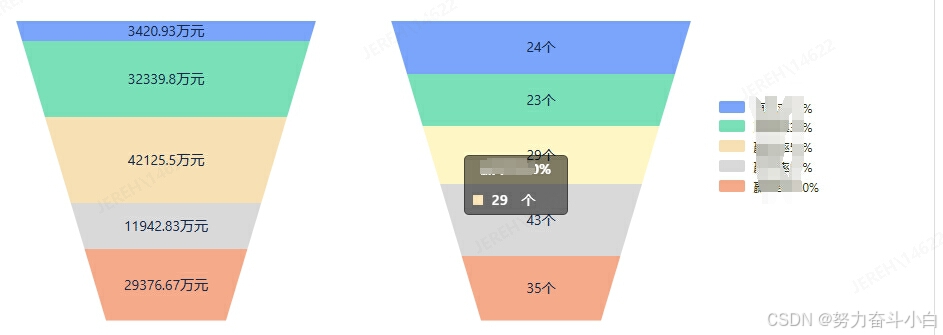
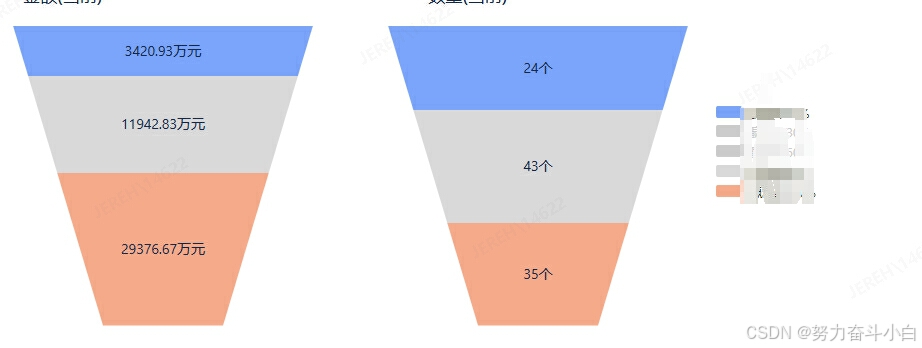
代码展示
基于Vue封装的标准漏斗图,增加权重算法,避免数值很小时图表显示过小,监听滚轮高度,防止弹窗飞走,点击示例动态显示对应的梯形图表块。
/**
 * 权重
 */
export function qz(arr) {
  // 计算数列的总和
  const total = arr.reduce((sum, val) => sum + val, 0)
  // 如果总和为零,则无法平衡,直接返回原数组
  if (total === 0) {
    return arr
  }
  function nonlinearScale(val) {
    return Math.sqrt(val) // 对数值进行平方根变换
  }
  // 平方根为了让数小点,一般降级都采用平方根处理
  const scaledArr = arr.map(val => nonlinearScale(val))
  // 计算缩放后数列的总和
  const scaledTotal = scaledArr.reduce((sum, val) => sum + val, 0)
  // 将缩放后的数列归一到100%,超过100就越界了
  let balancedArr = scaledArr.map(val => (val / scaledTotal) * 100)
  // 由于浮点数的精度问题,总和可能不是精确的100%,问题不大
  const error = 100 - balancedArr.reduce((sum, val) => sum + val, 0)
  const nonZeroCount = balancedArr.filter(val => val > 0).length
  if (nonZeroCount > 0) {
    const adjustment = error / nonZeroCount
    balancedArr = balancedArr.map(val => val + (val > 0 ? adjustment : 0))
  }
  // 四舍五入到小数点后两
  balancedArr = balancedArr.map(val => Math.round(val * 100) / 100)
  return balancedArr
}
<LdChart :chart-data="charDataArray" :flag-type="flagType" />
// 接口返回
this.charDataArray = []
this.charDataTwoArray = []
this.num1 = 0
this.num2 = 0
if (res.data && res.data.length > 0) {
this.loading = false
// 数据都是固定的五个!!!1
const obj1 = [
{ height: '20%', top: '0%', name: '名称1', value: '', type: '10%', unit: '万元', color: '#7aa5fa', checkItem: false, itemColor: '#7aa5fa', fontColor: '#303313' },
{ height: '20%', top: '20%', name: '名称2', value: '', type: '30%', unit: '万元', color: '#7ae0b8', checkItem: false, itemColor: '#7ae0b8', fontColor: '#303313' },
{ height: '20%', top: '40%', name: '名称3', value: '', type: '50%', unit: '万元', color: '#f6e0b4', checkItem: false, itemColor: '#f6e0b4', fontColor: '#303313' },
{ height: '20%', top: '60%', name: '名称4', value: '', type: '80%', unit: '万元', color: '#d9d9d9', checkItem: false, itemColor: '#d9d9d9', fontColor: '#303313' },
{ height: '20%', top: '80%', name: '名称5', value: '', type: '100%', unit: '万元', color: '#f5aa8a', checkItem: false, itemColor: '#f5aa8a', fontColor: '#303313' }
]
const obj2 = [
{ height: '20%', top: '0%', name: '名称1', value: '', type: '10%', unit: '个', color: '#7aa5fa', checkItem: false, itemColor: '#7aa5fa', fontColor: '#303313' },
{ height: '20%', top: '20%', name: '名称2', value: '', type: '30%', unit: '个', color: '#7ae0b8', checkItem: false, itemColor: '#7ae0b8', fontColor: '#303313' },
{ height: '20%', top: '40%', name: '名称3', value: '', type: '50%', unit: '个', color: '#f6e0b4', checkItem: false, itemColor: '#f6e0b4', fontColor: '#303313' },
{ height: '20%', top: '60%', name: '名称4', value: '', type: '80%', unit: '个', color: '#d9d9d9', checkItem: false, itemColor: '#d9d9d9', fontColor: '#303313' },
{ height: '20%', top: '80%', name: '名称5', value: '', type: '100%', unit: '个', color: '#f5aa8a', checkItem: false, itemColor: '#f5aa8a', fontColor: '#303313' }
]
const sumOne = res.data[0].reduce((sum, current) => sum + Number(current.sales), 0)
const sumTwo = res.data[1].reduce((sum, current) => sum + Number(current.sales), 0)
this.num1 = sumOne.toFixed(2)
this.num2 = sumTwo
obj1.forEach(item => {
res.data[0].forEach(it => {
if (item.type === it.winOrderRate) {
item.value = it.sales
// 计算比例
let bl = 0
sumOne === 0 ? bl = 0 : bl = Math.floor(Number(it.sales) / sumOne * 100)
Number(it.sales) > 0 && bl === 0 ? bl = 1 : ''
// 设置合适的比例1
item.height = bl + '%'
}
})
})
obj2.forEach(item => {
res.data[1].forEach(it => {
if (item.type === it.winOrderRate) {
item.value = it.sales
// 计算比例
let bl = 0
sumTwo === 0 ? bl = 0 : bl = Math.floor(Number(it.sales) / sumTwo * 100)
Number(it.sales) > 0 && bl === 0 ? bl = 1 : ''
// 设置合适的比例
item.height = bl + '%'
}
})
})
const qzOne = qz(obj1.map(it => Number(it.height.split('%')[0])))
const qzTwo = qz(obj2.map(it => Number(it.height.split('%')[0])))
obj1.forEach((it, index) => {
it.height = qzOne[index] + '%'
})
obj2.forEach((it, index) => {
it.height = qzTwo[index] + '%'
})
// 排除0的,
const objNew1 = obj1.filter(item => item.value !== 0 && item.value !== '0')
const objNew2 = obj2.filter(item => item.value !== 0 && item.value !== '0')
// 第一个是 0, 第二个是 第一个的高度, 第三个是 第一个+ 第二个 第四个是 1+2+3
const result = []
const result1 = []
let sum = 0
let sum1 = 0
for (let i = 0; i < objNew1.length; i++) {
sum += Number(objNew1[i].height.split('%')[0])
result.push(sum)
}
for (let i = 0; i < objNew2.length; i++) {
sum1 += Number(objNew2[i].height.split('%')[0])
result1.push(sum1)
}
result.pop()
result1.pop()
objNew1.forEach((it, index) => {
// 第一个是 0, 之后的每一个都是 前面的相加!!!1
if (index === 0) {
it.top = '0%'
} else {
it.top = result[index - 1] + '%'
}
})
objNew2.forEach((it, index) => {
// 第一个是 0, 之后的每一个都是 前面的相加
if (index === 0) {
it.top = '0%'
} else {
it.top = result1[index - 1] + '%'
}
})
// 计算比例得
const one = '名称1'
const two = '名称2'
const three = '名称3'
const four = '名称4'
const five = '名称5'
const all = [one, two, three, four, five]
this.charDataArray.push(all)
this.charDataArray.push(objNew1)
this.charDataArray.push(objNew2)
this.charDataArray.push('类型1')总结
以上为个人经验,希望能给大家一个参考,也希望大家多多支持脚本之家。
相关文章

vue3 中使用vue img cutter 图片裁剪插件的方法
这篇文章主要介绍了vue3 中使用vue img cutter 图片裁剪插件的方法,首先安装依赖,构建 components/ImgCutter.vue 组件,需要的朋友可以参考下2024-05-05
Vue.js 通过jQuery ajax获取数据实现更新后重新渲染页面的方法
今天小编小编就为大家分享一篇Vue.js 通过jQuery ajax获取数据实现更新后重新渲染页面的方法,具有很好的参考价值,希望对大家有所帮助。一起跟随小编过来看看吧2018-08-08 这篇文章主要介绍了vue3中的组件间的传值(props)问题,具有很好的参考价值,希望对大家有所帮助。如有错误或未考虑完全的地方,望不吝赐教2023-04-04
 本篇文章主要介绍了vuelidate 对于vueJs2.0的验证解决方案,具有一定的参考价值,感兴趣的小伙伴们可以参考一下。2017-03-03
 本篇文章将与各位开发者分享下 vue-native-websocket 库的使用以及配置,通过实例代码给大家分享Vue通过配置WebSocket并实现群聊功能,需要的朋友可以参考下2019-12-12
 这篇文章主要介绍了在vs code 中如何创建一个自己的 Vue 模板代码,本文通过图文并茂的形式给大家介绍的非常详细,对大家的学习或工作具有一定的参考借鉴价值,需要的朋友可以参考下2020-11-11
 这篇文章主要为大家介绍了Vue实现电商网站商品放大镜效果示例详解,有需要的朋友可以借鉴参考下,希望能够有所帮助,祝大家多多进步,早日升职加薪2022-10-10
 这篇文章主要为大家详细介绍了Vue使用echarts定制特殊的仪表盘,文中示例代码介绍的非常详细,具有一定的参考价值,感兴趣的小伙伴们可以参考一下2022-03-03
 这篇文章主要为大家详细介绍了Vue使用Echarts实现数据可视化的方法,文中示例代码介绍的非常详细,具有一定的参考价值,感兴趣的小伙伴们可以参考一下,希望能够给你带来帮助2022-03-03
如何在Vue3和Vite项目中用SQLite数据库进行数据存储
SQLite是一种嵌入式关系型数据库管理系统,是一个零配置、无服务器的、自给自足的、事务性的SQL数据库引擎,这篇文章主要给大家介绍了关于如何在Vue3和Vite项目中用SQLite数据库进行数据存储的相关资料,需要的朋友可以参考下2024-03-03
最新评论