

如何使用 Deepseek 写的uniapp油耗计算器
更新时间:2025年04月21日 09:43:25 作者:—Qeyser
这篇文章主要介绍了如何使用 Deepseek 写的uniapp油耗计算器,下面是一个基于 Uniapp 的油耗计算器实现,包含 Vue 组件和页面代码,需要的朋友可以参考下
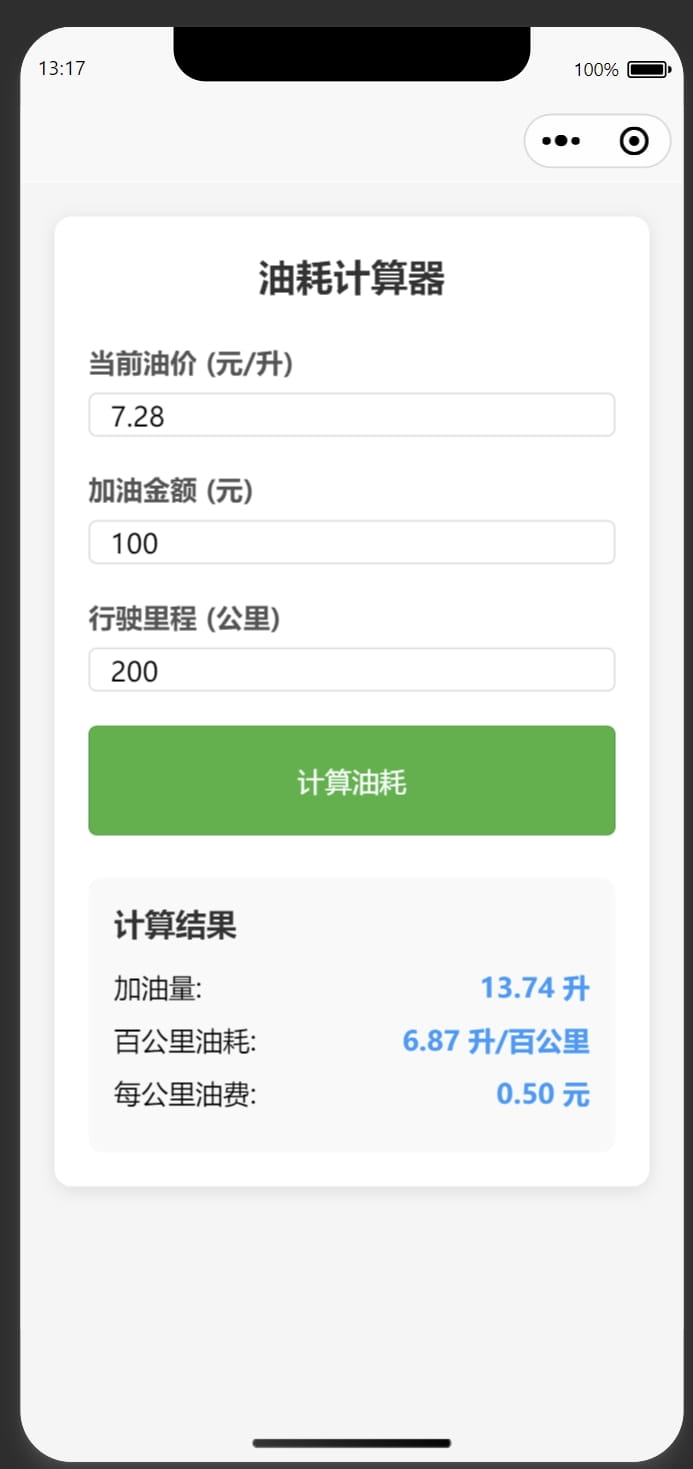
下面是一个基于 Uniapp 的油耗计算器实现,包含 Vue 组件和页面代码。
1. 创建页面文件
在 pages 目录下创建 fuel-calculator 页面:
<!-- pages/fuel-calculator/fuel-calculator.vue -->
<template>
  <view class="container">
    <view class="calculator">
      <view class="header">
        <text class="title">油耗计算器</text>
      </view>
      <view class="input-group">
        <text class="label">当前油价 (元/升)</text>
        <input
          type="number"
          v-model="price"
          placeholder="例如:7.85"
          class="input"
          @input="validateInput('price')"
        />
      </view>
      <view class="input-group">
        <text class="label">加油金额 (元)</text>
        <input
          type="number"
          v-model="money"
          placeholder="例如:300"
          class="input"
          @input="validateInput('money')"
        />
      </view>
      <view class="input-group">
        <text class="label">行驶里程 (公里)</text>
        <input
          type="number"
          v-model="distance"
          placeholder="例如:450"
          class="input"
          @input="validateInput('distance')"
        />
      </view>
      <button class="calculate-btn" @click="calculate">计算油耗</button>
      <view class="result" v-if="showResult">
        <view class="result-header">
          <text class="result-title">计算结果</text>
        </view>
        <view class="result-item">
          <text>加油量:</text>
          <text class="result-value">{{ fuel.toFixed(2) }} 升</text>
        </view>
        <view class="result-item">
          <text>百公里油耗:</text>
          <text class="result-value">{{ consumption.toFixed(2) }} 升/百公里</text>
        </view>
        <view class="result-item">
          <text>每公里油费:</text>
          <text class="result-value">{{ costPerKm.toFixed(2) }} 元</text>
        </view>
      </view>
    </view>
  </view>
</template>
<script>
export default {
  data() {
    return {
      price: '',
      money: '',
      distance: '',
      fuel: 0,
      consumption: 0,
      costPerKm: 0,
      showResult: false
    }
  },
  methods: {
    validateInput(field) {
      // 确保输入是正数
      if (this[field] < 0) {
        this[field] = ''
      }
    },
    calculate() {
      // 验证输入
      if (!this.price || !this.money || !this.distance) {
        uni.showToast({
          title: '请填写完整信息',
          icon: 'none'
        })
        return
      }
      if (this.price <= 0 || this.money <= 0 || this.distance <= 0) {
        uni.showToast({
          title: '请输入大于0的数值',
          icon: 'none'
        })
        return
      }
      // 计算
      this.fuel = this.money / this.price
      this.consumption = (this.fuel / this.distance) * 100
      this.costPerKm = this.money / this.distance
      this.showResult = true
      // 隐藏键盘
      uni.hideKeyboard()
    }
  }
}
</script>
<style>
.container {
  padding: 20px;
  background-color: #f5f5f5;
  min-height: 100vh;
}
.calculator {
  background-color: #ffffff;
  border-radius: 10px;
  padding: 20px;
  box-shadow: 0 2px 10px rgba(0, 0, 0, 0.1);
}
.header {
  margin-bottom: 25px;
}
.title {
  font-size: 22px;
  font-weight: bold;
  color: #333;
  text-align: center;
  display: block;
}
.input-group {
  margin-bottom: 20px;
}
.label {
  font-size: 16px;
  color: #555;
  font-weight: bold;
  display: block;
  margin-bottom: 8px;
}
.input {
  border: 1px solid #ddd;
  border-radius: 5px;
  padding: 12px;
  font-size: 16px;
  width: 100%;
  box-sizing: border-box;
}
.calculate-btn {
  background-color: #4CAF50;
  color: white;
  border: none;
  border-radius: 5px;
  padding: 12px;
  font-size: 16px;
  margin-top: 10px;
  width: 100%;
}
.calculate-btn:active {
  background-color: #45a049;
}
.result {
  margin-top: 25px;
  padding: 15px;
  background-color: #f9f9f9;
  border-radius: 8px;
}
.result-header {
  margin-bottom: 15px;
}
.result-title {
  font-size: 18px;
  font-weight: bold;
  color: #333;
}
.result-item {
  display: flex;
  justify-content: space-between;
  margin-bottom: 10px;
  font-size: 16px;
}
.result-value {
  font-weight: bold;
  color: #2196F3;
}
</style>
2. 配置页面路由
在 pages.json 中添加页面路由配置:
{
  "pages": [
    // ...其他页面配置
    {
      "path": "pages/fuel-calculator/fuel-calculator",
      "style": {
        "navigationBarTitleText": "油耗计算器"
      }
    }
  ]
}
3. 功能说明
这个 Uniapp 油耗计算器具有以下特点:
- 响应式设计:适配各种屏幕尺寸
- 输入验证:确保输入值为正数
- 计算结果:
- 加油量(升)
- 百公里油耗(升/百公里)
- 每公里油费(元)
- 用户体验优化:
- 计算后自动隐藏键盘
- 错误输入提示
- 清晰的结果展示
4. 使用方法
- 将代码添加到您的 Uniapp 项目中
- 通过路由跳转或导航栏访问油耗计算器页面
- 输入油价、加油金额和行驶里程
- 点击"计算油耗"按钮查看结果
5. 扩展建议
如果需要进一步增强功能,可以考虑:
- 添加历史记录功能,保存每次计算结果
- 实现多车管理,比较不同车辆的油耗
- 增加图表展示,可视化油耗变化趋势
- 添加分享功能,方便分享计算结果
这个组件已经包含了完整的计算逻辑和基本的UI界面,可以直接集成到您的Uniapp项目中使用。
到此这篇关于如何使用 Deepseek 写的uniapp油耗计算器的文章就介绍到这了,更多相关Deepseek uniapp油耗计算器内容请搜索脚本之家以前的文章或继续浏览下面的相关文章希望大家以后多多支持脚本之家!
您可能感兴趣的文章:
相关文章

vite打包出现"default" is not exported by "no
这篇文章主要给大家介绍了关于vite打包出现"default" is not exported by "node_modules/...问题解决的相关资料,文中通过代码介绍的非常详细,需要的朋友可以参考下2023-11-11 这篇文章主要介绍了关于vue3使用particles粒子特效的问题,具有很好的参考价值,希望对大家有所帮助。如有错误或未考虑完全的地方,望不吝赐教2022-06-06
 这篇文章主要介绍了Vue项目中实现ElementUI按需引入,本文通过实例代码给大家介绍的非常详细,对大家的学习或工作具有一定的参考借鉴价值,需要的朋友可以参考下2023-05-05
 文章主要介绍了使用UniApp+Vue3进行跨平台应用开发的优势,包括性能提升、开发体验优化、多端适配能力以及官方支持和生态完善,通过示例代码展示了如何利用该组合进行高效开发,感兴趣的朋友跟随小编一起看看吧2026-04-04
VUE+Element UI实现简单的表格行内编辑效果的示例的代码
这篇文章主要介绍了VUE+Element UI实现简单的表格行内编辑效果的示例的代码,小编觉得挺不错的,现在分享给大家,也给大家做个参考。一起跟随小编过来看看吧2018-10-10 这篇文章主要为大家详细介绍了Vue如何将页面导出成PDF文件,文中示例代码介绍的非常详细,具有一定的参考价值,感兴趣的小伙伴们可以参考一下2020-08-08
 本篇文章主要介绍了vuejs响应用户事件(如点击),通过vuejs响应用户事件的技巧,具有一定的参考价值,有兴趣的小伙伴们可以参考一下。2017-03-03
 这篇文章主要介绍了移动端Vue2.x Picker的全局调用实现,文中通过示例代码介绍的非常详细,对大家的学习或者工作具有一定的参考学习价值,需要的朋友们下面随着小编来一起学习学习吧2021-03-03
 这篇文章主要介绍了Vue 组件参数校验与非props特性的方法,小编觉得挺不错的,现在分享给大家,也给大家做个参考。一起跟随小编过来看看吧2019-02-02
 这篇文章主要为大家详细介绍了vue实现鼠标滑动展示tab栏切换,文中示例代码介绍的非常详细,具有一定的参考价值,感兴趣的小伙伴们可以参考一下2022-04-04
最新评论