

如何用 Deepseek 写的uniapp血型遗传查询工具
更新时间:2025年04月21日 09:48:41 作者:—Qeyser
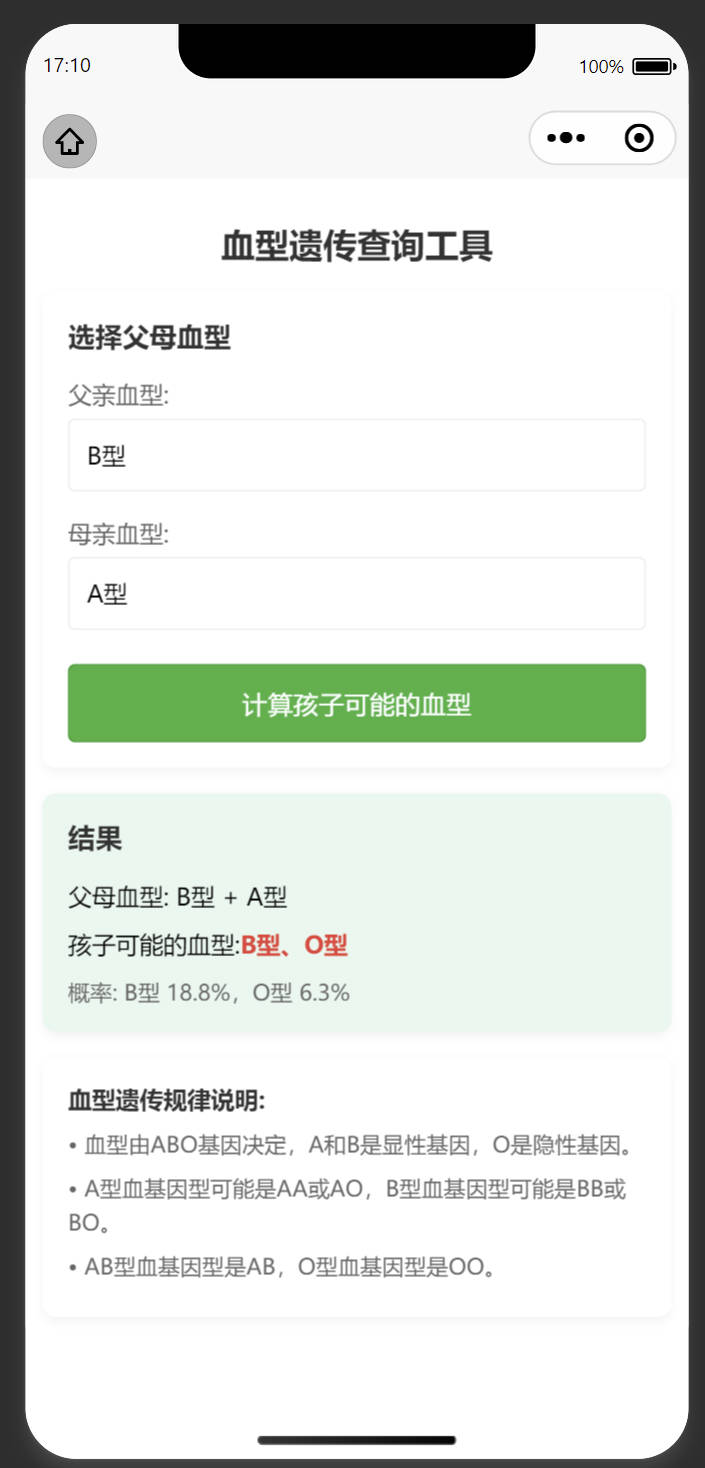
在现代社会中,了解血型遗传规律对于优生优育、医疗健康等方面都有重要意义,本文将介绍如何使用Uniapp开发一个跨平台的血型遗传查询工具,帮助用户预测孩子可能的血型,感兴趣的朋友一起看看吧
引言
在现代社会中,了解血型遗传规律对于优生优育、医疗健康等方面都有重要意义。本文将介绍如何使用Uniapp开发一个跨平台的血型遗传查询工具,帮助用户预测孩子可能的血型。
一、血型遗传基础知识
人类的ABO血型系统由三个等位基因决定:IA、IB和i。其中IA和IB对i是显性关系:
- A型血基因型:IAIA或IAi
- B型血基因型:IBIB或IBi
- AB型血基因型:IAIB
- O型血基因型:ii
根据孟德尔遗传定律,孩子的血型由父母双方各提供一个等位基因组合而成。
二、Uniapp开发优势
选择Uniapp开发这款工具主要基于以下优势:
- 跨平台能力:一次开发,可发布到iOS、Android、H5及各种小程序平台
- 开发效率高:基于Vue.js框架,学习成本低,开发速度快
- 性能优良:接近原生应用的体验
- 生态丰富:拥有完善的插件市场和社区支持
三、核心代码解析
1. 血型遗传算法实现
getPossibleGenotypes(parent1, parent2) {
  // 血型对应的可能基因型
  const typeToGenotypes = {
    'A': ['AA', 'AO'],
    'B': ['BB', 'BO'],
    'AB': ['AB'],
    'O': ['OO']
  }
  const parent1Genotypes = typeToGenotypes[parent1]
  const parent2Genotypes = typeToGenotypes[parent2]
  const possibleGenotypes = []
  // 生成所有可能的基因组合
  for (const g1 of parent1Genotypes) {
    for (const g2 of parent2Genotypes) {
      // 每个父母贡献一个等位基因
      for (let i = 0; i < 2; i++) {
        for (let j = 0; j < 2; j++) {
          const childGenotype = g1[i] + g2[j]
          possibleGenotypes.push(childGenotype)
        }
      }
    }
  }
  return possibleGenotypes
}
这段代码实现了血型遗传的核心算法,通过遍历父母可能的基因型组合,计算出孩子所有可能的基因型。
2. 概率计算
calculateProbabilities(genotypes) {
  const bloodTypeCounts = {
    'A': 0,
    'B': 0,
    'AB': 0,
    'O': 0
  }
  // 基因型到血型的映射
  const genotypeToType = {
    'AA': 'A',
    'AO': 'A',
    'BB': 'B',
    'BO': 'B',
    'AB': 'AB',
    'OO': 'O'
  }
  // 统计每种血型的出现次数
  for (const genotype of genotypes) {
    const type = genotypeToType[genotype]
    bloodTypeCounts[type]++
  }
  const total = genotypes.length
  const probabilities = {}
  // 计算概率
  for (const type in bloodTypeCounts) {
    const count = bloodTypeCounts[type]
    if (count > 0) {
      probabilities[type] = (count / total * 100).toFixed(1)
    }
  }
  return probabilities
}
这部分代码统计各种血型出现的频率,并计算出每种血型出现的概率百分比。
3. 界面交互实现
<view class="form-item">
  <text class="label">父亲血型:</text>
  <picker @change="bindParent1Change" :value="parent1Index" :range="bloodTypes" range-key="name">
    <view class="picker">
      {{bloodTypes[parent1Index].name}}
    </view>
  </picker>
</view>
<button class="calculate-btn" @click="calculateBloodType">计算孩子可能的血型</button>
使用Uniapp的picker组件实现血型选择,通过按钮触发计算逻辑,界面简洁友好。
四、项目亮点
- 科学准确性:严格遵循遗传学原理,计算结果准确可靠
- 用户体验优化:
- 结果自动滚动到可视区域
- 概率可视化展示
- 遗传知识科普
- 代码结构清晰:
- 业务逻辑与UI分离
- 复用性高的工具函数
- 良好的代码注释
完整代码
<template>
	<view class="container">
		<view class="header">
			<text class="title">血型遗传查询工具</text>
		</view>
		<view class="card">
			<text class="subtitle">选择父母血型</text>
			<view class="form-item">
				<text class="label">父亲血型:</text>
				<picker @change="bindParent1Change" :value="parent1Index" :range="bloodTypes" range-key="name">
					<view class="picker">
						{{bloodTypes[parent1Index].name}}
					</view>
				</picker>
			</view>
			<view class="form-item">
				<text class="label">母亲血型:</text>
				<picker @change="bindParent2Change" :value="parent2Index" :range="bloodTypes" range-key="name">
					<view class="picker">
						{{bloodTypes[parent2Index].name}}
					</view>
				</picker>
			</view>
			<button class="calculate-btn" @click="calculateBloodType">计算孩子可能的血型</button>
		</view>
		<view class="card result-card" v-if="showResult">
			<text class="subtitle">结果</text>
			<text class="result-text">父母血型: {{parent1Name}} + {{parent2Name}}</text>
			<text class="result-text">孩子可能的血型:
				<text class="blood-type">{{resultText}}</text>
			</text>
			<text class="probability" v-if="probabilityText">{{probabilityText}}</text>
		</view>
		<view class="card note-card">
			<text class="note-title">血型遗传规律说明:</text>
			<text class="note-text">• 血型由ABO基因决定,A和B是显性基因,O是隐性基因。</text>
			<text class="note-text">• A型血基因型可能是AA或AO,B型血基因型可能是BB或BO。</text>
			<text class="note-text">• AB型血基因型是AB,O型血基因型是OO。</text>
		</view>
	</view>
</template>
<script>
	export default {
		data() {
			return {
				bloodTypes: [{
						name: 'A型',
						value: 'A'
					},
					{
						name: 'B型',
						value: 'B'
					},
					{
						name: 'AB型',
						value: 'AB'
					},
					{
						name: 'O型',
						value: 'O'
					}
				],
				parent1Index: 0,
				parent2Index: 0,
				parent1Name: 'A型',
				parent2Name: 'A型',
				parent1Value: 'A',
				parent2Value: 'A',
				showResult: false,
				resultText: '',
				probabilityText: ''
			}
		},
		methods: {
			bindParent1Change(e) {
				this.parent1Index = e.detail.value
				this.parent1Name = this.bloodTypes[this.parent1Index].name
				this.parent1Value = this.bloodTypes[this.parent1Index].value
			},
			bindParent2Change(e) {
				this.parent2Index = e.detail.value
				this.parent2Name = this.bloodTypes[this.parent2Index].name
				this.parent2Value = this.bloodTypes[this.parent2Index].value
			},
			calculateBloodType() {
				// 计算可能的基因组合
				const possibleGenotypes = this.getPossibleGenotypes(this.parent1Value, this.parent2Value)
				// 计算可能的血型及其概率
				const bloodTypeProbabilities = this.calculateProbabilities(possibleGenotypes)
				// 生成结果文本
				let resultText = ''
				let probabilityText = '概率: '
				let first = true
				for (const type in bloodTypeProbabilities) {
					if (!first) {
						resultText += '、'
						probabilityText += ','
					}
					resultText += this.getBloodTypeName(type)
					probabilityText += `${this.getBloodTypeName(type)} ${bloodTypeProbabilities[type]}%`
					first = false
				}
				this.resultText = resultText
				this.probabilityText = probabilityText
				this.showResult = true
				// 滚动到结果位置
				uni.pageScrollTo({
					scrollTop: 300,
					duration: 300
				})
			},
			getBloodTypeName(type) {
				const names = {
					'A': 'A型',
					'B': 'B型',
					'AB': 'AB型',
					'O': 'O型'
				}
				return names[type]
			},
			getPossibleGenotypes(parent1, parent2) {
				// 血型对应的可能基因型
				const typeToGenotypes = {
					'A': ['AA', 'AO'],
					'B': ['BB', 'BO'],
					'AB': ['AB'],
					'O': ['OO']
				}
				const parent1Genotypes = typeToGenotypes[parent1]
				const parent2Genotypes = typeToGenotypes[parent2]
				const possibleGenotypes = []
				// 生成所有可能的基因组合
				for (const g1 of parent1Genotypes) {
					for (const g2 of parent2Genotypes) {
						// 每个父母贡献一个等位基因
						for (let i = 0; i < 2; i++) {
							for (let j = 0; j < 2; j++) {
								const childGenotype = g1[i] + g2[j]
								possibleGenotypes.push(childGenotype)
							}
						}
					}
				}
				return possibleGenotypes
			},
			calculateProbabilities(genotypes) {
				const bloodTypeCounts = {
					'A': 0,
					'B': 0,
					'AB': 0,
					'O': 0
				}
				// 基因型到血型的映射
				const genotypeToType = {
					'AA': 'A',
					'AO': 'A',
					'BB': 'B',
					'BO': 'B',
					'AB': 'AB',
					'OO': 'O'
				}
				// 统计每种血型的出现次数
				for (const genotype of genotypes) {
					const type = genotypeToType[genotype]
					bloodTypeCounts[type]++
				}
				const total = genotypes.length
				const probabilities = {}
				// 计算概率
				for (const type in bloodTypeCounts) {
					const count = bloodTypeCounts[type]
					if (count > 0) {
						probabilities[type] = (count / total * 100).toFixed(1)
					}
				}
				return probabilities
			}
		}
	}
</script>
<style>
	.container {
		padding: 20rpx;
	}
	.header {
		margin: 30rpx 0;
		text-align: center;
	}
	.title {
		font-size: 40rpx;
		font-weight: bold;
		color: #333;
	}
	.card {
		background-color: #fff;
		border-radius: 16rpx;
		padding: 30rpx;
		margin-bottom: 30rpx;
		box-shadow: 0 4rpx 12rpx rgba(0, 0, 0, 0.05);
	}
	.subtitle {
		font-size: 32rpx;
		font-weight: bold;
		margin-bottom: 30rpx;
		display: block;
		color: #333;
	}
	.form-item {
		margin-bottom: 30rpx;
	}
	.label {
		font-size: 28rpx;
		color: #666;
		margin-bottom: 10rpx;
		display: block;
	}
	.picker {
		height: 80rpx;
		line-height: 80rpx;
		padding: 0 20rpx;
		border: 1rpx solid #eee;
		border-radius: 8rpx;
		font-size: 28rpx;
	}
	.calculate-btn {
		background-color: #4CAF50;
		color: white;
		margin-top: 40rpx;
		border-radius: 8rpx;
		font-size: 30rpx;
		height: 90rpx;
		line-height: 90rpx;
	}
	.result-card {
		background-color: #e9f7ef;
	}
	.result-text {
		font-size: 28rpx;
		margin-bottom: 20rpx;
		display: block;
	}
	.blood-type {
		color: #e74c3c;
		font-weight: bold;
	}
	.probability {
		font-size: 26rpx;
		color: #666;
		display: block;
		margin-top: 10rpx;
	}
	.note-title {
		font-weight: bold;
		font-size: 28rpx;
		margin-bottom: 15rpx;
		display: block;
		color: #333;
	}
	.note-text {
		font-size: 26rpx;
		color: #666;
		display: block;
		margin-bottom: 10rpx;
		line-height: 1.6;
	}
</style>
到此这篇关于用 Deepseek 写的uniapp血型遗传查询工具的文章就介绍到这了,更多相关Deepseek uniapp血型遗传内容请搜索脚本之家以前的文章或继续浏览下面的相关文章希望大家以后多多支持脚本之家!
相关文章
 这篇文章主要介绍了vue如何实现垂直居中,具有很好的参考价值,希望对大家有所帮助。如有错误或未考虑完全的地方,望不吝赐教2022-09-09
 这篇文章主要介绍了Vue瀑布流插件的使用示例,小编觉得挺不错的,现在分享给大家,也给大家做个参考。一起跟随小编过来看看吧2018-09-09
uniapp实现省市区三级级联选择功能(含地区json文件)
这篇文章主要给大家介绍了关于uniapp实现省市区三级级联选择功能(含地区json文件)的相关资料,级级联是一种常见的网页交互设计,用于省市区选择,它的目的是方便用户在一系列选项中进行选择,并且确保所选选项的正确性和完整性,需要的朋友可以参考下2024-06-06 这篇文章主要为大家详细介绍了Vue实现天气预报小应用,查询一些城市的天气情况,文中示例代码介绍的非常详细,具有一定的参考价值,感兴趣的小伙伴们可以参考一下2021-08-08
 在 Vue 3 中的 Composition API 中,$refs 并不直接可用于 setup 函数,但是实际工作中确实有需求,那么该如何解决呢,本文为大家整理了两个方案,希望对大家有所帮助2023-08-08
vuedraggable+element ui实现页面控件拖拽排序效果
这篇文章主要为大家详细介绍了vuedraggable+element ui实现页面控件拖拽排序效果,文中示例代码介绍的非常详细,具有一定的参考价值,感兴趣的小伙伴们可以参考一下2018-12-12 这篇文章主要介绍了Vue组件化开发的思考以及相关的原理介绍,如果你对此有兴趣,可以学习参考下。2018-02-02
 这篇文章主要为大家介绍了极度舒适的Vue弹窗Dialog最佳使用方案实战,有需要的朋友可以借鉴参考下,希望能够有所帮助,祝大家多多进步,早日升职加薪2023-11-11
 这篇文章主要介绍了vue循环语句v-for中的元素绑定值问题,具有很好的参考价值,希望对大家有所帮助,如有错误或未考虑完全的地方,望不吝赐教2023-11-11
Vue编译器中的过滤器转换机制(transformFilter)详解
本文将详细解读 Vue 兼容模式下的过滤器编译逻辑——transformFilter 模块,它是 Vue 3 为了兼容 Vue 2 模板过滤器语法而存在的编译阶段转换器,需要的朋友可以参考下2025-11-11
最新评论