

vue3-reactive定义的对象数组如何赋值
更新时间:2025年06月16日 09:20:14 作者:柠檬树^-^
这篇文章主要介绍了vue3-reactive定义的对象数组如何赋值问题,具有很好的参考价值,希望对大家有所帮助,如有错误或未考虑完全的地方,望不吝赐教
vue3-reactive定义的对象数组赋值
type childEditQosItem = {
objectName: string;
attribute: string;
type: string;
valueType: string;
value: string;
};
const ruleList = reactive<childEditQosItem>([
{ objectName: "", attribute: "", type: "", valueType: "", value: "" },
]);

const data = [
{ attribute: "2", type: "3", valueType: "4", value: "6" },
{ objectName: "7", attribute: "8", type: "9", valueType: "" },
];
将 data 数组中的元素补充完整并更新到 ruleList 中。
思路
- 类型定义:和之前一样,先定义了
childEditQosItem类型,明确每个元素应该包含的属性。 - 创建响应式数组
ruleList:使用reactive函数创建响应式数组并初始化了一个默认元素。 - 清空
ruleList:使用splice方法将ruleList中的元素清空,为后续添加处理后的数据做准备。
使用 for...in 处理数据:
- 外层
for循环遍历data数组中的每个元素。 - 对于每个元素,先创建一个默认的
newItem对象,其属性都初始化为空字符串。 - 内层
for...in循环遍历当前元素的每个属性。使用Object.prototype.hasOwnProperty.call来确保只处理对象自身的属性,避免处理原型链上的属性。 - 将当前元素的属性值赋值给
newItem对应的属性。
更新 ruleList:将处理好的 newItem 添加到 ruleList 中。
const ruleList = reactive([
{ objectName: "", attribute: "", type: "", valueType: "", value: "" },
]);

const data = [
{ attribute: "2", type: "3", valueType: "4", value: "6" },
{ objectName: "7", attribute: "8", type: "9", valueType: "" },
];

// 清空 ruleList 原有的内容
ruleList.length = 0;

// 遍历 data 数组
for (let i = 0; i < data.length; i++) {
const newItem = {
objectName: "",
attribute: "",
type: "",
valueType: "",
value: ""
};
// 合并 data 中当前项的属性到新对象
for (const key in data[i]) {
if (data[i].hasOwnProperty(key)) {
newItem[key] = data[i][key];
}
}
ruleList.push(newItem);
}

console.log(ruleList);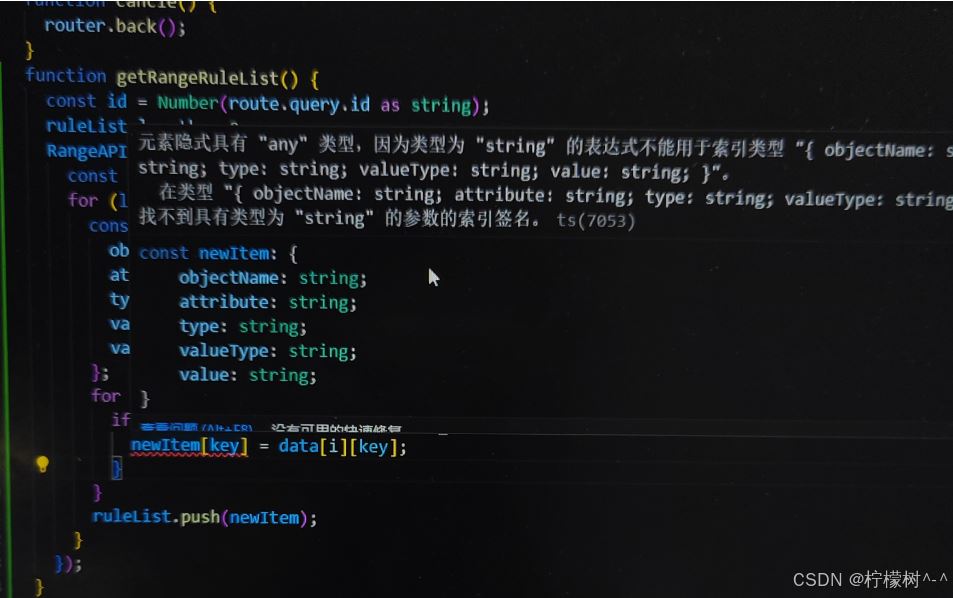
这个 TypeScript 错误提示表明,你试图使用一个 string 类型的变量 key 来索引 newItem 对象,但 newItem 类型并没有定义这样的索引签名。
要解决这个问题
你可以通过类型断言或者使用类型守卫来确保 key 是 newItem 对象的合法属性名。
// 定义 childEditQosItem 类型
type childEditQosItem = {
objectName: string;
attribute: string;
type: string;
valueType: string;
value: string;
};

const ruleList = reactive<childEditQosItem[]>([
{ objectName: "", attribute: "", type: "", valueType: "", value: "" },
]);

const data = [
{ attribute: "2", type: "3", valueType: "4", value: "6" },
{ objectName: "7", attribute: "8", type: "9", valueType: "" },
];

// 清空 ruleList
ruleList.length = 0;

// 定义类型守卫函数
function isValidKey(key: string): key is keyof childEditQosItem {
return ['objectName', 'attribute', 'type', 'valueType', 'value'].includes(key);
}

for (let i = 0; i < data.length; i++) {
const newItem: childEditQosItem = {
objectName: "",
attribute: "",
type: "",
valueType: "",
value: "",
};
for (const key in data[i]) {
if (data[i].hasOwnProperty(key) && isValidKey(key)) {
newItem[key] = data[i][key] || "";
}
}
ruleList.push(newItem);
}

console.log(ruleList);
isValidKey 函数是一个类型守卫,它接受一个 string 类型的参数 key,并检查 key 是否是 childEditQosItem 类型的合法属性名。如果是,则返回 true,并且 TypeScript 编译器会将 key 的类型缩小为 keyof childEditQosItem。
在 for...in 循环中,使用 isValidKey(key) 作为类型守卫,确保只有合法的属性名才能用于索引 newItem 对象。
其中
newItem[key] = data[i][key] || "";
在赋值时使用 || "" 运算符,若 data[i][key] 的值为 undefined 或者空字符串,就会将空字符串赋给 newItem[key],这样就保证了赋值的类型是 string。
或者:
for (const key in data[i]) {
if (data[i].hasOwnProperty(key) && isValidKey(key)) {
const value = data[i][key];
if (value!== undefined) {
newItem[key] = value;
}
}
}
总结
以上为个人经验,希望能给大家一个参考,也希望大家多多支持脚本之家。
相关文章
 这篇文章主要介绍了vue修改滚动条样式,首先要知道,修改滚动条样式,利用伪元素-webkit-scrollbar。下面来看看文章内容的具体实现吧2021-11-11
vue vxe-table 实现表格设置默认行高同时又支持自定义行高的示例代码
本文给大家介绍vue vxe-table如何实现表格设置默认行高同时又支持自定义行高,首先将默认行高通过css变量修改,然后再启用自定义行高,就可以轻松实现这个功能了,感兴趣的朋友跟随小编一起看看吧2025-08-08
Vue2中使用自定义指令实现el-table虚拟列表的代码示例
在实际开发中,我们可能会面临其他需求,例如在 el-table 中无法使用分页技术的情况下展示海量数据,这种情况下,页面可能会出现卡顿,严重时甚至可能引发浏览器崩溃,所以针对这个问题本文给大家介绍了vue2中使用自定义指令实现el-table虚拟列表,需要的朋友可以参考下2025-01-01 当我们使用vuex的时候,时不时能看到“更改Vuex中的store中的状态唯一办法就是提交mutations”,但是有没有试想过,我们不提交mutations其实也能修改state的值?答案是可以的,下面通过本文介绍下vuex修改state值的方法,感兴趣的朋友一起看看吧2022-11-11
 这篇文章主要为大家介绍了VueUse使用及造轮子选择对比示例详解,有需要的朋友可以借鉴参考下,希望能够有所帮助,祝大家多多进步,早日升职加薪2022-08-08
 这篇文章主要介绍了Vue 和 Django 实现 Token 身份验证 ,Vue.js 和 Django 编写的前后端项目中,实现了基于 Token 的身份验证机制,其他前后端框架的 Token 实现原理与本文一致,需要的朋友可以参考下2022-08-08
 下面小编就为大家分享一篇vue2.0 子组件改变props值,并向父组件传值的方法,具有很好的参考价值,希望对大家有所帮助。一起跟随小编过来看看吧2018-03-03
 这篇文章主要介绍了vue复杂表格单元格合并根据数据动态合并方式,具有很好的参考价值,希望对大家有所帮助,如有错误或未考虑完全的地方,望不吝赐教2024-02-02
 本篇文章主要介绍了vue生成随机验证码的示例代码,小编觉得挺不错的,现在分享给大家,也给大家做个参考。一起跟随小编过来看看吧‘2017-09-09
 Vue项目打包部署Nginx服务器后,刷新页面后出现404的问题,下面这篇文章主要给大家介绍了关于前端部署踩坑的实战记录,文中包括部署后404、页面空白等问题的解决办法,需要的朋友可以参考下2024-09-09
最新评论