

vue窗口内容滚动到底部实现过程
更新时间:2025年12月17日 09:00:53 作者:巨蟹座守护骑士
这篇文章主要介绍了vue窗口内容滚动到底部实现过程,以上为个人经验,希望能给大家一个参考,也希望大家多多支持脚本之家,
vue窗口内容滚动到底部
onMounted(() => {
  scrollToBottom()
})
// 滚动到底部方法
const scrollToBottom = () => {
  // 获取聊天窗口容器
  let chatRoom: any = document.querySelector(".chat-content");
  // 滚动到容器底部
  chatRoom.scrollTop = chatRoom.scrollHeight;
}
效果
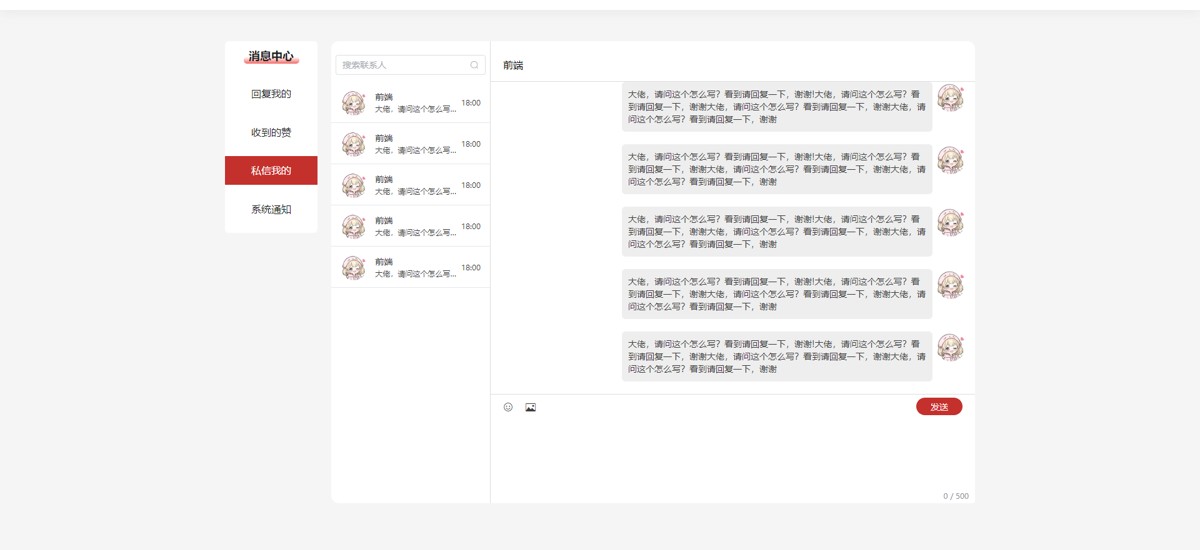
聊天窗口代码
<template>
  <div class="chat">
    <div class="left">
      <div class="top">
        <ClientOnly>
          <el-input v-model="search" style="width: 240px;" placeholder="搜索联系人" :suffix-icon="Search" />
        </ClientOnly>
      </div>
      <div class="ul">
        <div class="li" v-for="item, i in 5" :key="i">
          <div class="img">
            <img src="/assets/images/head/user.jpg" alt="">
          </div>
          <div class="content">
            <div class="name">前端</div>
            <div class="text text_ov1">大佬,请问这个怎么写?看到请回复一下,谢谢</div>
          </div>
          <div class="tiem">
            18:00
          </div>
        </div>
      </div>
    </div>
    <div class="right">
      <div class="chat-name">前端</div>
      <!-- 聊天内容 -->
      <div class="chat-content">
        <!-- 收到的 -->
        <div class="chat-item">
          <div class="chat-img">
            <img src="/assets/images/head/user.jpg" alt="">
          </div>
          <div class="chat-text">
            大佬,请问这个怎么写?看到请回复一下,谢谢!大佬,请问这个怎么写?看到请回复一下,谢谢大佬,请问这个怎么写?看到请回复一下,谢谢大佬,请问这个怎么写?看到请回复一下,谢谢
          </div>
        </div>
        <!-- 发送的 -->
        <div class="my_chat-item" v-for="item, i in 10" :key="i">
          <div class="chat-img">
            <img src="/assets/images/head/user.jpg" alt="">
          </div>
          <div class="chat-text">
            大佬,请问这个怎么写?看到请回复一下,谢谢!大佬,请问这个怎么写?看到请回复一下,谢谢大佬,请问这个怎么写?看到请回复一下,谢谢大佬,请问这个怎么写?看到请回复一下,谢谢
          </div>
        </div>
      </div>
      <!-- 输入框 -->
      <div class="chat-input">
        <div class="rest">
          <div class="ul">
            <div class="li">
              <i class="iconfont icon-smile"></i>
            </div>
            <div class="li">
              <i class="iconfont icon-tupian"></i>
            </div>
          </div>
          <div class="publish">发送</div>
        </div>
        <ClientOnly>
          <el-input type="textarea" resize="none" :autosize="{ minRows: 6, maxRows: 6 }" maxlength="500" show-word-limit
            placeholder="" v-model="message">
          </el-input>
        </ClientOnly>
      </div>
    </div>
  </div>
</template>
<script setup lang="ts">
import { Search } from '@element-plus/icons'
let search = ref("");
let message = ref("");
onMounted(() => {
scrollToBottom()
})
// 滚动到底部方法
const scrollToBottom = () => {
// 获取聊天窗口容器
let chatRoom: any = document.querySelector(".chat-content");
// 滚动到容器底部
chatRoom.scrollTop = chatRoom.scrollHeight;
}
</script>
<style scoped lang="scss">
.chat {
  margin-left: 22px;
  width: 1030px;
  border-radius: 12px;
  background: #ffffff;
  display: flex;

  .left {
    padding-top: 10px;
    border-right: 1px solid #dddddd;
    width: 255px;

    .top {
      display: flex;
      justify-content: center;
      align-items: center;
      height: 55px;
    }

    .ul {
      .li {
        padding: 15px;
        background-color: #fff;
        height: 66px;
        display: flex;
        justify-content: space-between;
        align-items: center;
        border-bottom: 1px solid #E4E7ED;
        cursor: pointer;

        &:hover {
          background: #F1F6FF;
        }

        .img {
          width: 42px;
          height: 42px;
          overflow: hidden;
          border-radius: 50%;
          margin-right: 10px;

          img {
            width: 100%;
          }
        }

        div.content {
          width: 60%;

          div.name {
            font-size: 14px;
            color: #303133;
          }

          div.text {
            margin-top: 2px;
            font-size: 12px;
            color: #3D3D3D;
          }
        }

        div.tiem {
          font-size: 12px;
          color: #3D3D3D;
        }

      }
    }
  }

  .right {
    padding-top: 10px;
    flex: 1;

    .chat-name {
      border-bottom: 1px solid #dddddd;
      height: 55px;
      line-height: 55px;
      padding-left: 20px;
    }

    /**聊天框*/
    div.chat-content {
      overflow-y: scroll;
      height: 500px;
      padding: 20px 10px;

      &::-webkit-scrollbar {
        /**display: none;*/
        width: 5px !important;
      }


      /**我接收的*/
      div.chat-item {
        display: flex;
        margin-top: 20px;

        div.chat-img {
          width: 48px;
          height: 48px;
          border-radius: 50%;
          overflow: hidden;
          margin-right: 5px;

          img {
            width: 100%;
          }
        }

        div.chat-text {
          background: #EEEEEE;
          border-radius: 6px;
          padding: 10px;
          margin-right: 200px;
          font-size: 14px;
          color: #3D3D3D;
          line-height: 20px;
          flex: 1;
        }
      }

      /**我发送的*/
      div.my_chat-item {
        display: flex;
        flex-direction: row-reverse;
        margin-top: 20px;

        div.chat-img {
          width: 48px;
          height: 48px;
          border-radius: 50%;
          overflow: hidden;
          margin-left: 5px;

          img {
            width: 100%;
          }
        }

        div.chat-text {
          background: #EEEEEE;
          border-radius: 6px;
          padding: 10px;
          flex: 1;
          margin-left: 200px;
          font-size: 14px;
          color: #3D3D3D;
          line-height: 20px;
        }
      }
    }

    .chat-input {
      height: 30%;
      border-top: 1px solid #dddddd;

      .rest {
        display: flex;
        justify-content: space-between;
        align-items: center;
        padding: 5px 20px;

        .ul {
          display: flex;

          .li {
            margin-right: 20px;

            i {
              color: #3D3D3D;
              cursor: pointer;
            }
          }
        }
      }

      // 清除文本域边框
      :deep(.el-textarea__inner) {
        box-shadow: 0 0 0 0px;
      }

      :deep(.el-textarea__inner:hover) {
        box-shadow: 0 0 0 0px;
      }

      :deep(.el-textarea__inner:focus) {
        box-shadow: 0 0 0 0px;
      }

      .publish {
        cursor: pointer;
        width: 74px;
        height: 28px;
        border-radius: 14px;
        text-align: center;
        line-height: 28px;
        background: #fff;
        color: #888888;
        font-size: 14px;
        border: 1px solid #888888;

        &:hover {
          background: #C4302C;
          color: #fff;
          border: 1px solid #ffffff00;
        }
      }
    }
  }
}
</style>
总结
以上为个人经验,希望能给大家一个参考,也希望大家多多支持脚本之家。
相关文章

vue最强table vxe-table 虚拟滚动列表 前端导出问题分析
最近遇到个问题,后台一次性返回2万条列表数据并且需求要求所有数据必须全部展示,不能做假分页,怎么操作呢,下面通过本文介绍下vue最强table vxe-table 虚拟滚动列表 前端导出问题,感兴趣的朋友一起看看吧2023-10-10 这篇文章主要为大家介绍了Vue之Axios异步通信,具有一定的参考价值,感兴趣的小伙伴们可以参考一下,希望能够给你带来帮助2021-11-11
 本文主要介绍了vue使用JSEncrypt对密码本地存储时加解密,文中通过示例代码介绍的非常详细,对大家的学习或者工作具有一定的参考学习价值,需要的朋友们下面随着小编来一起学习学习吧2023-07-07
组件中多个el-upload存在导致上传图片失效的问题及解决
这篇文章主要介绍了组件中多个el-upload存在导致上传图片失效的问题及解决方案,具有很好的参考价值,希望对大家有所帮助。如有错误或未考虑完全的地方,望不吝赐教2023-03-03
vue中解决chrome浏览器自动播放音频和MP3语音打包到线上的实现方法
这篇文章主要介绍了vue中解决chrome浏览器自动播放音频和MP3语音打包到线上的实现方法,本文通过实例代码给大家介绍的非常详细,对大家的学习或工作具有一定的参考借鉴价值,需要的朋友可以参考下2020-10-10 这篇文章主要介绍了vue使用高德地图实现实时天气预报功能,根据定位功能,使用高德地图实现定位当前城市的天气预报功能,本文通过实例代码给大家介绍的非常详细,需要的朋友可以参考下2022-05-05
 在最近的一个项目中我需要实现表格的翻页,并且还要实现全选、多选功能,下面这篇文章主要给大家介绍了关于vue如何基于el-table实现多页多选及翻页回显过程的相关资料,需要的朋友可以参考下2022-12-12
 这篇文章主要介绍了vue实现折叠展开收缩动画,通过scrollHeight实现,本文通过实例代码给大家介绍的非常详细,感兴趣的朋友一起看看吧2023-11-11
vue 中常用操作数组的方法(forEach()和reduce())
文章介绍了JavaScript中常用的操作数组方法,包括forEach()和reduce(),forEach()用于遍历数组并对每个元素执行操作,而reduce()则用于遍历数组并进行累加等迭代操作,感兴趣的朋友一起看看吧2025-03-03 本文主要介绍了VUE侧边导航栏实现筛选过滤的示例代码,文中通过示例代码介绍的非常详细,对大家的学习或者工作具有一定的参考学习价值,需要的朋友们下面随着小编来一起学习学习吧2023-05-05
最新评论