

Vue实现前端页面版本检测的示例代码
更新时间:2026年02月02日 08:36:28 作者:誰在花里胡哨
这篇文章主要介绍了使用Vue实现前端页面版本检测功能的相关知识,文中的示例代码讲解详细,感兴趣的小伙伴可以跟随小编一起学习一下
为什么需要版本检测
1. 解决浏览器缓存问题
- 静态资源缓存:浏览器会缓存 JS、CSS 等静态资源,用户可能继续使用旧版本
- 用户体验影响:用户无法及时获取新功能,导致功能缺失或操作异常
2. 保障功能一致性
- 功能同步:确保所有用户都能使用最新的功能和修复
- 数据一致性:避免因版本差异导致的数据不一致问题
3. 提升用户体验
- 主动提醒:在新版本发布后主动通知用户更新
- 无缝升级:减少用户手动刷新页面的需求
版本检测核心思路

整体架构
构建阶段 → 版本文件生成 → 运行时检测 → 版本对比 → 用户提醒
技术实现要点
1. 版本标识生成
- 构建时生成:每次打包时生成唯一的版本标识
- 时间戳方案:使用时间戳确保每次构建版本号唯一
2. 版本文件部署
- JSON 格式:将版本信息保存为
version.json文件 - 静态访问:通过 HTTP 请求可直接访问版本文件
3. 客户端检测机制
- 定时轮询:定期检查服务器版本文件
- 版本对比:比较本地缓存版本与服务器版本
- 智能提醒:仅在版本不一致时提醒用户
版本检测实现步骤
步骤一:构建版本文件生成脚本
创建 build-version.js 文件:
// build-version.js (自动生成版本文件脚本)
const fs = require('fs')
const path = require('path')

// 方案A:使用时间戳作为版本标识(最简单,确保每次打包唯一)
const version = new Date().getTime().toString()

// 版本文件内容
const versionJson = {
  version: version,
  updateTime: new Date().toLocaleString() // 可选:添加更新时间,便于排查
}

// 写入version.json文件(项目根目录)
const versionPath = path.resolve(__dirname, 'public', 'version.json')
fs.writeFileSync(versionPath, JSON.stringify(versionJson, null, 2), 'utf-8')

console.log(`✅ 自动生成版本文件成功,版本号:${version}`)
步骤二:修改构建命令
在 package.json 中修改构建命令:
{
  "scripts": {
    "build:prod": "node build-version.js && vue-cli-service build"
  }
}
步骤三:配置 Vue 构建过程
在 vue.config.js 中添加版本文件复制配置:
chainWebpack(config) {
  // ... 其他配置

  // 复制 version.json 到 dist 目录
  config.plugin('copy')
    .tap(args => {
      const hasVersionJson = args[0].some(item => item.from === 'version.json')
      if (!hasVersionJson) {
        args[0].push({
          from: path.resolve(__dirname, 'public/version.json'),
          to: path.resolve(__dirname, 'dist/version.json')
        })
      }
      return args
    })
}
步骤四:实现版本检测工具类
创建 src/utils/versionUpdate.js:
// src/utils/versionUpdate.js
import { Notification } from 'element-ui'
/**
 * 版本更新检测工具类(仅生产环境启用轮询,内置环境判断)
 */
class VersionUpdate {
  constructor(options = {}) {
    this.config = {
      versionFileUrl: '/version.json', // 版本文件地址
      localVersionKey: 'cmpVersion', // 本地存储的版本号key
      disableFetchCache: true, // 禁用Fetch缓存
      pollInterval: 5 * 60 * 1000, // 5分钟轮询一次
      hasNotified: false // 是否已提醒过用户有新版本
    }
    Object.assign(this.config, options)
    // 定时轮询定时器
    this.pollTimer = null
    // 识别当前环境(Vue CLI 4 自动注入的环境变量)
    this.isProduction = process.env.NODE_ENV === 'production'
  }

  /**
   * 核心方法:执行版本检测
   */
  async checkVersion(isInit = false) {
    try {
      if (this.config.hasNotified) return false

      const localVersion = localStorage.getItem(this.config.localVersionKey) || ''
      const fetchOptions = {}
      if (this.config.disableFetchCache) {
        fetchOptions.cache = 'no-cache'
      }

      const response = await fetch(this.config.versionFileUrl, fetchOptions)
      if (!response.ok) {
        throw new Error(`版本文件请求失败,状态码:${response.status}`)
      }
      const latestVersionInfo = await response.json()
      const serverVersion = latestVersionInfo.version

      if (isInit) {
        this.cacheLatestVersion(serverVersion)
        return true
      }

      if (serverVersion && serverVersion !== localVersion) {
        this.config.hasNotified = true
        console.log('有新版本可用', latestVersionInfo)
        Notification({
          title: '🎉 有新版本可用',
          dangerouslyUseHTMLString: true,
          message: `<p style="font-size:12px;">建议点击刷新页面,以获取最新功能和修复</p> <p style="color:#cccccc;font-size:12px;">更新时间:${latestVersionInfo.updateTime}</p>`,
          duration: 0,
          customClass: 'check-version-notify',
          onClick: () => {
            this.forceRefreshPage()
          },
          onClose: () => {
            this.resetNotifyFlag()
          }
        })
        return true
      } else {
        // 版本一致时,重置提醒标记,便于后续轮询检测新版本
        this.config.hasNotified = false
        // console.log('当前已是最新版本,已缓存最新版本号')
        return false
      }
    } catch (error) {
      console.warn('版本检测异常,不影响应用运行:', error.message)
      return false
    }
  }
  /**
   * 启动定时轮询检测(内置环境判断:仅生产环境生效)
   */
  async startPolling() {
    // 核心:非生产环境,直接返回,不启动轮询
    if (!this.isProduction) {
      console.log('当前为非生产环境,不启动版本检测轮询')
      return
    }

    // 生产环境:正常启动轮询
    this.stopPolling() // 先停止已有轮询,避免重复启动
    this.checkVersion(true) // 立即执行一次检测

    this.pollTimer = setInterval(() => {
      this.checkVersion()
    }, this.config.pollInterval)

    console.log(`生产环境版本轮询检测已启动,每隔${this.config.pollInterval / 1000 / 60}分钟检测一次`)
  }

  /**
   * 停止定时轮询检测
   */
  stopPolling() {
    if (this.pollTimer) {
      clearInterval(this.pollTimer)
      this.pollTimer = null
      console.log('版本轮询检测已停止')
    }
  }

  /**
   * 重置提醒标记
   */
  resetNotifyFlag() {
    this.config.hasNotified = false
  }

  // 缓存最新版本号
  cacheLatestVersion(version) {
    localStorage.setItem(this.config.localVersionKey, version)
    this.resetNotifyFlag()
  }

  // 强制刷新页面
  forceRefreshPage() {
    window.location.reload(true)
  }
}

const versionUpdateInstance = new VersionUpdate()
export { VersionUpdate, versionUpdateInstance }
export default versionUpdateInstance
创建自定义.check-version-notify的版本检测全局样式:
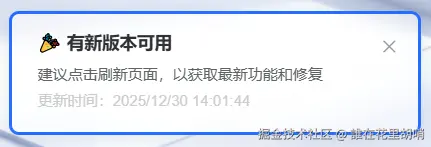
// 版本检测通知样式
.check-version-notify{
  border: 3px solid transparent !important;
  cursor: pointer;
  background-color: rgba(255, 255, 255, 0.6) !important;
  backdrop-filter: blur(5px);
  &:hover{
    border: 3px solid $--color-primary !important;
  }
  .el-notification__icon{
    font-size: 18px;
    height: 18px;
  }
  .el-notification__title{
    font-size: 14px;
    line-height: 18px;
  }
  .el-notification__group{
    margin-left: 8px;
  }
}
步骤五:在应用入口启动版本检测
在 App.vue 或合适的入口文件中启动版本检测:
import versionUpdate from '@/utils/versionUpdate'
...
mounted() {
  versionUpdate.startPolling()
},
beforeDestroy() {
  versionUpdate.stopPolling()
}
到此这篇关于Vue实现前端页面版本检测的示例代码的文章就介绍到这了,更多相关Vue页面版本检测内容请搜索脚本之家以前的文章或继续浏览下面的相关文章希望大家以后多多支持脚本之家!
您可能感兴趣的文章:
相关文章
 这篇文章主要介绍了vue实现公共组件传值并及时监听到数据更新视图方式,具有很好的参考价值,希望对大家有所帮助。如有错误或未考虑完全的地方,望不吝赐教2023-01-01
 我们会经常使用表格,如果数据量大就直接可以分页,如果多条可能会影响表格的卡顿,那么应该如何进行优化,感兴趣的可以了解一下2021-08-08
 这篇文章主要为大家详细介绍了vue实现在线预览pdf文件和下载,文中示例代码介绍的非常详细,具有一定的参考价值,感兴趣的小伙伴们可以参考一下2019-11-11
 这篇文章主要为大家介绍了vue3 name 属性的使用技巧详解,有需要的朋友可以借鉴参考下,希望能够有所帮助,祝大家多多进步,早日升职加薪2022-09-09
 这篇文章主要为大家详细介绍了vue2.0实现音乐和视频播放进度条组件的思路及具体实现方法,具有一定的参考价值,感兴趣的小伙伴们可以参考一下2018-06-06
 今天小编就为大家分享一篇解决vue 表格table列求和的问题,具有很好的参考价值,希望对大家有所帮助。一起跟随小编过来看看吧2019-11-11
element-ui自定义message-box自定义样式不生效的解决
这篇文章主要介绍了element-ui自定义message-box自定义样式不生效的解决方案,具有很好的参考价值,希望对大家有所帮助。如有错误或未考虑完全的地方,望不吝赐教2022-09-09 这篇文章主要介绍了Vue3父子通讯方式及Vue3插槽的使用方法详解,需要的朋友可以参考下2023-01-01
 本篇文章主要介绍了Vue键盘事件用法总结,详细的介绍了各种键盘事件的用法,有兴趣的可以了解一下2017-04-04
基于Vue3与免费满血版DeepSeek实现无限滚动+懒加载+瀑布流模块及优化过程
在进行非完全标准化数据的可视化展示时,瀑布流是一种经常被采用的展示方法,瀑布流能够有效地将不同大小规格的内容以一种相对规整的方式呈现出来,本文给大家介绍了基于Vue3与免费满血版DeepSeek实现无限滚动+懒加载+瀑布流模块,需要的朋友可以参考下2025-03-03
最新评论