

vue表单vxe-form多字段联动校验的操作方法(对一个控件校验多个关联字段)
更新时间:2026年02月02日 09:08:28 作者:zy65
vue表单vxe-form如何多字段联动校验,对一个控件校验多个关联字段,这篇文章给大家介绍vue表单vxe-form如何多字段联动校验,对一个控件校验多个关联字段,感兴趣的朋友跟随小编一起看看吧
vue表单vxe-form如何多字段联动校验,对一个控件校验多个关联字段。正常的表单场景是一个控件一个字段,那么配置起来非常任意,一个字段对应一个校验规则。当时某些复杂场景就不一样了,比如用户控件,有id/code/role等。比如范围日期选择,一个控件是对应2个字段的,开始日期和结束日期。这个时候就可以使用 rule 规则中 field 属性来指定复杂的多字段校验。
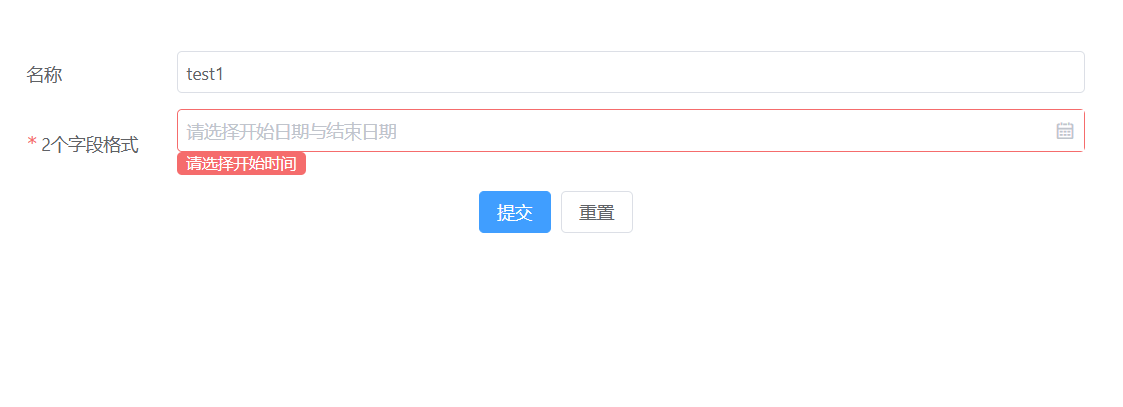
表单-日期范围-多字段校验
举个例子,比如日期范围选择,有2个字段,先给控件绑定一个不存在的字段,然后在这个字段里面配置2条规则,分别校验多个字段;当某个字段为空时都能被直接校验并提示出来
<template>
  <div>
    <vxe-form v-bind="formOptions" v-on="formEvents" ></vxe-form>
  </div>
</template>
<script setup>
import { reactive } from 'vue'
import { VxeUI } from 'vxe-pc-ui'
const formOptions = reactive({
  titleWidth: 120,
  data: {
    name: 'test1',
    startDate: '',
    endDate: ''
  },
  rules: {
    _startAndEnd: [
      { field: 'startDate', required: true, message: '请选择开始时间' },
      { field: 'endDate', required: true, message: '请选择结束时间' }
    ]
  },
  items: [
    { field: 'name', title: '名称', span: 24, itemRender: { name: 'VxeInput' } },
    { field: '_startAndEnd', title: '2个字段格式', span: 24, itemRender: { name: 'VxeDateRangePicker', startField: 'startDate', endField: 'endDate' } },
    {
      align: 'center',
      span: 24,
      itemRender: {
        name: 'VxeButtonGroup',
        options: [
          { type: 'submit', content: '提交', status: 'primary' },
          { type: 'reset', content: '重置' }
        ]
      }
    }
  ]
})
const formEvents = {
  submit () {
    VxeUI.modal.message({ content: '保存成功', status: 'success' })
  },
  reset () {
    VxeUI.modal.message({ content: '重置事件', status: 'info' })
  }
}
</script>
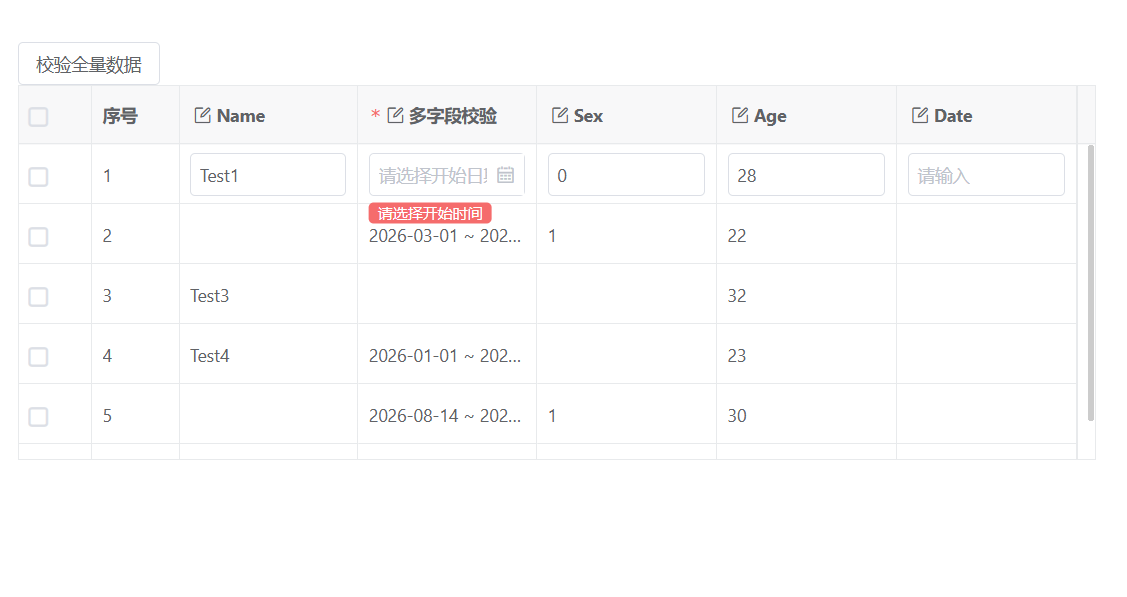
表格-日期范围-多字段校验
同样先给控件绑定一个不存在的字段,然后在这个字段里面配置2条规则,分别校验多个字段
<template>
  <div>
    <vxe-button @click="fullValidEvent">校验全量数据</vxe-button>
    <vxe-grid ref="gridRef" v-bind="gridOptions"></vxe-grid>
  </div>
</template>
<script setup>
import { ref, reactive } from 'vue'
import { VxeUI } from 'vxe-table'
const gridRef = ref()
const gridOptions = reactive({
  border: true,
  showOverflow: true,
  keepSource: true,
  height: 300,
  editConfig: {
    trigger: 'click',
    mode: 'row',
    showStatus: true
  },
  editRules: {
    _startAndEnd: [
      { field: 'startDate', required: true, message: '请选择开始时间' },
      { field: 'endDate', required: true, message: '请选择结束时间' }
    ]
  },
  columns: [
    { type: 'checkbox', width: 60 },
    { type: 'seq', width: 70 },
    { field: 'name', title: 'Name', editRender: { name: 'VxeInput' } },
    { field: '_startAndEnd', title: '多字段校验', editRender: { name: 'VxeDateRangePicker', startField: 'startDate', endField: 'endDate' } },
    { field: 'sex', title: 'Sex', editRender: { name: 'VxeInput' } },
    { field: 'age', title: 'Age', editRender: { name: 'VxeInput' } },
    { field: 'date', title: 'Date', editRender: { name: 'VxeInput' } }
  ],
  data: [
    { id: 10001, name: 'Test1', startDate: '', endDate: '', sex: '0', age: 28, address: 'test abc' },
    { id: 10002, name: '', startDate: '2026-03-01', endDate: '2026-04-01', sex: '1', age: 22, address: 'Guangzhou' },
    { id: 10003, name: 'Test3', startDate: '', endDate: '', sex: '', age: 32, address: 'Shanghai' },
    { id: 10004, name: 'Test4', startDate: '2026-01-01', endDate: '2026-01-10', sex: '', age: 23, address: 'test abc' },
    { id: 10005, name: '', startDate: '2026-08-14', endDate: '2026-08-26', sex: '1', age: 30, address: 'Shanghai' },
    { id: 10006, name: 'Test6', startDate: '2026-10-10', endDate: '026-12-10', sex: '1', age: 21, address: 'test abc' }
  ]
})
const fullValidEvent = async () => {
  const $grid = gridRef.value
  if ($grid) {
    const errMap = await $grid.validate(true)
    if (errMap) {
      VxeUI.modal.message({ status: 'error', content: '校验不通过!' })
    } else {
      VxeUI.modal.message({ status: 'success', content: '校验成功!' })
    }
  }
}
</script>
https://gitee.com/x-extends/vxe-table
到此这篇关于vue表单vxe-form多字段联动校验的操作方法(对一个控件校验多个关联字段)的文章就介绍到这了,更多相关vue表单vxe-form多字段联动校验内容请搜索脚本之家以前的文章或继续浏览下面的相关文章希望大家以后多多支持脚本之家!
您可能感兴趣的文章:
- Vue项目Element表格对应字段映射显示方法:formatter格式化数据问题
- Vue如何实现u-form多个form表单同时校验
- Vue3使用el-form嵌套el-table进行单条数据的表单校验功能
- Vue3表单组件el-form校验规则rules属性示例详解
- vue3+ant design的form数组表单校验方法
- vue实现多个el-form表单提交统一校验的2个方法
- vue中的el-form表单rule校验问题(特殊字符、中文、数字等)
- vue之el-form表单校验以及常用正则详解
- Vue 清除Form表单校验信息的解决方法(清除表单验证上次提示信息)
- Vue之ElementUI Form表单校验
相关文章
 这篇文章主要介绍了v-model中如何使用过滤器问题,具有很好的参考价值,希望对大家有所帮助,如有错误或未考虑完全的地方,望不吝赐教2023-10-10
 这篇文章主要介绍了解决vue项目axios每次请求session不一致的问题,具有很好的参考价值,希望对大家有所帮助。一起跟随小编过来看看吧2020-10-10
 这篇文章主要介绍了vue项目嵌套iframe实现发送、接收数据,具有很好的参考价值,希望对大家有所帮助。如有错误或未考虑完全的地方,望不吝赐教2022-05-05
vue组件 $children,$refs,$parent的使用详解
本篇文章主要介绍了vue组件 $children,$refs,$parent的使用详解,具有一定的参考价值,感兴趣的小伙伴们可以参考一下2017-07-07 这篇文章主要介绍了Vue如何基于es6导入外部js文件,文中通过示例代码介绍的非常详细,对大家的学习或者工作具有一定的参考学习价值,需要的朋友可以参考下2020-05-05
 这篇文章主要为大家详细介绍了vue2.0 keep-alive的最佳实践,具有一定的参考价值,感兴趣的小伙伴们可以参考一下2017-07-07
 本篇文章主要介绍了vue.js根据代码运行环境选择baseurl的方法,小编觉得挺不错的,现在分享给大家,也给大家做个参考。一起跟随小编过来看看吧2018-02-02
vue中使用百度脑图kityminder-core二次开发的实现
这篇文章主要介绍了vue中使用百度脑图kityminder-core二次开发的实现,文中通过示例代码介绍的非常详细,对大家的学习或者工作具有一定的参考学习价值,需要的朋友们下面随着小编来一起学习学习吧2019-09-09 这篇文章主要介绍了Vue 插槽 (Slots) 源码解析与用法,通过实例,我们全面了解了默认插槽、具名插槽和作用域插槽的用法,并深入理解了其在Vue源码中的实现原理,需要的朋友可以参考下2024-01-01
 这篇文章主要介绍了Element输入框带历史查询记录的实现示例,小编觉得挺不错的,现在分享给大家,也给大家做个参考。一起跟随小编过来看看吧2019-01-01
最新评论