

Windows 8技巧:Xaml+C#开发第一个Metro Style应用程序的使用
发布时间:2013-04-22 15:19:13 作者:佚名  我要评论
我要评论
我要评论本篇文章小编为大家介绍,Windows 8技巧:Xaml+C#开发第一个Metro Style应用程序的使用。需要的朋友参考下
首先我们需要安装Windows 8以及VS2012,下载地址:http://msdn.microsoft.com/zh-CN/windows/apps/br229516/
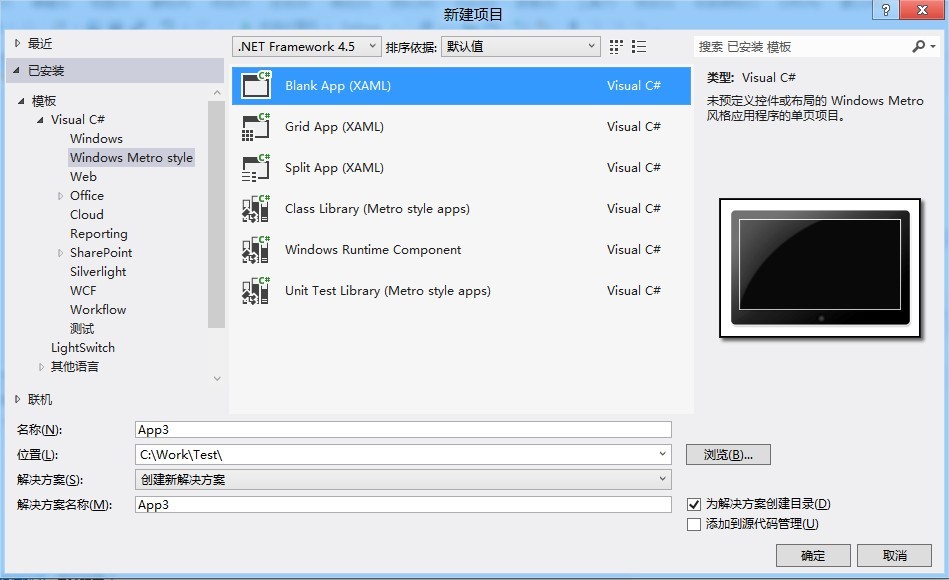
然后我们打开VS2012,选择Windows Metro Style,然后选择创建Blank App项目如下图:
<Grid Background="{StaticResource ApplicationPageBackgroundThemeBrush}">
<Button Content="Button" Name="button1" HorizontalAlignment="Left"
Margin="135,124,0,0" VerticalAlignment="Top" Click="button1_Click"/>
<ListBox HorizontalAlignment="Left" Name="listbox1" Height="100"
Margin="135,187,0,0" VerticalAlignment="Top" Width="140">
<ListBox.ItemTemplate>
<DataTemplate>
<TextBlock Width="60" Text="{Binding ItemName}"/>
</DataTemplate>
</ListBox.ItemTemplate>
</ListBox>
</Grid>
/// <summary>
/// An empty page that can be used on its own or navigated to within a Frame.
/// </summary>
public sealed partial class MainPage : Page
{
public MainPage()
{
this.InitializeComponent();
listbox1.ItemsSource = ItemModel.GetItem();
button1.Content = "Windows 8按钮";
}</p> <p> /// <summary>
/// Invoked when this page is about to be displayed in a Frame.
/// </summary>
/// <param name="e">Event data that describes how this page was reached. The Parameter
/// property is typically used to configure the page.</param>
protected override void OnNavigatedTo(NavigationEventArgs e)
{
}</p> <p> private void button1_Click(object sender, RoutedEventArgs e)
{
this.button1.Content = this.button1.Content + "1";
}
}
public class ItemModel
{
public string ItemName { get; set; }</p> <p> public string ItemValue { get; set; }</p> <p> public static List<ItemModel> GetItem()
{
List<ItemModel> list = new List<ItemModel>();
list.Add(new ItemModel() { ItemName = "北京", ItemValue = "010" });
list.Add(new ItemModel() { ItemName = "上海", ItemValue = "020" });
list.Add(new ItemModel() { ItemName = "成都", ItemValue = "028" });
return list;
}
}
然后我们打开VS2012,选择Windows Metro Style,然后选择创建Blank App项目如下图:
其新建完成的项目结构如下:

我们拖动一个按钮和ListBox到界面中,设置按钮事件以及ListBox的DataTemplate,如下Xaml代码:
复制代码
代码如下:<Grid Background="{StaticResource ApplicationPageBackgroundThemeBrush}">
<Button Content="Button" Name="button1" HorizontalAlignment="Left"
Margin="135,124,0,0" VerticalAlignment="Top" Click="button1_Click"/>
<ListBox HorizontalAlignment="Left" Name="listbox1" Height="100"
Margin="135,187,0,0" VerticalAlignment="Top" Width="140">
<ListBox.ItemTemplate>
<DataTemplate>
<TextBlock Width="60" Text="{Binding ItemName}"/>
</DataTemplate>
</ListBox.ItemTemplate>
</ListBox>
</Grid>
其Xaml.cs文件如下:
复制代码
代码如下:/// <summary>
/// An empty page that can be used on its own or navigated to within a Frame.
/// </summary>
public sealed partial class MainPage : Page
{
public MainPage()
{
this.InitializeComponent();
listbox1.ItemsSource = ItemModel.GetItem();
button1.Content = "Windows 8按钮";
}</p> <p> /// <summary>
/// Invoked when this page is about to be displayed in a Frame.
/// </summary>
/// <param name="e">Event data that describes how this page was reached. The Parameter
/// property is typically used to configure the page.</param>
protected override void OnNavigatedTo(NavigationEventArgs e)
{
}</p> <p> private void button1_Click(object sender, RoutedEventArgs e)
{
this.button1.Content = this.button1.Content + "1";
}
}
ListBox绑定的数据源代码如下:
复制代码
代码如下:public class ItemModel
{
public string ItemName { get; set; }</p> <p> public string ItemValue { get; set; }</p> <p> public static List<ItemModel> GetItem()
{
List<ItemModel> list = new List<ItemModel>();
list.Add(new ItemModel() { ItemName = "北京", ItemValue = "010" });
list.Add(new ItemModel() { ItemName = "上海", ItemValue = "020" });
list.Add(new ItemModel() { ItemName = "成都", ItemValue = "028" });
return list;
}
}
运行效果图如下:
相关文章
Win8.1 KB5021294补丁月度更新汇总!(附完整更新日志)
微软已向用户发布了Win8.1月度更新汇总,补丁为KB5021294,下文为大家带来了详细的更新介绍,需要的朋友一起看看吧2022-12-15
微软警告:Win8.1系统即将停止支持,将很快弹窗提醒,建议购买 Win11/1
6月24日消息,据报道,微软正准备开展行动,通知Windows8.1用户关于该产品的停止支持日期,下面随小编一起来看看吧2022-06-24 这篇文章主要介绍了win8系统怎么加密文件?win8系统加密文件详细操作方法的相关资料,需要的朋友可以参考下本文详细内容介绍2022-06-13
win8系统如何设置开机密码?Win8系统设置开机密码操作教程
这篇文章主要介绍了win8系统如何设置开机密码?Win8系统设置开机密码操作教程的相关资料,需要的朋友可以参考下本文详细内容介绍2022-06-13 这篇文章主要介绍了Win8系统在后台运行打印机程序操作教程的相关资料,需要的朋友可以参考下本文详细内容介绍2022-06-13
Win8系统安全证书过期怎么办?Win8系统安全证书过期的解决方法
这篇文章主要介绍了Win8系统安全证书过期怎么办?Win8系统安全证书过期的解决方法的相关资料,需要的朋友可以参考下本文详细内容介绍2022-06-13 如何解决Win10浏览器打不开网页但能上网?最近很多用户向小编反应升级了win10系统之后在下载软件或者打开第三方网页的时候会出现病毒误报,该怎么办呢?跟随小编来看看吧2020-12-31
 Win8临时文件夹如何修改路径?Win8临时文件夹文件过多会影响速度,我们可以通过修改文件路径很好的解决这一问题,下面让我们来看看如何修改2020-12-22
 Win8系统如何设置鼠标左右键互换?最近很多小伙伴向小编咨询关于Win8系统设置鼠标左右键互换的问题,下面就跟随小编一起学习吧2020-12-11
 Win8系统怎么关闭系统还原?最近很多win8系统的用户向小编咨询想要关闭系统还原,不知道如何操作,不妨我们一起来看看下文的教程吧2020-12-09


最新评论