

win7总出现Bluetooth外围设备解决方法
发布时间:2013-05-14 15:59:52 作者:佚名  我要评论
我要评论
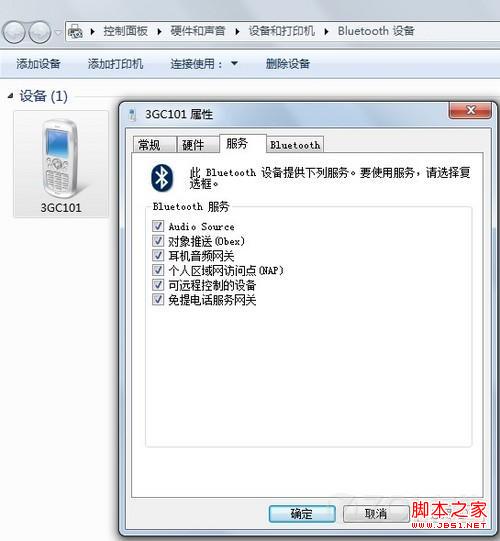
我要评论win7出现Bluetooth外围设备的解决步骤如下:右键右下角的蓝牙图标单击显示Bluetooth设备取消掉部分无驱动的服务后确定,希望对你有所帮助
1、右键右下角的蓝牙图标单击显示Bluetooth设备;

2、取消掉部分无驱动的服务后确定,Bluetooth外围设备消失。
相关文章
directx3D加速怎么关? Win7关闭3D加速功能的技巧
3d硬件加速就是利用硬件所固有的快速特性,使得画面更加的逼真、细腻和流畅,开启后怎么关闭呢?下面我们就来看看详细的教程2025-07-11win7如何禁止在桌面上存放文件? 禁止在电脑桌面存放文件的方法
习惯性的把文件存放在桌面中,时间长了就会堆满了整个桌面,因此不少用户就想禁止此功能,下面我们就来看看详细设置方法2025-05-06win7总是定期清理文件怎么解决? Win7关闭磁盘的定期碎片整理的技巧
在使用Win7操作系统的过程中,定期进行磁盘碎片整理是一项重要的维护工作,能够帮助提升系统性能和存储效率,但也有可能造成不必要的系统负担,下面我们就来看看详细设置方2025-05-06windows索引器可以关闭么? Win7禁用索引器回退的方法
如果你用的是Win7系统,那么索引服务会占用一些系统资源哦,如果你觉得不需要这个功能,就可以把它关掉,这样就不会影响到你的设备使用体验啦2025-04-09Win7如何禁用刻录光盘功能? 关闭Win7系统中CD刻录功能的方法
在公司局域网中,有时候处于商业机密保护的需要,我们需要禁止光驱刻录功能而只保留光驱播放功能,那么我们该如何禁用win7系统的光驱刻录功能、禁止光驱刻录DVD呢?详细请2025-03-25电脑打字选字框消失怎么办? win7系统解决打字没有选字框的方法
当你在电脑上打字时,发现选字框消失了,这可能是由于系统设置或软件问题导致的,下面我们就来看看详细解决办法2025-03-24Win7怎么调DPI? Win7系统DPI缩放功能的设置方法
相信很多用户在使用Win7系统时,为了方便自己使用,都会进行一些设置,其中肯定有DPI缩放功能,它能够按照用户自己的习惯去显示最佳的效果,但有部分用户想将其关闭,具体2025-02-28- 在Win7电脑操作中,用户因操作需求想关闭实时保护功能,但不清楚在哪里才能成功关闭?详细请看下文设置方法2025-02-24
win7怎么设置软件不联网使用? Win7电脑给某个软件断网的技巧
最近有使用Win7系统的用户想要设置某个软件不要联网,该怎么单独设置不让某个程序联网呢?下面我们就来看看详细教程2025-02-18- 最近有使用Win7系统的用户想要设置系统中的环境变量,让程序运行更顺畅,该怎么设置呢?详细请看下文介绍2025-02-18
最新评论