

如何解决EasyExcel导出文件LocalDateTime报错问题
解决EasyExcel导出文件LocalDateTime报错
问题引出
我在参与一个项目的时候接触到数据表格导出为Excel表格的需求,但是在导出的时候会出现报错
Cannot find ‘Converter’ support class LocalDateTime
原因是我需要导出的实体类中存在 LocalDateTime 类型的属性,而又恰巧 EasyExcel 不支持 LocalDate 和 LocalDateTime 接收数据,啊人生。
解决方案
在寻找了多篇文章之后,在下面对这个问题进行总结,既然默认不支持我使用这个类型,那就杀出一条路来。
首先先来看报的错误提示:
Cannot find ‘Converter’ support class LocalDateTime
明显可以看出来是找不到 LocalDateTime 的一个 Converter,那么这个所谓的 Converter 到底是个什么东西呢?既然他缺少这个东西我们能不能给他自己弄一个上去呢?说干就干!(其实解决方法也真就是这个)
自定义Converter
Converter 在这里其实是一个字段转换器,在 EasyExcel 中担任将Java属性转换成Excel表格中合法数据的一个小东西。
由于EasyExcel自己没有我们需要的 LocalDateTime 的字段转换器,那我们就自己搞一个出来。
在 config 包下新建一个自定义的字段转换器 LocalDateTimeConverter 。
package edu.lingnan.rili.converter;
import com.alibaba.excel.converters.Converter;
import com.alibaba.excel.enums.CellDataTypeEnum;
import com.alibaba.excel.metadata.CellData;
import com.alibaba.excel.metadata.GlobalConfiguration;
import com.alibaba.excel.metadata.property.ExcelContentProperty;
import java.time.LocalDateTime;
import java.time.format.DateTimeFormatter;
/**
 * @author xBaozi
 * @version 1.0
 * @classname LocalDateTimeConverter
 * @description EasyExcel LocalDateTime转换器
 * @date 2022/3/19 2:17
 */
public class LocalDateTimeConverter implements Converter<LocalDateTime> {
    private static final String DEFAULT_PATTERN = "yyyy-MM-dd HH:mm:ss";
    @Override
    public Class<LocalDateTime> supportJavaTypeKey() {
        return LocalDateTime.class;
    }
    @Override
    public CellDataTypeEnum supportExcelTypeKey() {
        return CellDataTypeEnum.STRING;
    }
    @Override
    public LocalDateTime convertToJavaData(CellData cellData, ExcelContentProperty contentProperty,
                                           GlobalConfiguration globalConfiguration) {
        return LocalDateTime.parse(cellData.getStringValue(), DateTimeFormatter.ofPattern(DEFAULT_PATTERN));
    }
    @Override
    public CellData<String> convertToExcelData(LocalDateTime value, ExcelContentProperty contentProperty,
                                               GlobalConfiguration globalConfiguration) {
        return new CellData<>(value.format(DateTimeFormatter.ofPattern(DEFAULT_PATTERN)));
    }
}
引用 LocalDateTimeConverter
既然这东西是本来没有然后我们自己弄出来的,那肯定要告诉程序:**诶!这里我给你生了个崽,要记得领回去啊!**所以,我们在原本需要导出的 LocalDateTime 类型中的 @ExcelProperty 注解中引入自定义的字段转换器。
同时要加上一个JsonFormat的格式化注解,将该属性转换成 json格式,这里要注意的就是要导入一下阿里巴巴的 fastjson Maven坐标了。
@ExcelProperty(value = "操作时间", index = 8, converter = LocalDateTimeConverter.class)
@JsonFormat(shape = JsonFormat.Shape.STRING, pattern="yyyy-MM-dd HH:mm:ss")
@ApiModelProperty("操作时间")
private LocalDateTime operationTime;
<!-- fastjson的Maven坐标 -->
<dependency>
<groupId>com.alibaba</groupId>
<artifactId>fastjson</artifactId>
<version>1.2.73</version>
</dependency>好啦!到这里我们遇到的问题就已经解决了呀!虽然说前期刚遇到这个问题的时候一直在被折磨,但是却是一个很好的一个提升机会,没点儿bug,怎么能保得住头发呢是吧。
EasyExcel导出问题
报错信息!!!
错误一:
com.alibaba.excel.exception.ExcelAnalysisException: java.lang.NoClassDefFoundError: Could not initialize class net.sf.cglib.beans.BeanMap$Generator
com.alibaba.excel.exception.ExcelAnalysisException: java.lang.VerifyError: class net.sf.cglib.core.DebuggingClassWriter overrides final method visit.(IILjava/lang/String;Ljava/lang/String;Ljava/lang/String;[Ljava/lang/String;)V

上面两种报错!!!都是一个原因,各种查询之后,说是版本冲突,这种就很头疼
经过排查,我在pom中将单元测试的依赖注解之后,导入就正常了
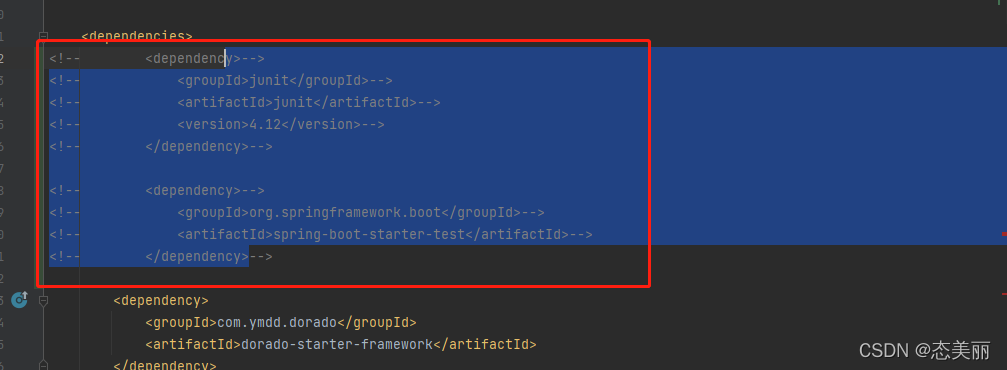
错误二:
com.alibaba.excel.exception.ExcelDataConvertException: Can not find 'Converter' support
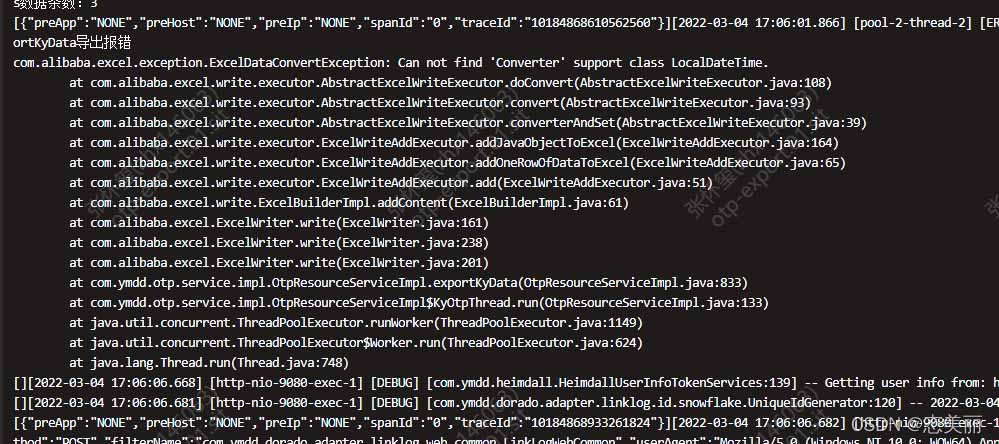
原因:默认只能转换BigDecimal、Bolean、Byte[]、btye[]、Byte、Date、Double、File、Float、InputStream、Integer、Long、Short、URL几种类型,== 所以必须自己手动编写一个转换类==
我原本得实体类:用的数据类型是:LocalDateTime,不能自动转换

修改后:自己编辑了一个转换类LocalDateConverter
    @JsonFormat(pattern = "yyyy-MM-dd HH:mm:ss", timezone = "GMT+8")
    @ExcelProperty(value="时间",index = 10,converter = LocalDateConverter.class)
    @ColumnWidth(25)
    private LocalDateTime turnoutTime;
LocalDateConverter
import com.alibaba.excel.converters.Converter;
import com.alibaba.excel.enums.CellDataTypeEnum;
import com.alibaba.excel.metadata.CellData;
import com.alibaba.excel.metadata.GlobalConfiguration;
import com.alibaba.excel.metadata.property.ExcelContentProperty;
import java.time.LocalDateTime;
import java.time.format.DateTimeFormatter;
public class LocalDateConverter implements Converter<LocalDateTime> {
    @Override
    public Class<LocalDateTime> supportJavaTypeKey() {
        return LocalDateTime.class;
    }
    @Override
    public CellDataTypeEnum supportExcelTypeKey() {
        return CellDataTypeEnum.STRING;
    }
    @Override
    public LocalDateTime convertToJavaData(CellData cellData, ExcelContentProperty excelContentProperty, GlobalConfiguration globalConfiguration) throws Exception {
        return LocalDateTime.parse(cellData.getStringValue(), DateTimeFormatter.ofPattern("yyyy-MM-dd HH:mm:ss"));
    }
    @Override
    public CellData convertToExcelData(LocalDateTime localDate, ExcelContentProperty excelContentProperty
            , GlobalConfiguration globalConfiguration) throws Exception {
        return new CellData<>(localDate.format(DateTimeFormatter.ofPattern("yyyy-MM-dd HH:mm:ss")));
    }
}
一般情况下应该是解决了!!!
但是部署后问题还是一样!!也不知道为什么没有生效。
于是乎,经过不断得尝试,还是报一样得错,无奈之下我只能在:EasyExcel写入数据之前得到list集合循环遍历,然后逐个用字符串进行时间转换
实体类更改:用一个String字符来代替LocalDateTime 来写入Excel
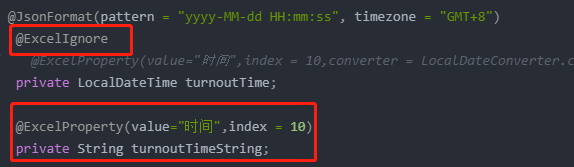
代码
   @JsonFormat(pattern = "yyyy-MM-dd HH:mm:ss", timezone = "GMT+8")
    @ExcelIgnore
//    @ExcelProperty(value="时间",index = 10,converter = LocalDateConverter.class)
    private LocalDateTime turnoutTime;
    @ExcelProperty(value="时间",index = 10)
    private String turnoutTimeString;
逻辑层更改
 List<Student> stus= (List<Student>) studentService.listByIds(student.getIds());
                log.info("stuss数据条数:{}",stus.size());
                List<Student> list = JSON.parseArray(JSON.toJSONString(stus), Student.class);
                for (Student stu: list) {
					//类型的判断
                    String sex="男";
                    if (stu.getSex() == 1) {
                        sex="男";
                    } else if (stu.getSex() == 2) {
                        sex="女";
                    }
                    stu.setSexName(sex);
                    DateTimeFormatter formatter = DateTimeFormatter.ofPattern("yyyy-MM-dd HH:mm:ss");
					//将LocalDateTime转换String
                    stu.setTurnoutTimeString(stu.getTurnoutTime().format(formatter));
                }
                excelWriter.write(list, sheet);
           		excelWriter.finish();
最后到这里再进行运行,就没什么问题了,只是可能有些性能的消耗,毕竟要是数据量大,10w+的数据,这种情况有待考量,至于转换类不生效的问题后期发现了再更吧,有知道的伙计们也分享一下呗!!(奇怪的是我在注解里面加得index = 10得序号和 @ColumnWidth(25)都没有生效,当然类型的转换类也没有生效!!!)
总结
以上为个人经验,希望能给大家一个参考,也希望大家多多支持脚本之家。
相关文章
 本篇主要介绍了RestTemplate中的GET,POST,PUT,DELETE、文件上传和文件下载6大常用的功能,具有一定的参考价值,感兴趣的可以了解一下2023-08-08
Java大对象存储之@Lob注解处理BLOB和CLOB数据的方法
本文将深入探讨@Lob注解的使用方法、最佳实践以及在处理大对象存储时应当注意的性能与内存考量,我们将通过实际示例展示如何在Java应用中有效地管理和操作BLOB和CLOB数据,感兴趣的朋友一起看看吧2025-05-05 这篇文章主要为大家详细介绍了SpringBoot集成kaptcha验证码,具有一定的参考价值,感兴趣的小伙伴们可以参考一下2018-07-07
 Spring Boot结合AOP提供了强大的功能,可以用于日志记录、性能监控、异常处理、权限校验等多种场景,通过AOP,我们可以将横切关注点从业务逻辑中分离出来,从而提高代码的可维护性和可读性,下面就来一起了解一下2026-03-03
 在Spring中,要想更简单的存储和读取对象的核心是使用注解,这篇文章主要给大家介绍了关于Spring如何通过注解存储和读取对象的相关资料,文中通过实例代码介绍的非常详细,需要的朋友可以参考下2022-07-07
 这篇文章主要为大家详细介绍了SSH框架网上商城项目第21战之易宝支付的流程,感兴趣的小伙伴们可以参考一下2016-06-06
 这篇文章主要介绍了idea 创建properties配置文件的步骤,具有很好的参考价值,希望对大家有所帮助。一起跟随小编过来看看吧2021-01-01
 sqlmap是一款强大的开源 SQL 注入自动化测试工具,支持识别并利用多种类型的 SQL 注入漏洞(Boolean-based、Time-based、Error-based、Stacked Queries 等),本文给大家介绍sqlmap使用教程,感兴趣的朋友一起看看吧2016-11-11
 这篇文章主要介绍了java过滤器中Filter,发送请求时,如果有不符合的信息将会被filter进行拦截,如果符合则会进行放行。如果感兴趣可以来学习一下2021-08-08
 这篇文章主要介绍了Mybatis 中的insertOrUpdate操作,代码简单易懂,非常不错需要的的朋友参考下2016-12-12
最新评论