

springsecurity第三方授权认证的项目实践
由于博主在做一个校园项目的时候使用啦spring security安全框架,然后在整合第三方授权登录的时候,被困扰了好几天,就想着发一下这个文章,希望能给大家带来帮助。
第三方授权登录的原理,我就不在这里过多阐述了(作者也是小白,怕给你们带入歧途),大家不熟悉或者不了解的可以取哔哩哔哩看一下不良人的springsecurity教程,后面的课程就是讲述的第三方授权登录的知识。也可以看一下《深入浅出spring security》这本书。
单纯的springboot项目的话可以直接使用justauth这个第三方框架,集成啦许多的第三方登录的接口,只用自己调用一下api就能解决第三方授权登录的问题。
问题描述
现在大多数软件和web网站都会加入第三方授权登录的功能,以方便提高用户的体验。此时就给我们后端开发的人带来了极大的烦恼。
由于此项目加入了springsecurity框架,此时就不能使用justauth这个框架了,这个框架关于springsecurity的解决还没完善。所以就要使用springsecurity自带的oauth2认证过滤器(其实你会发现非常简单就能解决了)。
详细步骤(以gitee举例)
1. 进入官网点击设置

2. 向下翻转,点击第三方应用

3. 点击创建应用后就进入下面这个界面

4. 然后把标星的给填上
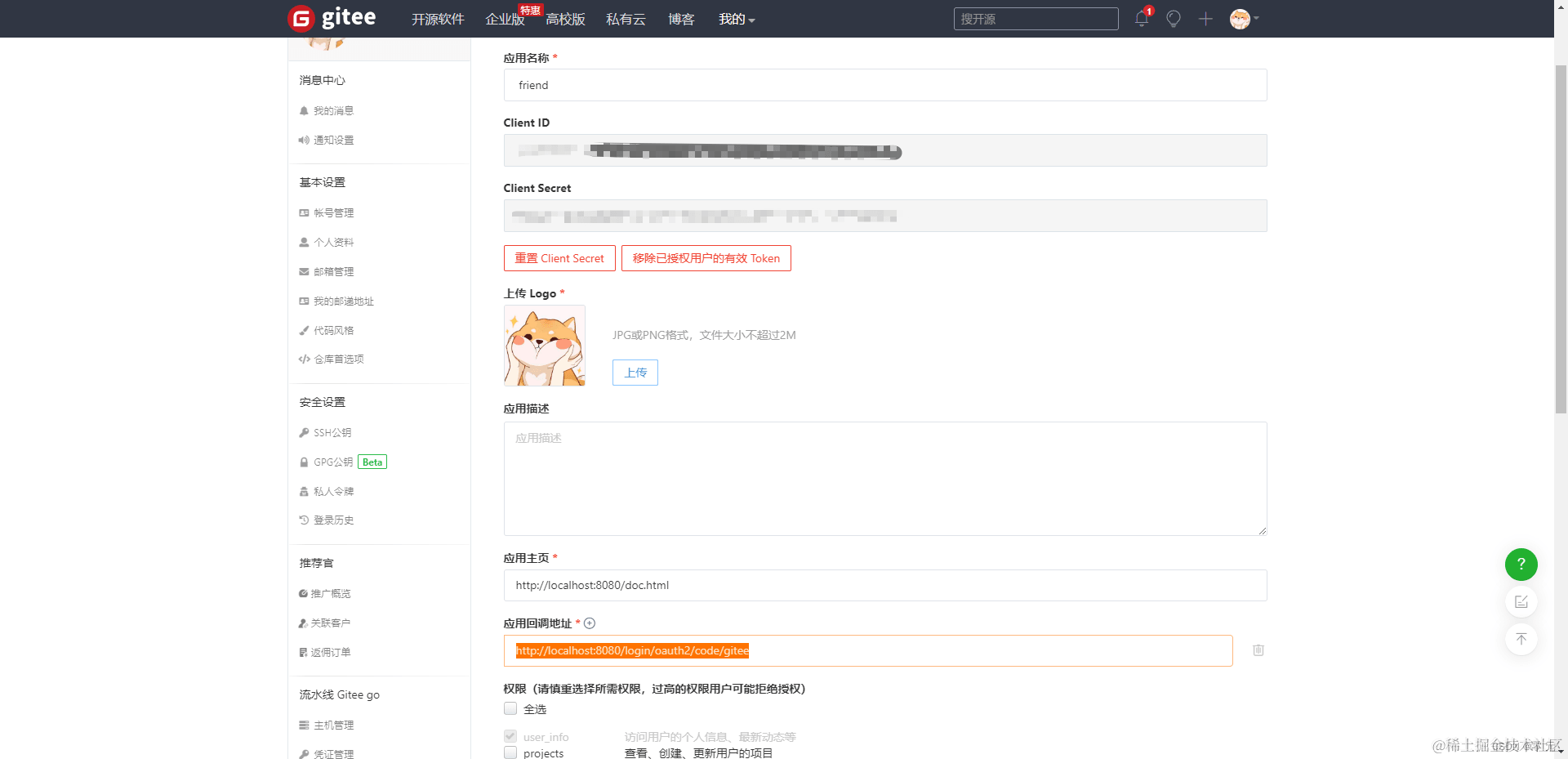
注意回调地址格式不要写错,否则springsecurity识别不出http://IP地址:端口号/login/oauth2/code/应用名称
5. 在springboot里加入配置
security:
    oauth2:
      client:
        registration:
          gitee:
            client-id: #授权id
            client-secret:  #授权密钥
            authorization-grant-type: authorization_code
            redirect-uri:  #回调地址
            client-name: gitee #应用名称
            scope: user_info
        provider:
          gitee:
            authorization-uri: https://gitee.com/oauth/authorize
            token-uri: https://gitee.com/oauth/token
            user-info-uri: https://gitee.com/api/v5/user
            user-name-attribute: gitee
6. 此时要创建一个实体类,这个实体类是接收第三方应用传输的授权信息的。每个应用的授权信息都不同,大家可以在网上单独看一下对应的官网都会返回什么授权信息。
@NoArgsConstructor
@AllArgsConstructor
@Data
public class OAuth2UserDTO implements OAuth2User {
     private String source;
     private String id;
     private String name;
     private String email;
     private String avatar;
     @JsonIgnore
     @JSONField(serialize = false)
     private List<GrantedAuthority> authorities= AuthorityUtils.createAuthorityList("ROLE_USER");
     @JsonIgnore
     @JSONField(serialize = false)
     private Map<String,Object> attributes;
     @Override
     public Map<String, Object> getAttributes() {
          if (attributes==null){
               attributes=new HashMap<>();
               attributes.put("id",this.getId());
               attributes.put("name",this.getName());
               attributes.put("email",this.getEmail());
          }
          return attributes;
     }
     @Override
     public Collection<? extends GrantedAuthority> getAuthorities() {
          return this.authorities;
     }
     public OAuth2UserDTO(Map<String,Object> attributes,String source){
          this.attributes = attributes;
          this.source = source;
          this.id = attributes.get("id").toString();
          this.name = attributes.get("name").toString();
          this.email = attributes.get("email")==null?null:attributes.get("email").toString();
          this.avatar = attributes.get("avatar_url")==null?null:attributes.get("avatar_url").toString();
     }
}
7. 重写oauth2认证方法
@Service
public class CustomOAuth2UserService implements OAuth2UserService {
    private static final String MISSING_USER_INFO_URI_ERROR_CODE = "missing_user_info_uri";
    private static final String MISSING_USER_NAME_ATTRIBUTE_ERROR_CODE = "missing_user_name_attribute";
    private static final String INVALID_USER_INFO_RESPONSE_ERROR_CODE = "invalid_user_info_response";
    private static final ParameterizedTypeReference<Map<String, Object>> PARAMETERIZED_RESPONSE_TYPE = new ParameterizedTypeReference<Map<String, Object>>() {
    };
    private Converter<OAuth2UserRequest, RequestEntity<?>> requestEntityConverter = new OAuth2UserRequestEntityConverter();
    private RestOperations restOperations;
    public CustomOAuth2UserService() {
        RestTemplate restTemplate = new RestTemplate();
        restTemplate.setErrorHandler(new OAuth2ErrorResponseErrorHandler());
        this.restOperations = restTemplate;
    }
    @Override
    public OAuth2User loadUser(OAuth2UserRequest userRequest) throws OAuth2AuthenticationException {
        Assert.notNull(userRequest, "userRequest cannot be null");
        if (!StringUtils
                .hasText(userRequest.getClientRegistration().getProviderDetails().getUserInfoEndpoint().getUri())) {
            OAuth2Error oauth2Error = new OAuth2Error(MISSING_USER_INFO_URI_ERROR_CODE,
                    "Missing required UserInfo Uri in UserInfoEndpoint for Client Registration: "
                            + userRequest.getClientRegistration().getRegistrationId(),
                    null);
            throw new OAuth2AuthenticationException(oauth2Error, oauth2Error.toString());
        }
        String userNameAttributeName = userRequest.getClientRegistration().getProviderDetails().getUserInfoEndpoint()
                .getUserNameAttributeName();
        if (!StringUtils.hasText(userNameAttributeName)) {
            OAuth2Error oauth2Error = new OAuth2Error(MISSING_USER_NAME_ATTRIBUTE_ERROR_CODE,
                    "Missing required \"user name\" attribute name in UserInfoEndpoint for Client Registration: "
                            + userRequest.getClientRegistration().getRegistrationId(),
                    null);
            throw new OAuth2AuthenticationException(oauth2Error, oauth2Error.toString());
        }
        RequestEntity<?> request = this.requestEntityConverter.convert(userRequest);
        ResponseEntity<Map<String, Object>> response = getResponse(userRequest, request);
        Map<String, Object> userAttributes = response.getBody();
        Set<GrantedAuthority> authorities = new LinkedHashSet<>();
        authorities.add(new OAuth2UserAuthority(userAttributes));
        OAuth2AccessToken token = userRequest.getAccessToken();
        for (String authority : token.getScopes()) {
            authorities.add(new SimpleGrantedAuthority("SCOPE_" + authority));
        }
        //更换为自定义的OAuth2User实现
        return new OAuth2UserDTO(userAttributes, userNameAttributeName);
    }
    private ResponseEntity<Map<String, Object>> getResponse(OAuth2UserRequest userRequest, RequestEntity<?> request) {
        OAuth2Error oauth2Error;
        try {
            return this.restOperations.exchange(request, PARAMETERIZED_RESPONSE_TYPE);
        } catch (OAuth2AuthorizationException var6) {
            oauth2Error = var6.getError();
            StringBuilder errorDetails = new StringBuilder();
            errorDetails.append("Error details: [");
            errorDetails.append("UserInfo Uri: ").append(userRequest.getClientRegistration().getProviderDetails().getUserInfoEndpoint().getUri());
            errorDetails.append(", Error Code: ").append(oauth2Error.getErrorCode());
            if (oauth2Error.getDescription() != null) {
                errorDetails.append(", Error Description: ").append(oauth2Error.getDescription());
            }
            errorDetails.append("]");
            oauth2Error = new OAuth2Error("invalid_user_info_response", "An error occurred while attempting to retrieve the UserInfo Resource: " + errorDetails.toString(), (String)null);
            throw new OAuth2AuthenticationException(oauth2Error, oauth2Error.toString(), var6);
        } catch (UnknownContentTypeException var7) {
            String errorMessage = "An error occurred while attempting to retrieve the UserInfo Resource from '" + userRequest.getClientRegistration().getProviderDetails().getUserInfoEndpoint().getUri() + "': response contains invalid content type '" + var7.getContentType().toString() + "'. The UserInfo Response should return a JSON object (content type 'application/json') that contains a collection of name and value pairs of the claims about the authenticated End-User. Please ensure the UserInfo Uri in UserInfoEndpoint for Client Registration '" + userRequest.getClientRegistration().getRegistrationId() + "' conforms to the UserInfo Endpoint, as defined in OpenID Connect 1.0: 'https://openid.net/specs/openid-connect-core-1_0.html#UserInfo'";
            OAuth2Error oAuth2Error = new OAuth2Error("invalid_user_info_response", errorMessage, (String)null);
            throw new OAuth2AuthenticationException(oAuth2Error, oAuth2Error.toString(), var7);
        } catch (RestClientException var8) {
            oauth2Error = new OAuth2Error("invalid_user_info_response", "An error occurred while attempting to retrieve the UserInfo Resource: " + var8.getMessage(), (String)null);
            throw new OAuth2AuthenticationException(oauth2Error, oauth2Error.toString(), var8);
        }
    }
    public final void setRequestEntityConverter(Converter<OAuth2UserRequest, RequestEntity<?>> requestEntityConverter) {
        Assert.notNull(requestEntityConverter, "requestEntityConverter cannot be null");
        this.requestEntityConverter = requestEntityConverter;
    }
    public final void setRestOperations(RestOperations restOperations) {
        Assert.notNull(restOperations, "restOperations cannot be null");
        this.restOperations = restOperations;
    }
}
loadUser是核心方法,只用在业务上对其修改成符合自己的业务需求就行。
8. 配置securityConfig
http.oauth2Login()
                .userInfoEndpoint()
                .userService(new CustomOAuth2UserService());
9. 验证是否配置成功
<!DOCTYPE html>
<html lang="en">
<head>
<meta charset="UTF-8">
</head>
<body>
<form action="/oauth2/authorization/gitee" method="post" onsubmit="onsubmitFun()">
    <input type="submit" value="Gitee授权登录">
</form>
</body>
</html>
以上就配置成功了。更多相关springsecurity第三方授权认证内容请搜索脚本之家以前的文章或继续浏览下面的相关文章希望大家以后多多支持脚本之家!
相关文章
 这篇文章主要介绍了Spring定时服务QuartZ原理及代码案例,文中通过示例代码介绍的非常详细,对大家的学习或者工作具有一定的参考学习价值,需要的朋友可以参考下2020-11-11
 本文我们通过Spring AOP和Java的自定义注解来实现日志的插入功能,非常不错,具有一定的参考借鉴价值,需要的朋友一起看看吧,希望对你有所帮助2021-07-07
Spring Boot整合Elasticsearch实现全文搜索引擎案例解析
ElasticSearch作为基于Lucene的搜索服务器,既可以作为一个独立的服务部署,也可以签入Web应用中。SpringBoot作为Spring家族的全新框架,使得使用SpringBoot开发Spring应用变得非常简单,在本案例中我们给大家介绍Spring Boot整合Elasticsearch实现全文搜索引擎2017-11-11
Java前后端任意参数类型转换方式(Date、LocalDateTime、BigDecimal)
这篇文章主要介绍了Java前后端任意参数类型转换方式(Date、LocalDateTime、BigDecimal),具有很好的参考价值,希望对大家有所帮助,如有错误或未考虑完全的地方,望不吝赐教2024-06-06 这篇文章主要介绍了Java编程中10个最佳的异常处理技巧,在本文中,将讨论Java异常处理最佳实践,这些Java最佳实践遵循标准的JDK库,和几个处理错误和异常的开源代码,这还是一个提供给java程序员编写健壮代码的便利手册,需要的朋友可以参考下2015-01-01
 前几天小编给大家介绍了Java线性结构中的链表,除了链表这种结构之外,实际上还有栈、队列、串等结构,那么这些结构又有哪些特点呢,本文就给大家详细的介绍一下,感兴趣的小伙伴跟着小编一起来看看吧2023-07-07
Java利用Spire.Doc实现RTF转换PDF的高效方案
在企业级应用开发中,RTF格式虽因其良好的兼容性曾在文档交换领域占据一席之地,但随着移动办公和长期归档需求的增加,其跨平台显示不一致、易被篡改的弊端日益凸显,本文将介绍如何利用Spire.Doc for Java这一强大的类库实现将RTF转换为PDF,需要的朋友可以参考下2026-03-03 这篇文章主要为大家详细介绍了javaweb分页的原理,文中示例代码介绍的非常详细,具有一定的参考价值,感兴趣的小伙伴们可以参考一下2017-04-04
 这篇文章主要介绍了Java开发工具Eclipse使用技巧全局搜索和更替,小编觉得还是挺不错的,具有一定借鉴价值,需要的朋友可以参考下2018-01-01
 本篇文章主要介绍了android中判断服务或者进程是否存在实例,小编觉得挺不错的,现在分享给大家,也给大家做个参考。一起跟随小编过来看看吧2017-05-05
最新评论