

MyBatis Generator快速生成实体类和映射文件的方法
一、MyBatis Generator 的使用
1.1、生成类和映射文件
1.1.1、在 pom.xml 中引入依赖
在 properties 标签中加入版本号.
<mybatis-generator-plugin-version>1.4.1</mybatis-generator-plugin-version>
在 build => plugins 标签中加入如下配置
            <!-- mybatis ⽣成器插件 -->
            <plugin>
                <groupId>org.mybatis.generator</groupId>
                <artifactId>mybatis-generator-maven-plugin</artifactId>
                <version>${mybatis-generator-plugin-version}</version>
                <executions>
                    <execution>
                        <id>Generate MyBatis Artifacts</id>
                        <phase>deploy</phase>
                        <goals>
                            <goal>generate</goal>
                        </goals>
                    </execution>
                </executions>
                <!-- 相关配置 -->
                <configuration>
                    <!-- 打开⽇志 -->
                    <verbose>true</verbose>
                    <!-- 允许覆盖 -->
                    <overwrite>true</overwrite>
                    <!-- 配置⽂件路径 -->
                    <configurationFile>
                        src/main/resources/mybatis/generatorConfig.xml
                    </configurationFile>
                </configuration>
            </plugin>
上述配置中需要注意的是 “配置文件路径”,这个路径就是用来生成 实体类和映射文件 配置规则的位置.
1.1.2、根据 configurationFile 标签中配置的路径 创建 generatorConfig.xml 文件
这个文件就是用来描述生成规则的.
根据路径(src/main/resources/mybatis),在 mybatis 目录下创建 generatorConfig.xml 文件.
Ps:下述配置文件中需要修改的有 数据库连接、实体类和映射文件的路径、数据库表名
<?xml version="1.0" encoding="UTF-8"?>
<!DOCTYPE generatorConfiguration
PUBLIC "-//mybatis.org//DTD MyBatis Generator Configuration 1.0//EN"
"http://mybatis.org/dtd/mybatis-generator-config_1_0.dtd">
<generatorConfiguration>
<!-- 驱动包路径,location中路径替换成⾃⼰本地路径 -->
<classPathEntry location="D:\class\source\mysql-connector-java-5.1.49.jar"/>
<context id="DB2Tables" targetRuntime="MyBatis3">
<!-- 禁⽤⾃动⽣成的注释 -->
<commentGenerator>
<property name="suppressAllComments" value="true"/>
<property name="suppressDate" value="true"/>
</commentGenerator>
<!-- 连接配置 -->
<jdbcConnection driverClass="com.mysql.jdbc.Driver"
connectionURL="jdbc:mysql://127.0.0.1:3306/javanav_db?
characterEncoding=utf8&useSSL=false"
userId="root"
password="1111">
</jdbcConnection>
<javaTypeResolver>
<!-- ⼩数统⼀转为BigDecimal -->
<property name="forceBigDecimals" value="false"/>
</javaTypeResolver>
<!-- 实体类⽣成位置 -->
<javaModelGenerator targetPackage="com.example.cyk.model"
targetProject="src/main/java">
<property name="enableSubPackages" value="true"/>
<property name="trimStrings" value="true"/>
</javaModelGenerator>
<!-- mapper.xml⽣成位置 -->
<sqlMapGenerator targetPackage="mapper"
targetProject="src/main/resources">
<property name="enableSubPackages" value="true"/>
</sqlMapGenerator>
<!-- mapper 接口⽣成位置 -->
<javaClientGenerator type="XMLMAPPER"
targetPackage="com.example.cyk.mapper" targetProject="src/main/java">
<property name="enableSubPackages" value="true"/>
</javaClientGenerator>
<!-- 配置⽣成表与实例, 只需要修改表名tableName, 与对应类名domainObjectName 即
可-->
<table tableName="j_article" domainObjectName="Article"
enableSelectByExample="false"
enableDeleteByExample="false" enableDeleteByPrimaryKey="false"
enableCountByExample="false"
enableUpdateByExample="false">
<!-- 类的属性⽤数据库中的真实字段名做为属性名, 不指定这个属性会⾃动转换 _ 为
驼峰命名规则-->
<property name="useActualColumnNames" value="true"/>
</table>
<table tableName="j_article_reply" domainObjectName="ArticleReply"
enableSelectByExample="false"
enableDeleteByExample="false" enableDeleteByPrimaryKey="false"
enableCountByExample="false"
enableUpdateByExample="false">
<property name="useActualColumnNames" value="true"/>
</table>
<table tableName="j_board" domainObjectName="Board"
enableSelectByExample="false" enableDeleteByExample="false"
enableDeleteByPrimaryKey="false" enableCountByExample="false"
enableUpdateByExample="false">
<property name="useActualColumnNames" value="true"/>
</table>
<table tableName="j_message" domainObjectName="Message"
enableSelectByExample="false"
enableDeleteByExample="false" enableDeleteByPrimaryKey="false"
enableCountByExample="false"
enableUpdateByExample="false">
<property name="useActualColumnNames" value="true"/>
</table>
<table tableName="j_user" domainObjectName="User"
enableSelectByExample="false" enableDeleteByExample="false"
enableDeleteByPrimaryKey="false" enableCountByExample="false"
enableUpdateByExample="false">
<property name="useActualColumnNames" value="true"/>
</table>
</context>
</generatorConfiguration>注意:
驱动包路径是自己本地仓库的路径

但一定注意!! 需要在非中文的目录下,因此你可以把这个驱动包拷贝出来,放到一个非中文的目录中即可.

1.1.3、自动生成类 和 映射文件
重新加载Maven项⽬,在Plugins节点下出现mybatis-generator,双击运⾏,在对应的目录下⽣成相应的类与映射⽂件:

接着你就可以看到对应的生成了
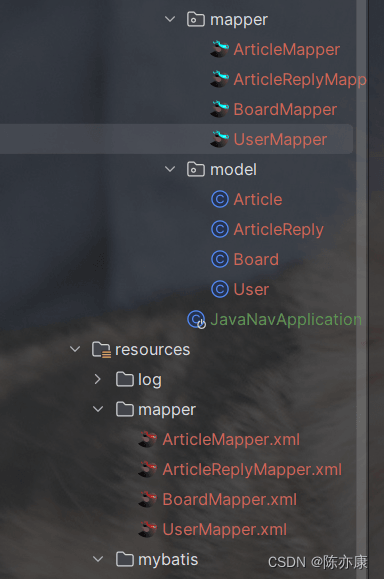
1.1.4、在 Insert 标签中添加获取主键值的选项
在生成的 xml 文件中,给每一个 insert 标签都添加以下属性:useGeneratedKeys="true" keyProperty="id"
<!-- useGeneratedKeys = true -->
<!-- keyProperty = 主键字段-->

<!-- 当插⼊⼀条数据后,可以通过user.getId()获取到⾃动⽣成的Id值,如果⽅法中需要⽴即获取Id值,加⼊这个配置 -->
<insert id="insert" parameterType="com.example.cyk.model.User"
useGeneratedKeys="true" keyProperty="id" >
Ps:这个选项也可以自动生成,但是不理想(有些问题)
1.1.5、扫描配置:添加 @Mapper 注解 / 添加扫描注解
有两种方式配置扫描 Mapper 接口.
1)给每个 mapper 包下的 mapper 接口都添加 @Mapper 注解.
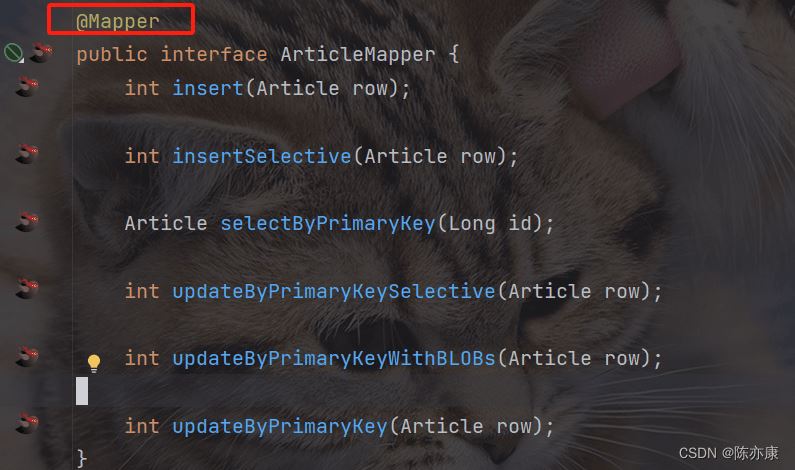
2)给启动类上 或者 新建一个配置类(有 @Configuration 注解)加上 @MapperScan("com.example.cyk.mapper") 注解.
1.1.6、配置 mybatis
在 yml 文件中配置
mybatis:
  mapper-locations: classpath:mapper/**/*Mapper.xml
1.1.7、测试
@SpringBootTest
public class TestMapper {

    @Autowired
    private UserMapper userMapper;

    @Test
    public void select() {
        User user = userMapper.selectByPrimaryKey(1L);
        System.out.println(user);
    }

}

到此这篇关于MyBatis Generator如何快速生成实体类和映射文件的文章就介绍到这了,更多相关MyBatis Generator生成 实体类内容请搜索脚本之家以前的文章或继续浏览下面的相关文章希望大家以后多多支持脚本之家!
相关文章
 这篇文章主要介绍了如何解决java:错误:无效的源发行版:17问题,具有很好的参考价值,希望对大家有所帮助,如有错误或未考虑完全的地方,望不吝赐教2024-07-07
 在 Java 中,数据类型转换用于将一种基本数据类型的值转换为另一种基本数据类型,主要分为自动类型转换(隐式转换) 和强制类型转换(显式转换) 两种,下面小编就为大家简单介绍一下吧2025-11-11
 Java缓存是指为了提高数据访问速度,在内存中存储数据副本的一种技术,这篇文章主要介绍了Java中缓存使用及使用场景的相关资料,文中通过代码介绍的非常详细,需要的朋友可以参考下2025-08-08
 这篇文章主要介绍了Java 判断IP地址的合法性实例详解的相关资料,需要的朋友可以参考下2017-05-05
Java与WebUploader相结合实现文件上传功能(实例代码)
这篇文章主要介绍了Java结合WebUploader实现文件上传功能,代码简单易懂,非常不错,具有参考借鉴价值,需要的朋友可以参考下2017-03-03
idea快速搭建spring cloud注册中心与注册的方法
这篇文章主要介绍了idea快速搭建spring cloud注册中心与注册的方法,小编觉得挺不错的,现在分享给大家,也给大家做个参考。一起跟随小编过来看看吧2018-07-07 下面小编就为大家带来一篇基于spring boot 的配置参考大全(推荐)。小编觉得挺不错的,现在就分享给大家,也给大家做个参考。一起跟随小编过来看看吧2017-09-09
 最近因为新项目有很多自定义的jar包,而且占内存很多,就直接拷贝过来,新开了一个maven仓库,用的时候没有问题,但是打包一直编译不通过,下面这篇文章主要给大家介绍了关于maven打包失败踩坑的解决方式,需要的朋友可以参考下2023-05-05
 这篇文章主要介绍了Spring中容器创建的四种方式示例,Spring容器是Spring框架的核心部分,它负责管理和组织应用程序中的对象,它提供了一种轻量级的、非侵入式的方式来实现对象的创建、依赖注入和生命周期管理,需要的朋友可以参考下2023-10-10
 这篇文章主要为大家分享了最值得Java开发者收藏的11个网站,帮助Java开发者提升编程能力2016-11-11
最新评论