

利用idea生成webservice客户端超详解步骤(wsdl文件的使用)
更新时间:2023年12月15日 11:14:07 作者:就是有缘人
这篇文章主要给大家介绍了关于利用idea生成webservice客户端超详解步骤,第一次接触webservice,从采坑到采坑,算是了解了一些,明白了一些,文中通过代码以及图文介绍的非常详细,需要的朋友可以参考下
一、idea安装webservice
1.点击左上file,选中settings

2.下载Web Service
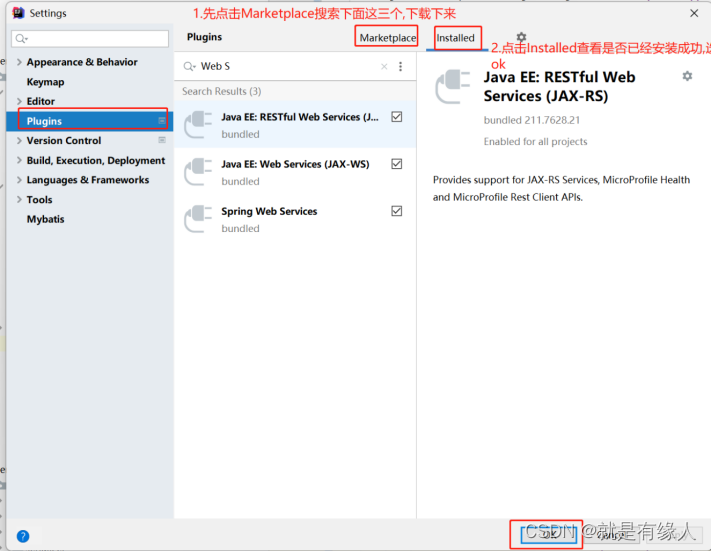
3.给此项目添加webservice


4.添加webservice的依赖
   <!--webservice的:TestCase需要的jar包-->
        <dependency>
            <groupId>junit</groupId>
            <artifactId>junit</artifactId>
            <version>4.12</version>
        </dependency>
二、利用idea根据wsdl文件自动生成webService客户端代码(然后比照着生成的测试类进行接口或方法的调用)
步骤:1.利用idea根据wsdl文件生成代码,需要先将wsdl文件下载到本地
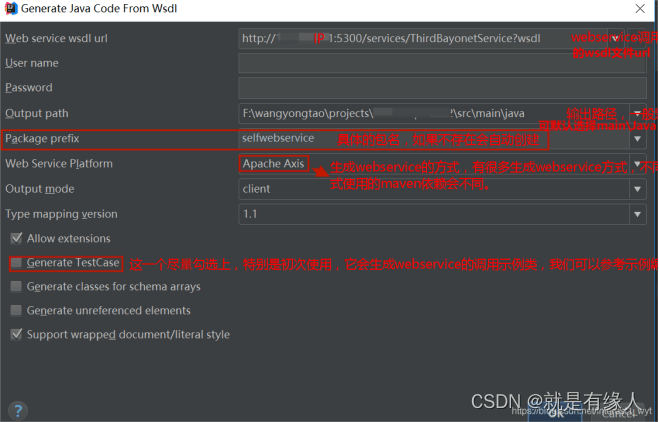
2.下载时无必要要求,选择Apache Axis,依赖需要自行百度搜索
3.下载后需要比照着测试类代码,写调用接口或方法的代码
好处:1.入参的参数不需要自己进行封装 , 特别容易写
2.返回值都被封装好了 , 可以很容易就取到 , 不用自己写解析代码
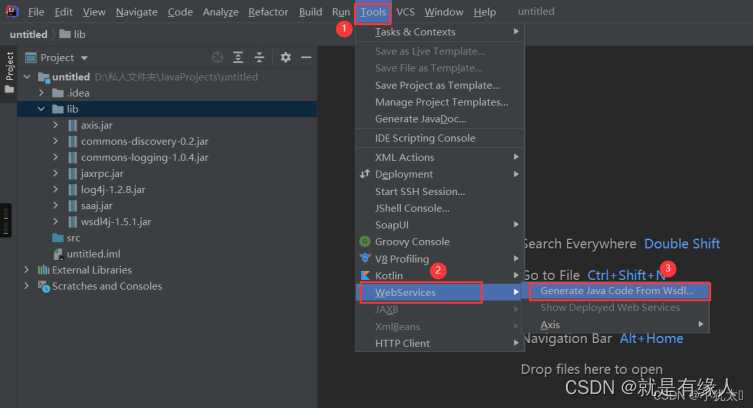
1.打开tools -> WebServices -> Generate Java Code From Wsdl,按照图中顺序进行
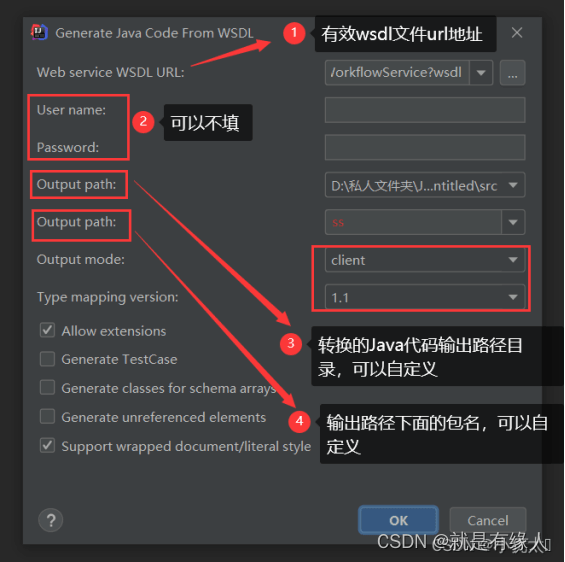
2.按照图中顺序进行操作,最后点击OK
3.必须勾选Generate TestCase
(会给出调用接口的例子,照着抄就可以实现调用指定接口)
4.2点击ok报错 , 就去百度下载Axis所需的依赖 , 第一次需额外下载一个插件(直接下载完就行)
只要不是报wsdl文件出错 , 其他报错后,只要能生成代码 , 就可以使用
4.wsdl文件转换生成Java代码:成功
例子1:
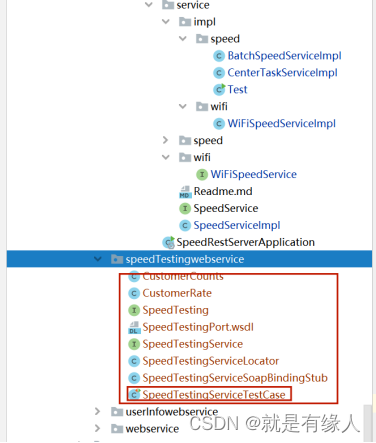
例子2:

5.如何使用生成的代码
点击打开名字中带Test的这个类,找到你需要的方法,直接复制出来就能用
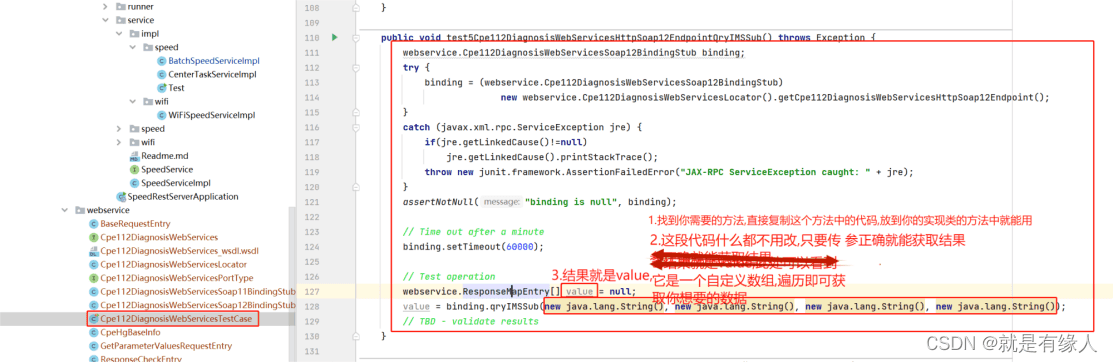
三、直接利用Axis2调用wsdl类型接口:
好处:不用利用idea根据wsdl自动生成webService客户端代码,然后再比照着测试类调用所需方法
坏处: 1.入参需要自己进行参数的封装 ,自己封装参数有例子也不容易
2.如果需要获取调用接口的返回值,则还不会解析返回的数据,无法得到所需的参数(没解析报文的例子,自己不会写)
Axis2 调用接口示例:
import org.apache.axiom.om.OMAbstractFactory;
import org.apache.axiom.om.OMElement;
import org.apache.axiom.om.OMFactory;
import org.apache.axiom.om.OMNamespace;
import org.apache.axis2.AxisFault;
import org.apache.axis2.addressing.EndpointReference;
import org.apache.axis2.client.Options;
import org.apache.axis2.rpc.client.RPCServiceClient;


public class Test {
    public static void test() {
        String userId = "123";
        String bindAccount = "123";
        RPCServiceClient serviceClient = null;

        OMFactory factory = OMAbstractFactory.getOMFactory();
        OMNamespace omDiag = factory.createOMNamespace("http://diagnosis.interfaces.axis2.osf.nort hbound.neal.cpehg.ums.zte.com", "diag");
        OMNamespace omXSD = factory.createOMNamespace("http://model.common.northbound.neal.cpehg. ums.zte.com/xsd", "xsd");

        try {
            serviceClient = new RPCServiceClient();
            Options options = serviceClient.getOptions();
// 指定调用WebService的URL
            EndpointReference targetEPR = new EndpointReference("http://10.46.60.200:9094/axis2/services/Cpe112Diag nosisWebServices?wsdl");
            options.setTo(targetEPR);
            options.setTimeOutInMilliSeconds(30000);
            options.setManageSession(true);

// 指定方法的参数值
            OMElement paramRequest = factory.createOMElement("request", omDiag);
            OMElement paramUserId = factory.createOMElement("userID", omXSD);

            paramUserId.setText(userId);
            OMElement paramBindAccount = factory.createOMElement("bindAccount", omXSD);
            paramBindAccount.setText(bindAccount);
            paramRequest.addChild(paramBindAccount);
            paramRequest.addChild(paramUserId);

            OMElement paramItemName = factory.createOMElement("itemName", omDiag);
            paramItemName.setText("cpehg.diagnosis.CpeBasicInfo");

            String method = "getParameterValuesFromDbAndCpeByItemName";

            OMElement data = factory.createOMElement(method, omXSD);
            data.setNamespace(omDiag);
            data.addChild(paramRequest);
            data.addChild(paramItemName);

            OMElement re = serviceClient.sendReceive(data);
// 处理返回数据

        } catch (AxisFault e) {
// 异常处理
            e.printStackTrace();
        } finally {

            try {
                if (serviceClient != null) serviceClient.cleanupTransport();
            } catch (AxisFault e) {

            }
        }
    }
}
总结
到此这篇关于利用idea生成webservice客户端的文章就介绍到这了,更多相关idea生成webservice客户端内容请搜索脚本之家以前的文章或继续浏览下面的相关文章希望大家以后多多支持脚本之家!
相关文章

Stream distinct根据list某个字段去重的解决方案
这篇文章主要介绍了Stream distinct根据list某个字段去重,stream的distinct去重方法,是根据 Object.equals,和 Object.hashCode这两个方法来判断是否重复的,本文给大家介绍的非常详细,需要的朋友可以参考下2023-05-05 这篇文章主要介绍了Mybatis之Mapper动态代理实例解析,文中通过示例代码介绍的非常详细,对大家的学习或者工作具有一定的参考学习价值,需要的朋友可以参考下2019-08-08
 在数据库操作过程中,经常有修改表名的需求,下面这篇文章主要给大家介绍了关于mybatis插件实现自定义改写表名的相关资料,文中通过实例代码介绍的非常详细,需要的朋友可以参考下2022-04-04
 文章介绍了如何通过动态标签日志实现,解决了部分业务代码在多个模块中调用时日志无法直观看出来源的问题,主要通过ThreadLocal存储业务标签,并在日志输出时插入该标签,实现日志的动态标签功能,感兴趣的朋友一起看看吧2024-12-12
 这篇文章主要为大家详细介绍了Java如何解决HTTP GET方法调用带有body的问题,文中的示例代码讲解详细,感兴趣的小伙伴可以参考一下2024-02-02
 这篇文章主要介绍了Java并发编程中的生产者与消费者模型简述,多线程并发是Java编程中最终要的部分之一,需要的朋友可以参考下,希望能给你带来帮助2021-07-07
 本篇文章主要介绍了Spring Boot JPA访问Mysql示例,小编觉得挺不错的,现在分享给大家,也给大家做个参考。一起跟随小编过来看看吧2017-03-03
 在Java中线程安全的集合类对于多线程编程至关重要,它们能够确保在多个线程同时访问集合时数据的一致性和完整性,下面这篇文章主要介绍了Java线程安全集合有哪些的相关资料,需要的朋友可以参考下2025-06-06
 这篇文章主要介绍了关于Spring中的动态数据源解读,具有很好的参考价值,希望对大家有所帮助。如有错误或未考虑完全的地方,望不吝赐教2023-06-06
 这篇文章主要介绍了Java中list集合的clear方法及空字符串的区别,在使用list 结合的时候习惯了 list=null ;在创建这样的方式,但是发现使用list的clear 方法很不错,尤其是有大量循环的时候<BR>list.clear()与list = null 区别,需要的朋友可以参考下2023-08-08
最新评论