

MyBatis中的XML实现和动态SQL实现示例详解
更新时间:2024年02月18日 10:15:20 作者:zhanlongsiqu
这篇文章主要介绍了MyBatis中的XML实现和动态SQL实现,我们可以将XML中重复出现的内容提取出来放到sql标签中,当需要用到sql标签中的内容时,用include标签将sql标签中的内容引进来即可,感兴趣的朋友跟随小编一起看看吧
一、XML实现
先在新建的XML文件中写入如下内容:
<?xml version="1.0" encoding="UTF-8"?>
<!DOCTYPE mapper PUBLIC "-//mybatis.org//DTD Mapper 3.0//EN" "http://mybatis.org/dtd/mybatis-3-mapper.dtd">
<mapper namespace="com.example.demo.mapper.UserInfoMapper">
</mapper>
再在mapper标签里写入操作数据库的增删查改。
1.1增
mapper层声明的方法为:
Integer insert(UserInfo userInfo);
XML文件中的实现为:
<insert id = "insert">
    insert into
    userinfo
    (username, password, age, gender, phone)
    values
    (#{username}, #{password}, #{age}, #{gender}, #{phone})
</insert>
1.2删
mapper层声明的方法为:
Integer delete(Integer id);
XML文件中的实现为:
<delete id="delete">
    delete from userinfo where id = #{id}
</delete>
1.3查
mapper层声明的方法为:
List<UserInfo> queryUserList();
XML文件中的实现为:
<select id="queryUserList" resultType="com.example.demo.model.UserInfo">
    select * from userinfo
</select>
1.4改
mapper层声明的方法为:
Integer update(UserInfo userInfo);
XML文件中的实现为:
<update id="update">
    update userinfo
    set password = #{password}
    where id = #{id}
</update>
二、XML方式实现动态SQL
2.1if标签
使用示例:
<update id = "updateBook">
    update book_info
    <set>
        <if test = "bookName != null">
            book_name = #{bookName},
        </if>
        <if test = "author != null">
            author = #{author},
        </if>
        <if test = "count != null">
            count = #{count},
        </if>
        <if test = "price != null">
            price = #{price},
        </if>
        <if test = "publish != null">
            publish = #{publish},
        </if>
        <if test = "status != null">
            status = #{status},
        </if>
    </set>
    where id = #{id}
</update>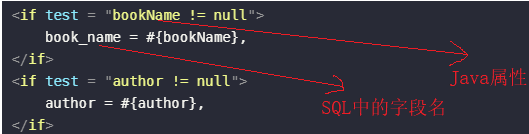
如果满足bookName!=null这个条件,则会显示if标签里的内容。
2.2trim标签
使用示例:
<insert id="insert2" useGeneratedKeys="true" keyProperty="id">
    insert into
    userinfo
    <trim prefixOverrides="," prefix="(" suffix=")" suffixOverrides=",">
        <if test="username!=null">
            username,
        </if>
        <if test="password!=null">
            password,
        </if>
        <if test="age!=null">
            age,
        </if>
        <if test="gender!=null">
            gender,
        </if>
        <if test="phone!=null">
            phone,
        </if>
    </trim>
    values
    <trim prefixOverrides="," prefix="(" suffix=")" suffixOverrides=",">
        <if test="username!=null">
            #{username},
        </if>
        <if test="password!=null">
            #{password},
        </if>
        <if test="age!=null">
            #{age},
        </if>
        <if test="gender!=null">
            #{gender},
        </if>
        <if test="phone!=null">
            #{phone},
        </if>
     </trim>
</insert>
2.3where标签
使用示例:
<select id="queryUserByWhere" resultType="com.yixing.mybatis.model.UserInfo">
    select * from userinfo
    <where>
        <if test="userName!=null">
            username= #{userName}
        </if>
        <if test="age!=null">
            and age=#{age}
        </if>
    </where>
</select>
where标签的作用是删除代码块最前面的and;当查询条件为空时,会去掉where关键字。
2.4set标签
使用示例:
<update id="update2">
    update userinfo
    <set>
        <if test="username!=null">
            username = #{username},
        </if>
        <if test="password!=null">
            password = #{password},
        </if>
        <if test="age!=null">
            age = #{age}
        </if>
    </set>
    where id = #{id}
</update>
set标签会删除代码块最后面的逗号。
2.5foreach标签
使用示例:
<update id="batchDelete">
    update book_info
    set `status` = 0
    where id in
    <foreach collection="ids" open="(" close=")" separator="," item="id">
        #{id}
    </foreach>
</update>
默认情况下,如果mapper层声明方法的参数是List类型,则foreach标签里的collection会等于"list";如果mapper层声明方法的参数是数组类型,则foreach标签里的collection会等于"array",这时mybatis自动做的。我们可以在mapper层声明方法中用@Param注解对声明方法的参数进行重命名。
2.6include标签和sql标签
<sql id="cols">
    id, username,password,gender,age,phone,
</sql>
<select id="queryUserList" resultType="com.yixing.mybatis.model.UserInfo">
    select
    <include refid="cols"></include>
    delete_flag,
    create_time,
    update_time
    from userinfo
</select>
我们可以将XML中重复出现的内容提取出来放到sql标签中,当需要用到sql标签中的内容时,用include标签将sql标签中的内容引进来即可。
到此这篇关于MyBatis中的XML实现和动态SQL实现的文章就介绍到这了,更多相关MyBatis XML和动态SQL内容请搜索脚本之家以前的文章或继续浏览下面的相关文章希望大家以后多多支持脚本之家!
相关文章

关于ObjectUtils.isEmpty() 和 null 的区别
这篇文章主要介绍了关于ObjectUtils.isEmpty() 和 null 的区别,具有很好的参考价值,希望对大家有所帮助。如有错误或未考虑完全的地方,望不吝赐教2022-02-02
基于@ConfigurationProperties的三种用法及说明
SpringBoot配置属性绑定详解,介绍@Component若您配置类、@ConfigurationProperties绑定属性及三种常见应用场景,附带代码示例与测试步骤2026-06-06 这篇文章主要介绍了IDEA无法使用终端terminal问题的解决方案,具有很好的参考价值,希望对大家有所帮助,如有错误或未考虑完全的地方,望不吝赐教2023-09-09
 这篇文章主要给大家介绍了关于如何通过字节码看java中this的隐式传参的相关资料,文中通过示例代码介绍的非常详细,对大家的学习或者工作具有一定的参考学习价值,需要的朋友们下面随着小编来一起学习学习吧2018-11-11
mybaties plus实体类设置typeHandler不生效的解决
这篇文章主要介绍了mybaties plus实体类设置typeHandler不生效的解决方案,具有很好的参考价值,希望对大家有所帮助。如有错误或未考虑完全的地方,望不吝赐教2022-08-08 本文介绍了快速定位和解决Java应用CPU占用过高问题的标准流程,并通过一个实际案例演示,核心思想是通过进程、线程、线程栈和源代码的逐步排查,最终定位到问题代码,需要的朋友可以参考下2025-11-11
 本文介绍了MyBatis拦截器的使用,通过实现Interceptor接口对SQL进行处理,实现数据权限过滤功能,通过在本地线程变量中存储数据权限相关信息,并在拦截器的intercept方法中进行SQL增强处理2024-12-12
SpringCloud Gateway中断言路由和过滤器的使用详解
这篇文章主要介绍了SpringCloud Gateway中断言路由和过滤器的使用,具有很好的参考价值,希望对大家有所帮助,如有错误或未考虑完全的地方,望不吝赐教2025-04-04 这篇文章主要介绍了java封装继承多态,文中通过示例代码介绍的非常详细,对大家的学习或者工作具有一定的参考学习价值,需要的朋友们下面随着小编来一起学习学习吧2019-03-03
 这篇文章主要给大家介绍了关于Java中实现定时任务的两种方法,文中总结了各种实现方式的优缺点,并给出了推荐的使用场景,通过代码介绍的非常详细,需要的朋友可以参考下2024-12-12
最新评论