

解决IDEA中Maven下载依赖包过慢或报错的问题
更新时间:2024年02月26日 09:39:23 作者:清晨的风Tank
由于公司项目迭代,越来越多的项目开始转型新版本,由于我对Java一直不感冒,但要顺应公司项目要求,遂自己要逐步开始完善Java相关的知识层面,此篇是我在学习SpringBoot时对一些不懂地方及遇到问题时的记录,需要的朋友可以参考下
在初步建立好项目后,Maven在下载依赖,等了很久,始终有4个依赖报错,通过网上查询,找到了解决方案:
问题原因:导致IDEA Maven下载依赖包速度过慢,有很大一部分原因是因为需要请求到国外镜像仓库,响应比较慢,遂会造成等待时间久、相应报错的问题。
解决方案:
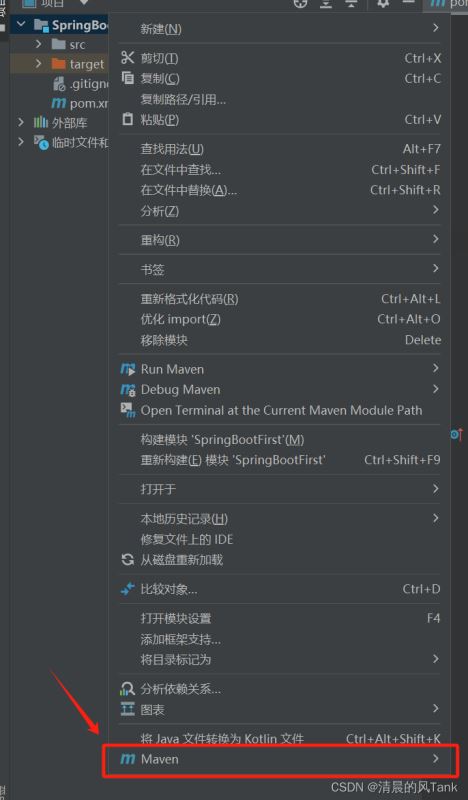
1.鼠标右击自己的项目,找到【Maven】
2.选择【Open ‘settings.xml'】或者【Create ‘settings.xml’】
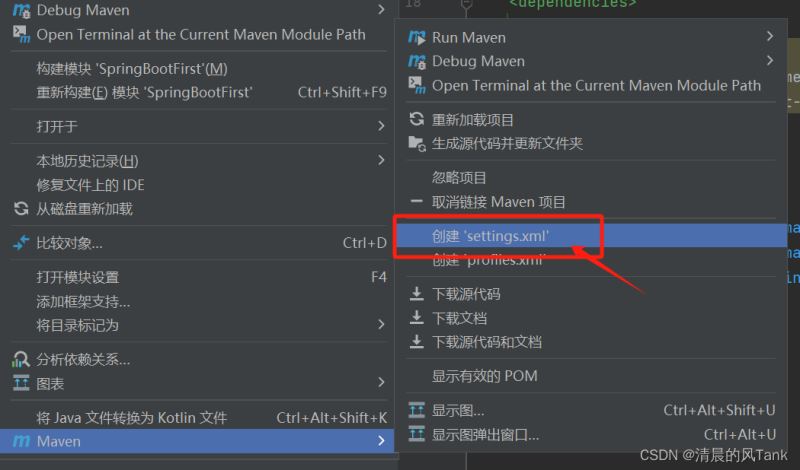
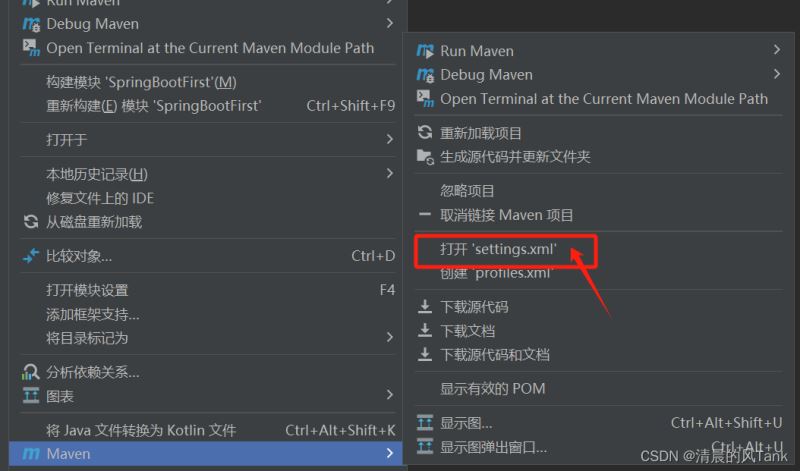
3.将以下代码粘入文件中,重启IDEA后即可提高速度
【设置Maven镜像库为阿里云镜像库和Junit镜像库】
<?xml version="1.0" encoding="UTF-8"?>
<settings xmlns="http://maven.apache.org/SETTINGS/1.0.0"
          xmlns:xsi="http://www.w3.org/2001/XMLSchema-instance"
          xsi:schemaLocation="http://maven.apache.org/SETTINGS/1.0.0 http://maven.apache.org/xsd/settings-1.0.0.xsd">
<mirrors>

<!--    <mirror>-->
<!--      <id>mirrorId</id>-->
<!--      <mirrorOf>repositoryId</mirrorOf>-->
<!--      <name>Human Readable Name for this Mirror.</name>-->
<!--      <url>http://my.repository.com/repo/path</url>-->
<!--    </mirror>-->

    <mirror>
        <id>alimaven</id>
        <name>aliyun maven</name>
        <url>http://maven.aliyun.com/nexus/content/groups/public/</url>
        <mirrorOf>central</mirrorOf>
    </mirror>

    <mirror>
        <id>uk</id>
        <mirrorOf>central</mirrorOf>
        <name>Human Readable Name for this Mirror.</name>
        <url>http://uk.maven.org/maven2/</url>
    </mirror>

    <mirror>
        <id>CN</id>
        <name>OSChina Central</name>
        <url>http://maven.oschina.net/content/groups/public/</url>
        <mirrorOf>central</mirrorOf>
    </mirror>

    <mirror>
        <id>nexus</id>
        <name>internal nexus repository</name>
        <url>http://repo.maven.apache.org/maven2</url>
        <mirrorOf>central</mirrorOf>
    </mirror>

    <!-- junit镜像地址 -->
    <mirror>
        <id>junit</id>
        <name>junit Address/</name>
        <url>http://jcenter.bintray.com/</url>
        <mirrorOf>central</mirrorOf>
    </mirror>

<!--    <mirrors>-->
        <!-- mirror
         | Specifies a repository mirror site to use instead of a given repository. The repository that
         | this mirror serves has an ID that matches the mirrorOf element of this mirror. IDs are used
         | for inheritance and direct lookup purposes, and must be unique across the set of mirrors.
         |
        <mirror>
          <id>mirrorId</id>
          <mirrorOf>repositoryId</mirrorOf>
          <name>Human Readable Name for this Mirror.</name>
          <url>http://my.repository.com/repo/path</url>
        </mirror>
         -->

        <mirror>
            <!--This sends everything else to /public -->
            <id>nexus-aliyun</id>
            <mirrorOf>*</mirrorOf>
            <name>Nexus aliyun</name>
            <url>http://maven.aliyun.com/nexus/content/groups/public</url>
        </mirror>

        <mirror>
            <id>osc</id>
            <mirrorOf>*</mirrorOf>
            <url>http://maven.oschina.net/content/groups/public/</url>
        </mirror>

        <mirror>
            <id>repo2</id>
            <mirrorOf>central</mirrorOf>
            <name>Human Readable Name for this Mirror.</name>
            <url>http://repo2.maven.org/maven2/</url>
        </mirror>

        <mirror>
            <id>net-cn</id>
            <mirrorOf>central</mirrorOf>
            <name>Human Readable Name for this Mirror.</name>
            <url>http://maven.net.cn/content/groups/public/</url>
        </mirror>

        <mirror>
            <id>ui</id>
            <mirrorOf>central</mirrorOf>
            <name>Human Readable Name for this Mirror.</name>
            <url>http://uk.maven.org/maven2/</url>
        </mirror>

        <mirror>
            <id>ibiblio</id>
            <mirrorOf>central</mirrorOf>
            <name>Human Readable Name for this Mirror.</name>
            <url>http://mirrors.ibiblio.org/pub/mirrors/maven2/</url>
        </mirror>

        <mirror>
            <id>jboss-public-repository-group</id>
            <mirrorOf>central</mirrorOf>
            <name>JBoss Public Repository Group</name>
            <url>http://repository.jboss.org/nexus/content/groups/public</url>
        </mirror>

        <mirror>
            <id>JBossJBPM</id>
            <mirrorOf>central</mirrorOf>
            <name>JBossJBPM Repository</name>
            <url>https://repository.jboss.org/nexus/content/repositories/releases/</url>
        </mirror>

    </mirrors>
</settings>
截止到此,Maven的依赖包就能很快速的下载了。
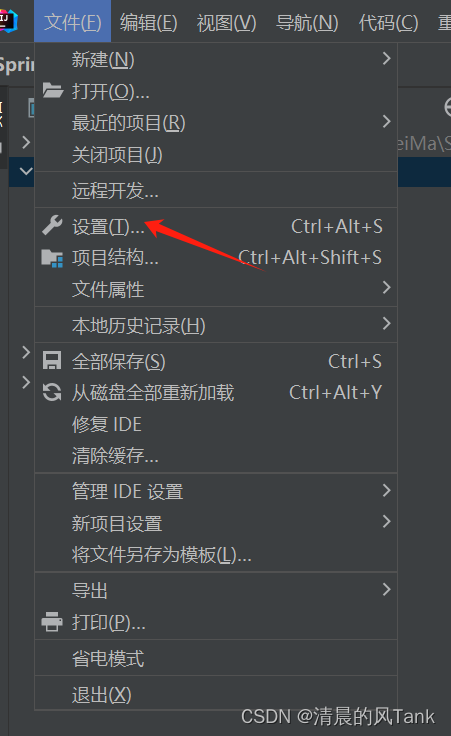
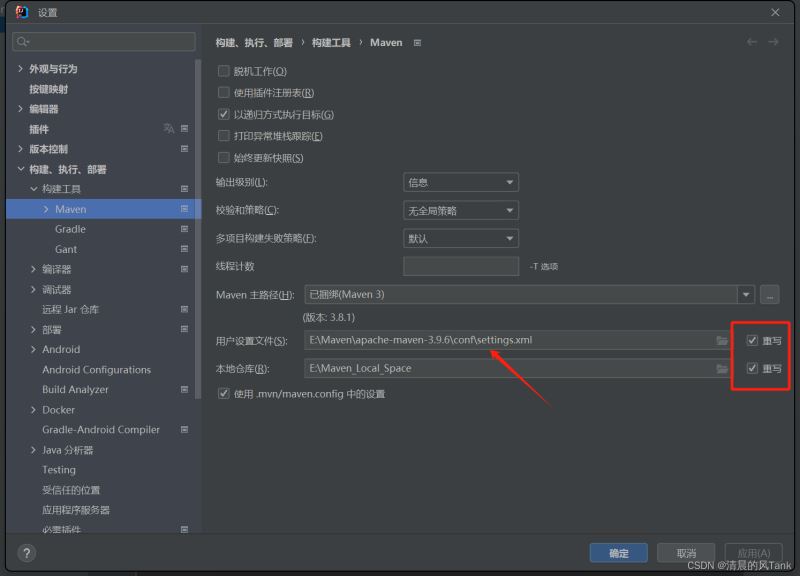
另一种解决方案
1.设置Maven镜像仓库
在Maven文件夹下找到【conf】文件夹下,找到【setting,xml】,编辑此文件,如果里面已经配置了阿里云镜像库和Junit镜像库则跳过,如果没有则进行插入。
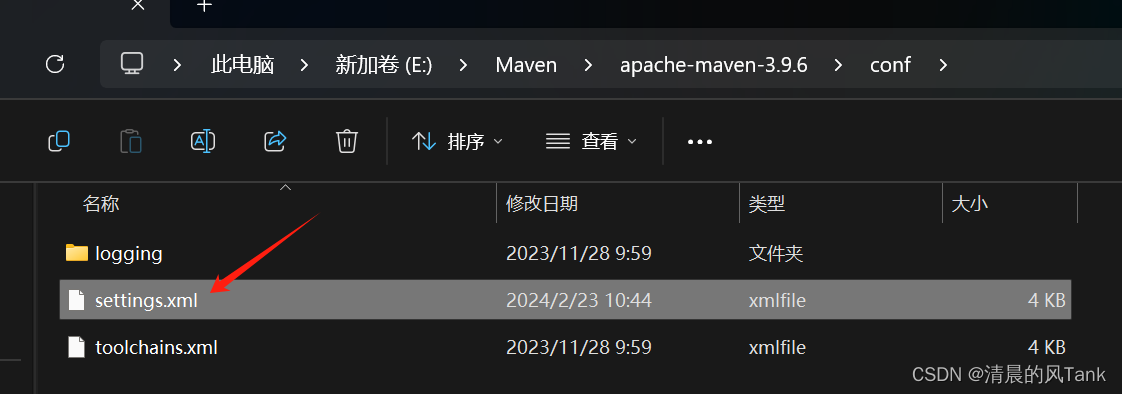
2.编辑【setting】
以上就是解决IDEA中Maven下载依赖包过慢或报错的问题的详细内容,更多关于IDEA Maven下载过慢或报错的资料请关注脚本之家其它相关文章!
相关文章
 这篇文章主要介绍了Java @Autowired报错原因分析和4种解决方案,文章围绕主题展开详细内容介绍,具有一定的参考价值,需要的小伙伴可以参考以一下2022-05-05
 这篇文章主要介绍了Java 实现查找旋转数组的最小数字,小编觉得挺不错的,现在分享给大家,也给大家做个参考。一起跟随小编过来看看吧2018-07-07
idea一直提示Loaded classes are up to da
该文章总结了使用Spring Boot和Tomcat过程中遇到的一个提示:"Loaded classes are up to date. Nothing to reload.",并提供了解决方案和经验分享,希望对读者有帮助2026-05-05
IDEA 中 maven 的 Lifecycle 和Plugins&n
IDEA 主界面右侧 Maven 标签栏有同样的命令,比如 install,既在 Plugins 中存在,也在 Lifecycle中存在,到底选哪个?二者又有什么区别呢?下面小编给大家介绍下IDEA 中 maven 的 Lifecycle 和Plugins 的区别,感兴趣的朋友一起看看吧2023-03-03
详谈Java枚举、静态导入、自动拆装箱、增强for循环、可变参数
下面小编就为大家带来一篇详谈Java枚举、静态导入、自动拆装箱、增强for循环、可变参数。小编觉得挺不错的,现在就分享给大家,也给大家做个参考。一起跟随小编过来看看吧2017-08-08 这篇文章主要介绍了Java信号量的相关资料,帮助大家更好的理解和使用Java,感兴趣的朋友可以了解下2021-01-01
 今天带大家学习SpringBoot导入静态资源的过程,文中介绍的非常详细,对正在学习java的小伙伴们有很好地帮助,需要的朋友可以参考下2021-05-05
 这篇文章主要介绍了java HashMap内部实现原理详解的相关资料,需要的朋友可以参考下2017-02-02
基于springboot拦截器HandlerInterceptor的注入问题
这篇文章主要介绍了springboot拦截器HandlerInterceptor的注入问题,具有很好的参考价值,希望对大家有所帮助。如有错误或未考虑完全的地方,望不吝赐教2021-09-09 这篇文章主要介绍了SpringBoot访问请求404解决方法,文中有详细的解决方法供大家参考,对我们学习或工作有一定的帮助,需要的朋友跟着小编一起来学习吧2023-07-07
最新评论