

C#使用SevenZipSharp实现压缩文件和目录
更新时间:2025年01月08日 11:39:26 作者:秋月的私语
SevenZipSharp压缩/解压(.7z .zip)”是指使用SevenZipSharp库进行7z和zip格式的文件压缩与解压缩操作,SevenZipSharp是C#语言封装的7-Zip API,它使得在.NET环境中调用7-Zip的功能变得简单易行,本文给大家介绍了C#使用SevenZipSharp实现压缩文件和目录
C#使用SevenZipSharp的操作
封装了一个类,方便使用SevenZipSharp,支持加入进度显示事件。
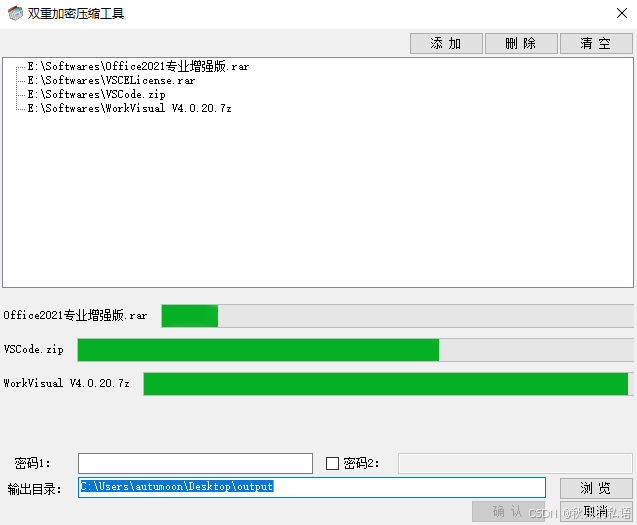
双重加密压缩工具范例:
using SevenZip;
using System;
using System.Collections.Generic;
using System.IO;
using System.Linq;
using System.Text;
using System.Threading.Tasks;

namespace ProcessItems
{
    class SevenZipSharpUser
    {
        // 假设这是某个类中的一个事件定义
        public  event EventHandler<ProgressEventArgs> ProgressUpdated = null;

        public  static bool SetSetLibraryPath()
        {
            //设置库路径
            string currentDirectory = AppDomain.CurrentDomain.BaseDirectory;
            string dllPath = GetAppropriate7zDllPath(currentDirectory);

            if (!File.Exists(dllPath))
            {
                return false;
            }

            SevenZipSharpUser.SetSetLibraryPath(dllPath);

            return true;
        }

        public static void SetSetLibraryPath(string s7zDllPath)
        {
            SevenZipBase.SetLibraryPath(s7zDllPath);
        }

        public  bool CompressItem(string inputItem, string outputFile, string password = null)
        {
            string directory = Path.GetDirectoryName(outputFile);
            if (!Directory.Exists(directory))
            {
                Directory.CreateDirectory(directory);
            }

            if (Directory.Exists(inputItem))
            {
                return CompressDir(inputItem, outputFile, password);
            }
            else if (File.Exists(inputItem))
            {
                return CompressFile(inputItem, outputFile, password);
            }

            return false;
        }

        public  bool DoubleCompressItem(string inputItem, string outputFile, string password1 = null, string password2 = null)
        {
            string directory = Path.GetDirectoryName(outputFile);
            string fileNameWithoutExtension = Path.GetFileNameWithoutExtension(outputFile);

            string sFirstDstPath = Path.Combine(directory, $"{fileNameWithoutExtension}{".7zx"}");

            CompressItem(inputItem, sFirstDstPath, password1);
            CompressItem(sFirstDstPath, outputFile, password2);

            File.Delete(sFirstDstPath);

            return false;
        }

        public  string GetUniqueFilePath(string filePath)
        {
            string directory = Path.GetDirectoryName(filePath);
            string fileNameWithoutExtension = Path.GetFileNameWithoutExtension(filePath);
            string extension = Path.GetExtension(filePath);

            int counter = 1;
            string newFilePath = filePath;

            while (File.Exists(newFilePath))
            {
                newFilePath = Path.Combine(directory, $"{fileNameWithoutExtension}{counter}{extension}");
                counter++;
            }

            return newFilePath;
        }

        public  bool CompressFile(string inputFile, string outputFile, string password = null)
        {
            try
            {
                // 检查输入文件是否存在
                if (!File.Exists(inputFile))
                {
                    throw new FileNotFoundException("输入文件不存在。", inputFile);
                }

                // 创建 SevenZipCompressor 实例
                var compressor = new SevenZipCompressor();
                // 设置压缩级别和档案格式
                compressor.CompressionLevel = CompressionLevel.Normal;
                compressor.ArchiveFormat = OutArchiveFormat.SevenZip;

                // 订阅进度更新事件
                if (ProgressUpdated != null)
                {
                    compressor.Compressing += ProgressUpdated;
                }

                // 压缩文件
                compressor.CompressFilesEncrypted(outputFile, password, inputFile);

                if (ProgressUpdated != null)
                {
                    compressor.Compressing -= ProgressUpdated;
                }

                // 压缩成功后返回 true
                return true;
            }
            catch (Exception ex)
            {
                // 在发生异常时记录日志、抛出异常或返回 false
                // 这里简单地返回 false,但你可以根据需要更改此行为
                Console.WriteLine($"压缩文件时发生错误: {ex.Message}");
                return false;
            }
            finally
            {

            }
        }

        public  bool CompressDir(string stInputDir, string stOutputFile, string stPwd)
        {
            try
            {
                // 检查输入文件是否存在
                if (!Directory.Exists(stInputDir))
                {
                    throw new FileNotFoundException("输入目录不存在。", stInputDir);
                }

                // 创建 SevenZipCompressor 实例
                var compressor = new SevenZipCompressor();
                // 设置压缩级别和档案格式
                compressor.CompressionLevel = CompressionLevel.Normal;
                compressor.ArchiveFormat = OutArchiveFormat.SevenZip;

                // 订阅进度更新事件
                if (ProgressUpdated != null)
                {
                    compressor.Compressing += ProgressUpdated;
                }

                // 压缩文件
                compressor.CompressDirectory(stInputDir, stOutputFile, stPwd);

                if (ProgressUpdated != null)
                {
                    compressor.Compressing -= ProgressUpdated;
                }

                // 压缩成功后返回 true
                return true;
            }
            catch (Exception ex)
            {
                // 在发生异常时记录日志、抛出异常或返回 false
                // 这里简单地返回 false,但你可以根据需要更改此行为
                Console.WriteLine($"压缩文件时发生错误: {ex.Message}");
                return false;
            }
            finally
            {

            }
        }

        private static string GetAppropriate7zDllPath(string basePath)
        {
            string dllName = "7z.dll";
            string dllPath = Path.Combine(basePath, dllName);

            // Check if the system is 64-bit or 32-bit
            if (Environment.Is64BitOperatingSystem)
            {
                // If the system is 64-bit, check for a specific 64-bit version of the DLL
                string dll64Path = Path.Combine(basePath, "7z.dll"); // Example name for 64-bit version
                if (File.Exists(dll64Path))
                {
                    return dll64Path;
                }
                // If the specific 64-bit version is not found, fall back to the generic name
            }
            else
            {
                // If the system is 32-bit, check for a specific 32-bit version of the DLL
                string dll32Path = Path.Combine(basePath, "7-zip32.dll"); // Example name for 32-bit version
                if (File.Exists(dll32Path))
                {
                    return dll32Path;
                }
                // If the specific 32-bit version is not found, fall back to the generic name
            }

            // If neither specific version is found, return the generic DLL name (which might be a universal version or an error)
            return dllPath;
        }
    }
}
使用方法:
            //设置库
            if (!SevenZipSharpUser.SetSetLibraryPath())
            {
                MessageBox.Show("7z.dll库引用失败!", "错误!", MessageBoxButtons.OK, MessageBoxIcon.Error);
            }

            //这里是处理任务逻辑开始========start===========
            if (itemInfo.bDoubleCompress)
            {
                szu.DoubleCompressItem(itemInfo.sItemPath, itemInfo.sDstPath, itemInfo.sPassword1, itemInfo.sPassword2);
            }
            else
            {
                szu.CompressItem(itemInfo.sItemPath, itemInfo.sDstPath, itemInfo.sPassword1);
            }

            //这里是处理任务逻辑结束========end=============
拓展:C#使用SevenZipSharp压缩解压文件
首先程序需要用到三个DLL文件,分别是:SevenZipSharp.dll、7z.dll、7z64.dll,其中SevenZipSharp.dll需要程序进行引用,而其他两个文件给代码使用,其中7z.dll是32位,7z64.dll是64位的。(此处需要注意,这里的32位与64位指的是程序,而不是操作系统,即指的是VS中右键项目属性里的目标平台,可由System.IntPtr.Size判断,4为32位,8为64位,当时因为这里的歧义踩过坑)
解压
伪代码:
	if(IntPtr.Size == 4)    //32位操作系统
	{
     	 SevenZipCompressor.SetLibraryPath(AppDomain.CurrentDomain.BaseDirectory + @"\7z.dll"); //路径指向dll文件,此处dll放在与程序相同目录,以下相同。

	}
	else    //64位操作系统
	{
    	SevenZipCompressor.SetLibraryPath(AppDomain.CurrentDomain.BaseDirectory + @"\7z64.dll");
	}
	using (var tmp = new SevenZipExtractor(“压缩文件全名称”))    //这里的全名称包含路径
    {
         tmp.ExtractArchive(“解压到的路径”);
    }
压缩
伪代码:
	if(IntPtr.Size == 4)    //32位操作系统
	{
     	 SevenZipCompressor.SetLibraryPath(AppDomain.CurrentDomain.BaseDirectory + @"\7z.dll");
	}
	else    //64位操作系统
	{
    	SevenZipCompressor.SetLibraryPath(AppDomain.CurrentDomain.BaseDirectory + @"\7z64.dll");
	}
	var compressor = new SevenZipCompressor();
	//压缩文件夹:
	compressor.CompressDirectory(目录名,压缩文件名称);//此处有多个重载,不一一列出。

	//压缩文件:
	var zipTool = new SevenZipCompressor();
	zipTool.ArchiveFormat = OutArchiveFormat.Zip;   //压缩文件类型
    string[] fileNames = {“文件全路径”,“文件全路径” }; //需要添加到压缩文件的文件的全路径数组。
    zipTool.CompressFiles(“压缩文件名称”, fileNames); //传递压缩文件名称,及文件全路径数组。
以上就是C#使用SevenZipSharp实现压缩文件和目录的详细内容,更多关于C# SevenZipSharp压缩的资料请关注脚本之家其它相关文章!
相关文章
 这篇文章主要介绍了C#实现启动,关闭与查找进程的方法,通过简单实例形式分析了C#针对进程的启动,关闭与查找的相关实现技巧,具有一定参考借鉴价值,需要的朋友可以参考下2015-11-11
 这篇文章主要介绍了C#写差异文件备份工具的示例,帮助大家利用c#备份,管理文件,感兴趣的朋友可以了解下2020-10-10
 本文给大家介绍的是C#程序优化的小技巧,通过此方法可以有效的降低CPU的占用率,十分的简单实用,有需要的小伙伴可以参考下。2015-06-06
 这篇文章介绍了,C#中通过API实现的打印类 实例代码,有需要的朋友可以参考一下2013-08-08
 这篇文章主要介绍了C#中的TemplateMethod模式,本文通过实例代码给大家介绍的非常详细,对大家的学习或工作具有一定的参考借鉴价值,需要的朋友可以参考下2020-06-06
 这篇文章主要介绍了C#简单实现SNMP的方法,通过一个简单的自定义类分析了C#实现SNMP的相关技巧,具有一定参考借鉴价值,需要的朋友可以参考下2015-07-07
 这个简单的飞行棋游戏主要是讲的方法怎么应用,充分的去理解方法和方法的调用。整体收获还是很大的。感兴趣的朋友可以参考下2021-06-06
 在日常办公和自动化流程中,Word文档扮演着不可或缺的角色,本文将深入探讨如何利用C#结合强大的第三方库Spire.Doc for .NET在Word文档中添加和移除可编辑区域,感兴趣的小伙伴可以了解下2026-01-01
 由于最近的项目中需要用到大量的序列帧动画以及逻辑处理,本来想用Unity自带的Animation组件来实现的,但由于甲方需求一再变更,需要处理的逻辑太多,为了方便修改和拓展,所以就根据自己项目的需求自定义了一个序列帧播放组件来辅助开发2022-01-01
 这篇文章主要介绍了C#中LINQ的Select与SelectMany函数使用,具有很好的参考价值,希望对大家有所帮助。如有错误或未考虑完全的地方,望不吝赐教2022-08-08
最新评论