

springboot集成screw反向生成数据库说明文档
更新时间:2025年01月09日 09:57:36 作者:肥仔哥哥1930
screw是一个一键式生成数据库文档的开源工具包,目前screw可以生成word、md和html格式类的文档,本文主要来讲讲如何通过screw反向生成数据库说明文档,感兴趣的可以了解下
一、screw介绍
不是大厂写的,是个人写的,但是不得不说,好使啊, 为爱发电。
二、使用步骤
1.新建一个空的springboot项目
这个使用idea,选择springboot,下一步下一步就行。
我这里是maven项目,pom文件引入jar包。
我这里的整个pom.xml内容
<?xml version="1.0" encoding="UTF-8"?>
<project xmlns="http://maven.apache.org/POM/4.0.0" xmlns:xsi="http://www.w3.org/2001/XMLSchema-instance"
	xsi:schemaLocation="http://maven.apache.org/POM/4.0.0 https://maven.apache.org/xsd/maven-4.0.0.xsd">
	<modelVersion>4.0.0</modelVersion>
	<parent>
		<groupId>org.springframework.boot</groupId>
		<artifactId>spring-boot-starter-parent</artifactId>
		<version>3.3.3</version>
		<relativePath/> <!-- lookup parent from repository -->
	</parent>
	<groupId>com.easylinkin</groupId>
	<artifactId>my-screw</artifactId>
	<version>0.0.1-SNAPSHOT</version>
	<name>my-screw</name>
	<description>my-screw</description>
	<url/>
	<licenses>
		<license/>
	</licenses>
	<developers>
		<developer/>
	</developers>
	<scm>
		<connection/>
		<developerConnection/>
		<tag/>
		<url/>
	</scm>
	<properties>
		<java.version>17</java.version>
	</properties>
	<dependencies>
		<dependency>
			<groupId>org.springframework.boot</groupId>
			<artifactId>spring-boot-starter</artifactId>
		</dependency>

		<dependency>
			<groupId>org.springframework.boot</groupId>
			<artifactId>spring-boot-starter-test</artifactId>
			<scope>test</scope>
		</dependency>

		<dependency>
			<groupId>org.springframework.boot</groupId>
			<artifactId>spring-boot-starter-web</artifactId>
		</dependency>
		<dependency>
			<groupId>cn.smallbun.screw</groupId>
			<artifactId>screw-core</artifactId>
			<version>1.0.5</version>
		</dependency>
		<dependency>
			<groupId>com.mysql</groupId>
			<artifactId>mysql-connector-j</artifactId>
		</dependency>
		<dependency>
			<groupId>com.zaxxer</groupId>
			<artifactId>HikariCP</artifactId>
		</dependency>
		<dependency>
			<groupId>org.projectlombok</groupId>
			<artifactId>lombok</artifactId>
		</dependency>
	</dependencies>

	<build>
		<plugins>
			<plugin>
				<groupId>org.springframework.boot</groupId>
				<artifactId>spring-boot-maven-plugin</artifactId>
			</plugin>
		</plugins>
	</build>

</project>
2.生成文档的测试类
package com.easylinkin.myscrew;

import cn.smallbun.screw.core.Configuration;
import cn.smallbun.screw.core.engine.EngineConfig;
import cn.smallbun.screw.core.engine.EngineFileType;
import cn.smallbun.screw.core.engine.EngineTemplateType;
import cn.smallbun.screw.core.execute.DocumentationExecute;
import cn.smallbun.screw.core.process.ProcessConfig;
import com.zaxxer.hikari.HikariDataSource;
import lombok.extern.slf4j.Slf4j;
import org.junit.jupiter.api.Test;
import org.springframework.boot.test.context.SpringBootTest;

import java.util.ArrayList;
import java.util.Arrays;
import java.util.List;

@Slf4j
@SpringBootTest
class MyScrewApplicationTests {

	//@Test
	void contextLoads() {
	}

	/**
	 * 获取数据源配置
	 */
	@Test
	void generate() {
		log.info("开始生成数据库文档");
		String dbFilePath = "/Users/zwmac/work/ovu/数据库";
		// 生成文件配置
		EngineConfig engineConfig = EngineConfig.builder()
				// 生成文件路径,自己mac本地的地址,这里需要自己更换下路径
				.fileOutputDir(dbFilePath)
				// 打开目录
				.openOutputDir(false)
				// 文件类型 HTML/WORD/MD 三种格式
				.fileType(EngineFileType.WORD)
				// 生成模板实现
				.produceType(EngineTemplateType.freemarker).build();

		//数据库名称
		String[] dbNames = {"ovuhome"};
		for (String dbName : dbNames) {
			HikariDataSource hikariDataSource = new HikariDataSource();
			//设置数据库连接
			hikariDataSource.setJdbcUrl("jdbc:mysql://127.0.0.1:3306/" + dbName + "?characterEncoding=utf8&zeroDateTimeBehavior=convertToNull&useSSL=false&useJDBCCompliantTimezoneShift=true&useLegacyDatetimeCode=false&serverTimezone=GMT%2B8&allowMultiQueries=true&allowPublicKeyRetrieval=true");
			hikariDataSource.setUsername("root");
			hikariDataSource.setPassword("12345678");
			// 生成文档配置(包含以下自定义版本号、描述等配置连接)
			Configuration config = Configuration.builder()
					//文档版本号
					.version("1.0.1")
					//文档名称
					.description("公寓数据库设计文档")
					//数据源
					.dataSource(hikariDataSource)
					//生成引擎配置
					.engineConfig(engineConfig)
					//高级配置
					//.produceConfig(getProcessConfig())
					.build();

			// 执行生成
			new DocumentationExecute(config).execute();
		}
		log.info("生成数据库文档完成");
	}

	/**
	 * 配置想要生成的表+ 配置想要忽略的表
	 * @return 生成表配置
	 */
	public static ProcessConfig getProcessConfig(){
		// 忽略表名
		List<String> ignoreTableName = Arrays.asList("testa_testa","testb_testb");
		// 忽略表前缀
		List<String> ignorePrefix = Arrays.asList("testa","testb");
		// 忽略表后缀
		List<String> ignoreSuffix = Arrays.asList("_testa","_testb");
		return ProcessConfig.builder()
				//根据名称指定表生成 我需要生成所有表 这里暂时不设置
				.designatedTableName(new ArrayList<>())
				//根据表前缀生成 我需要生成所有表 这里暂时不设置
				.designatedTablePrefix(new ArrayList<>())
				//根据表后缀生成 我需要生成所有表 这里暂时不设置
				.designatedTableSuffix(new ArrayList<>())
				//忽略表名
				.ignoreTableName(ignoreTableName)
				//忽略表前缀
				.ignoreTablePrefix(ignorePrefix)
				//忽略表后缀
				.ignoreTableSuffix(ignoreSuffix).build();
	}

}
测试类运行,就不说了,自己摸索摸索。
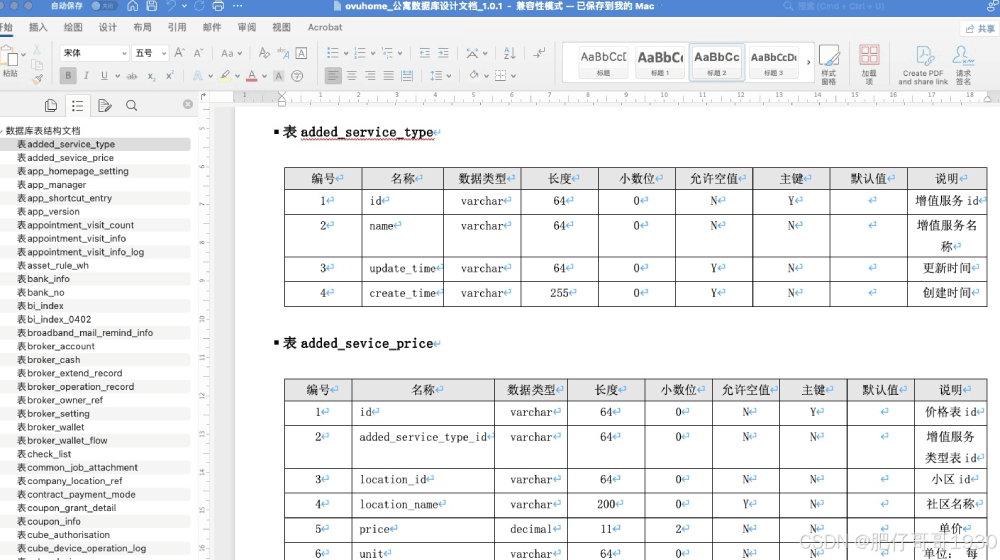
3.生成的word文档效果
到此这篇关于springboot集成screw反向生成数据库说明文档的文章就介绍到这了,更多相关springboot screw生成数据库说明文档内容请搜索脚本之家以前的文章或继续浏览下面的相关文章希望大家以后多多支持脚本之家!
相关文章
 下面小编就为大家带来一篇java 获取路径的各种方法(总结)。小编觉得挺不错的,现在就分享给大家,也给大家做个参考。一起跟随小编过来看看吧2016-08-08
springboot+dubbo+zookeeper的简单实例详解
本文主要介绍了springboot+dubbo+zookeeper的简单实例,文中通过示例代码介绍的非常详细,具有一定的参考价值,感兴趣的小伙伴们可以参考一下2021-10-10 开始学习maven,并用maven创建了第一个属于自己的web项目,下面这篇文章主要给大家介绍了关于eclipse创建一个基于maven的web项目的相关资料,文中通过图文介绍的非常详细,需要的朋友可以参考下2023-12-12
 文章描述了一项目使用RabbitMQ但仅使用发送功能未监听,导致启动时无自动创建队列的问题,作者通过手动连接RabbitMQ配置队列信息来解决此问题,并提供了一种测试可用的方法,此方法仅为作者个人经验,仅供参考2026-05-05
 这篇文章主要介绍了JAVA反射机制,包括了Java反射机制的各种应用技巧,非常具有实用价值,需要的朋友可以参考下2014-09-09
 这篇文章主要介绍Struts2中使用Result配置全局结果集的方法,希望能给大家做一个参考。2016-06-06
Springboot整合ip2region实现用户ip归属地获取
ip2region是一个离线IP地址定位库和IP定位数据管理框架,提供了众多主流编程语言的 xdb 数据生成和查询客户端实现,下面我们来看看如何使用ip2region实现用户ip归属地获取吧2025-05-05 本文主要介绍了mybatisPlus配置逻辑字段不生效问题解决,文中通过示例代码介绍的非常详细,对大家的学习或者工作具有一定的参考学习价值,需要的朋友们下面随着小编来一起学习学习吧2024-05-05
SpringBoot集成Swagger2构建在线API文档的代码详解
这篇文章主要介绍了SpringBoot集成Swagger2构建在线API文档,本文通过实例代码给大家介绍的非常详细,对大家的学习或工作具有一定的参考借鉴价值,需要的朋友可以参考下2020-12-12 在JavaScript中实现异步编程的方法多种多样,每种方法都有其特定的应用场景和优缺点,这篇文章主要介绍了JavaScript异步通信三种玩法的相关资料,文中通过代码介绍的非常详细,需要的朋友可以参考下2025-12-12
最新评论