

Qt Qml实现任意角为圆角的矩形
在 Qml 中,矩形(Rectangle)是最常用的元素之一。
然而,标准的矩形元素仅允许设置统一的圆角半径。
在实际开发中,我们经常需要更灵活的圆角设置,例如只对某些角进行圆角处理,或者设置不同角的圆角半径。
本文将介绍如何通过自定义 Qml 元素实现一个任意角可为圆角的矩形。
效果图
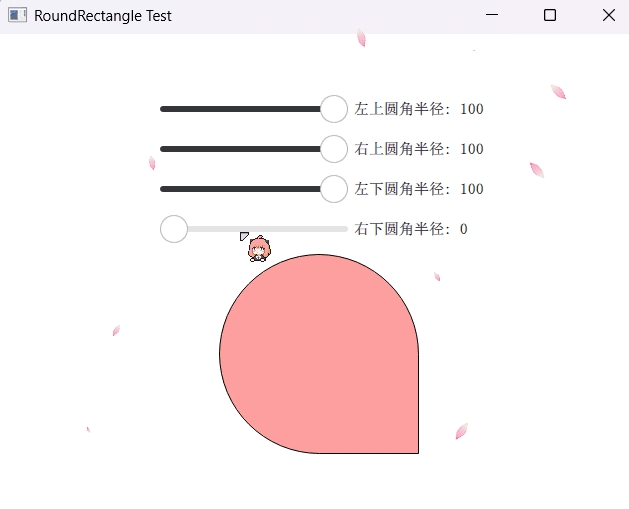
自定义 Qml 元素:DelRectangle
我们将创建一个名为 DelRectangle 的自定义 Qml 元素,它继承自 QQuickPaintedItem,并重写其 paint() 方法来自定义绘制逻辑。
头文件(delrectangle.h)
#ifndef DELRECTANGLE_H
#define DELRECTANGLE_H

#include <QQuickPaintedItem>

class DelPen: public QObject
{
    Q_OBJECT
    Q_PROPERTY(qreal width READ width WRITE setWidth NOTIFY widthChanged FINAL)
    Q_PROPERTY(QColor color READ color WRITE setColor NOTIFY colorChanged FINAL)
    QML_NAMED_ELEMENT(DelPen)
public:
    DelPen(QObject *parent = nullptr);
    qreal width() const;
    void setWidth(qreal width);
    QColor color() const;
    void setColor(const QColor &color);
    bool isValid() const;
signals:
    void widthChanged();
    void colorChanged();
private:
    qreal m_width = 1;
    QColor m_color = Qt::transparent;
};

class DelRectangle: public QQuickPaintedItem
{
    Q_OBJECT
    Q_PROPERTY(qreal radius READ radius WRITE setRadius NOTIFY radiusChanged FINAL)
    Q_PROPERTY(qreal topLeftRadius READ topLeftRadius WRITE setTopLeftRadius NOTIFY topLeftRadiusChanged FINAL)
    Q_PROPERTY(qreal topRightRadius READ topRightRadius WRITE setTopRightRadius NOTIFY topRightRadiusChanged FINAL)
    Q_PROPERTY(qreal bottomLeftRadius READ bottomLeftRadius WRITE setBottomLeftRadius NOTIFY bottomLeftRadiusChanged FINAL)
    Q_PROPERTY(qreal bottomRightRadius READ bottomRightRadius WRITE setBottomRightRadius NOTIFY bottomRightRadiusChanged FINAL)
    Q_PROPERTY(QColor color READ color WRITE setColor NOTIFY colorChanged FINAL)
    Q_PROPERTY(DelPen* border READ border CONSTANT)
    QML_NAMED_ELEMENT(DelRectangle)
public:
    explicit DelRectangle(QQuickItem *parent = nullptr);
    ~DelRectangle();
    qreal radius() const;
    void setRadius(qreal radius);
    qreal topLeftRadius() const;
    void setTopLeftRadius(qreal radius);
    qreal topRightRadius() const;
    void setTopRightRadius(qreal radius);
    qreal bottomLeftRadius() const;
    void setBottomLeftRadius(qreal radius);
    qreal bottomRightRadius() const;
    void setBottomRightRadius(qreal radius);
    QColor color() const;
    void setColor(QColor color);
    DelPen *border();
    void paint(QPainter *painter) override;
signals:
    void radiusChanged();
    void topLeftRadiusChanged();
    void topRightRadiusChanged();
    void bottomLeftRadiusChanged();
    void bottomRightRadiusChanged();
    void colorChanged();
private:
    Q_DECLARE_PRIVATE(DelRectangle);
    QSharedPointer<DelRectanglePrivate> d_ptr;
};

#endif // DELRECTANGLE_H
实现文件(delrectangle.cpp)
#include "delrectangle.h"

#include <QPainter>
#include <QPainterPath>
#include <private/qqmlglobal_p.h>

class DelRectanglePrivate
{
public:
    QColor m_color = { 0xffffff };
    DelPen *m_pen = nullptr;
    qreal m_radius = 0;
    qreal m_topLeftRadius = 0;
    qreal m_topRightRadius = 0;
    qreal m_bottomLeftRadius = 0;
    qreal m_bottomRightRadius = 0;
};

DelRectangle::DelRectangle(QQuickItem *parent)
    : QQuickPaintedItem{parent}
    , d_ptr(new DelRectanglePrivate)
{
}

DelRectangle::~DelRectangle()
{
}

qreal DelRectangle::radius() const
{
    Q_D(const DelRectangle);
    return d->m_radius;
}

void DelRectangle::setRadius(qreal radius)
{
    Q_D(DelRectangle);
    if (d->m_radius != radius) {
        d->m_radius = radius;
        d->m_topLeftRadius = radius;
        d->m_topRightRadius = radius;
        d->m_bottomLeftRadius = radius;
        d->m_bottomRightRadius = radius;
        emit radiusChanged();
        update();
    }
}

// 其他 getter 和 setter 方法省略...

QColor DelRectangle::color() const
{
    Q_D(const DelRectangle);
    return d->m_color;
}

void DelRectangle::setColor(QColor color)
{
    Q_D(DelRectangle);
    if (d->m_color != color) {
        d->m_color = color;
        emit colorChanged();
        update();
    }
}

DelPen *DelRectangle::border()
{
    Q_D(DelRectangle);
    if (!d->m_pen) {
        d->m_pen = new DelPen;
        QQml_setParent_noEvent(d->m_pen, this);
        connect(d->m_pen, &DelPen::colorChanged, this, [this]{ update(); });
        connect(d->m_pen, &DelPen::widthChanged, this, [this]{ update(); });
        update();
    }
    return d->m_pen;
}

void DelRectangle::paint(QPainter *painter)
{
    Q_D(DelRectangle);
    painter->save();
    painter->setRenderHint(QPainter::Antialiasing);
    QRectF rect = boundingRect();
    if (d->m_pen && d->m_pen->isValid()) {
        rect = boundingRect();
        if (rect.width() > d->m_pen->width() * 2) {
            auto dx = d->m_pen->width() * 0.5;
            rect.adjust(dx, 0, -dx, 0);
        }
        if (rect.height() > d->m_pen->width() * 2) {
            auto dy = d->m_pen->width() * 0.5;
            rect.adjust(0, dy, 0, -dy);
        }
        painter->setPen(QPen(d->m_pen->color(), d->m_pen->width(), Qt::SolidLine, Qt::SquareCap, Qt::SvgMiterJoin));
    }
    QPainterPath path;
    path.moveTo(rect.bottomRight() - QPointF(0, d->m_bottomRightRadius));
    path.lineTo(rect.topRight() + QPointF(0, d->m_topRightRadius));
    path.arcTo(QRectF(QPointF(rect.topRight() - QPointF(d->m_topRightRadius * 2, 0)), QSize(d->m_topRightRadius * 2, d->m_topRightRadius * 2)), 0, 90);
    path.lineTo(rect.topLeft() + QPointF(d->m_topLeftRadius, 0));
    path.arcTo(QRectF(QPointF(rect.topLeft()), QSize(d->m_topLeftRadius * 2, d->m_topLeftRadius * 2)), 90, 90);
    path.lineTo(rect.bottomLeft() - QPointF(0, d->m_bottomLeftRadius));
    path.arcTo(QRectF(QPointF(rect.bottomLeft().x(), rect.bottomLeft().y() - d->m_bottomLeftRadius * 2), QSize(d->m_bottomLeftRadius * 2, d->m_bottomLeftRadius * 2)), 180, 90);
    path.lineTo(rect.bottomRight() - QPointF(d->m_bottomRightRadius, 0));
    path.arcTo(QRectF(QPointF(rect.bottomRight() - QPointF(d->m_bottomRightRadius * 2, d->m_bottomRightRadius * 2)), QSize(d->m_bottomRightRadius * 2, d->m_bottomRightRadius * 2)), 270, 90);
    painter->setBrush(d->m_color);
    painter->drawPath(path);
    painter->restore();
}
关键点解析
自定义 Qml 元素:通过继承 QQuickPaintedItem 并使用 QML_NAMED_ELEMENT 宏,我们可以将自定义的 C++ 类注册为 Qml 元素。
属性定义:我们定义了多个属性来控制矩形的圆角半径和颜色,例如 radius、topLeftRadius、color 等,并提供了相应的 getter 和 setter 方法。
边框管理:通过 DelPen 类来管理矩形的边框样式,包括边框颜色和宽度。
绘制逻辑:在 paint() 方法中,我们使用 QPainterPath 来绘制具有不同圆角的矩形。通过组合使用直线和弧线,我们可以实现任意角的圆角效果。
使用示例
在 Qml 文件中,我们可以像使用标准的 Rectangle 元素一样使用 DelRectangle:
import QtQuick 2.15
import QtQuick.Window 2.15
import DelegateUI.Controls 1.0

Window {
    visible: true
    width: 400
    height: 300
    title: "DelRectangle Example"

    DelRectangle {
        anchors.centerIn: parent
        width: 200
        height: 150
        color: "lightblue"
        topLeftRadius: 20
        bottomRightRadius: 30
        border {
            width: 2
            color: "blue"
        }
    }
}
总结
通过自定义 Qml 元素 DelRectangle,我们实现了对矩形圆角的更灵活控制,使其能够满足更多实际开发需求。
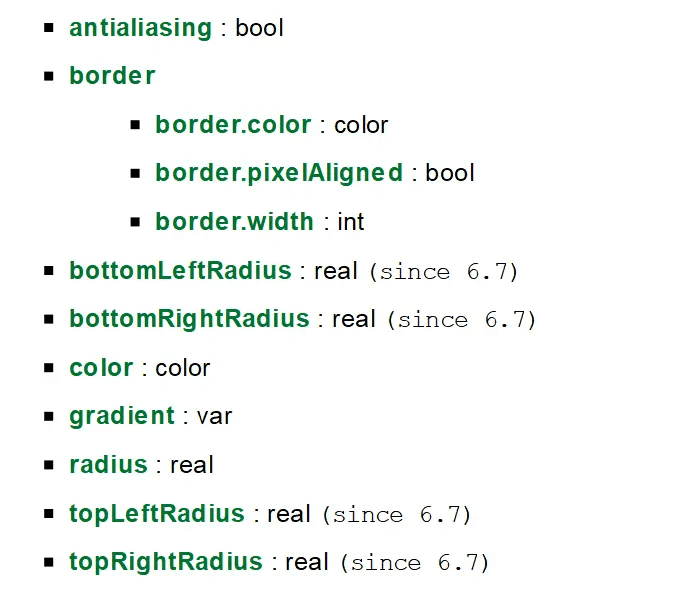
要注意的是,在 Qt 6.7 版本以后,内置的 Rectangle 将提供同等功能( 作为技术预览 ),并且效果更好:
到此这篇关于Qt Qml实现任意角为圆角的矩形的文章就介绍到这了,更多相关Qt Qml圆角矩形内容请搜索脚本之家以前的文章或继续浏览下面的相关文章希望大家以后多多支持脚本之家!
相关文章
 这篇文章主要介绍了C语言实现逆序输出。主要实现C语言实现对数组元素依次赋值然后按照逆序输出,下面文章小编将详细解说,需要的朋友可以参考一下2021-10-10
 std::transform 是 C++ 标准库中的一个算法,本文主要介绍了C++中std::transform的使用,具有一定的参考价值,感兴趣的可以了解一下2024-05-05
 本文主要介绍了VS2022连接sqlserver数据库教程,文中通过示例代码介绍的非常详细,对大家的学习或者工作具有一定的参考学习价值,需要的朋友们下面随着小编来一起学习学习吧2022-07-07
 在本篇文章当中主要给大家介绍C语言当中一些不常用的特性,比如在main函数之前和之后设置我们想要执行的函数,以及各种花式退出程序的方式,需要的可以参考一下2022-10-10
 C++ 11加入了一个非常重要的特性——Lambda表达式。这篇文章主要介绍了C++ 中lambda表达式的编译器实现原理,需要的朋友可以参考下2017-02-02
 本文主要介绍了C++中分配器allocator的实现,文中通过示例代码介绍的非常详细,对大家的学习或者工作具有一定的参考学习价值,需要的朋友们下面随着小编来一起学习学习吧2026-03-03
 这篇文章主要介绍了用C语言求幂函数和指数函数的方法,即pow()函数和sqrt()函数的使用,需要的朋友可以参考下2015-08-08
 我们知道C语言是面向过程的编程语言,C++在C语言的基础上进化出了面向对象的模型,而继承就是面向对象的重要属性,下面就让小编来和大家详细讲讲吧2023-07-07
 这篇文章主要为大家详细介绍了C++实现结束应用进程小工具,文中示例代码介绍的非常详细,具有一定的参考价值,感兴趣的小伙伴们可以参考一下2021-05-05
C++ protobuf中对不同消息内容进行赋值的方式总结(set_、set_allocated_、mutable_、
这篇文章主要给大家介绍了关于C++ protobuf中对不同消息内容进行赋值的方式总结,主要使用的是set_、set_allocated_、mutable_、add_,文中通过实例代码介绍的非常详细,需要的朋友可以参考下2023-03-03
最新评论