

java将word转pdf的方法示例详解
更新时间:2025年01月26日 09:47:06 作者:ziyue7575
这篇文章主要介绍了java将word转pdf的相关资料,文中讲解了使用Aspose-Words工具将Word文档转换为PDF的优劣,并提供了一种在Java项目中使用Aspose-Words进行Word转PDF的示例方法,需要的朋友可以参考下
总结
建议使用aspose-words转pdf,poi的容易出问题还丑…
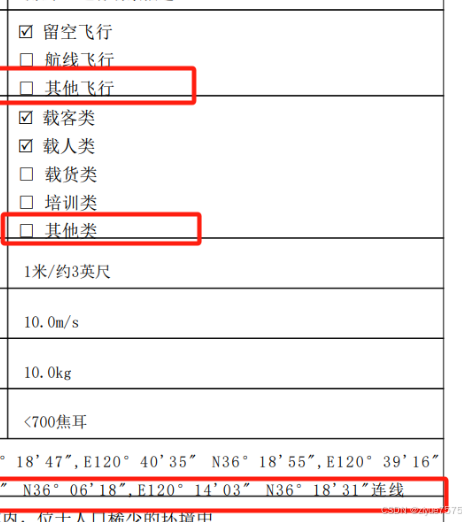
poi的(多行的下边框就不对了)
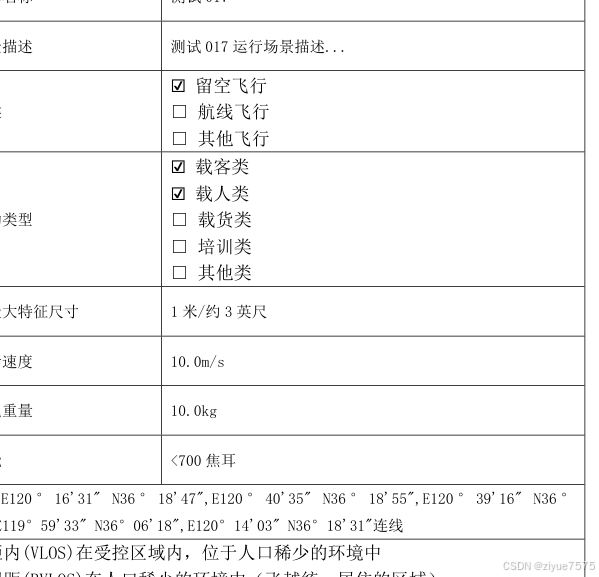
aspose-words的(基本和word一样)
poi工具转换
        <!-- 处理PDF -->
        <dependency>
            <groupId>fr.opensagres.xdocreport</groupId>
            <artifactId>fr.opensagres.poi.xwpf.converter.pdf-gae</artifactId>
            <version>2.0.3</version>
        </dependency>
这个工具使用了poi,最新的2.0.3对应poi的5.2.0,2.0.1对应poi的3.15
使用
//拿到word流
InputStream inputStream = Thread.currentThread().getContextClassLoader().getResourceAsStream("word/muban3.docx");
        if (inputStream == null) {
            throw new MsgException("读取模板失败");
        }
XWPFDocument document = new XWPFDocument(inputStream);
//.....word处理
PdfOptions pdfOptions = PdfOptions.create();//.fontEncoding( BaseFont.CP1250 );
//转pdf操作 (直接写入响应)
PdfConverter.getInstance().convert(document, response.getOutputStream(), pdfOptions);
response.setContentType("application/pdf");
或者写入输出流
    /**
     * 将word转为pdf并返回一个输出流
     *
     * @param document 输出文件名(pdf格式)
     */
    public static ByteArrayOutputStream wordToPdfOutputStream(XWPFDocument document) throws IOException {
        //word转pdf
        ByteArrayOutputStream outputStream = new ByteArrayOutputStream();
        PdfOptions pdfOptions = PdfOptions.create();//.fontEncoding( BaseFont.CP1250 );
        //转pdf操作
        PdfConverter.getInstance().convert(document, outputStream, pdfOptions);

        return outputStream;
    }
问题
poi改了word之后,生成没问题,word中创建的表格,转pdf的时候经常出问题(直接报错或者合并无效)
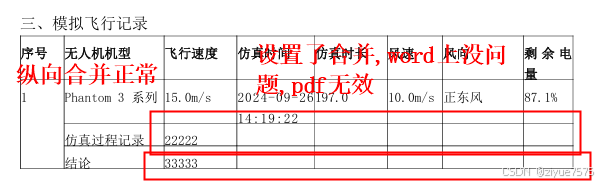
研究了2天,pdf转一直各种问题,一起之下换技术
aspose-words
https://blog.csdn.net/Wang_Pink/article/details/141898210
        <dependency>
            <groupId>com.luhuiguo</groupId>
            <artifactId>aspose-words</artifactId>
            <version>23.1</version>
        </dependency>
poi处理word一堆的依赖,这个一个就好,而且本身就支持转pdf!!!
使用
- 在resources创建
word-license.xml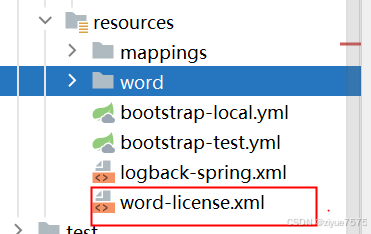
<License>
    <Data>
        <Products>
            <Product>Aspose.Total for Java</Product>
            <Product>Aspose.Words for Java</Product>
        </Products>
        <EditionType>Enterprise</EditionType>
        <SubscriptionExpiry>20991231</SubscriptionExpiry>
        <LicenseExpiry>20991231</LicenseExpiry>
        <SerialNumber>8bfe198c-7f0c-4ef8-8ff0-acc3237bf0d7</SerialNumber>
    </Data>
    <Signature>
        sNLLKGMUdF0r8O1kKilWAGdgfs2BvJb/2Xp8p5iuDVfZXmhppo+d0Ran1P9TKdjV4ABwAgKXxJ3jcQTqE/2IRfqwnPf8itN8aFZlV3TJPYeD3yWE7IT55Gz6EijUpC7aKeoohTb4w2fpox58wWoF3SNp6sK6jDfiAUGEHYJ9pjU=
    </Signature>
</License>
- 工具类
import com.aspose.words.Document;
import com.aspose.words.License;
import com.aspose.words.SaveFormat;
import lombok.extern.slf4j.Slf4j;

import java.io.File;
import java.io.FileOutputStream;
import java.io.InputStream;
import java.io.OutputStream;
import java.util.Objects;

@Slf4j
public class Doc2PdfUtil {

    /**
     * 获取 license 去除水印
     * 若不验证则转化出的pdf文档会有水印产生
     */
    private static void getLicense() {
        String licenseFilePath = "word-license.xml";
        try {
            InputStream is = Doc2PdfUtil.class.getClassLoader().getResourceAsStream(licenseFilePath);
            License license = new License();
            license.setLicense(Objects.requireNonNull(is));
        } catch (Exception e) {
            log.error("license verify failed");
            e.printStackTrace();
        }
    }

    /**
     * word 转 pdf
     *
     * @param wordFile word 文件路径
     * @param pdfFile  生成的 pdf 文件路径
     */
    public static void word2Pdf(String wordFile, String pdfFile) {
        File file = new File(pdfFile);
        if (!file.getParentFile().exists()) {
            file.getParentFile().mkdir();
        }
        getLicense();
        try (FileOutputStream os = new FileOutputStream(new File(pdfFile))) {
            Document doc = new Document(wordFile);
            doc.save(os, SaveFormat.PDF);
        } catch (Exception e) {
            log.error("word转pdf失败", e);
        }
    }

    /**
     * word 转 pdf
     *
     * @param wordFile word 文件流
     * @param pdfFile  生成的 pdf 文件流
     */
    public static void word2Pdf(InputStream wordFile, OutputStream pdfFile) {
        getLicense();
        try {
            Document doc = new Document(wordFile);
            doc.save(pdfFile, SaveFormat.PDF);
        } catch (Exception e) {
            log.error("word转pdf失败", e);
        }
    }
}
使用
Doc2PdfUtil.word2Pdf("aa.docx","bb.pdf");
我是依旧使用poi处理word,用这个转pdf
//拿到word流
InputStream inputStream = Thread.currentThread().getContextClassLoader().getResourceAsStream("word/muban3.docx");
        if (inputStream == null) {
            throw new MsgException("读取模板失败");
        }
XWPFDocument document = new XWPFDocument(inputStream);
//.....word处理
        ByteArrayInputStream in = null;
        try {
            //由于使用的poi的document,需要现将poi的document转为普通的输入流
            in = WordUtil.getInputStream(document);
            Doc2PdfUtil.word2Pdf(in,response.getOutputStream());
            response.setContentType("application/pdf");

        } catch (Exception e) {
            log.error("报告下载失败", e);
        } finally {
            try {
                document.close();
            } catch (Exception e1) {
                log.error("document 流关闭失败", e1);
            }
            if (in != null) {
                try {
                    in.close();
                } catch (Exception e1) {
                    log.error("in 流关闭失败", e1);
                }
            }
        }
    public static ByteArrayInputStream getInputStream(XWPFDocument document) {
        ByteArrayOutputStream outputStream = new ByteArrayOutputStream();
        try {
            document.write(outputStream);
            return outputStreamToPdfInputStream(outputStream);
        } catch (IOException e) {
            throw new RuntimeException(e);
        } finally {
            if (outputStream != null) {
                try {
                    outputStream.close();
                } catch (IOException e) {
                    throw new RuntimeException(e);
                }
            }
        }
    }
    /**
     * 将word转为pdf并返回一个输入流
     *
     * @param outputStream 输出文件名(pdf格式)
     */
    public static ByteArrayInputStream outputStreamToPdfInputStream(ByteArrayOutputStream outputStream) throws IOException {
        //输出的pdf输出流转输入流
        try {
            //临时
            byte[] bookByteAry = outputStream.toByteArray();
            return new ByteArrayInputStream(bookByteAry);
        } catch (Exception e) {
            e.printStackTrace();
            return null;
        }
    }
完美转换

到此这篇关于java将word转pdf的文章就介绍到这了,更多相关java将word转pdf内容请搜索脚本之家以前的文章或继续浏览下面的相关文章希望大家以后多多支持脚本之家!
相关文章

Mybatis-Plus或PageHelper多表分页查询总条数不对问题的解决方法
PageHelper 这个插件用了很多次了,今天使用的时候才遇到一个问题,这篇文章主要给大家介绍了关于Mybatis-Plus或PageHelper多表分页查询总条数不对问题的解决方法,文中通过实例代码介绍的非常详细,需要的朋友可以参考下2022-08-08 这篇文章主要介绍了Java 基础之修饰符关键词整理的相关资料,需要的朋友可以参考下2017-02-02
 SseEmitter是SpringMVC提供的一种技术,可以实现服务端向客户端实时推送数据的功能,在Controller中提供一个接口返回SseEmitter对象,发送数据可以在另一个接口调用其send方法,SpringBoot已经集成此功能2026-03-03
 String.join() 方法是连接指定数组的元素或集合的成员,在每个元素或成员之间使用指定的分隔符,这篇文章主要介绍了String.join()方法示例详解,需要的朋友可以参考下2024-01-01
mybatis连接PGSQL中对于json和jsonb的处理方法
在使用PostgreSQL数据库时,将表字段设置为jsonb格式可以存储JSON数据,本文给大家介绍mybatis连接PGSQL中对于json和jsonb的处理方法,感兴趣的朋友一起看看吧2024-11-11
@NotEmpty、@NotBlank、@NotNull的区别
这篇文章主要介绍了@NotEmpty、@NotBlank、@NotNull的区别,需要的朋友可以参考下2016-09-09 今天带大家学习Java Spring的相关知识,文中对Spring扩展接口作了非常详细的介绍及代码示例,对正在学习java的小伙伴们有很好地帮助,需要的朋友可以参考下2021-05-05
 String、StringBuilder、StringBuffer还傻傻分不清,下面这篇文章主要给大家介绍了关于Java字符串相关类使用的相关资料,文中通过代码介绍的非常详细,需要的朋友可以参考下2024-07-07
使用Swagger时Controller中api接口显示不全的问题分析及解决
swagger是一个十分好用的api接口管理、测试框架,现在越来越多的人使用这个做接口的测试和管理,但经常遇到Controller中的api接口显示不全的问题,所以本文给大家详细分析了问题以及解决方法,需要的朋友可以参考下2024-02-02 这篇文章主要介绍了关于后端如何解决跨域的问题说明,具有很好的参考价值,希望对大家有所帮助。如有错误或未考虑完全的地方,望不吝赐教2022-08-08
最新评论