

Android仿微信聊天图片的放大缩小功能
更新时间:2025年02月24日 09:35:14 作者:Mr_Tony
本文介绍了如何实现Android仿微信聊天图片的放大缩小效果,通过修改Android官方代码,实现点击图片放大,再次点击缩小回原位的功能,感兴趣的朋友跟随小编一起看看吧
一、前言
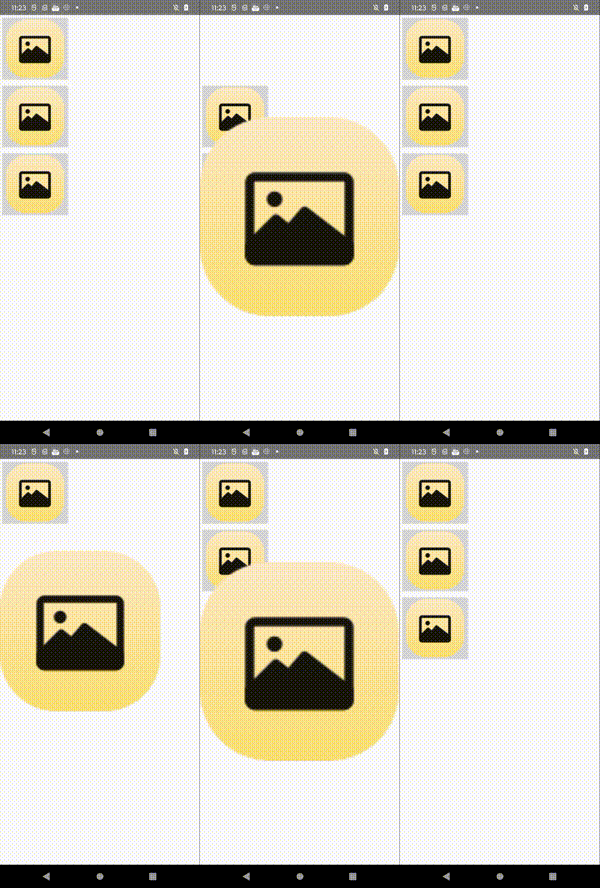
经常会遇到类似微信聊天图片点击放大缩小的效果,从点击位置的图片放大,再点击缩小回去原位置的效果,查找过网上代码,不过可参考比较少,这里将Android官方代码进行略作修改有了以下代码。
效果如下:
二、核心源码
item_zoom.xml
<?xml version="1.0" encoding="utf-8"?>
<FrameLayout xmlns:android="http://schemas.android.com/apk/res/android"
    xmlns:app="http://schemas.android.com/apk/res-auto"
    xmlns:tools="http://schemas.android.com/tools"
    android:layout_width="wrap_content"
    android:layout_height="wrap_content">
    <ImageButton
        android:id="@+id/thumb_button_1"
        android:layout_width="wrap_content"
        android:layout_height="wrap_content"
        android:layout_marginRight="1dp"
        android:contentDescription="@string/description_image_1"
        android:scaleType="centerCrop"
        android:src="@drawable/ic_main_img" />
</FrameLayout>
activity_zoom_list.xml
<FrameLayout xmlns:android="http://schemas.android.com/apk/res/android"
    xmlns:app="http://schemas.android.com/apk/res-auto"
    xmlns:tools="http://schemas.android.com/tools"
    android:id="@+id/container"
    android:layout_width="match_parent"
    android:layout_height="match_parent">
    <androidx.recyclerview.widget.RecyclerView
        android:id="@+id/rv_room"
        android:layout_width="match_parent"
        android:layout_height="wrap_content"
        android:orientation="vertical"
        app:layoutManager="androidx.recyclerview.widget.LinearLayoutManager"
        tools:itemCount="3"
        tools:listitem="@layout/item_zoom"/>
    <!-- This initially hidden ImageView holds the zoomed version of
         the preceding images. Without transformations applied, it fills the entire
         screen. To achieve the zoom animation, this view's bounds are animated
         from the bounds of the preceding thumbnail button to its final laid-out
         bounds.
         -->
    <ImageView
        android:id="@+id/expanded_image"
        android:layout_width="match_parent"
        android:layout_height="match_parent"
        android:visibility="invisible"
        android:contentDescription="@string/description_zoom_touch_close" />
</FrameLayout>
ZoomAdapter.kt
class ZoomAdapter: RecyclerView.Adapter<ZoomAdapter.VH>() {
    var itemClick: ( (View) -> Unit ) ?= null
    inner class VH(binding: ItemZoomBinding): RecyclerView.ViewHolder(binding.root)
    override fun onCreateViewHolder(parent: ViewGroup, viewType: Int): VH {
        val layoutInflater = LayoutInflater.from(parent.context)
        val binding = ItemZoomBinding.inflate(layoutInflater,parent,false)
        binding.thumbButton1.setOnClickListener {
            itemClick?.invoke(it)
        }
        return VH(binding)
    }
    override fun onBindViewHolder(holder: VH, position: Int) {
    }
    override fun getItemCount(): Int = 3
}
ZoomActivity.kt
/**
 * 仿写微信应用中图片放大缩小效果
 */
class ZoomActivity: FragmentActivity() {
    // Hold a reference to the current animator so that it can be canceled
    // midway.
    private var currentAnimator: Animator? = null
    // The system "short" animation time duration in milliseconds. This duration
    // is ideal for subtle animations or animations that occur frequently.
    private var shortAnimationDuration: Int = 0
    private val binding: ActivityZoomListBinding by lazy {
        ActivityZoomListBinding.inflate(layoutInflater)
    }
    private val adapter = ZoomAdapter()
    override fun onCreate(savedInstanceState: Bundle?) {
        super.onCreate(savedInstanceState)
        setContentView(binding.root)
        // Retrieve and cache the system's default "short" animation time.
        shortAnimationDuration = resources.getInteger(android.R.integer.config_shortAnimTime)
        initView()
    }
    private fun initView(){
        binding.rvRoom.adapter = adapter
        // Hook up taps on the thumbnail views.
        adapter.itemClick = {
            zoomImageFromThumb(it, R.drawable.ic_main_img)
        }
    }
    private fun zoomImageFromThumb(thumbView: View, imageResId: Int) {
        // If there's an animation in progress, cancel it immediately and
        // proceed with this one.
        currentAnimator?.cancel()
        // Load the high-resolution "zoomed-in" image.
        binding.expandedImage.setImageResource(imageResId)
        // Calculate the starting and ending bounds for the zoomed-in image.
        val startBoundsInt = Rect()
        val finalBoundsInt = Rect()
        val globalOffset = Point()
        // The start bounds are the global visible rectangle of the thumbnail,
        // and the final bounds are the global visible rectangle of the
        // container view. Set the container view's offset as the origin for the
        // bounds, since that's the origin for the positioning animation
        // properties (X, Y).
        thumbView.getGlobalVisibleRect(startBoundsInt)
        binding.container.getGlobalVisibleRect(finalBoundsInt, globalOffset)
        startBoundsInt.offset(-globalOffset.x, -globalOffset.y)
        finalBoundsInt.offset(-globalOffset.x, -globalOffset.y)
        val startBounds = RectF(startBoundsInt)
        val finalBounds = RectF(finalBoundsInt)
        // Using the "center crop" technique, adjust the start bounds to be the
        // same aspect ratio as the final bounds. This prevents unwanted
        // stretching during the animation. Calculate the start scaling factor.
        // The end scaling factor is always 1.0.
        val startScale: Float
        if ((finalBounds.width() / finalBounds.height() > startBounds.width() / startBounds.height())) {
            // Extend start bounds horizontally.
            startScale = startBounds.height() / finalBounds.height()
            val startWidth: Float = startScale * finalBounds.width()
            val deltaWidth: Float = (startWidth - startBounds.width()) / 2
            startBounds.left -= deltaWidth.toInt()
            startBounds.right += deltaWidth.toInt()
        } else {
            // Extend start bounds vertically.
            startScale = startBounds.width() / finalBounds.width()
            val startHeight: Float = startScale * finalBounds.height()
            val deltaHeight: Float = (startHeight - startBounds.height()) / 2f
            startBounds.top -= deltaHeight.toInt()
            startBounds.bottom += deltaHeight.toInt()
        }
        // Hide the thumbnail and show the zoomed-in view. When the animation
        // begins, it positions the zoomed-in view in the place of the
        // thumbnail.
        thumbView.alpha = 0f
        animateZoomToLargeImage(startBounds, finalBounds, startScale)
        setDismissLargeImageAnimation(thumbView, startBounds, startScale)
    }
    private fun animateZoomToLargeImage(startBounds: RectF, finalBounds: RectF, startScale: Float) {
        binding.expandedImage.visibility = View.VISIBLE
        // Set the pivot point for SCALE_X and SCALE_Y transformations to the
        // top-left corner of the zoomed-in view. The default is the center of
        // the view.
        binding.expandedImage.pivotX = 0f
        binding.expandedImage.pivotY = 0f
        // Construct and run the parallel animation of the four translation and
        // scale properties: X, Y, SCALE_X, and SCALE_Y.
        currentAnimator = AnimatorSet().apply {
            play(
                ObjectAnimator.ofFloat(
                    binding.expandedImage,
                    View.X,
                    startBounds.left,
                    finalBounds.left)
            ).apply {
                with(ObjectAnimator.ofFloat(binding.expandedImage, View.Y, startBounds.top, finalBounds.top))
                with(ObjectAnimator.ofFloat(binding.expandedImage, View.SCALE_X, startScale, 1f))
                with(ObjectAnimator.ofFloat(binding.expandedImage, View.SCALE_Y, startScale, 1f))
            }
            duration = shortAnimationDuration.toLong()
            interpolator = DecelerateInterpolator()
            addListener(object : AnimatorListenerAdapter() {
                override fun onAnimationEnd(animation: Animator) {
                    currentAnimator = null
                }
                override fun onAnimationCancel(animation: Animator) {
                    currentAnimator = null
                }
            })
            start()
        }
    }
    private fun setDismissLargeImageAnimation(thumbView: View, startBounds: RectF, startScale: Float) {
        // When the zoomed-in image is tapped, it zooms down to the original
        // bounds and shows the thumbnail instead of the expanded image.
        binding.expandedImage.setOnClickListener {
            currentAnimator?.cancel()
            // Animate the four positioning and sizing properties in parallel,
            // back to their original values.
            currentAnimator = AnimatorSet().apply {
                play(ObjectAnimator.ofFloat(binding.expandedImage, View.X, startBounds.left)).apply {
                    with(ObjectAnimator.ofFloat(binding.expandedImage, View.Y, startBounds.top))
                    with(ObjectAnimator.ofFloat(binding.expandedImage, View.SCALE_X, startScale))
                    with(ObjectAnimator.ofFloat(binding.expandedImage, View.SCALE_Y, startScale))
                }
                duration = shortAnimationDuration.toLong()
                interpolator = DecelerateInterpolator()
                addListener(object : AnimatorListenerAdapter() {
                    override fun onAnimationEnd(animation: Animator) {
                        thumbView.alpha = 1f
                        binding.expandedImage.visibility = View.GONE
                        currentAnimator = null
                    }
                    override fun onAnimationCancel(animation: Animator) {
                        thumbView.alpha = 1f
                        binding.expandedImage.visibility = View.GONE
                        currentAnimator = null
                    }
                })
                start()
            }
        }
    }
}
三、参考链接:
到此这篇关于Android仿微信聊天图片的放大缩小效果的文章就介绍到这了,更多相关Android微信聊天图片放大缩小内容请搜索脚本之家以前的文章或继续浏览下面的相关文章希望大家以后多多支持脚本之家!
相关文章
 这篇文章主要介绍了Android消息循环机制源码深入理解的相关资料,需要的朋友可以参考下2017-07-07
Android编程使WebView支持HTML5 Video全屏播放的解决方法
这篇文章主要介绍了Android编程使WebView支持HTML5 Video全屏播放的解决方法,较为详细的分析了全屏播放所涉及的相关技巧,并给出了完整代码下载地址供读者参考,需要的朋友可以参考下2015-10-10 这篇文章主要介绍了Android编程计算函数时间戳的相关方法,结合实例形式总结分析了Android Java、Native、Kernel时间戳计算相关操作技巧,需要的朋友可以参考下2017-05-05
Android 判断某个Activity 是否在前台运行的实例
下面小编就为大家分享一篇Android 判断某个Activity 是否在前台运行的实例,具有很好的参考价值,希望对大家有所帮助。一起跟随小编过来看看吧2018-03-03 这篇文章主要为大家详细介绍了Android获取view高度的三种方式,感兴趣的小伙伴们可以参考一下2016-05-05
 今天小编就为大家分享一篇android 把float转换成Int的实例讲解,具有很好的参考价值,希望对大家有所帮助。一起跟随小编过来看看吧2018-07-07
 这篇文章主要为大家详细介绍了Android实现透明动画,文中示例代码介绍的非常详细,具有一定的参考价值,感兴趣的小伙伴们可以参考一下2021-05-05
快速解决fragment中onActivityResult不调用的问题
下面小编就为大家带来一篇快速解决fragment中onActivityResult不调用的问题。小编觉得挺不错的,现在就分享给大家,也给大家做个参考。一起跟随小编过来看看吧2017-04-04 本篇文章主要介绍了Android 一个日历控件的实现代码,小编觉得挺不错的,现在分享给大家,也给大家做个参考。一起跟随小编过来看看吧2017-05-05
 这篇文章主要介绍了Android编程之手机壁纸WallPaper设置方法,结合实例形式分析了Android手机壁纸WallPaper的相关设置与使用技巧,需要的朋友可以参考下2017-08-08
最新评论