

使用EasyPOI实现多sheet动态列导出
更新时间:2025年03月10日 10:11:40 作者:高山不再高2
这篇文章主要为大家详细介绍了如何使用EasyPOI根据指定时间范围创建动态列,以及如何将数据组织成符合要求的格式并导出,感兴趣的可以了解下
POM
<dependency>
    <groupId>cn.afterturn</groupId>
    <artifactId>easypoi-base</artifactId>
    <version>3.2.0</version>
</dependency>
<dependency>
    <groupId>cn.afterturn</groupId>
    <artifactId>easypoi-annotation</artifactId>
    <version>3.2.0</version>
</dependency>
主类
public class Demo {

    @Test
    void product() throws IOException, ParseException {
        // 这里时间是用来做动态列的
        String startTime = "2019-09-01 00:00:00";
        String endTime = "2020-03-31 23:59:59";

        // sheetName 列表
        List<String> sheetNameList = new ArrayList<>();
        sheetNameList.add("sheet1");
        sheetNameList.add("sheet2");
        sheetNameList.add("sheet3");

        // 将sheet1和sheet2使用得map进行包装
        List<Map<String, Object>> sheetsList = new ArrayList<>();

        for (String sheetName : sheetNameList) {
            // 获取每一个sheet列(里面有固定列,也有根据时间动态算出的列)
            List<ExcelExportEntity> excelExportEntities = getExportExcelDefine(startTime, endTime);
            // 获取行数据(一般数据库拿)
            List<CustomerMonthProductNum> rowsBean = new ArrayList<>();
            getOriDate(rowsBean);

            // 组装一个sheet出来(sheet名称,列名,数据)
            Map<String, Object> oneSheet = this.getOneSheet(sheetName, excelExportEntities, rowsBean);
            // 加入到sheet列表里面
            sheetsList.add(oneSheet);
        }
        // 导出多个sheet
        Workbook workBook = exportExcel(sheetsList);
        FileOutputStream fos = new FileOutputStream("D:/多sheet动态列.xls");
        workBook.write(fos);
        fos.close();

    }

    /**
     * 获取原始数据(真实情况可能从数据库里面拿)
     *
     * @param rowsBean
     */
    void getOriDate(List<CustomerMonthProductNum> rowsBean) {
        CustomerMonthProductNum productNumBean = new CustomerMonthProductNum();
        productNumBean.setCustomerName("张三");
        productNumBean.setAuthCode("121-121");
        productNumBean.setRegion("Q");
        productNumBean.setCustomerId(212312);
        productNumBean.setSum(2323);
        TreeMap<String, Integer> productNum = new TreeMap<>();
        productNum.put("2020-01", 1);
        productNum.put("2020-02", 12);
        productNum.put("2019-09", 19);
        productNumBean.setProductNum(productNum);
        rowsBean.add(productNumBean);
        rowsBean.add(productNumBean);


        CustomerMonthProductNum productNumBean1 = new CustomerMonthProductNum();
        productNumBean1.setCustomerName("张三");
        productNumBean1.setAuthCode("121-121");
        productNumBean1.setRegion("Q");
        productNumBean1.setCustomerId(212312);
        productNumBean1.setSum(2323);
        TreeMap<String, Integer> productNum1 = new TreeMap<>();
        productNum1.put("2020-01", 1);
        productNum1.put("2020-02", 12);
        productNum1.put("2019-09", 19);
        productNumBean1.setProductNum(productNum);
        rowsBean.add(productNumBean1);
        rowsBean.add(productNumBean1);

    }


    /**
     * 导出Ecel
     *
     * @return org.apache.poi.ss.usermodel.Workbook
     */
    private static Workbook exportExcel(List<Map<String, Object>> list) {
        Workbook workbook = new HSSFWorkbook();
        for (Map<String, Object> map : list) {
            MyExcelExportService service = new MyExcelExportService();
            service.createSheetWithList(workbook, (ExportParams) map.get("title"), ExportParams.class, (List<ExcelExportEntity>) map.get("entityList"), (Collection<?>) map.get("data"));
        }
        return workbook;
    }


    private Map<String, Object> getOneSheet(String sheetName, List<ExcelExportEntity> colList, List<CustomerMonthProductNum> dataList) {

        // 创建sheet1使用得map
        Map<String, Object> sheetExportMap = new HashMap<>();
        // Sheet1样式
        ExportParams sheet1ExportParams = new ExportParams();
        // 设置sheet得名称
        sheet1ExportParams.setSheetName(sheetName);

        // title的参数为ExportParams类型,目前仅仅在ExportParams中设置了sheetName
        sheetExportMap.put("title", sheet1ExportParams);
        //sheet1样式
        sheetExportMap.put("entityList", colList);

        //sheet1中要填充得数据
        List<Map<String, String>> rows = new ArrayList<>();
        for (CustomerMonthProductNum data : dataList) {
            rows.add(this.getRowData(data));
        }

        sheetExportMap.put("data", rows);

        return sheetExportMap;
    }


    /**
     * 获取列定义
     *
     * @param start 开始时间
     * @param end   结束时间
     */
    private List<ExcelExportEntity> getExportExcelDefine(String start, String end) throws ParseException {
//        String start = "2019-09-01 00:00:00";
//        String end = "2020-03-14 00:00:12";
        List<String> monthBetweenDates = DateUtil.getMonthBetweenDates(start, end);
        //定义表格列名,该集合存放的就是表格的列明,每个对象就是表格中的一列
        List<ExcelExportEntity> modelList = new ArrayList<>();
        //该对象就是定义列属性的对象
        ExcelExportEntity excelentity;

        //定义第一个列
        excelentity = new ExcelExportEntity("授权名", "agentName");
        excelentity.setWidth(20);
        excelentity.setHeight(10);
        modelList.add(excelentity);

        //定义第一个列
        excelentity = new ExcelExportEntity("大区", "region");
        excelentity.setWidth(20);
        excelentity.setHeight(10);
        modelList.add(excelentity);

        //定义第一个列
        excelentity = new ExcelExportEntity("授权码", "auth");
        excelentity.setWidth(20);
        excelentity.setHeight(10);
        modelList.add(excelentity);
        for (String monthBetweenDate : monthBetweenDates) {
            //定义第一个列
            excelentity = new ExcelExportEntity(monthBetweenDate, monthBetweenDate);
            excelentity.setWidth(10);
            excelentity.setHeight(10);
            modelList.add(excelentity);
        }

        //定义列
        excelentity = new ExcelExportEntity("合计", "sum");
        excelentity.setWidth(20);
        excelentity.setHeight(10);
        modelList.add(excelentity);
        return modelList;

    }


    /**
     * 将对象数据转换为导出需要的map数据结构
     * <pre>
     *     map的可以对应了列定义里面的key。eg: ExcelExportEntity("授权名", "agentName");
     * </pre>
     *
     * @param productNum bean
     */
    private Map<String, String> getRowData(CustomerMonthProductNum productNum) {
        Map<String, String> data = new HashMap<>();
        data.put("agentName", productNum.getCustomerName());
        data.put("auth", productNum.getAuthCode());
        data.put("region", productNum.getRegion());
        data.put("sum", productNum.getSum().toString());
        TreeMap<String, Integer> productNum1 = productNum.getProductNum();
        for (Map.Entry<String, Integer> stringIntegerEntry : productNum1.entrySet()) {
            data.put(stringIntegerEntry.getKey(), stringIntegerEntry.getValue().toString());
        }
        return data;
    }


}
导出逻辑
import cn.afterturn.easypoi.excel.annotation.ExcelTarget;
import cn.afterturn.easypoi.excel.entity.ExportParams;
import cn.afterturn.easypoi.excel.entity.enmus.ExcelType;
import cn.afterturn.easypoi.excel.entity.params.ExcelExportEntity;
import cn.afterturn.easypoi.excel.export.ExcelExportService;
import cn.afterturn.easypoi.exception.excel.ExcelExportException;
import cn.afterturn.easypoi.exception.excel.enums.ExcelExportEnum;
import cn.afterturn.easypoi.util.PoiPublicUtil;
import lombok.extern.slf4j.Slf4j;
import org.apache.poi.ss.usermodel.Workbook;

import java.lang.reflect.Field;
import java.util.ArrayList;
import java.util.Collection;
import java.util.List;
/**
 * 自定义下导出逻辑
 * @author huan
 * @version 2.8.2
 * @date  2019/7/5
 */
@Slf4j
public class MyExcelExportService extends ExcelExportService {
    public void createSheetWithList(Workbook workbook, ExportParams entity, Class<?> pojoClass, List<ExcelExportEntity> entityList, Collection<?> dataSet) {
        if (LOGGER.isDebugEnabled()) {
            LOGGER.debug("Excel export start ,class is {}", pojoClass);
            LOGGER.debug("Excel version is {}",
                    entity.getType().equals(ExcelType.HSSF) ? "03" : "07");
        }
        if (workbook == null || entity == null || pojoClass == null || dataSet == null) {
            throw new ExcelExportException(ExcelExportEnum.PARAMETER_ERROR);
        }
        try {
            List<ExcelExportEntity> excelParams = entityList;
            // 得到所有字段
            Field[] fileds = PoiPublicUtil.getClassFields(pojoClass);
            ExcelTarget etarget = pojoClass.getAnnotation(ExcelTarget.class);
            String targetId = etarget == null ? null : etarget.value();
            getAllExcelField(entity.getExclusions(), targetId, fileds, excelParams, pojoClass,
                    null, null);
            //获取所有参数后,后面的逻辑判断就一致了
            createSheetForMap(workbook, entity, excelParams, dataSet);
        } catch (Exception e) {
            LOGGER.error(e.getMessage(), e);
            throw new ExcelExportException(ExcelExportEnum.EXPORT_ERROR, e.getCause());
        }
    }
}
时间处理类
public class DateUtil {
    /**
     * 获取某个时间段内所有月份
     *
     * @param minDate
     * @param maxDate
     * @return
     */
    public static List<String> getMonthBetweenDates(String minDate, String maxDate) throws ParseException {
        Date d1 = new SimpleDateFormat("yyyy-MM-dd HH:mm:ss").parse(minDate);//定义起始日期
        Date d2 = new SimpleDateFormat("yyyy-MM-dd HH:mm:ss").parse(maxDate);//定义结束日期  可以去当前月也可以手动写日期。
        ArrayList<String> result = new ArrayList<String>();
        SimpleDateFormat sdf = new SimpleDateFormat("yyyy-MM");//格式化为年月
        Calendar min = Calendar.getInstance();
        Calendar max = Calendar.getInstance();
        min.setTime(d1);
//        min.set(min.get(Calendar.YEAR), min.get(Calendar.MONTH), 1);
        max.setTime(d2);
//        max.set(max.get(Calendar.YEAR), max.get(Calendar.MONTH), 2);
        Calendar curr = min;
        while (curr.before(max)) {
            result.add(sdf.format(curr.getTime()));
            curr.add(Calendar.MONTH, 1);
        }
        return result;
    }
}
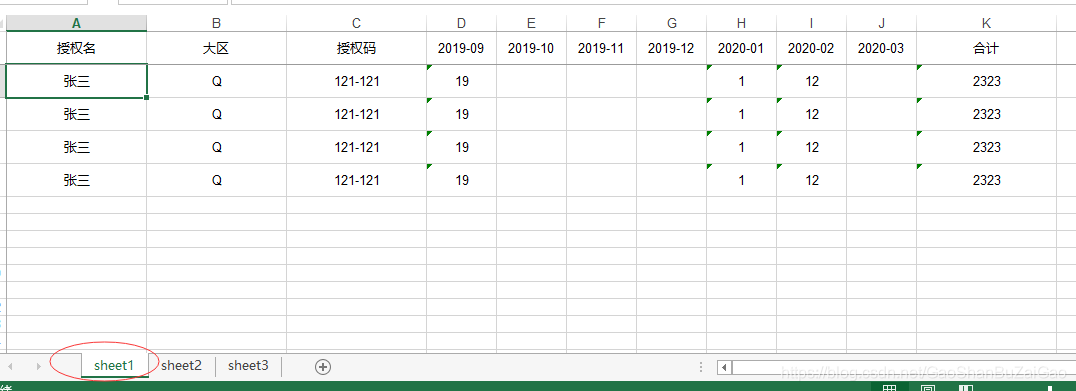
结果:
以上就是使用EasyPOI实现多sheet动态列导出的详细内容,更多关于EasyPOI多sheet导出的资料请关注脚本之家其它相关文章!
相关文章
 这篇文章主要介绍了Java 如何从list中删除符合条件的数据,具有很好的参考价值,希望对大家有所帮助。如有错误或未考虑完全的地方,望不吝赐教2021-11-11
 这篇文章主要为大家详细介绍了JavaMail实现带附件的邮件发送,文中示例代码介绍的非常详细,具有一定的参考价值,感兴趣的小伙伴们可以参考一下2022-08-08
Spring Boot Thymeleaf实现国际化的方法详解
这篇文章主要给大家介绍了关于Spring Boot Thymeleaf实现国际化的相关资料,文中通过示例代码介绍的非常详细,对大家学习或者使用Spring Boot具有一定的参考学习价值,需要的朋友们下面来一起学习学习吧2019-10-10
导入项目出现Java多个工程相互引用异常A cycle was detected in the build path o
今天小编就为大家分享一篇关于导入项目出现Java多个工程相互引用异常A cycle was detected in the build path of project的解决办法,小编觉得内容挺不错的,现在分享给大家,具有很好的参考价值,需要的朋友一起跟随小编来看看吧2018-12-12 这篇文章主要介绍了Java中println输出汉字乱码问题一招解决方案,具有很好的参考价值,希望对大家有所帮助。如有错误或未考虑完全的地方,望不吝赐教2022-12-12
 本文主要介绍了Security6.4.2 自定义异常中统一响应遇到的问题,文中通过示例代码介绍的非常详细,对大家的学习或者工作具有一定的参考学习价值,需要的朋友们下面随着小编来一起学习学习吧2025-03-03
 这篇文章主要介绍了深入理解Java动态代理与静态代理,静态代理,代理类和被代理的类实现了同样的接口,代理类同时持有被代理类的引用,动态代理的根据实现方式的不同可以分为JDK动态代理和CGlib动态代理2022-06-06
java集合框架 arrayblockingqueue应用分析
ArrayBlockingQueue是一个由数组支持的有界阻塞队列。此队列按 FIFO(先进先出)原则对元素进行排序。队列的头部 是在队列中存在时间最长的元素2012-11-11 文件上传是许多项目都有的功能,用户上传小文件速度一般都很快,但如果是大文件几个g,几十个g的时候,上传了半天,马上就要完成的时候,网络波动一下,文件又要重新上传,所以本文给大家介绍了Java实现浏览器大文件上传的示例,需要的朋友可以参考下2024-07-07
 这篇文章主要介绍了Java简易登录注册功能实现代码解析,文中通过示例代码介绍的非常详细,对大家的学习或者工作具有一定的参考学习价值,需要的朋友可以参考下2020-06-06
最新评论