

一文详解SpringBoot如何使用pageHelper做分页处理
分页是常见大型项目都需要的一个功能,PageHelper是一个非常流行的MyBatis分页插件,它支持多数据库分页,无需修改SQL语句即可实现分页功能。
本文在最后展示了两种依赖验证的结果。
一、第一种依赖方式
1、在项目中使用 PageHelper 插件需要先添加依赖:
<dependency>
	<groupId>com.github.pagehelper</groupId>
	<artifactId>pagehelper</artifactId>
	<version>4.1.3</version>
</dependency>
2、这种方式需要配置一个 config 文件
package com.wen.config;

import com.github.pagehelper.PageHelper;
import org.springframework.context.annotation.Bean;
import org.springframework.context.annotation.Configuration;
import java.util.Properties;

/**
 * @author : rjw
 * @date : 2024-09-20
 */
@Configuration
public class MyBatisConfig {

    @Bean
    public PageHelper pageHelper() {
        PageHelper pageHelper = new PageHelper();
        Properties properties = new Properties();
        properties.setProperty("dialect", "Mysql");
        properties.setProperty("offsetAsPageNum", "true");
        properties.setProperty("rowBoundsWithCount", "true");
        pageHelper.setProperties(properties);
        return pageHelper;
    }
}
3、setProperty 方法设置了三个分页插件的属性:
"dialect", "Mysql":指定了数据库方言为Mysql。(主要是因为SQL语句不同)。
"offsetAsPageNum", "true":这个属性通常用于指定是否将传入的 offset 参数当作 pageNum (页码)使用。在这个配置中,它被设置为true,意味着如果分页查询时传递了offset(偏移量),PageHelper会将其视为页码来处理。然而,这个设置通常不是必需的,因为PageHelper默认就是使用页码(pageNum)和每页记录数(pageSize)来进行分页的。
"rowBoundsWithCount", "true":这个属性用于指定是否进行 count 查询以获取总记录数。在分页查询时,知道总记录数是有用的,因为它可以让你在前端展示总页数或总记录数。设置为 true 表示 PageHelper 在执行分页查询时,会先执行一个 count 查询来获取总记录数。
二、第二种依赖方式
<dependency>
	<groupId>com.github.pagehelper</groupId>
	<artifactId>pagehelper-spring-boot-starter</artifactId>
	<version>1.2.10</version>
</dependency>
这种方式需要在配置文件配置一下,application.properties 或 application.yml 。
pagehelper.helper-dialect=mysql   // 数据库   可选
pagehelper.reasonable=true        // 规整页码范围,应对负数或过大页码
pagehelper.support-methods-arguments=true  // 规整可以通过方法参数获取,可用可不用输入即可
pagehelper.params=count=countSql
pagehelper:
  helper-dialect: mysql
  reasonable: true
  support-methods-arguments: true
  params: count=countSql
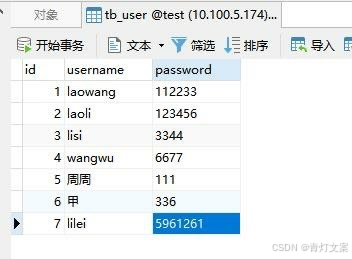
三、创建数据库表格
分页条件配置
pagehelper:
  helper-dialect: mysql
  reasonable: true   // 规整页码范围
  support-methods-arguments: true   // 规整方法参数获取
四、代码示例
关于统一 API 响应结果封装,代码示例在 SpringBoot 项目统一 API 响应结果封装。
关于 mybatis 的项目搭建在 SpringBoot 项目整合 MyBatis 框架 。
1、TestController
package com.wen.controller;

import com.wen.data.Result;
import com.wen.data.ResultGenerator;
import com.wen.dto.TbUser;
import com.wen.service.TestService;
import org.apache.ibatis.annotations.Param;
import org.springframework.beans.factory.annotation.Autowired;
import org.springframework.web.bind.annotation.GetMapping;
import org.springframework.web.bind.annotation.RequestMapping;
import org.springframework.web.bind.annotation.RestController;

@RestController
@RequestMapping("/test")
public class TestController {

    @Autowired
    private TestService testService;

    @GetMapping("/select")
    public Result<?> selectUserByPage(
    					@Param("pageSize") Integer pageSize,
    					@Param("pageNumber") Integer pageNumber){
        return ResultGenerator.genSuccessResult(testService.selectUserByPage(pageSize, pageNumber));
    }
}
2、TestService
package com.wen.service;

import com.github.pagehelper.PageInfo;
import com.wen.dto.TbUser;

public interface TestService {
    PageInfo<TbUser> selectUserByPage(Integer pageSize, Integer pageNumber);
}
3、TestServiceImpl
package com.wen.service.impl;

import com.github.pagehelper.PageHelper;
import com.github.pagehelper.PageInfo;
import com.wen.dto.TbUser;
import com.wen.mapper.TbUserMapper;
import com.wen.service.TestService;
import org.springframework.beans.factory.annotation.Autowired;
import org.springframework.stereotype.Service;
import java.util.List;

@Service
public class TestServiceImpl implements TestService {

    @Autowired
    private TbUserMapper tbUserMapper;

    @Override
    public PageInfo<TbUser> selectUserByPage(Integer pageSize, Integer pageNumber) {
        // 这句代码要放在查询 mapper 语句的前面
        PageHelper.startPage(pageNumber, pageSize);
        List<TbUser> tbUsers = tbUserMapper.selectUser();
        PageInfo<TbUser> tbUserPageInfo = new PageInfo<>(tbUsers);
        return tbUserPageInfo;
    }
}
4、TbUserMapper
package com.wen.mapper;

import com.wen.dto.TbUser;
import org.apache.ibatis.annotations.Mapper;
import java.util.List;

@Mapper
public interface TbUserMapper {
    List<TbUser> selectUser();
}
5、TbUserMapper.xml
<?xml version="1.0" encoding="UTF-8"?>
<!DOCTYPE mapper PUBLIC "-//mybatis.org//DTD Mapper 3.0//EN" "http://mybatis.org/dtd/mybatis-3-mapper.dtd">
<mapper namespace="com.wen.mapper.TbUserMapper">
    <select id="selectUser" resultType="com.wen.dto.TbUser">
        SELECT username, password FROM tb_user
    </select>
</mapper>
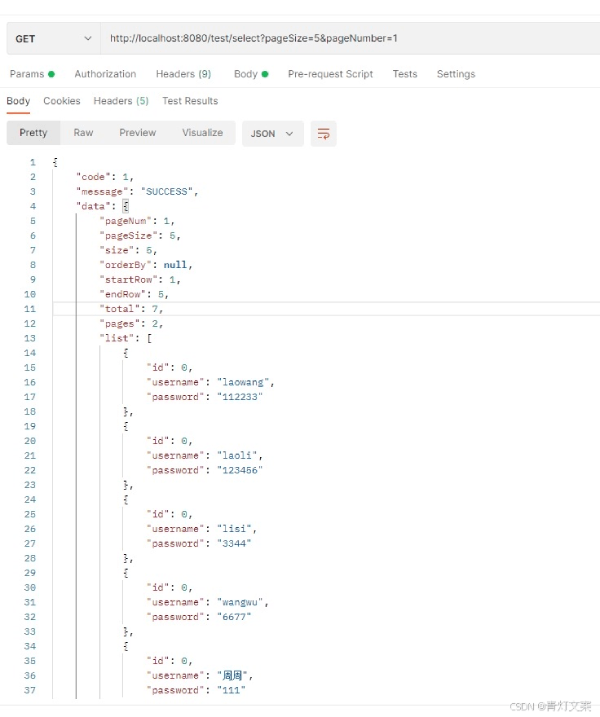
五、第一种依赖展示结果
http://localhost:8080/test/select?pageSize=5&pageNumber=1
{
    "code": 1,
    "message": "SUCCESS",
    "data": {
        "pageNum": 1,
        "pageSize": 5,
        "size": 5,
        "orderBy": null,
        "startRow": 1,
        "endRow": 5,
        "total": 7,
        "pages": 2,
        "list": [
            {
                "id": 0,
                "username": "laowang",
                "password": "112233"
            },
            {
                "id": 0,
                "username": "laoli",
                "password": "123456"
            },
            {
                "id": 0,
                "username": "lisi",
                "password": "3344"
            },
            {
                "id": 0,
                "username": "wangwu",
                "password": "6677"
            },
            {
                "id": 0,
                "username": "周周",
                "password": "111"
            }
        ],
        "firstPage": 1,
        "prePage": 0,
        "nextPage": 2,
        "lastPage": 2,
        "isFirstPage": true,
        "isLastPage": false,
        "hasPreviousPage": false,
        "hasNextPage": true,
        "navigatePages": 8,
        "navigatepageNums": [
            1,
            2
        ]
    }
}
六、第二种依赖展示结果
http://localhost:8080/test/select?pageSize=5&pageNumber=1

{
    "code": 1,
    "message": "SUCCESS",
    "data": {
        "total": 7,
        "list": [
            {
                "id": 0,
                "username": "laowang",
                "password": "112233"
            },
            {
                "id": 0,
                "username": "laoli",
                "password": "123456"
            },
            {
                "id": 0,
                "username": "lisi",
                "password": "3344"
            },
            {
                "id": 0,
                "username": "wangwu",
                "password": "6677"
            },
            {
                "id": 0,
                "username": "周周",
                "password": "111"
            }
        ],
        "pageNum": 1,
        "pageSize": 5,
        "size": 5,
        "startRow": 1,
        "endRow": 5,
        "pages": 2,
        "prePage": 0,
        "nextPage": 2,
        "isFirstPage": true,
        "isLastPage": false,
        "hasPreviousPage": false,
        "hasNextPage": true,
        "navigatePages": 8,
        "navigatepageNums": [
            1,
            2
        ],
        "navigateFirstPage": 1,
        "navigateLastPage": 2
    }
}
到此这篇关于一文详解SpringBoot如何使用pageHelper做分页处理的文章就介绍到这了,更多相关SpringBoot pageHelper分页处理内容请搜索脚本之家以前的文章或继续浏览下面的相关文章希望大家以后多多支持脚本之家!
相关文章
 这篇文章主要介绍了详解java NIO之Channel(通道)的相关资料,文中讲解非常详细,示例代码帮助大家更好的理解和学习,感兴趣的朋友可以了解下2020-07-07
 这篇文章主要为大家详细介绍了OPENCV+JAVA实现人脸识别,具有一定的参考价值,感兴趣的小伙伴们可以参考一下2018-02-02
 这篇文章主要介绍了Java中的静态绑定和动态绑定详细介绍,在Java中存在两种绑定方式,一种为静态绑定,又称作早期绑定,另一种就是动态绑定,亦称为后期绑定,需要的朋友可以参考下2015-01-01
 这篇文章主要给大家介绍了关于Java实现自动获取法定节假日的相关资料,获取并处理节假日数据是一个常见需求,特别是在需要安排任务调度、假期通知等功能的场景中,需要的朋友可以参考下2024-05-05
SpringBoot使用Spring Security实现登录注销功能
这篇文章主要介绍了SpringBoot使用Spring Security实现登录注销功能,本文通过实例代码给大家介绍的非常详细,对大家的学习或工作具有一定的参考借鉴价值,需要的朋友参考下吧2020-09-09 该篇文章总结了查看Java本地jar包注释的几种方法,包括使用快捷键CTRL+q和在设置中设置自动浮现注释2024-11-11
重新启动IDEA时maven项目SSM框架文件变色所有@注解失效
这篇文章主要介绍了重新启动IDEA时maven项目SSM框架文件变色所有@注解失效,文中通过示例代码介绍的非常详细,对大家的学习或者工作具有一定的参考学习价值,需要的朋友们下面随着小编来一起学习学习吧2020-03-03
Spring Boot 集成 InfluxDB 3.x完整教程
本文详细介绍了如何在SpringBoot项目中集成InfluxDB3.x,并提供了一个完整的教程,包括环境准备、添加依赖、配置连接信息、创建客户端配置类、数据写入与查询示例以及关键注意事项,感兴趣的朋友跟随小编一起看看吧2026-01-01 这篇文章主要介绍了Java设计模式中的组合模式,组合模式依据树形结构来组合对象,用来表示部分以及整体层次,种类型的设计模式属于结构型模式2022-07-07
 这篇文章主要为大家详细介绍了Java如何实现调用Python代码实现Word转化为PDF格式,文中的示例代码讲解详细,感兴趣的小伙伴可以跟随小编一起学习一下2026-03-03
最新评论