

SpringBoot实现HTTP调用的7 种方式
本文主要介绍了SpringBoot实现HTTP调用的7 种方式,具体如下:
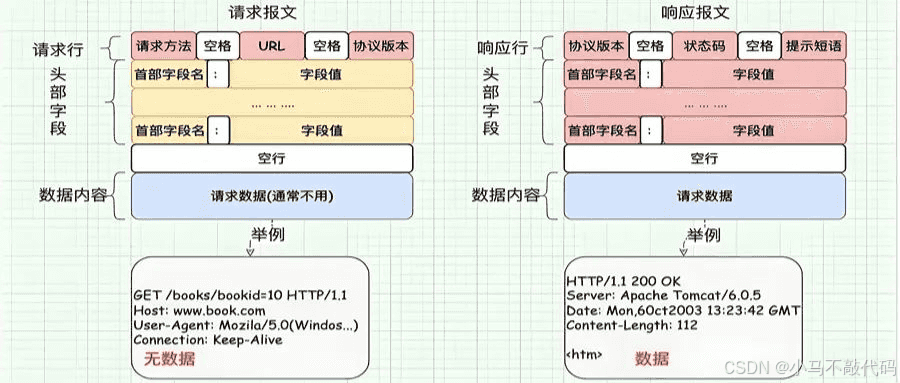
1. HttpClient
HttpClient是Apache基金会提供的一个用于发送HTTP请求的Java客户端库。
尽管它功能强大,但由于其API设计较为复杂且包体积庞大,在一些轻量级的应用场景中可能显得过于臃肿。
不过,在需要高度定制化的HTTP请求时,HttpClient依然是一个不错的选择。
import org.apache.http.client.config.RequestConfig;
import org.apache.http.client.methods.CloseableHttpResponse;
import org.apache.http.client.methods.HttpGet;
import org.apache.http.impl.client.CloseableHttpClient;
import org.apache.http.impl.client.HttpClients;

publicclassHttpClientUtil {

    publicstatic String get(String url)throws Exception {
        CloseableHttpClienthttpClient= HttpClients.createDefault();
        RequestConfigconfig= RequestConfig.custom()
                .setConnectTimeout(12000)
                .setConnectionRequestTimeout(12000)
                .setSocketTimeout(12000)
                .build();

        HttpGetrequest=newHttpGet(url);
        request.setConfig(config);

        try (CloseableHttpResponseresponse= httpClient.execute(request)) {
            // 处理响应
            return"Response received";
        } catch (Exception e) {
            thrownewRuntimeException("HTTP调用失败", e);
        }
    }
}
2. OkHttp
OkHttp是一个现代化的HTTP客户端,它提供了简洁且高效的API。
相比HttpClient,OkHttp更加轻量级且易于使用。
OkHttp支持同步和异步请求,并提供了连接池、GZIP压缩和缓存等高级功能。
import okhttp3.OkHttpClient;
import okhttp3.Request;
import okhttp3.Response;

publicclassOkHttpUtil {

    privatestaticfinalOkHttpClientCLIENT=newOkHttpClient();

    publicstatic String get(String url)throws Exception {
        Requestrequest=newRequest.Builder()
                .url(url)
                .build();

        try (Responseresponse= CLIENT.newCall(request).execute()) {
            // 处理响应
            return response.body().string();
        }
    }
}
3. OkHttpUtil(封装版)
为了简化OkHttp的使用,我们可以对其进行封装,提供一个更加友好的API接口。
OkHttpUtil封装版就是这样一个工具类,它使得HTTP请求变得异常简单。
// 假设已经有了一个封装好的OkHttpUtil类
public class OkHttpUtilWrapper {

    public static String get(String url, Map<String, Object> queryParams) throws IOException {
        // 假设OkHttpUtil提供了这样的get方法
        return OkHttpUtil.get(url, queryParams);
    }
}
4. Jodd HTTP
Jodd HTTP是另一个轻量级的HTTP客户端库,它提供了简洁的API和高效的性能。
Jodd HTTP支持各种HTTP方法、请求头、查询参数和表单数据等,非常适合快速构建HTTP请求。
import jodd.http.HttpRequest;
import jodd.http.HttpResponse;

publicclassJoddHttpUtil {

    publicstatic String get(String url, Map<String, Object> queryParams)throws IOException {
        HttpRequestrequest= HttpRequest.get(url).query(queryParams);
        HttpResponseresponse= request.send();
        return response.bodyText();
    }
}
5. Hutool HTTP
Hutool是一个Java工具类库,其中包含了丰富的HTTP工具类。
Hutool HTTP提供了简洁且强大的HTTP请求功能,支持GET、POST、PUT、DELETE等多种HTTP方法,并内置了连接池和重试机制。
import cn.hutool.http.HttpRequest;
import cn.hutool.http.HttpResponse;
import cn.hutool.http.HttpUtil;

publicclassHutoolHttpUtil {

    publicstatic String get(String url, Map<String, Object> queryParams)throws IOException {
        HttpRequestrequest= HttpUtil.createGet(url).form(queryParams);
        HttpResponseresponse= request.execute();
        return response.body();
    }
}
6. RestTemplate
RestTemplate是Spring框架提供的一个同步HTTP客户端工具,它简化了与HTTP服务的通信,并统一了异常处理。
RestTemplate支持RESTful风格的URL模板和请求参数的绑定,非常适合与RESTful服务进行交互。
import org.springframework.boot.web.client.RestTemplateBuilder;
import org.springframework.stereotype.Component;
import org.springframework.web.client.RestTemplate;
import org.springframework.http.ResponseEntity;

@Component
publicclassRestTemplateUtil {

    privatefinal RestTemplate restTemplate;

    publicRestTemplateUtil(RestTemplateBuilder builder) {
        this.restTemplate = builder.build();
    }

    public String get(String url, Map<String, Object> queryParams) {
        Stringuri= buildUri(url, queryParams);
        ResponseEntity<String> response = restTemplate.getForEntity(uri, String.class);
        return response.getBody();
    }

    private String buildUri(String url, Map<String, Object> queryParams) {
        // 构建URI的逻辑
        return url;
    }
}
7. Forest
Forest是一个声明式的HTTP客户端框架,它允许开发者以接口的方式来定义HTTP请求。
Forest提供了简洁的API和强大的功能,如请求重试、超时设置、请求头等,非常适合构建复杂的HTTP请求场景。
# application.yml
forest:
  max-connections: 1000
  connect-timeout: 3000
  read-timeout: 3000
import com.dtflys.forest.annotation.Get;
import com.dtflys.forest.annotation.Post;
import com.dtflys.forest.annotation.Query;
import com.dtflys.forest.annotation.Header;
import com.dtflys.forest.annotation.JSONBody;
import com.dtflys.forest.springboot.annotation.ForestScan;
import org.springframework.stereotype.Component;

@ForestScan(basePackages = "com.example.client")
@Component
public interface TestClient {

    @Get("http://localhost:20001/test/queryById")
    String queryById(@Header Map<String, Object> headerMap, @Query Map<String, Object> params);

    @Post("http://localhost:20001/test/add")
    String add(@Header Map<String, Object> headerMap, @JSONBody UserVo userVo);
}
到此这篇关于SpringBoot实现HTTP调用的7 种方式的文章就介绍到这了,更多相关SpringBoot HTTP调用内容请搜索脚本之家以前的文章或继续浏览下面的相关文章希望大家以后多多支持脚本之家!
相关文章

Java中操作Xml使用方法备忘录(Hutool工具类XmlUtil、XStream)
这篇文章主要给大家介绍了关于Java中操作Xml使用方法(Hutool工具类XmlUtil、XStream)的相关资料,XMLUtil是一个工具类,主要用于读取XML配置文件并提供相应的操作方法,文中通过代码介绍的非常详细,需要的朋友可以参考下2023-11-11 这篇文章主要为大家介绍了Guava事件总线应用场景最佳实践,有需要的朋友可以借鉴参考下,希望能够有所帮助,祝大家多多进步,早日升职加薪2023-12-12
 文章介绍了Spring Security在分布式环境下的使用,包括单点登录(SSO)的概念、流程图以及JWT(JSON Web Token)的生成和校验,通过使用JWT和RSA非对称加密,可以实现安全的分布式认证,感兴趣的朋友一起看看吧2025-02-02
 这篇文章主要介绍了Java中的ThreadLocal详解,ThreadLocal 是一个线程局部变量,其实的功用非常简单,就是为每一个使用该变量的线程都提供一个变量值的副本,是Java中一种较为特殊的线程绑定机制,需要的朋友可以参考下2023-09-09
基于Spring Boot DevTools实现开发过程优化
这篇文章主要介绍了基于Spring Boot DevTools实现开发过程优化,文中通过示例代码介绍的非常详细,对大家的学习或者工作具有一定的参考学习价值,需要的朋友可以参考下2020-09-09 这篇文章主要介绍了SpringBoot 并发登录人数控制的实现方法,文中通过示例代码介绍的非常详细,对大家的学习或者工作具有一定的参考学习价值,需要的朋友们下面随着小编来一起学习学习吧2019-05-05
 这篇文章主要介绍了Spring集成Seata方式,本案例使用Seata-All演示,结合实例代码给大家讲解的非常详细,对大家的学习或工作具有一定的参考借鉴价值,需要的朋友可以参考下2023-08-08
 玩转spring boot,如何快速搭建一个MCV程序?这篇文章为大家详细主要介绍了一个MCV程序的快速搭建过程,具有一定的参考价值,感兴趣的小伙伴们可以参考一下2017-01-01
Netty之使用DelimiterBasedFrameDecoder进行消息分隔详解
这篇文章主要介绍了Netty之使用DelimiterBasedFrameDecoder进行消息分隔详解,在使用Netty进行TCP消息传输时,为了上层协议能够对消息正确区分,避免粘包和拆包导致的问题,一般可以通过消息定长、将回车换行符作为消息结束符,需要的朋友可以参考下2023-12-12
Mybatis如何使用动态语句实现批量删除(delete结合foreach)
这篇文章主要介绍了Mybatis如何使用动态语句实现批量删除(delete结合foreach),具有很好的参考价值,希望对大家有所帮助。如有错误或未考虑完全的地方,望不吝赐教2022-03-03
最新评论