

Java controller接口出入参时间序列化转换操作方法(两种)
更新时间:2025年04月30日 11:58:17 作者:Muscleheng
这篇文章主要介绍了Java controller接口出入参时间序列化转换操作方法,本文给大家列举两种简单方法,感兴趣的朋友一起看看吧
场景:在controller编写的接口,在前后端交互过程中一般都会涉及到时间字段的交互,比如:后端给前端返的数据有时间相关的字段,同样,前端也存在传时间相关的字段给后端,最原始的方式就是前后端都先转换成字符串和时间戳后进行传输,收到后再进行转换,特别麻烦。
为了方便可以使用注解或者配置做到时间字段的自动转换,这里列举两种简单的操作。
方式一、使用注解
就是在日期字段上添加对应的注解(@JsonFormat),例:
    @JsonFormat(timezone = "GMT+8", pattern = "yyyy-MM-dd HH:mm:ss")
    private LocalDateTime createTime2;
    @JsonFormat(timezone = "GMT+8", pattern = "yyyy-MM-dd HH:mm:ss")
    private Date createTime3;
优点:灵活、清晰。
缺点:所有需要转换的字段都需要手动添加、并且只支持时间和指定格式字符串互转,不支持时间戳
方式二、统一配置
一劳永逸的方式,支持时间和 时间戳、字符串 之间的互转
package com.zhh.demo.config;
import cn.hutool.core.date.LocalDateTimeUtil;
import cn.hutool.core.util.NumberUtil;
import com.fasterxml.jackson.core.JsonGenerator;
import com.fasterxml.jackson.core.JsonParser;
import com.fasterxml.jackson.databind.DeserializationContext;
import com.fasterxml.jackson.databind.JsonDeserializer;
import com.fasterxml.jackson.databind.JsonSerializer;
import com.fasterxml.jackson.databind.SerializerProvider;
import com.fasterxml.jackson.databind.ser.std.ToStringSerializer;
import org.apache.commons.lang3.StringUtils;
import org.springframework.boot.autoconfigure.jackson.Jackson2ObjectMapperBuilderCustomizer;
import org.springframework.context.annotation.Bean;
import org.springframework.context.annotation.Configuration;
import java.io.IOException;
import java.math.BigInteger;
import java.time.LocalDateTime;
import java.time.ZoneOffset;
import java.time.format.DateTimeFormatter;
import java.time.format.DateTimeParseException;
@Configuration
// 表示通过aop框架暴露该代理对象,AopContext能够访问
//@EnableAspectJAutoProxy(exposeProxy = true)
public class ApplicationConfig {
    /** 年-月-日 时:分:秒 */
    private static final String DEFAULT_DATE_TIME_FORMAT = "yyyy-MM-dd HH:mm:ss";
    /**
     * 序列化 时间格式转换类型
     * timestamp:时间戳
     * dateString: 时间字符串格式
     * */
    private static final String LOCAL_DATE_TIME_SERIALIZER_TYPE = "dateString";
    /**
     * description:适配自定义序列化和反序列化策略
     */
    @Bean
    public Jackson2ObjectMapperBuilderCustomizer jackson2ObjectMapperBuilderCustomizer() {
        return builder -> {
            // 时间的序列化和反序列化
            builder.serializerByType(LocalDateTime.class, new LocalDateTimeSerializer());
            builder.deserializerByType(LocalDateTime.class, new LocalDateTimeDeserializer());
            // 将long类型数据转化为string给前端 避免前端造成的精度丢失
            builder.serializerByType(Long.class, ToStringSerializer.instance);
            builder.serializerByType(BigInteger.class, ToStringSerializer.instance);
        };
    }
    /**
     * description:序列化
     * LocalDateTime序列化为毫秒级时间戳
     */
    public static class LocalDateTimeSerializer extends JsonSerializer<LocalDateTime> {
        @Override
        public void serialize(LocalDateTime value, JsonGenerator gen, SerializerProvider serializers)
                throws IOException {
            if (value != null) {
                // 通过配置决定把时间转换成 时间戳 或 时间字符串
                if ("timestamp".equals(LOCAL_DATE_TIME_SERIALIZER_TYPE)) {
                    // 13位时间戳
                    gen.writeNumber(LocalDateTimeUtil.toEpochMilli(value));
                } else {
                    // 指定格式的时间字符串
                    gen.writeString(value.format(DateTimeFormatter.ofPattern(DEFAULT_DATE_TIME_FORMAT)));
                }
            }
        }
    }
    /**
     * description:反序列化
     * 毫秒级时间戳序列化为LocalDateTime
     */
    public static class LocalDateTimeDeserializer extends JsonDeserializer<LocalDateTime> {
        @Override
        public LocalDateTime deserialize(JsonParser p, DeserializationContext deserializationContext)
                throws IOException {
            //2023年11月2日: 尝试反序列增加更多的支持, 支持long输入, 支持字符串输入
            if (p == null) {
                return null;
            }
            String source = p.getText();
            return parse(source);
        }
    }
    /**
     * 时间戳字符串或格式化时间字符串转换为 LocalDateTime
     * 例:1745806578000、2025-04-28 10:16:18
     * @param source    13位时间戳 或格式化时间字符串
     * @return
     */
    private static LocalDateTime parse(String source) {
        // 如果是时间戳
        if (NumberUtil.isLong(source)) {
            long timestamp = Long.parseLong(source);
            if (timestamp > 0) {
                return LocalDateTimeUtil.of(timestamp, ZoneOffset.of("+8"));
            } else {
                return null;
            }
            // 如果是格式化时间字符串
        } else {
            if (StringUtils.isBlank(source)) {
                return null;
            }
            // 尝试判断能否解析
            if (canParseByDateTimeFormatter(source, DateTimeFormatter.ofPattern(DEFAULT_DATE_TIME_FORMAT))) {
                return LocalDateTime.parse(source, DateTimeFormatter.ofPattern(DEFAULT_DATE_TIME_FORMAT));
            }
            return null;
        }
    }
    /**
     * 判断是否能解析格式化时间字符串
     * @param source    格式化时间字符串(格式 2025-04-28 10:16:18)
     * @param dateTimeFormatter 格式 yyyy-MM-dd HH:mm:ss
     * @return
     */
    private static boolean canParseByDateTimeFormatter(String source, DateTimeFormatter dateTimeFormatter) {
        try {
            dateTimeFormatter.parse(source);
        } catch (DateTimeParseException e) {
            return false;
        }
        return true;
    }
}
测试一下:
在上面配置的基础上添加部分测试使用的代码
用于前后端交互的bean对象:
@Data
public class UserRO {
    private LocalDateTime createTime1;
    private LocalDateTime createTime2;
    @JsonFormat(timezone = "GMT+8", pattern = "yyyy-MM-dd HH:mm:ss")
    private Date createTime3;
}
controller层接口:
   @ApiOperation("时间测试")
    @PostMapping("/time")
    public UserRO show(@RequestBody UserRO userRO){
        System.out.println("\n接收到的入参:");
        System.out.println(userRO.getCreateTime1());
        System.out.println(userRO.getCreateTime2());
        System.out.println(userRO.getCreateTime3());
        System.out.println("\n出参:");
        LocalDateTime newTime = LocalDateTime.now();
        UserRO user = new UserRO();
        user.setCreateTime1(newTime);
        user.setCreateTime2(newTime);
        user.setCreateTime3(new Date());
        System.out.println(user.getCreateTime1());
        System.out.println(user.getCreateTime2());
        System.out.println(user.getCreateTime3());
        System.out.println("\n");
        return user;
    }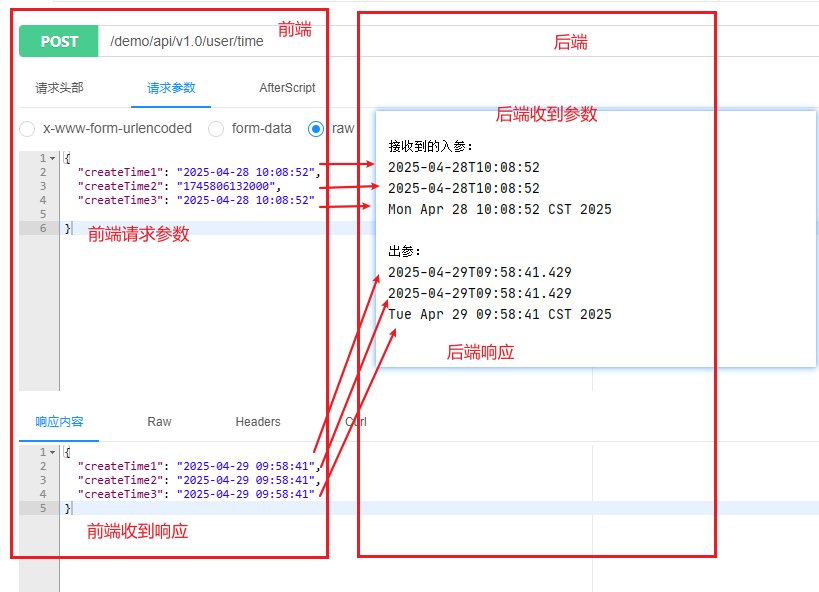
通过配置类,可以配置后端接口给调用方返的时间格式【字符串、时间戳】、接口调用方传的入参可以是字符串也可以的时间戳,后端会自动解析。
到此这篇关于Java controller接口出入参时间序列化转换操作方法(两种)的文章就介绍到这了,更多相关Java controller接口出入参内容请搜索脚本之家以前的文章或继续浏览下面的相关文章希望大家以后多多支持脚本之家!
您可能感兴趣的文章:
- java idea如何根据请求路径url自动找到对应controller方法插件
- Java中Controller、Service、Dao/Mapper层的区别与用法
- Java实现一键生成表controller,service,mapper文件
- Java中Controller引起的Ambiguous mapping问题及解决
- 详解java封装返回结果与RestControllerAdvice注解
- Java后台Controller实现文件下载操作
- java springboot poi 从controller 接收不同类型excel 文件处理
- java模拟ajax访问另一个项目的controller代码实例
- Java Spring Controller 获取请求参数的几种方法详解
相关文章

Spring Scheduler定时任务实战指南(零基础入门任务调度)
本文介绍SpringScheduler在电商订单超时处理中的应用,涵盖启用定时任务、使用@Scheduled注解、cron表达式配置、线程池优化及异步执行等核心内容,本文给大家介绍Spring Scheduler定时任务实战指南,感兴趣的朋友跟随小编一起看看吧2025-09-09 在SpringBoot开发中接收参数是非常常见且重要的一部分,依赖于请求的不同场景,Spring Boot提供了多种方式来处理和接收参数,项目小编就和大家简单讲讲SpringBoot接收前端参数的3 个最常用的场景和具体案例2025-11-11
 Neo4j是一个高性能的图数据库,适用于存储和查询节点(Node)和关系(Relationship)的数据,本文介绍在springboot项目中整合neo4j,并实现基本的crud操作,感兴趣的朋友跟随小编一起看看吧2025-10-10
关于MyBatis通用Mapper@Table注解使用的注意点
这篇文章主要介绍了关于MyBatis通用Mapper@Table注解使用的注意点,具有很好的参考价值,希望对大家有所帮助。如有错误或未考虑完全的地方,望不吝赐教2021-11-11
SpringCloud使用CircuitBreaker实现熔断器的详细步骤
在微服务架构中,服务之间的依赖调用非常频繁,当一个下游服务因高负载或故障导致响应变慢或不可用时,可能会引发上游服务的级联故障,最终导致整个系统崩溃,熔断器是解决这类问题的关键模式之一,Spring Cloud提供了对熔断器的支持,本文将详细介绍如何集成和使用它2025-02-02 一般来讲SpringBoot项目是不需要指定版本,而SSM项目是需要指定版本,SpringBoot的核心依赖就是spring-boot-starter-parent和spring-boot-starter-web两个依赖,这篇文章主要介绍了SpringBoot依赖管理与自动配置概念与使用2022-10-10
 Java下常用的安全框架主要有Spring Security和shiro,都可提供非常强大的功能,但学习成本较高。但在微服务下鉴权又会对服务有一定的入侵性。 因此,本文将介绍Spring Cloud下实现用户鉴权的方案,感兴趣的同学可以关注一下2021-11-11
 这篇文章主要介绍了Java 互相关联的实体无限递归问题的解决,具有很好的参考价值,希望对大家有所帮助。如有错误或未考虑完全的地方,望不吝赐教2021-10-10
 这篇文章主要介绍了spring 自定义让@Value被解析到,具有很好的参考价值,希望对大家有所帮助。如有错误或未考虑完全的地方,望不吝赐教2021-09-09
 MyBatisSQL映射文件定义了SQL语句和参数映射规则,用于将Java代码与数据库操作解耦,实现SQL语句的灵活配置和动态生成2025-03-03
最新评论