

SpringBoot+ MySQL多线程查询与联表查询性能对比
背景
在现代 Web 应用开发中,数据库性能是影响系统响应时间和用户体验的关键因素之一。随着业务需求的不断增长,单表查询和联表查询的效率问题日益凸显。特别是在 Spring Boot 项目中,结合 MySQL 数据库进行复杂查询时,如何优化查询性能已成为开发者必须面对的重要问题。
在本实验中,我们使用了 Spring Boot 框架结合 MySQL 数据库,进行了两种常见查询方式的性能对比:多线程查询 和 联表查询。通过对比这两种查询方式的响应时间,本文旨在探讨在实际业务场景中,选择哪种方式能带来更高的查询效率,尤其是在面对大数据量和复杂查询时的性能表现。
实验目的
本实验的主要目的是通过对比以下两种查询方式的性能,帮助开发者选择在不同业务场景下的查询方式:
- 联表查询(使用 SQL 语句中的 LEFT JOIN 等连接操作)
- 多线程查询(通过 Spring Boot 异步处理,分批查询不同表的数据)
实验环境
开发框架:Spring Boot
数据库:MySQL
数据库表结构:
test_a:主表,包含与其他表(test_b、test_c、test_d、test_e)的关联字段。test_b、test_c、test_d、test_e:附表,分别包含不同的数据字段。
这些表通过外键(逻辑)关联,
test_a表中的test_b_id、test_c_id、test_d_id和test_e_id字段指向各自的附表。数据量:约 100,000 条数据,分别在主表和附表中填充数据。
一.建表语句
主表A
CREATE TABLE `test_a` (
  `id` int NOT NULL AUTO_INCREMENT,
  `name` varchar(255) NOT NULL,
  `description` varchar(255) DEFAULT NULL,
  `test_b_id` int DEFAULT NULL,
  `test_c_id` int DEFAULT NULL,
  `test_d_id` int DEFAULT NULL,
  `test_e_id` int DEFAULT NULL,
  `created_at` timestamp NULL DEFAULT CURRENT_TIMESTAMP,
  `updated_at` timestamp NULL DEFAULT CURRENT_TIMESTAMP ON UPDATE CURRENT_TIMESTAMP,
  PRIMARY KEY (`id`)
) ENGINE=InnoDB AUTO_INCREMENT=6 DEFAULT CHARSET=utf8mb4 COLLATE=utf8mb4_0900_ai_ci;
附表b,c,d,e
CREATE TABLE `test_b` (
  `id` int NOT NULL AUTO_INCREMENT,
  `field_b1` varchar(255) DEFAULT NULL,
  `field_b2` int DEFAULT NULL,
  `created_at` timestamp NULL DEFAULT CURRENT_TIMESTAMP,
  PRIMARY KEY (`id`)
) ENGINE=InnoDB AUTO_INCREMENT=792843462 DEFAULT CHARSET=utf8mb4 COLLATE=utf8mb4_0900_ai_ci;

CREATE TABLE `test_c` (
  `id` int NOT NULL AUTO_INCREMENT,
  `field_c1` varchar(255) DEFAULT NULL,
  `field_c2` datetime DEFAULT NULL,
  `created_at` timestamp NULL DEFAULT CURRENT_TIMESTAMP,
  PRIMARY KEY (`id`)
) ENGINE=InnoDB AUTO_INCREMENT=100096 DEFAULT CHARSET=utf8mb4 COLLATE=utf8mb4_0900_ai_ci;

CREATE TABLE `test_d` (
  `id` int NOT NULL AUTO_INCREMENT,
  `field_d1` text,
  `field_d2` tinyint(1) DEFAULT NULL,
  `created_at` timestamp NULL DEFAULT CURRENT_TIMESTAMP,
  PRIMARY KEY (`id`)
) ENGINE=InnoDB AUTO_INCREMENT=100300 DEFAULT CHARSET=utf8mb4 COLLATE=utf8mb4_0900_ai_ci;


CREATE TABLE `test_e` (
  `id` int NOT NULL AUTO_INCREMENT,
  `field_e1` int DEFAULT NULL,
  `field_e2` varchar(255) DEFAULT NULL,
  `created_at` timestamp NULL DEFAULT CURRENT_TIMESTAMP,
  PRIMARY KEY (`id`)
) ENGINE=InnoDB AUTO_INCREMENT=100444 DEFAULT CHARSET=utf8mb4 COLLATE=utf8mb4_0900_ai_ci;
二.填充数据
@SpringBootTest
class DemoTestQuerySpringbootApplicationTests {

    @Autowired
    private TestAMapper testAMapper;
    @Autowired
    private TestBMapper testBMapper;
    @Autowired
    private TestCMapper testCMapper;
    @Autowired
    private TestDMapper testDMapper;
    @Autowired
    private TestEMapper testEMapper;

    @Test
    void contextLoads() {
        // 随机数生成器
        Random random = new Random();

        for (int i = 1; i <= 100000; i++) {
            // 插入 test_b 数据
            int testBId = insertTestB(random);

            // 插入 test_c 数据
            int testCId = insertTestC(random);

            // 插入 test_d 数据
            int testDId = insertTestD(random);

            // 插入 test_e 数据
            int testEId = insertTestE(random);

            // 插入 test_a 数据
            insertTestA(testBId, testCId, testDId, testEId, random);
        }
    }

    private int insertTestB(Random random) {
        TestB testB = new TestB();
        testB.setFieldB1("B Field " + random.nextInt(1000));
        testB.setFieldB2(random.nextInt(1000));
        testBMapper.insert(testB);  // 插入数据
        return testB.getId();
    }

    private int insertTestC(Random random) {
        TestC testC = new TestC();
        testC.setFieldC1("C Field " + random.nextInt(1000));
        testC.setFieldC2(new java.sql.Timestamp(System.currentTimeMillis()));
        testCMapper.insert(testC);  // 插入数据
        return testC.getId();
    }

    private int insertTestD(Random random) {
        TestD testD = new TestD();
        testD.setFieldD1("D Field " + random.nextInt(1000));
        testD.setFieldD2(random.nextBoolean());
        testDMapper.insert(testD);  // 插入数据
        return testD.getId();
    }

    private int insertTestE(Random random) {
        TestE testE = new TestE();
        testE.setFieldE1(random.nextInt(1000));
        testE.setFieldE2("E Field " + random.nextInt(1000));
        testEMapper.insert(testE);  // 插入数据
        return testE.getId();
    }

    private void insertTestA(int testBId, int testCId, int testDId, int testEId, Random random) {
        TestA testA = new TestA();
        testA.setName("Test A Name " + random.nextInt(1000));
        testA.setDescription("Test A Description " + random.nextInt(1000));
        testA.setTestBId(testBId);
        testA.setTestCId(testCId);
        testA.setTestDId(testDId);
        testA.setTestEId(testEId);
        testAMapper.insert(testA);  // 插入数据
    }

}
三.配置线程池
3.1配置
/**
 * 实现AsyncConfigurer接口
 * 并重写了 getAsyncExecutor方法,
 * 这个方法返回 myExecutor(),
 * Spring 默认会将 myExecutor 作为 @Async 方法的线程池。
 */
@Configuration
@EnableAsync
public class ThreadPoolConfig implements AsyncConfigurer {
    /**
     * 项目共用线程池
     */
    public static final String TEST_QUERY = "testQuery";


    @Override
    public Executor getAsyncExecutor() {
        return myExecutor();
    }

    @Bean(TEST_QUERY)
    @Primary
    public ThreadPoolTaskExecutor myExecutor() {
        //spring的线程池
        ThreadPoolTaskExecutor executor = new ThreadPoolTaskExecutor();
        //线程池优雅停机的关键
        executor.setWaitForTasksToCompleteOnShutdown(true);
        executor.setCorePoolSize(10);
        executor.setMaxPoolSize(10);
        executor.setQueueCapacity(200);
        executor.setThreadNamePrefix("my-executor-");
        //拒绝策略->满了调用线程执行,认为重要任务
        executor.setRejectedExecutionHandler(new ThreadPoolExecutor.CallerRunsPolicy());
        //自己就是一个线程工程
        executor.setThreadFactory(new MyThreadFactory(executor));
        executor.initialize();
        return executor;
    }

}
3.2异常处理
public class MyUncaughtExceptionHandler implements Thread.UncaughtExceptionHandler {
    private static final Logger log = LoggerFactory.getLogger(MyUncaughtExceptionHandler.class);

    @Override
    public void uncaughtException(Thread t, Throwable e) {
        log.error("Exception in thread",e);
    }
}
3.3线程工厂
@AllArgsConstructor
public class MyThreadFactory implements ThreadFactory {

    private static final MyUncaughtExceptionHandler MyUncaughtExceptionHandler = new MyUncaughtExceptionHandler();
    private ThreadFactory original;

    @Override
    public Thread newThread(Runnable r) {
        //执行Spring线程自己的创建逻辑
        Thread thread = original.newThread(r);
        //我们自己额外的逻辑
        thread.setUncaughtExceptionHandler(MyUncaughtExceptionHandler);
        return thread;
    }
}
四.Service查询方法
4.1left join连接查询
    @Override
    public IPage<TestAll> getTestAllPage_1(int current, int size) {
        // 创建 Page 对象,current 为当前页,size 为每页大小
        Page<TestAll> page = new Page<>(current, size);
        return testAMapper.selectAllWithPage(page);
    }
对应的xml 的sql语句
<?xml version="1.0" encoding="UTF-8"?>
<!DOCTYPE mapper PUBLIC "-//mybatis.org//DTD Mapper 3.0//EN" "http://mybatis.org/dtd/mybatis-3-mapper.dtd">
<mapper namespace="org.fth.demotestqueryspringboot.com.test.mapper.TestAMapper">

  <!-- 基本的 ResultMap 映射 -->
  <resultMap id="BaseResultMap" type="org.fth.demotestqueryspringboot.com.test.entity.vo.TestAll">
    <id column="test_a_id" jdbcType="INTEGER" property="testAId" />
    <result column="name" jdbcType="VARCHAR" property="name" />
    <result column="description" jdbcType="VARCHAR" property="description" />
    <result column="test_b_id" jdbcType="INTEGER" property="testBId" />
    <result column="test_c_id" jdbcType="INTEGER" property="testCId" />
    <result column="test_d_id" jdbcType="INTEGER" property="testDId" />
    <result column="test_e_id" jdbcType="INTEGER" property="testEId" />
    <result column="created_at" jdbcType="TIMESTAMP" property="createdAt" />
    <result column="updated_at" jdbcType="TIMESTAMP" property="updatedAt" />
    <!-- TestB -->
    <result column="field_b1" jdbcType="VARCHAR" property="fieldB1" />
    <result column="field_b2" jdbcType="INTEGER" property="fieldB2" />
    <result column="test_b_created_at" jdbcType="TIMESTAMP" property="testBCreatedAt" />
    <!-- TestC -->
    <result column="field_c1" jdbcType="VARCHAR" property="fieldC1" />
    <result column="field_c2" jdbcType="TIMESTAMP" property="fieldC2" />
    <result column="test_c_created_at" jdbcType="TIMESTAMP" property="testCCreatedAt" />
    <!-- TestD -->
    <result column="field_d1" jdbcType="VARCHAR" property="fieldD1" />
    <result column="field_d2" jdbcType="BOOLEAN" property="fieldD2" />
    <result column="test_d_created_at" jdbcType="TIMESTAMP" property="testDCreatedAt" />
    <!-- TestE -->
    <result column="field_e1" jdbcType="INTEGER" property="fieldE1" />
    <result column="field_e2" jdbcType="VARCHAR" property="fieldE2" />
    <result column="test_e_created_at" jdbcType="TIMESTAMP" property="testECreatedAt" />
  </resultMap>

  <!-- 分页查询 TestA 和其他表的数据 -->
  <select id="selectAllWithPage" resultMap="BaseResultMap">
    SELECT
    a.id AS test_a_id,
    a.name,
    a.description,
    a.test_b_id,
    a.test_c_id,
    a.test_d_id,
    a.test_e_id,
    a.created_at,
    a.updated_at,
    -- TestB
    b.field_b1,
    b.field_b2,
    b.created_at AS test_b_created_at,
    -- TestC
    c.field_c1,
    c.field_c2,
    c.created_at AS test_c_created_at,
    -- TestD
    d.field_d1,
    d.field_d2,
    d.created_at AS test_d_created_at,
    -- TestE
    e.field_e1,
    e.field_e2,
    e.created_at AS test_e_created_at
    FROM test_a a
    LEFT JOIN test_b b ON a.test_b_id = b.id
    LEFT JOIN test_c c ON a.test_c_id = c.id
    LEFT JOIN test_d d ON a.test_d_id = d.id
    LEFT JOIN test_e e ON a.test_e_id = e.id

  </select>

</mapper>
4.2多线程查询
 @Override
    public IPage<TestAll> getTestAllPage_2(int current, int size) {
        IPage<TestA> testAPage = testAMapper.selectPage(new Page<>(current, size), null);
        List<TestA> testAS = testAPage.getRecords();
        CompletableFuture<List<TestB>> futureBs = selectTestBids(testAS.stream().map(TestA::getTestBId).collect(Collectors.toSet()));
        CompletableFuture<List<TestC>> futureCs = selectTestCids(testAS.stream().map(TestA::getTestCId).collect(Collectors.toSet()));
        CompletableFuture<List<TestD>> futureDs = selectTestDids(testAS.stream().map(TestA::getTestDId).collect(Collectors.toSet()));
        CompletableFuture<List<TestE>> futureEs = selectTestEids(testAS.stream().map(TestA::getTestEId).collect(Collectors.toSet()));
        // 等待所有异步任务完成并收集结果
        CompletableFuture<Void> allFutures = CompletableFuture.allOf(futureBs, futureCs, futureDs, futureEs);

        try {
            // 等待所有异步任务完成
            allFutures.get();
        } catch (InterruptedException | ExecutionException e) {
            e.printStackTrace();
            throw new RuntimeException("Failed to fetch data", e);
        }
        // 获取异步查询的结果
        List<TestB> bs = futureBs.join();
        List<TestC> cs = futureCs.join();
        List<TestD> ds = futureDs.join();
        List<TestE> es = futureEs.join();

        // 将结果映射到Map以便快速查找
        Map<Integer, TestB> bMap = bs.stream().collect(Collectors.toMap(TestB::getId, b -> b));
        Map<Integer, TestC> cMap = cs.stream().collect(Collectors.toMap(TestC::getId, c -> c));
        Map<Integer, TestD> dMap = ds.stream().collect(Collectors.toMap(TestD::getId, d -> d));
        Map<Integer, TestE> eMap = es.stream().collect(Collectors.toMap(TestE::getId, e -> e));
        List<TestAll> testAllList = testAS.stream().map(testA -> {
            TestAll testAll = new TestAll();
            testAll.setTestAId(testA.getId());
            testAll.setName(testA.getName());
            testAll.setDescription(testA.getDescription());
            testAll.setCreatedAt(testA.getCreatedAt());

            // 根据 testBId 填充 TestB 的字段
            if (testA.getTestBId() != null) {
                TestB testB = bMap.get(testA.getTestBId());
                if (testB != null) {
                    testAll.setFieldB1(testB.getFieldB1());
                    testAll.setFieldB2(testB.getFieldB2());
                    testAll.setTestBCreatedAt(testB.getCreatedAt());
                }
            }

            // 根据 testCId 填充 TestC 的字段
            if (testA.getTestCId() != null) {
                TestC testC = cMap.get(testA.getTestCId());
                if (testC != null) {
                    testAll.setFieldC1(testC.getFieldC1());
                    testAll.setFieldC2(testC.getFieldC2());
                    testAll.setTestCCreatedAt(testC.getCreatedAt());
                }
            }

            // 根据 testDId 填充 TestD 的字段
            if (testA.getTestDId() != null) {
                TestD testD = dMap.get(testA.getTestDId());
                if (testD != null) {
                    testAll.setFieldD1(testD.getFieldD1());
                    testAll.setFieldD2(testD.getFieldD2());
                    testAll.setTestDCreatedAt(testD.getCreatedAt());
                }
            }

            // 根据 testEId 填充 TestE 的字段
            if (testA.getTestEId() != null) {
                TestE testE = eMap.get(testA.getTestEId());
                if (testE != null) {
                    testAll.setFieldE1(testE.getFieldE1());
                    testAll.setFieldE2(testE.getFieldE2());
                    testAll.setTestECreatedAt(testE.getCreatedAt());
                }
            }
            return testAll;
        }).collect(Collectors.toList());

        // 创建并返回新的分页对象
        IPage<TestAll> page = new Page<>(testAPage.getCurrent(), testAPage.getSize(), testAPage.getTotal());
        page.setRecords(testAllList);
        return page;
    }


    @Async
    public CompletableFuture<List<TestB>> selectTestBids(Set<Integer> bids) {
        return CompletableFuture.supplyAsync(() -> testBMapper.selectBatchIds(bids));
    }

    @Async
    public CompletableFuture<List<TestC>> selectTestCids(Set<Integer> cids) {
        return CompletableFuture.supplyAsync(() -> testCMapper.selectBatchIds(cids));
    }

    @Async
    public CompletableFuture<List<TestD>> selectTestDids(Set<Integer> dids) {
        return CompletableFuture.supplyAsync(() -> testDMapper.selectBatchIds(dids));
    }

    @Async
    public CompletableFuture<List<TestE>> selectTestEids(Set<Integer> eids) {
        return CompletableFuture.supplyAsync(() -> testEMapper.selectBatchIds(eids));
    }
五.结果测试
5.1连接查询
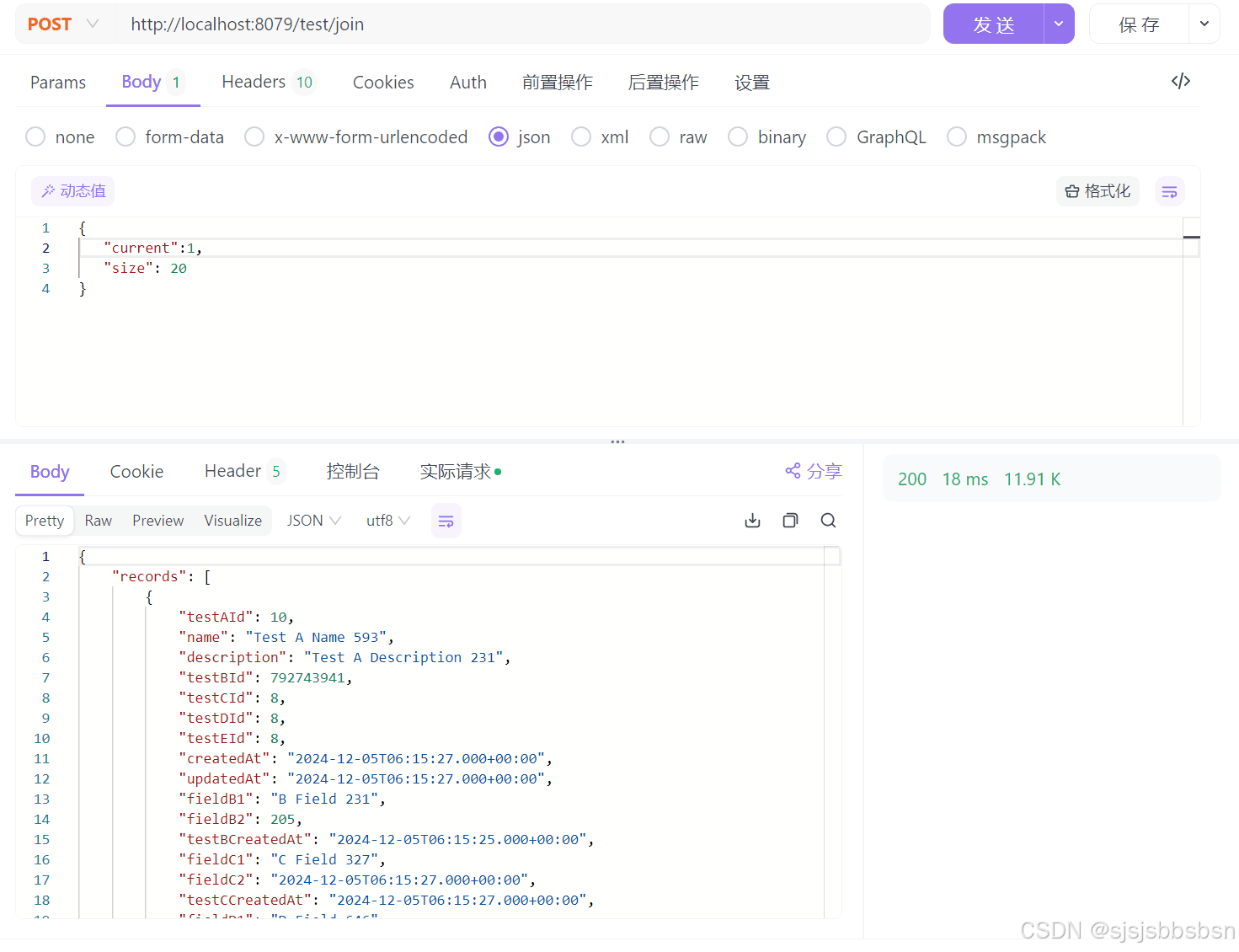
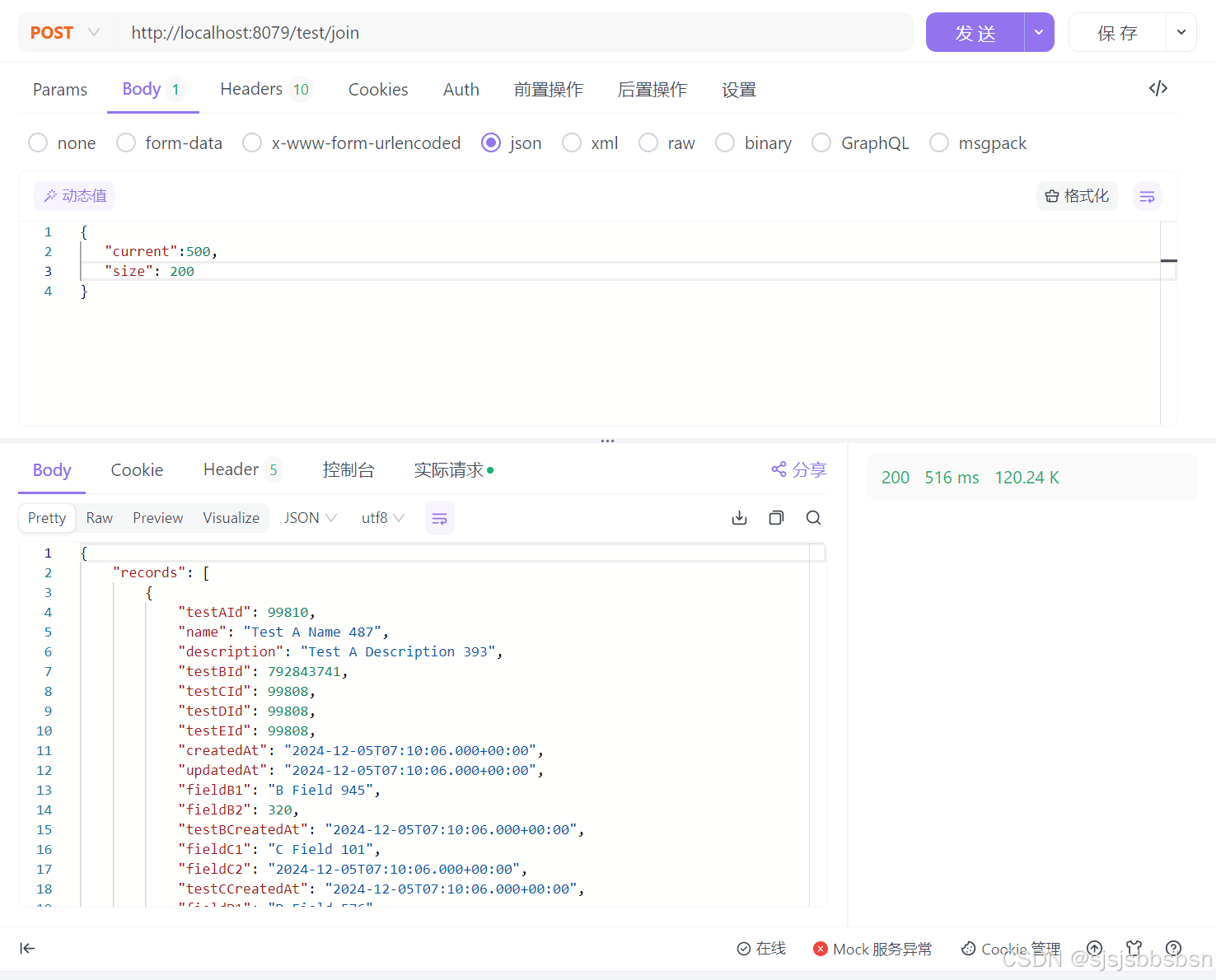
查询结果表格
| current | size | 响应时间 |
|---|---|---|
| 1 | 20 | 16ms |
| 50 | 20 | 23ms |
| 100 | 20 | 22ms |
| 500 | 20 | 52ms |
| 200 | 200 | 213ms |
| 500 | 200 | 517ms |
5.2多线程查询
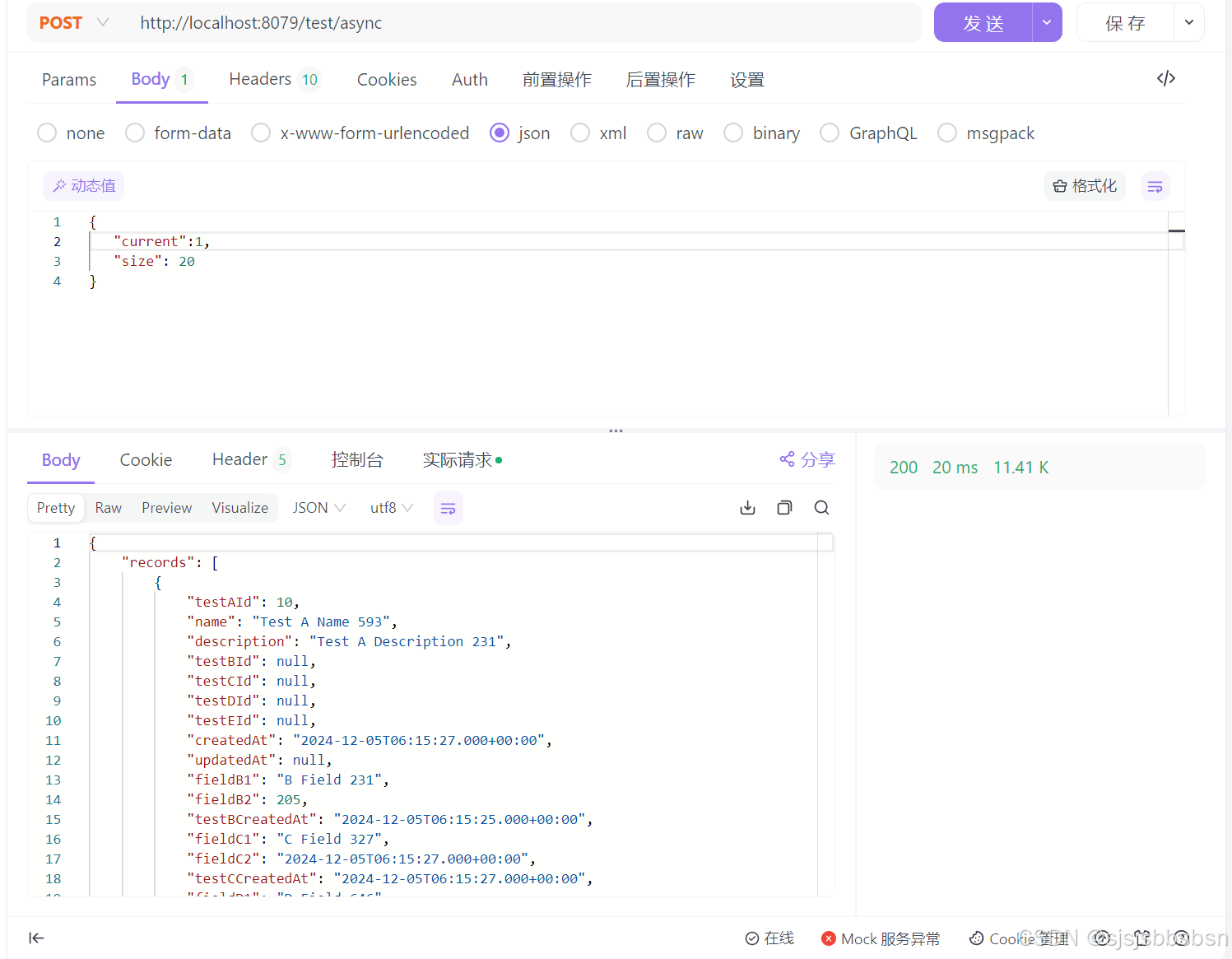
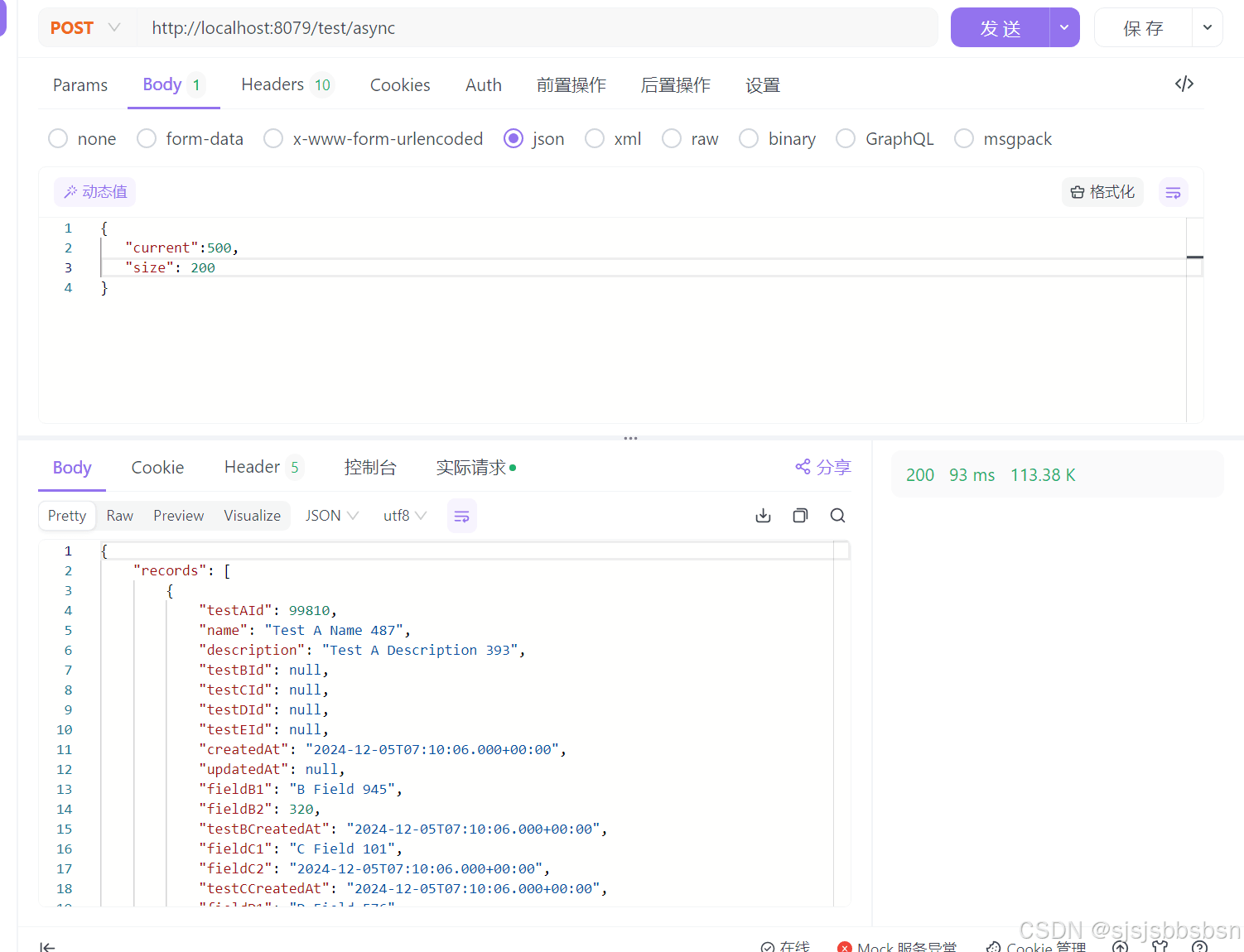
查询结果表格
| current | size | 响应时间 |
|---|---|---|
| 1 | 20 | 18ms |
| 50 | 20 | 17ms |
| 100 | 20 | 17ms |
| 500 | 20 | 21ms |
| 200 | 200 | 56ms |
| 500 | 200 | 80ms |
总结与建议
- 选择联表查询:当数据量较小,或者查询逻辑较为简单时,使用联表查询可以更简单直接,查询性能也较为优秀。
- 选择多线程查询:当面对大数据量或者复杂查询时,采用多线程查询将带来更显著的性能提升。通过异步并行查询,可以有效缩短响应时间,提升系统的整体性能。
在实际开发中,可以根据具体的业务需求和数据库的规模,合理选择查询方式,从而提高数据库查询效率,优化系统性能
到此这篇关于SpringBoot+ MySQL多线程查询与联表查询性能对比的文章就介绍到这了,更多相关SpringBoot+ MySQL多线程查询与联表查询内容请搜索脚本之家以前的文章或继续浏览下面的相关文章希望大家以后多多支持脚本之家!
相关文章
 这篇文章主要介绍了Java函数式编程(二):集合的使用,本文着重讲解了遍历列表的一些方法,需要的朋友可以参考下2014-09-09
 文章介绍了三种停止正在运行线程的方法:设置标志位、利用中断标志位和利用InterruptedException异常,这些方法可以帮助我们有效地控制线程的执行2025-01-01
 接口是Java中最重要的概念之一,它可以被理解为一种特殊的类,不同的是接口的成员没有执行体,是由全局常量和公共的抽象方法所组成,本文给大家介绍Java接口,感兴趣的朋友一起看看吧2022-06-06
 这篇文章通过实例代码给大家介绍了java判断http地址是否连通,文末给大家补充知识点url.openconnection() 设置超时时间的方法,感兴趣的朋友跟随小编一起看看吧2021-12-12
 本文主要介绍了MyBatis动态SQL通过分块处理突破IN子句参数数量限制,文中通过示例代码介绍的非常详细,对大家的学习或者工作具有一定的参考学习价值,需要的朋友们下面随着小编来一起学习学习吧2025-07-07
 这篇文章主要介绍了scala中的隐式类型转换的实现,文中通过示例代码介绍的非常详细,对大家的学习或者工作具有一定的参考学习价值,需要的朋友们下面随着小编来一起学习学习吧2019-06-06
java封装空值建议使用Optional替代null的方法示例解析
这篇文章主要为大家介绍了java封装空值建议使用Optional替代null的方法原理解析,有需要的朋友可以借鉴参考下,希望能够有所帮助,祝大家多多进步,早日升职加薪2023-11-11
java集合——Java中的equals和hashCode方法详解
本篇文章详细介绍了Java中的equals和hashCode方法详解,Object 类是所有类的父类,非常具有实用价值,需要的朋友可以参考下。2016-10-10 这篇文章主要为大家详细介绍了如何基于SpringBoot制作一个PDF切图小工具,文中的示例代码讲解详细,感兴趣的小伙伴可以跟随小编一起学习一下2024-01-01
解决spring.thymeleaf.cache=false不起作用的问题
这篇文章主要介绍了解决spring.thymeleaf.cache=false不起作用的问题,具有很好的参考价值,希望对大家有所帮助。如有错误或未考虑完全的地方,望不吝赐教2022-06-06
最新评论