

基于WPF实现描点导航功能
更新时间:2025年06月05日 09:59:05 作者:WPF开发者
这篇文章主要为大家详细介绍了如何基于WPF实现描点导航功能,文中的示例代码讲解详细,具有一定的借鉴价值,感兴趣的小伙伴可以了解一下
WPF 实现描点导航
1.框架支持.NET4 至 .NET8;
2.Visual Studio 2022;
有一位开发者需要实现类似「左侧导航栏 + 右侧滚动内容」的控件,需要支持数据绑定、内容模板、同步滚动定位等功能。
1. 新增 NavScrollPanel.cs
- 左侧导航栏
ListBox:显示导航,支持点击定位; - 右侧滚动内容区
ScrollViewer和StackPanel:展示对应内容模板,支持滚动自动选中导航项。 - 通过
ItemsSource绑定内容集合; - 自定义
ItemTemplate显示内容; - 通过
TranslatePoint方法,可以获取元素相对于容器的坐标位置,并确保该位置不受Margin的影响。通过调用ScrollToVerticalOffset来滚动右侧容器;
public classNavScrollPanel : Control
{
    static NavScrollPanel()
    {
        DefaultStyleKeyProperty.OverrideMetadata(typeof(NavScrollPanel),
            new FrameworkPropertyMetadata(typeof(NavScrollPanel)));
    }

    public IEnumerable ItemsSource
    {
        get => (IEnumerable)GetValue(ItemsSourceProperty);
        set => SetValue(ItemsSourceProperty, value);
    }

    publicstaticreadonly DependencyProperty ItemsSourceProperty =
        DependencyProperty.Register(nameof(ItemsSource), typeof(IEnumerable), typeof(NavScrollPanel), new PropertyMetadata(null, OnItemsSourceChanged));

    public DataTemplate ItemTemplate
    {
        get => (DataTemplate)GetValue(ItemTemplateProperty);
        set => SetValue(ItemTemplateProperty, value);
    }

    publicstaticreadonly DependencyProperty ItemTemplateProperty =
        DependencyProperty.Register(nameof(ItemTemplate), typeof(DataTemplate), typeof(NavScrollPanel), new PropertyMetadata(null));

    publicint SelectedIndex
    {
        get => (int)GetValue(SelectedIndexProperty);
        set => SetValue(SelectedIndexProperty, value);
    }

    publicstaticreadonly DependencyProperty SelectedIndexProperty =
        DependencyProperty.Register(nameof(SelectedIndex), typeof(int), typeof(NavScrollPanel), new PropertyMetadata(-1, OnSelectedIndexChanged));

    private ListBox _navListBox;
    private ScrollViewer _scrollViewer;
    private StackPanel _contentPanel;

    public override void OnApplyTemplate()
    {
        base.OnApplyTemplate();

        _navListBox = GetTemplateChild("PART_ListBox") as ListBox;
        _scrollViewer = GetTemplateChild("PART_ScrollViewer") as ScrollViewer;
        _contentPanel = GetTemplateChild("PART_ContentPanel") as StackPanel;

        if (_navListBox != null)
        {
            _navListBox.DisplayMemberPath = "Title";
            _navListBox.SelectionChanged -= NavListBox_SelectionChanged;
            _navListBox.SelectionChanged += NavListBox_SelectionChanged;
        }
        if (_scrollViewer != null)
        {
            _scrollViewer.ScrollChanged += ScrollViewer_ScrollChanged;
        }
        RenderContent();
    }

    private void NavListBox_SelectionChanged(object sender, SelectionChangedEventArgs e)
    {
        SelectedIndex = _navListBox.SelectedIndex;
    }

    private void ScrollViewer_ScrollChanged(object sender, ScrollChangedEventArgs e)
    {
        double currentOffset = _scrollViewer.VerticalOffset;
        double viewportHeight = _scrollViewer.ViewportHeight;

        for (int i = 0; i < _contentPanel.Children.Count; i++)
        {
            var element = _contentPanel.Children[i] as FrameworkElement;
            if (element == null) continue;

            Point relativePoint = element.TranslatePoint(new Point(0, 0), _contentPanel);

            if (relativePoint.Y >= currentOffset && relativePoint.Y < currentOffset + viewportHeight)
            {
                _navListBox.SelectionChanged -= NavListBox_SelectionChanged;
                SelectedIndex = i;
                _navListBox.SelectionChanged += NavListBox_SelectionChanged;
                break;
            }
        }
    }


    private static void OnItemsSourceChanged(DependencyObject d, DependencyPropertyChangedEventArgs e)
    {
        if (d is NavScrollPanel control)
        {
            control.RenderContent();
        }
    }

    private static void OnSelectedIndexChanged(DependencyObject d, DependencyPropertyChangedEventArgs e)
    {
        if (d is NavScrollPanel control)
        {
            int index = (int)e.NewValue;

            if (control._contentPanel != null &&
                index >= 0 && index < control._contentPanel.Children.Count)
            {
                var target = control._contentPanel.Children[index] as FrameworkElement;
                if (target != null)
                {
                    var virtualPoint = target.TranslatePoint(new Point(0, 0), control._contentPanel);
                    control._scrollViewer.ScrollToVerticalOffset(virtualPoint.Y);
                }
            }
        }
    }

    private void RenderContent()
    {
        if (_contentPanel == null || ItemsSource == null || ItemTemplate == null)
            return;
        _contentPanel.Children.Clear();
        foreach (var item in ItemsSource)
        {
            var content = new ContentControl
            {
                Content = item,
                ContentTemplate = ItemTemplate,
                Margin = new Thickness(10,50,10,50)
            };
            _contentPanel.Children.Add(content);
        }
    }
}
2. 新增 NavScrollPanel.Xaml
控件模板通过 ListBox 和 ScrollViewer 实现。
<Style TargetType="local:NavScrollPanel">
    <Setter Property="Template">
        <Setter.Value>
            <ControlTemplate TargetType="local:NavScrollPanel">
                <Grid>
                    <Grid.ColumnDefinitions>
                        <ColumnDefinition Width="120" />
                        <ColumnDefinition Width="*" />
                    </Grid.ColumnDefinitions>
                    <ListBox
                        x:Name="PART_ListBox"
                        ItemsSource="{TemplateBinding ItemsSource}"
                        SelectedIndex="{TemplateBinding SelectedIndex}" />
                    <ScrollViewer
                        x:Name="PART_ScrollViewer"
                        Grid.Column="1"
                        VerticalScrollBarVisibility="Auto">
                        <StackPanel x:Name="PART_ContentPanel" />
                    </ScrollViewer>
                </Grid>
            </ControlTemplate>
        </Setter.Value>
    </Setter>
</Style>
3. 使用示例
1. 定义数据结构
public class SectionItem {
    public string Title { get; set; }
    public object Content { get; set; }
}
2. 初始化数据并绑定
Sections = new ObservableCollection<SectionItem>
{
    new SectionItem{ Title = "播放相关", Content = new PlaybackSettings()},
    new SectionItem{ Title = "桌面歌词", Content = new DesktopLyrics()},
    new SectionItem{ Title = "快捷键", Content = new ShortcutKeys()},
    new SectionItem{ Title = "隐私设置", Content = new PrivacySettings()},
    new SectionItem{ Title = "关于我们", Content = new About()},
};
DataContext = this;
3. 模板定义
<DataTemplate x:Key="SectionTemplate">
    <StackPanel>
        <TextBlock Text="{Binding Title}" FontSize="20" Margin="0,10"/>
        <Border Background="#F0F0F0" Padding="20" CornerRadius="10">
            <ContentPresenter Content="{Binding Content}" FontSize="14"/>
        </Border>
    </StackPanel>
</DataTemplate>
4. 使用控件
<local:NavScrollPanel
    ItemTemplate="{StaticResource SectionTemplate}"
    ItemsSource="{Binding Sections}" />
5. 新增NavScrollPanelExample.xaml
<wd:Window
    x:Class="WpfNavPanel.MainWindow"
    xmlns="http://schemas.microsoft.com/winfx/2006/xaml/presentation"
    xmlns:x="http://schemas.microsoft.com/winfx/2006/xaml"
    xmlns:d="http://schemas.microsoft.com/expression/blend/2008"
    xmlns:local="clr-namespace:WpfNavPanel"
    xmlns:mc="http://schemas.openxmlformats.org/markup-compatibility/2006"
    xmlns:wd="https://github.com/WPFDevelopersOrg/WPFDevelopers"
    Title="NavScrollPanel - 锚点导航"
    Width="800"
    Height="450"
    mc:Ignorable="d">
    <wd:Window.Resources>
        <DataTemplate x:Key="SectionTemplate">
            <StackPanel>
                <TextBlock
                    Margin="0,10"
                    FontSize="20"
                    Text="{Binding Title}" />
                <Border
                    Padding="20"
                    Background="#F0F0F0"
                    CornerRadius="10">
                    <ContentPresenter Content="{Binding Content}" TextElement.FontSize="14" />
                </Border>
            </StackPanel>
        </DataTemplate>
    </wd:Window.Resources>
    <Grid Margin="4">
        <local:NavScrollPanel ItemTemplate="{StaticResource SectionTemplate}" ItemsSource="{Binding Sections}" />
    </Grid>
</wd:Window>
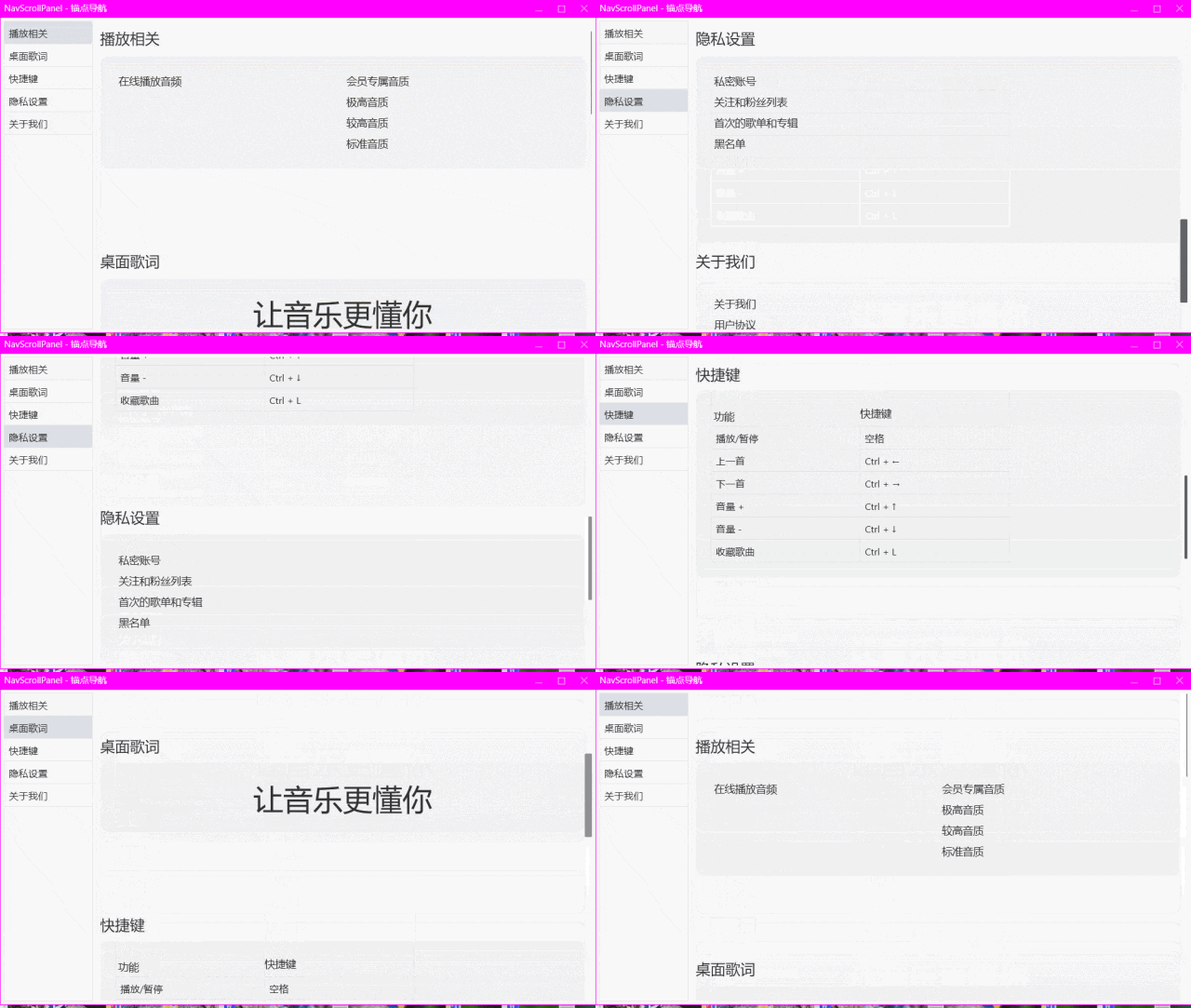
效果如下
到此这篇关于基于WPF实现描点导航功能的文章就介绍到这了,更多相关WPF描点导航内容请搜索脚本之家以前的文章或继续浏览下面的相关文章希望大家以后多多支持脚本之家!
相关文章
 以前C#脚本用的委托注入模式,今天在提示下,尝试用脚本直接实现接口,然后C#可以动态或指定新类型创建接口实现对象,下面我们就来试一下吧2025-05-05
 本篇文章主要介绍了基于C#的UDP协议的同步实现代码,小编觉得挺不错的,现在分享给大家,也给大家做个参考。一起跟随小编过来看看吧2017-02-02
 今天小编就为大家分享一篇关于C#数据导入到EXCEL的方法,小编觉得内容挺不错的,现在分享给大家,具有很好的参考价值,需要的朋友一起跟随小编来看看吧2019-01-01
 这篇文章主要介绍了WinFrom中label背景透明的实现方法,方法简单实用,是C#程序设计中非常实用的技巧,需要的朋友可以参考下2014-09-09
 这篇文章主要给大家介绍了关于C# 4.0新特性“缺省参数”的实现,文中通过示例代码介绍的非常详细,对大家学习或者使用C# 4.0具有一定的参考学习价值,需要的朋友们下面来一起学习学习吧2020-06-06
 这篇文章主要介绍了Audio Source组件及相关API的相关知识,非常不错,具有参考借鉴价值,需要的朋友可以参考下2017-11-11
 通过从unity内部函数中抽几个出来改造,强制取某个裁切球的级联阴影映射,通过案例给大家详细介绍,文中给出了完整的urp shader代码,对Unity级联阴影知识感兴趣的朋友一起看看吧2021-06-06
 这篇文章主要介绍了java和c#使用hessian通信的方法,服务器端为Java,客户端为C#实现。是一个非常实用的技巧,需要的朋友可以参考下2014-09-09
 这篇文章主要为大家详细介绍了一种 WPF + Prism 实现动态分页加载图片的方法,其中结合了ScrollViewer滚动条触底检测,实现边滚动边加载的流畅体验,下面就跟随小编一起学习一下吧2025-04-04
 这篇文章主要介绍了C#调用python.exe使用arcpy方式,具有很好的参考价值,希望对大家有所帮助。一起跟随小编过来看看吧2020-12-12
最新评论